At Home with Tech

Unlock the power of all your technology and learn how to master your photography, computers and smartphone.

Category: Tech How To

How to Give Money to a Friend Using a P2P Payment App

If you want to pay back a friend but you don’t have cash or a check, don’t despair. Here are a couple of ways to do it using a digital wallet in your iPhone….

Isn’t it a drag when you have to write a check to pay back a friend if you don’t have cash? Perhaps that’s okay if you carry around your checkbook. Otherwise, it becomes at least a two-step process that can really linger…

You’ve got to go home… write the check… put it in the mail… or have to wait until you see your friend again to hand over your money.

There’s got to be a better way through technology.

Well, of course there is…

Peer to Peer Transactions
Welcome to the world of peer to peer (P2P) money transaction services… a cashless way to electronically transfer money to family and friends through a mobile app on your smartphone.

I haven’t had the need for this type of financial person-to-person interface… until one day I suddenly felt like I had transported to an alternate universe where cash and checks never existed…

Where’s Your Digital Wallet?
My wife and I were offered a payment by another family to split the cost of swim lessons for all of the kids as part of an ongoing group playdate.
(Yes… swim lessons that are baked into a playdate… how efficient of all of us!)

And the payment offer was via the Venmo app.

Huh?

Sure, I had my iPhone XS Max in my pocket.
I was proudly wearing my Apple Watch Series 4.

And I was blindly holding onto the false impression that I’m up to speed on all of the current tech trends.
(Pop)

So, with my little bubble burst, I went home to do a little homework.
I knew I had some catching up to do…

Venmo
Venmo is the well-known P2P mobile payment service owned by PayPal and has about 27 million users.

Signing up was a snap.

And if you just want to receive money and then use those same digital dollars to pay someone else, that’s also super simple.

But if you need to pull some of your own money into Venmo, then you have to link your Venmo account to your bank account, credit card or debit card.

While that’s not technically difficult to do, there’s sometimes a fee attached…

  • Bank account – free
  • Credit card – 3% fee
  • Debit card – free

When you want to transfer money out of Venmo into your checking account, there’s also a 1% fee if you chose the ‘Instant Transfer’ option.
(minimum- 25¢, maximum- $10)

Otherwise, it’s free. But you’ve got to wait a couple of days, just like waiting for ‘an old-school check to clear.’

My First P2P Payment
The next step was to ‘friend’ people you want to pay in Venmo.
(It’s always a good idea to only friend folks you actually know.)

I searched for our swim class friends who got me started down this relatively shallow rabbit hole. I sent out my invite. And faster than you can say PayPal three times… we were “Venmo’d” together.
(Is that a verb? Quick… someone find me a Millennial!)

But I wasn’t over the finish line quite yet. I had to actually use the technology. As if connected by the Force, my friend sensed my need and sent me a prescient Venmo message…

It was a $1 “friend tariff.”

I stared at my iPhone.
Okay… I guess this was the final quiz for my Venmo 101 elective.

I tapped and paid the buck.

It was official.
I had joined the P2P payments world.
Yay, me.

To celebrate, my friend paid me a dollar.
It was very exciting.
(And there was no disturbance in the Force)

In case you’re worrying about the swim lessons payment, my wife had already taken care of that particular Venmo transaction.
(Yes, I must admit that I often rely on “Mrs. More-at-Home-with-Tech.”)

How Social Do You Want to Be?
There’s also a social media component to Venmo. You have the choice to ‘share’ your Venmo activity…
You can post your activity to the Venmo world or just to your Venmo friends.

Or you don’t have to share it at all.

I know I might be revealing a wildly out-of-touch perspective here…
But why would I want to tell the world that I paid out money?
Is that really a social moment I’d want to share… with anybody?

For me, that information only belongs with me and the person I’ve paid.

Apple Pay Cash
A funny thing happened on my way to Venmo. I realized I already had access to another P2P payment app.

It’s Apple Pay Cash, and it works very much the same as Venmo.
And it was living right next to Apple Pay in my iPhone.

Apple Pay Cash is turned off by default… You’ve got to go into ‘Wallet’ app in your iPhone to simply turn it on.
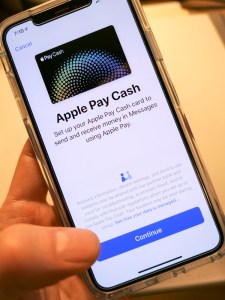


Once you’ve activated Apple Pay Cash, then you’ve just got to fund it, again much like Venmo.

And just like Venmo, you can transfer your Apple Pay Cash balance into your checking account.

You can also initiate an Apple Pay Cash payment by simply sending an iMessage.
(That almost feels a little too easy.)

One limitation to using Apple Pay Cash is both parties need to be in the iOS ecosystem.

Cash is So Yesterday
My alternate universe existence had quickly evaporated, and I was now armed with both Venmo and Apple Pay Cash and fully functional in the P2P payments game.

Sure, there are competing P2P money transfer systems out there, like Google Pay, Zelle, and Square Cash. But for now, I am satisfied with my choices.
(Which apps do you prefer? Any recommendations out there?)

I’m not so sure this particular form of financial enablement is a game changer for me right now, but at least I can play in the P2P payments’ pond when others insist.

And my toe-in-the-water mentality could change.
(It hasn’t been long since I’ve been actively using Apple Pay at stores instead of my credit card.)

But to simply have the capability to receive money from more ‘enlightened’ humans who want to pay me from their digital wallet…

I am now ready.

(P.S. I still accept cash.)

Why You Need to Open Tech Gifts Before Your Kids Do

If you’re planning on figuring out your kid’s new RC vehicles and drones right after “Thank you, Daddy!” you may be delirious from all of your shopping. Here’s what you should do instead…

Do you know how to use the tech toys you’re giving your children this year? If you think you’re just going to wing it on the big day, I’ve got a report to share from the front lines of parenting…

It doesn’t matter how technically savvy you think you are. I’ve got a third grader, and let me tell you, his tech is already getting complicated for me.

And even if the toys aren’t that complex to operate, misuse could actually get a little dangerous (if you’re to believe the instructions).

Parenting Tech Tip:
So, do yourself a favor and block some personal time to first teach yourself how the toys actually work. Does that mean you’ve got to unbox each item, play with it and then re-box it?

That’s absolutely right.

Let me share a couple of my own experiences…

New RC Vehicle for My 8 Year Old
This year, I bought another radio controlled car for my boy:

I picked it up our local hobby store… Horizon Hobby.
(How quaint, right?)

I unboxed the mini monster and took a peek at its instruction booklet.
(How hard could it be to operate another RC vehicle?)

Well, it may not be difficult to use, but apparently it’s easy to operate incorrectly. Here are some of the warnings that jumped off of the page…

  • Charge for 9 hours
  • Do not charge overnight
  • Do not leave unattended while charging
  • Do not charge battery in the chassis or battery will overheat
  • Do not lick any parts or death may result
  • Do not run the car slowly or else it will overheat.
    (Must operate as speedily as possible?)

Are they serious?
(All of this reminds me of the old Saturday Night Live sketch…
“Happy Fun Ball.”)

I signed off on what seemed like twenty pages of disclaimers and took the Seismic out for a quick spin…
Whoa!
It is fast… much better suited for outdoor operation in our driveway.

And yes, I’ll pay attention to how its battery is charged, although I’m not going to stare at it for nine hours.

More Drone Flying Lessons
This year, it was time to buy another starter drone for my eight year old.

Three years ago, I purchased this starter quadcopter:

The Inductrix is really tiny, and I had hoped it would be simple enough for my boy to learn with. But when I first tried it out myself, I found it difficult to control and couldn’t keep it hovering in one place.
(I should admit I’d never tried flying a drone before.)

As a result, I actually delayed giving the Inductrix to my young Padawan.

When he finally tried it out last year, he immediately demonstrated decent piloting competencies.
(Must be due to all of that flying he does in Minecraft creative mode on our iPad)

Still, the micro drone would inevitably crash into a wall or the ceiling. My boy loved the Inductrix, but it could only take so many impacts in our family room before one of the propellers stopped working…

Yes, I took it in for repair, but when another propeller stalled, I decided to look for a more durable model that was easier to control…

This year, I went with another Horizon Hobby model…

This quadcopter is bigger than the Inductrix, and it also sports an onboard camera. While the photo and video capability is cool, I’m not at all interested in that… yet.
(Remember, I’m just looking to keep the darn thing in the air!)

So, late one night… I quietly unboxed the Vizo and charged up the battery.
(Yes, the instructions contained battery warnings too.)

And guess what…?
This one is much easier to use…

It’s more stable while airborne and also comes with auto take-off and landing modes.

Essentially… you press a button, and the drone takes off and hovers a foot off the ground. You fly it from there. Similarly, when you want to land… you position the drone just above the floor and press the ‘land’ button. The drone descends slowly and the blades stop turning after touch down.
(It’s a real game-changer.)

I’m sure purists would say that this auto feature masks the heavy lifting of really figuring out how a quadcopter operates, but I’m okay with a little ‘help’ at this stage of the learning curve.

My Inner Child
I’m not sure what it says when I’m gifting my son toys that I can’t operate without some training. I’m sure some would say it has nothing to do with me, and that he should simply figure it out for himself.
(It’s the gift of building self-reliance.)

But what fun is that when we’re playing together?
So again, is this really more about him… or me?

That’s a deep question for another time…

Batteries Not Included
Suffice it to say, this daddy needed to secretly take some driving and flying training to ensure that he was ready to help his son enjoy his new tech toys this year.
(I highly recommend the prep.)

Just another way that as a parent… you’ve got to keep up.

And yes, there are, in fact, instruction manuals.

How a Roku will Make Your Old TV Shine Again

If you need an inexpensive way to upgrade your HDTV to be able to stream YouTube TV, I’ve got just the thing. And it’s hiding in plain sight…

So, as you may have heard… I’ve cancelled my cable service from my longtime cable TV provider. Instead, I’m now streaming my cable channels via the YouTube TV app for $40/month using my Apple TV in the family room.

That’s right…
I’ve joined the Dark Side.
Or perhaps I’ve finally left the Dark Side.

Either way, I loved this disruptive tech moment in my life.

I told my story to a work colleague, and he congratulated me and then commented how ‘freeing’ it must feel.

It certainly does.

Next, it was time to bring the freedom back to my older HDTV in my home office….

My Bat TV will Rise Again
Once designed as a compact media screen on the left side of my Batcave-like IKEA desk console, this little Sony TV has sat mostly dark over the past couple of years. It lost its cable box companion in the Lester Cable-Plan Purge of ’16.
(Yes, I’ve been on this path for a while now.)

In an attempt to keep feeding my Bat-TV a signal, I attached a Roku streaming puck to bring in a few streaming cable channel apps that I could still access via the existing cable subscription.

But it was a limited solution…

Find the Right Streaming Solution for You
Now, with the glow of YouTube TV permeating the Lester household… I was eager to activate another streaming device with no additional Google charge and no extra cable box to rent.
(You can actually run three simultaneous YouTube TV streams!)

So, it was time to get my home-office TV back in the game!

Unfortunately, my old Roku wasn’t built to run the YouTube TV app… so I needed to buy a newer streaming box.

Another Apple TV would certainly fit the bill, but the price tag is close to two hundred bucks. What about a new Roku?

Excellent idea….!

Roku Ultra
You can debate the larger issue of the value of an Apple TV vs. a Roku.
But all of the Roku streaming players are so much cheaper than an Apple TV!

For this little secondary TV, a new Roku was the easy choice. The final question was which one…

I decided on the Roku Ultra and picked up one on Black Friday for 50% off at Amazon for $49.99. I saw on Facebook that my old school friend Matt also took advantage of the same offer for some holiday gifts!
(Well done, Matt!)

I connected my new Roku Ultra to my Sony TV using its HDMI cable. Then, I used the Roku remote to guide my Roku towards my home Wi-Fi network. Finally, I downloaded the YouTube TV app… signed in… and BAM!

All done.

Future-Proof Where Possible
No, I didn’t need the top-of-the-line Roku model for my barely-HD HDTV. But I figured it will help to future-proof my purchase if I want to attach this Roku to a 4K TV one day.

Even without a discount, you can still pick up one of the other Roku models for $50 or less.
(The base 1080 HD-only “Roku Express” is thirty bucks!)

The Cost to Stream
I know Roku isn’t the only low-cost streaming solution out there, but for me it’s that darn brand-loyalty thing again.
(My old Roku puck got me hooked.)

Whichever brand you choose, the fact remains that adding streaming capability to your TV costs almost nothing. And if you own a smart TV that can stream all by itself, then this conversation gets even easier!

Easy Access Matters
Now, I’ve got YouTube TV on my…

  • Apple TV in the family room
  • Roku Ultra in my home-office Batcave
  • and the iPhone in my pocket

Now, that feels like real freedom to me!