At Home with Tech

Unlock the power of all your technology and learn how to master your photography, computers and smartphone.

Category: Tech in the News

Why “Star Trek: Discovery” and “The Orville” are Tearing a Hole in My Mind and Wallet

I’ve been a Trekkie all of my life. Here’s a photo of me as a teenager sitting in a replica U.S.S. Enterprise captain’s chair at the 1976 New York City Star Trek Convention. Does this demonstration of core-level nerdiness qualify me decades later to offer my first impressions of “Star Trek: Discovery” and “The Orville?” You bet it does!

I feel like I’ve entered a sci-fi nexus. A place where I can clearly see a warped “Star Trek” from my past and a newly phased, slightly alternate-reality version for the future.

A little confused? So am I.
(Though not entirely displeased)

All right everyone… go find your Spock ears and put them on. This is going to get a little geeky…

Two New Versions of “Star Trek”
It may feel like blasphemy to tinker with the old “Star Trek” some of us grew up with. But as I’m sure you’re aware, two new “Star Trek” based sci-fi series have almost simultaneously arrived after twelve years without new Star Trek episodes on television.

After what seems like an eternity of preproduction, “Star Trek: Discovery” has finally premiered. But it doesn’t entirely own the new-Trek conversation, because Seth MacFarlane’s irreverent “The Orville,” actually beat “Discovery” to the premiere punch by a couple of weeks.

“The Orville” isn’t technically a “Star Trek” series, but it’s clearly paying homage to the original show and “The Next Generation” while also trying to have a lot of fun with the format.

“Star Trek: Discovery” has chosen a darker and grittier path than any of its predecessors, one seemingly inspired by the “Battlestar Galactica” reboot. Starring Sonequa Martin-Green, “Discovery” works hard to remind us it’s “Star Trek.” In the pilot episode, you’ll see a front-and-center shot of what looks like Kirk’s original phaser. Starship doors slide open with the familiar swish. And the gurgles and chirps on the U.S.S. Shenzhou’s bridge come from the same infrastructure as the bridge of the U.S.S. Enterprise.

Yet, it’s clear that as a series, “Discovery” is a new version of “Star Trek.”

And while “The Orville” isn’t “Star Trek,” in so many ways… it is.
The ship. The bridge. The uniforms. Everything.
The special effects are even good.

Science Fiction for 2017
Both new series are intentionally being disruptive. One is dark.
The other is trying to be funny.

And it is that so bad?
Who said a “Star Trek” series had to be exactly like earlier versions? If you believe that, you can be sure you’d never see another “Star Trek” series ever again.

Hey, Trekkies… Grow up!
Life changes. Entertainment changes. “Star Trek” changes.

Unless you simultaneously resurrect and spoof the old format as Seth MacFarlane has done. As a life-long Trekkie, I’ve been wincing at some of the bits in the first two episodes of “The Orville.” Whether MacFarlane can successfully tap into “Star Trek” nostalgia and then skewer it in the same script will be determined as his series gets a few more episodes in under its belt.

One Trekkie’s Opinion
So, do I like “Star Trek: Discovery?”

It’s really too early to tell. It’s clearly got some big ambitions. The sets and special effects are beautiful, but I haven’t yet been drawn in emotionally, other than to mourn the loss of what I was hoping would be a long-time character.

Sure, I could quibble over how accurately the producers have inserted this series into the official Trek timeline. Should there be force fields that protect destroyed hull plating on a ship that predates the NCC-1701? That kind of tech didn’t start to show up until the Enterprise-D.
Right?
(The new “Star Trek” movies displayed advanced levels of tech… but that’s from an alternate timeline… so anything goes.)

But I know if I get stuck babbling like this, I’m missing the big picture.

Sticker Shock
The big question is whether I am going to start paying for my Trek moving forward.
(Except for the pilot, you can only watch the rest of the series by streaming it on CBS All Access for a monthly cost of $5.99. New episodes are available Sundays at 8:30pm)

As much as I hate the idea of it, yes… I’m in.
Of course, I am.

It’s worth mentioning that “The Orville” on Fox is free to watch with regular commercials. Or you can stream it on Fox.com with only one commercial up front.
(As long as you ‘interact’ with the sponsor’s ad)

A Federation Universe without Commercials
So, I signed up to join the CBS Borg collective using the downloaded app on my Apple TV.
(Make it so!)

Now here comes the illogical part…
I’ve actually decided to pay CBS more than I have to for my “Star Trek: Discovery.”
(What?!)

There’s a second plan offered when you sign up online.
It’s the ‘commercial-free’ plan.

Yep, there’s a four-dollar monthly surcharge to lose the commercials.
So that gooses the price tag up to ten bucks a month.

And why exactly did I decide to throw away money every month?
Well, I figured I’m already paying for my “Star Trek.” I just know how I’d feel being forced to also watch commercials as well.
(There really shouldn’t be commercials in the $5.99 plan either, but I’m not ready to argue economics with CBS.)

So, all in… the price tag comes to $2.50 per “Discovery” episode.
(That’s assuming I don’t take advantage of any other programming on CBS All Access… which is substantial.)

Value Add
There’s actually one possible game changer available on CBS All Access that would help to soften the sticker shock for me.
You get your live, local CBS feed.
(In over 150 U.S. markets)

Now, that’s interesting…

Because as I continue to consider how to cut the cable cord without losing programming that I want, having access to live CBS news, sports and special events is a huge benefit.

Hmmm… Let me think a bit more about that.

Discovery Vs. Orville
If you’ve been expecting me to choose one of these series over the other, spoiler alert… I’m not. As much as they’re both based on the same origin material, they’re entirely different.

Yes, while it’s odd to see two “Star Trek” shows running simultaneously, that’s not unprecedented.
(“Next Generation” and “Deep Space Nine”)

And while it’s early for both series, I do think “Discovery” has a better chance of ongoing success if it can convince enough viewers to pay for the privilege.

“The Orville” relies on a simplicity in television storytelling that’s rather retro these days. And I don’t know if the occasional humor shtick is going to work out.
(Though “Galaxy Quest” and “Spaceballs” did just fine going for the funny bone.)
But at the end of the day, the series will have to decide if it’s a sit-com, a dramedy or just more relaxed sci-fi.

But one thing’s for sure… “The Orville” has heart. Lots of heart.

It reminds me of that sense of optimism and awe that flooded me when I was a young boy watching my first “Star Trek” episodes. I clearly remember that feeling.

Engage!
Even though I’m all grown up now, I yearn for a “Star Trek” to do that again for me, whether the branded name is in the title or not.

Because I’m still a kid at heart…

…I’ll be watching.

CrashPlan is Breaking Up with Me

If you prefer the occasional peace of mind as the ‘IT Guy’ at home, well… guess what? Here’s another reason why you might not get that anytime soon. If you’re a CrashPlan customer, you’ve got some work to do…

I’m crushed.

CrashPlan for Home has been wonderful as a Cloud backup solution at home for disaster recovery. We’ve had a great relationship for the past five years. The cost was $60/year for my iMac for unlimited backup. It was pretty much… set it and forget it.

Done.

But recently, I received a little email from Code42’s CrashPlan service. In fact, we were done. CrashPlan is breaking up with me!

The email explained that over the next 18 months, Code42 will exit the consumer market for online backup. Instead, Code42 will focus on its “enterprise and small business segments.”

But I’m only getting three months, because my renewal is coming due.
(Customers get an additional two free months to help with their ‘transition.’)

I guess it was good while it lasted.
(sniff)

So, what are the options?
Whatever, I do, I’m still looking for a long-term relationship.
(I know, I’ve already been burned once. But, you can dream, right?)

CrashPlan for Small Business
As a current CrashPlan customer, I can migrate to the CrashPlan for Small Business plan.
That’s $10 per device each month for 5TB of storage.
So, $120/year for my iMac.
(Double what I was paying)

But, CrashPlan is offering me 75% off for the next 12 months.
That makes it only $30 for the first year.
(Half what I was paying)

Not bad… but remember, I’m looking at the long-term costs.
And I’m not longer getting ‘unlimited’ backup anymore.
Hmmm… That’s okay.
5TB is plenty.

Bottom line: CrashPlan will cost me twice as much moving forward.
(The first-year discount aside)

The Carbonite Choice
Code42 has struck a deal with Carbonite as CrashPlan’s ‘exclusive partner for home users’ with a 50% discount when switching over to Carbonite.
(How ironic that they were competitors once upon a time.)

When I clicked on the link in my Code42 email, I was sent to the following Carbonite offer:

Carbonite Core
It’s for unlimited computers. (Nice!)
With only 250GB of backup (What?!)
And costs 134.99/year (50% off the $269.00 price)
I don’t know if this discount holds after the first year.

You can purchase additional storage in chunks of 100GB
$79.99/100GB (20% off $99.99)

Whoa! This is way more expensive.
Plus, I’m only starting with 250GB? That’s a deal breaker right there!
The ‘unlimited computers’ piece is cool, but there’s not enough storage in the plan to make it worthwhile.

Why is Carbonite in the mix at all? I must be missing something…

Carbonite for Home
So, I went back to Carbonite’s website to look around as a ‘new customer.’

What I found was confusing…
Just showing up as a new customer and not attached to all of my CrashPlan baggage, I found an alternate Carbonite universe…

It’s called Carbonite for Home. And in this universe, you get unlimited backup for one computer in three flavors:

  • Basic for $59.99/year
  • Plus for $74.99/year (on sale from $99.99)
  • Prime for $149.99/year

The differences have to do with the features.
Plus provides external hard drive backup and automatic video backup.
Prime includes a courier recovery service.

The Plus plan seems like it would be the best option for me with its flexibility on including external drives.

Something’s Not Right
If you’re shopping for price, just showing up as a new Carbonite customer gives you the best deal.

But I was still confused why Code42 was giving me such a bum ride with Carbonite.
The Core plan really stinks.

Then, I ran across this TidBITS! article, which mentioned that CrashPlan ‘family’ users were only being offered a discount off of Carbonite’s business plan (Core) as opposed to Carbonite’s ‘Home’ plans.

Did that mean I had a family plan?
No… I checked.

So, was I being offered the wrong discount?

If so, then Carbonite for Home would be an even better deal.
(Assuming the 50% discount held more than the first year)

Looks like I’d have to reach out to Carbonite to investigate.

Rebound Options
So, the way I see it, I’ve got three choices….

  1. Stick with CrashPlan and pay double. ($120/year)
    But remember, “The devil you know…”
    (And only get 5TB vs unlimited… which is actually fine with me.)
  2. Move to Carbonite Plus and pay $75/year.
    (Or try to convince Carbonite to give me the 50% discount off of this plan as a CrashPlan reject)
  3. Start all over and look around for another choice.
    As it turns out, Joe Kissell from The Wirecutter doesn’t like Carbonite for Macs.
    He prefers Backblaze for an Apple ecosystem.
    And Backblaze only costs $50/year.
    (Here’s Backblaze’s invitation to CrashPlan customers.)

Back in the Game
Wow…I thought I was done with all of this.
Guess not.

I’ve got a little time before my CrashPlan breakup is official, and I need to pull the trigger on another choice.

Any relationship advice out there for Cloud backup at home?

What Does Error Code E22 on a Bosch Dishwasher Mean?

The good news is when something goes wrong with your dishwasher these days, if it’s got an LED display, it may try to tell you what the problem is. You just need to speak its language…

For me, dishwashers are simply supposed to do their job, and you shouldn’t have to think about it too much. Over the past four years, I’ve been totally satisfied with my Bosch dishwasher. The only oddity I’ve discovered (and the salesperson warned me about it when I was considering my choice) was you shouldn’t leave dirty dishes in it for days at a time without running it. That’s because there’s no heated drying cycle.
(An environmental friendly choice of Bosch’s)

Of course, that’s exactly what I did during the first few weeks and found that the residual dampness left behind would interact with the dirty dishes and create something of a stink after a few days.
(Of course)

The solution was simply to run the dishwasher every day or two, and the offending olfactory ‘ripeness’ immediately evaporated.

In Search of Code E22
Fast forward four years to last week…
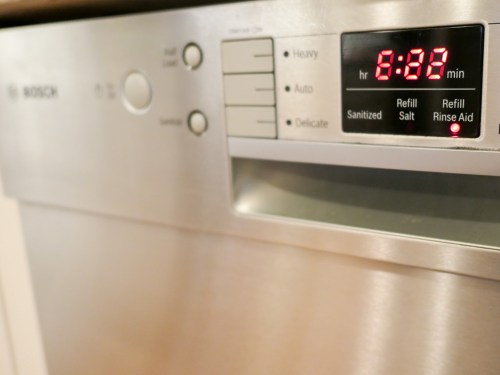
I ran the Bosch overnight, and when I woke up and walked down the stairs to a dark kitchen, I was greeted by an eerie red glow on the front panel.


Something was very wrong, and the mysterious error code on the display was #E22.

Awesome.

I took a peek inside. The dishes seemed clean, and I could feel some residual heat from the washing cycle. I figured the problem occurred somewhere mid-flight or after the cycle had mostly completed.

Now, I just had to figure out what #22 meant.
After a little online research, I came upon the following clue:

‘Residual water in the dishwasher’s sump pump’

Clear Out the Sludge!!!
And then I remembered one other warning the salesperson had given me…
(I suppose you might question a dishwasher that comes with multiple warnings… but let’s not go there.)

He told me you’ve got to regularly clean out the filter that captures all of the food particles at the base of the Bosch dishwasher. Because the ‘passive-catch’ filter can get pretty gross.
And it leads to the sump pump.

How gross?
I pulled the filter out…
Take a look…


I’d say all of that organic goo constitutes an official clog!

Do you think this alien-like slime can create E22?
You betcha.
(There was about a cup of undrained water lurking at the bottom.)

So, I cleaned away all of the sludge, removed the remaining water in the dishwasher and popped the filter back in.

And then… everything was just fine!
I ran the dishwasher that night, and no more E22.

You’ve Got to Clean the Filter!
You might be wondering… How long had it been since I’d cleaned out the filter?
Yeah, good question.

I’ve washed the filter before, but it’s obviously slipped my mind over the past few…
…months?

Yes, this story squarely falls into the category of
‘User Error.’

Perhaps the code should have been-
“E-User”

Now, that makes more sense!

Let’s not talk about this again.
Thank you.