At Home with Tech

Unlock the power of all your technology and learn how to master your photography, computers and smartphone.

Category: Tech in the News

If You Snap a Family Photo and Nobody Sees It, Does It Really Exist?

This nixplay WiFi Cloud Frame is a digital photo frame with lots of tricks to help display your photos. Unfortunately, I’m not sure it’s ready for prime time.

This nixplay WiFi Cloud Frame is a digital photo frame with lots of tricks to help display your photos. Unfortunately, I’m not sure it’s ready for prime time.

My life as the family photographer feels like a huge storage container of ‘quadro- triticale’ and a bunch of tribbles.

If you’re not familiar with the classic “Star Trek” episode, “The Trouble with Tribbles,” Captain Kirk uncovers a Klingon conspiracy to poison relief supplies designated for a distant planet‘s population. He realizes the evil plot when an expanding family of cute tribbles starve in a poisoned shipment of wheat.

The Trouble with Too Many Family Photos
I’m taking thousands of pictures a year, but you wouldn’t know it.
Neither would most of my family or friends.
Because the photos are buried away in my computer’s hard drive, burdened down by a self-inflicted organization and processing system I designed.

My original plan was solid (or so I thought):

  • Take lots of photos
  • Separate the digital wheat from the chaff every week
  • Upload the very best online to share with family and friends
  • Print photo albums by the year or event
  • Print one-off photos with your home printer

But I didn’t properly factor in the variable of time allocation per photo…

My system’s fatal flaw:
There are simply too many pictures to go through.
And now I’ve fallen behind…way behind.

I’ve talked before about the challenges of organizing vast numbers of digital family photos.

Yesterday’s Photo is Yesterday’s News
I’m a busy father.
Looking through all my photos every week isn’t exactly at the top of my to-do list.

My review process has slowed so dramatically, I’m getting to photos of my three and half year old son that don’t really look like him anymore!

And when they say a picture is worth a thousand words… that’s for yesterday’s picture. Six months from now, that cute photo of my boy ‘rowing his boat’ in a laundry basket still may be a keeper, but our extended family and friends want to know what he did six days ago!

So in a manner of speaking, family photos have an expiration date.

Life moves pretty quickly.
Your photos had better keep up!

Digital Photo Frames to the Rescue?
The same rule goes for sharing your photos at home with the inner circle…
So I decided it was time to update ‘the plan.’

One option was to simply take fewer pictures.
(Believe me… that would solve a lot of problems.
I almost pine for the days when you only had 24 or 36 shots to work with.)

The other ‘obvious’ solution is to power up a digital photo frame to help get those photos quickly in front of the family’s eyeballs.

I know this isn’t a revolutionary solution.
In fact, digital photos frames are already yesterday’s tech.

The idea of buying a digital screen and loading it up for the one purpose of rotating a group of photos isn’t as wonderful as it once was.
You can already display photos on all the other digital screens you own.

Who needs to spend money on another one?

Plus, I’ve generally found digital photo frames to be a pain to use.
(They’re just glitchy!)

Maybe since they never became such a hot tech commodity, all the kinks never got worked out.
(Not that I’ve tested all of them…)

That said, I’ve bought two digital photo frames so far,
including the positively-reviewed Pix- Star PXT510WR02 for my father a year ago.

I found the Pix-Star to be perfectly functional but also somewhat unresponsive whenever I tried adding more photos into the mix. The Pix-Star was supposed to make the upload process really simple, because it can pull existing photos from one of my Flickr family albums.
(It’s web connected.)

Third Time’s the Charm?
But I haven’t given up.
I’ve been paying attention to see when a new digital photo frame that could be a game changer hits the market …

Recently I noticed a new player:

nixplay Cloud Frame

The Nixplay WiFi Cloud Frame

It’s just come out and was displayed at CES 2014.

Nixplay’s Cloud Frame’s particular trick is it can access your pictures not only from your hard drive, but also from Facebook, Instagram and Picasa. Then you create your own albums and slideshows on nixplay.com and finally send them to your web-connected frame.

Plus, it’s got a motion sensor. So it can turn off when you’re not in the room.

Sweet!

Beta be Good!
For full disclosure, this Nixplay Cloud Frame is also a beta version.
But I figured it’s got to work since it was on sale at Amazon.

Click.

Buyer beware…
Beta versions always come with risks…

Setting up my nixplay and connecting it to my wireless network went smoothly enough, but as soon as I tried loading up some photos, I ran into a bit of trouble.

As in… I couldn’t load any photos onto the frame!

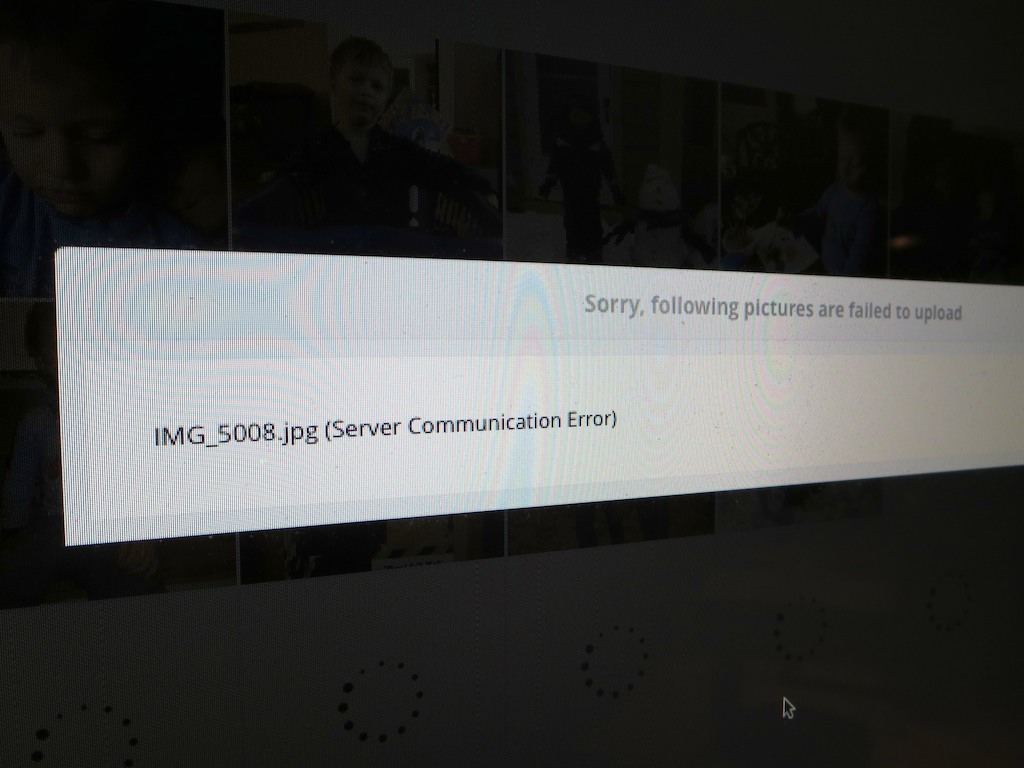
Yes, I was able to upload the photos onto my nixplay web albums, though a few pictures didn’t make it up to the nixplay cloud on the first try.
Instead, I got a scary ‘communications error’ message.
(A second attempt was ultimately successful.)

But when there’s smoke, there’s usually fire…

So Close and Yet So Far
For almost a day, I couldn’t get the frame to pull down any of the photos from the nixplay cloud.

NONE!

But it did recognize the existence of my online slideshows.
Just not any of the photos!

ARGH!!!!

Actually, all of the blank slideshows didn’t always show up in the menu.
Getting confused…?
Exactly.

NIXPLAY, WE HAVE A PROBLEM!

Nix the Nixplay?
When I first unpacked the nixplay, on the top of the its screen, there was a peel-able sticker that read,
“Congratulations on being one of our first nixplay customers. We are really excited to have you as part of the family!”

The feeling’s not mutual.

  • I’ve lost time trying to get this beast to work!
    (that precious commodity I was trying to save in the first place)
  • I’ve lost money!
    I just saw the nixplay’s price on Amazon has suddenly dropped 20% to $79.99!!!
    (I guess that $20 price drop is good for the next guy… though that’s predicated on the frame actually working!)
  • And I’ve lost a happy ending for this post!

But it gets worse.

The Taunt of the Intermittent Problem
To demonstrate further proof that technology has already reached a sentient stage… the next day, my frame inexplicably started working.
It started sucking in the photos.

Not all of them, mind you…. but a lot.
I think it was taunting me.

So what’s going on here?

  • More communication errors?
  • Or perhaps, it’s normal for nixplay photos to take their time downloading to the frame
    (so much for instantaneous gratification)

The questions keep pouring into my brain like water into a leaky Octonauts submarine toy during bath time.

Help At Home with Tech!
I’ll reach out to nixplay’s tech support for help…
But this kind of thing is really supposed to work from the start.

A device that works some of the time is the worst kind of tech to keep around.
It should either work right or not at all.
(I think I was happier when the frame remained stubbornly blank!)

Owning a solid digital photo frame shouldn’t be a pipe dream!
Like flying cars, it still seems like such a great idea!!

But it looks like Amazon could be getting a return very soon…

(If anyone out there has a recommendation for a good digital frame that’s not hobbled in some inscrutable way, please let me know!)

Stay tuned…
(Ugh)

13 Tech Tips from 2013

We’ve covered a lot of technology ground this year.
I hope you’re finally feeling a little closer to Tech Zen at home.
If not, don’t despair. It can be a long (never-ending?) journey!
So I’ve got a quick tech review to help you stay ahead of your many demanding gadgets in the year ahead.

Here are my lucky 13 tech tips to remember:

#1
You’re Going to Need a Bigger Hard Drive

LaCie Rugged with Rattle

Even if you have faith your external hard drives can withstand the forces of fate, they’ll eventually buckle under the load of all those home videos you’re shooting.

#2
There’s No Question. USB 3.0 Rocks!

The Choice

Thunderbolt is great. But USB 3.0 is just fine. Both blow FireWire (R.I.P.) away.

#3
Build Your Home TV Studio for $44

My favorite piece for this home-grown tech solution is the $2.99 teleprompter system for your iPad!


#4

That Bad Photo You Took May Be Your Best Yet

The Eye

You may not know it, but some of your best photos are slipping through the cracks. Maybe they first struck you as flawed, or you didn’t recognize their hidden value. Time to recognize your ugly ducklings!

#5
Find Your Neighbors on Nextdoor.com

Nextdoor enters the neighborhood

You can create your own virtual neighborhood based on your real one.
Talk about two worlds colliding!

#6
It’s Time to Buy LED Bulbs

Passing the Torch to Cree

The price is right for this Cree LED bulb. Convert!!

#7
Transcode Your Camera Videos to Windows Media Files
with 
Flip4Mac

When you want to email your child’s birthday party video to grandma, you’ll need the power of Flip4Mac. Then, she’ll be able to watch the magic
candle-blowing moment on her PC.

#8
Create a Shared iCal Calendar for Your Family

Connected and Happy iPhones

Missing a family commitment can be a thing of the past if your family iPhones share a calendar.

#9
Video on Instagram Gives You Your 15 Seconds of Fame

Watching a Blade of Grass Grow

If you can’t muster up 15-seconds worth viewing, you might like Vine instead.
They only offer you six seconds. If that gets too complicated, try taking a photo, and call it a day…

#10
Strap Your Smartphone into Your Car while It’s Doing GPS Duty

iPhone navigating in cup holder

Don’t let another road trip go by with your smartphone sliding about as its GPS app shouts out turn-by-turn directions from the car floor. Mount it onto your dash!

#11
Buy a Nest Learning Thermostat

My Nest and Me

How’s your 1950’s-era thermostat handling the extreme weather? Did you forget to adjust it before you left home today? Wish it were smarter? Well, now it can be…

#12
If You Buy an HD iTunes Movie, You Also Get the SD Version for Free

Movies for the Road

You just need to know how to ask for it. And why would you want the SD copy? Ask your bloated iPhone…

#13
BlackBerry is Toast

BlackBerry on the Floor

You don’t need me to tell you this news, but I really want you to read my little poem about this former giant.


Happy New Year!

Well, there you have it.
Feel free to add your own favorite tech tips from 2013.

(Yes, even I am not a Tech Jedi yet…)

Finally, thank you for visiting At Home with Tech over the past 12 months.
I hope my posts have been of some assistance or at least a bit of amusement.

I look forward to working through a few more of the universe’s many
tech mysteries with you in 2014…

Nanu! Nanu!

Brother, Can You Spare a Battery to Power my Phone Call?

Is this what your smartphone’s battery icon displays at 3:30pm? You really need help from a Mophie battery case.

Is this what your smartphone’s battery icon displays at 2:55pm? You really need help from a Mophie battery case.

Red Alert!
Smartphone batteries can’t get you though your day anymore.
Everybody out there seems to need a battery with more ‘mAh’ capacity.
(‘milliamp hour’)

Whenever someone shows up for a meeting with me,
the first comment I often get after “Hello!” is
“Can I plug in my phone somewhere?”

Worse yet, they often ask if I can loan them my iPhone charger for a quick hit.
It feels like they’re bumming a digital cigarette off me.
Now, I’m their personal power refueling station?!

Your Smartphone is Hungry!
This isn’t a new problem, but it seems to be getting worse.

Once upon a time, I could get through two days on one iPhone charge.
Then, as I discovered more apps to use, I wasn’t so sure.
So I made it a point to juice up every night.

Now with iOS 7, my little partner seems even hungrier.
I watch its battery percentage icon drain away throughout the day, and I often have to ration my afternoon email check-ins to keep the phone alive until I make it home.

And I don’t really consider myself a power user…

Better Keep that Smartphone in your Pocket
I think the good news is it’s okay to admit you can’t get through your day without a little extra juice…
I’ve always felt I was somehow hiding this deep, dark secret that I couldn’t keep my phone going all day long.

But there’s really no shame in it.
You’re not some sort of malcontent who can’t control your impulses to overuse your smartphone.
(If you are… sorry for calling you out!)

Sure, there are ways to cut back on the power drain:

  • Close unused apps
  • Turn off Wi-Fi and Bluetooth if your not using them
  • Don’t check your email with a poor signal
    (That makes your phone work harder.)

But the truth today seems to be that smartphone batteries just can’t keep up with the normal drain that’s put on them.

So until that problem improves, you’re going to have to take matters into your own hands.

You Need Some Portable Power
Last year, I got the tiny Innergie PocketCell for my iPhone to help keep it alive on the road with me.

This elegant $60 white ‘stick’ is small enough to slip into your back pocket and is great as a portable power back-up solution for lots of your hungry digital devices.  The one big downside is you always have to carry it around with you.

Plus, it’s cumbersome to set up your little digital MASH unit in the wild and execute a power transfusion whenever your smartphone runs low.

Feed your Digital Beast!
So I finally decided it was time to get with the program and upgrade to an augmented and elegant onboard battery solution…

Unfortunately, smartphone manufacturers don’t offer this tech through their own brands.  (That would suggest their technologies are somehow lacking.)

The added juice you need comes hidden in the bodies of
third-party smartphone battery cases.

And the good news is… There’s a lot of choice out there for you.

Size Doesn’t Matter
Sure, battery cases will inevitably make your smartphone’s footprint a bit larger.
But today, that’s not so much of an issue.
In fact, if anything, bigger is better.
iPhone users are drooling over all the larger screens out there.
Have you seen the size of these Phablets?
They’re huge!

So a little extra heft is really not a deal breaker anymore…

Mighty Mophie to the Rescue
A digitally enlightened friend of mine has happily used
the Mophie Juice Pack Plus.
So instead of going through my usual painstaking research before pulling the trigger on a battery case, I quickly settled on the Mophie.

Mophie_juice_pack_plus

Call me impulsive.
Or maybe it’s just the time of year, where you don’t have a lot of spare time to brood over the perfect power accessory for your smartphone.
(If you do, you should know that Mophie also offers a couple other design flavors.)

All my right-brain decision-making aside, Mophie is still highly regarded.

It’s Going to Cost You
Of course there’s a catch…
Convenient battery back up from Mophie doesn’t come cheap:

  • $100 to fuel the 4/4s
  • $120 for the 5/5S
  • $100 if you’ve got the Samsung Galaxy S4

But can you really put a price on having enough power to get you through your day?  Mophie claims to almost double the runtime of your iPhone.
Sweet!

Discovering a Great Last-Minute Tech Gift
What choice do we flawed, digitally dependent humans really have?

  • If you’re going to get caught on a few long phone calls throughout the day
  • If you like to stream a little Hulu video or watch part of a movie you downloaded from iTunes
  • If you pay a fair amount of attention to your email
  • And if you don’t want to plot your day based on where you can plug in

…You really need one of these battery cases.

And who wants to spend this time of year worrying about your power limitations?  Open up your brain space for more important concerns.

Like….
Time is running out and you don’t have all your presents yet!?
If only it was easy to find a great last-minute tech gift.
Wait a minute!

Got to run…