At Home with Tech

Unlock the power of all your technology and learn how to master your photography, computers and smartphone.

Category: Tech Trends

How to Quickly Delete Multiple Photos from Your iPhone

If your iPhone is running out of space, one way to find more room is to delete photos. But that can take a lot of time if you haven’t been regularly doing it. Here are tips to help you speed through this digital chore.

You really don’t need all of those photos in your iPhone’s ‘Camera Roll.’  Especially if you always download them to your computer or up to the cloud where they ‘officially’ live and are safely backed up. But manually deleting one photo at a time using the Photos app on your iPhone is a losing battle when you’ve built up thousands of photos.

And eventually, you start to run out of space on your iPhone, and then it becomes a real problem.
(Sound familiar?)

There needs to be a faster way to thin out your photos in bulk.
Well, of course there is…

Time for some digital spring cleaning!

Bulk Delete Pics on your iPhone
First, go to ‘Camera Roll’ in Photos…

  • You’ll see the ‘Select’ icon in the top right corner that allows you to tap and highlight multiple photos at the same time. Tap that.
  • Then, tap the trash icon on the bottom right.
  • Finally, touch the delete tab that pops up and you’re done!

But for me, that simple process still feels somewhat limited when you’re trying to move through so many photos. Plus, I’d prefer a larger canvas to work with than the surface of an iPhone.

Ideally, I’d like to be able to manage this process on my iMac so I can see more photos all at once.

Well, guess what?
You can do exactly that using the ‘Preview’ app on your Mac.

Bulk Delete those iPhone Photos Using Your Mac
First, you connect your iPhone to you iMac or MacBook….

  • Then, open up Preview.
  • Select ‘Import from’ your iPhone’s name.
  • Then click on the photos to delete.
  • And finally, click on the little red delete circle icon on the bottom left.

BAM!

So the truth is both methods are extremely similar. Again, the big difference is you’re working on a larger screen, which makes me much happier.

And if Preview isn’t right for you, the ‘Image Capture’ app on your Mac pretty much duplicates the same process as Preview.

Simple Isn’t Always Easy
To be perfectly transparent, this topic squarely falls right under the
“How Did I Not Know That?” category.

Apple designers have done perfectly fine in setting this up for us.

But sometimes the obvious solution that’s staring right in your face requires a little more thinking on your part.
(Chalk it up to your brain power focusing on more universally pressing issues.)

I must admit… not so long ago, it wasn’t so ‘obvious’ to me either.
Or I’ve never taken the time to want to delete multiple photos from my iPhone.
(I’m not sure which one I should admit to!)

And the fact that you’re still reading this suggests that you also might need a little ‘refresher’ too.

I won’t tell anyone… as long as you don’t!

#ThingsYouShouldKnow

How Useful is Hilton Honors Digital Check-In?

Staying at a hotel doesn’t have to feel like you’re walking in blind into your room. Here’s how to have a virtual view into your future stay…

My family and I just got back from a little weekend trip where we attended a bat mitzvah. We needed to drive up the night before, because the service began too early.  So I ended up booking a room at a Homewood Suites by Hilton not too far from the synagogue.

The morning before we left, I received an email from Hilton Honors inviting me to “check in now.” When I logged into the website, I had the opportunity to choose my own room via an interactive map of available rooms.
(You can also perform the same trick via an app on your smartphone.)

So I said to myself, “Why not?”

Choose Your Room Online
As I did a little digital snooping down the hotel’s hallway, I could click and open up pictures of the rooms, although I quickly realized they only represented room types… not specific room layouts.

So I’m choosing a room based on location and general layout.
Okay… that’s something.

I quickly realized the room that I was preassigned to was located just off the lobby.
Huh. That’s not ideal….
(I didn’t like the idea of being right in the middle of pedestrian traffic.)

I clicked on another room a little further down the hallway and on the other side of the hotel away from the road. You usually can’t figure out those kinds of nuances until you walk into the room and realize the deficiencies of its location.

I was actually feeling a little pumped by this virtual view of our upcoming hotel room.

But then I saw a disclaimer at the bottom of the page that said my pre-arrival room selection could still be changed at management’s discretion.

What? You were expecting a guarantee?
(I expect a lot can sometimes happen in the life cycle of a hotel room within a twenty-four hour period…)

Repeat Business
When we arrived at our Homewood Suites, the room I had selected online was…
(Drum roll please)
…Indeed still assigned to us.

So was that it?
Yep.

To be sure I hadn’t missed anything else with my new trick, I asked the man running the front desk about his opinion regarding digital check-in…

He agreed that the value was mostly the ability to choose your room. He suggested that this feature was more significant for repeat visitors. And that it made the in-person check-in experience a little faster.
(Of course, I blew through the ‘time-save’ by asking my question!)

Thank You, Hilton Honors
All right, then…

So a little tech trick from Hilton gives you the power to take a virtual peek and select your home away from home.
(Note— You need to be a member of the Hilton Honors program to have access.)

It worked for me.

Mazel tov.
Hilton Honors Welcome

How to Handle a Compact Camera That’s Still Too Big

Premium compact cameras are larger than you think. How you carry them can make all the difference in how you use them…

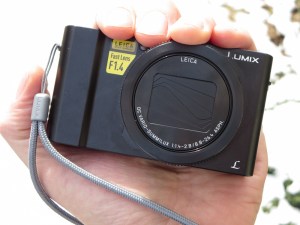
I have a confession to make. My shiny, new premium compact camera (Panasonic Lumix DMC-LX10) isn’t really… all that compact. Sure it’s a whole lot smaller than a DSLR, and it does just fit in the palm of my hand. Plus, it takes great pictures.
(For the price tag, it should!)

Technically, it fits the description of a pocket camera. But here’s the thing… It’s really too big to fit into the front pockets of my pants.


Sure, you can jam it in. But come on… that’s not comfortable. Especially if the pocket is already holding something else like your wallet.

My LX10 fits a little better sliding into my back pocket, but that still feels a little precarious. Especially if I were to sit down and forget it’s there.
(Crunch!)

Which Pocket?
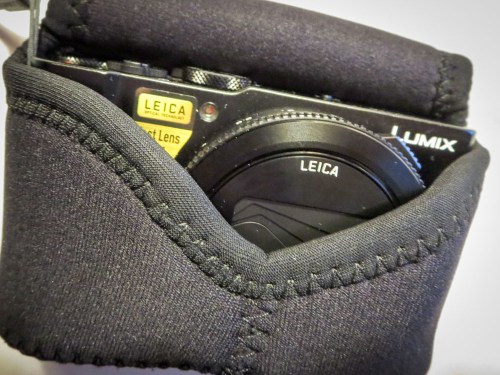
To be fair, I’m using a neoprene case with it, which adds some bulk.
(OP/TECH USA Digital D Soft Pouch, Micro – $17.95 at Amazon)

The material stretches tight around the camera, which creates something of an odd shape, because the lens juts out a bit. Still, it can slide in and out of a pocket as long as the pocket is large enough.

Jacket pocket?
Fine.

Coat pocket?
No problem.

But ideally, I want to be ready for action when I’m out and about. And the only way to guarantee that is to carry the camera in my pants like I do my iPhone.

And I don’t want it hanging off my shoulder with a strap. That’s not as convenient a solution.
(I think of a DSLR for that.)

Premium Compact Cameras Aren’t So Compact
You know what…? You can’t always get what you want.

I’m sure camera technology will get there one day, but if you want a big-time sensor in a small camera with a wide enough lens (24mm), today’s ‘premium compact camera’ is going be a little bigger than a true pocket camera or a lot thicker than your smartphone.
(I believe this also applies to the Sony RX100 V and Canon G7X Mark II competition.)

So deal with it.

How Fast Can You Get Your Camera Out of Its Case?
That’s the question today… How can I best handle the little beasty?

One way is to see if there’s a case with better functionality.

My OP/TECH USA is fine, but the fit is a little snug, requiring me to take an extra few seconds to pull the camera out. And as parents of young kids know, those priceless moments you want to capture only last for a few seconds. Fumbling with your camera to get it out of its case will often let that perfect picture slip away…
(I’m sure OP/TECH USA would remind me that you don’t want your camera to easily fall out of its case. That kind of defeats the point of having a protective covering to begin with.)

Also, this particular case has two snaps. And sometimes it’s a little wonky snapping them both once the camera is back in. Often, I just go for one. So that’s not perfect either…

MegaGear to the Rescue
The obvious choice is to buy the case that Panasonic makes for its Lumix LX10 camera, right?

Wrong.
Panasonic doesn’t make one. Not yet…
(Really)

So you’ve got to continue to travel the third-party route to see if there’s a better case solution.

In my research, I came upon ‘MegaGear,’ which appears to design camera cases for specific camera models.
(As opposed to generic cases that will ‘generally’ work. Ugh.)

I found their version of the stretchy neoprene case…

What’s the difference compared to the OP/TECH USA version?
It’s got a Velcro strip instead of two snaps to close the flap.
Is that significant?

Well, you’d probably save two seconds or so pulling at the Velcro instead of two snaps. And assuming the fit is a bit less snug, I think you’d have the camera out and focused on the ‘moment’ while it’s still happening.

I’d say that’s worth fifteen bucks.
Click.

Back to the Future
Then, there’s an old-school MegaGear leather case option that connects to the bottom of your camera and has a molded flap with a snap release that covers the lens. What I like about this choice is it offers more protection since you’re not sliding the naked camera in and out of a case.
There’s always that instant where if you momentarily lose your fine motor skills or you perform a clumsy handoff, the camera could enter free-fall mode.
(No, that’s not in the manual.)

On the down side, this MegaGear case is definitely not going to make the Lumix LX10 any more svelte. I don’t think it’s going to be hanging out in pants.

But if you’re already resigned to that reality, why not add some protection to your solution? Plus, the one snap flap release design satisfies my speed requirement.

And yes, if you’re okay with the idea of swinging it over your shoulder, this case is perfect for that too…

Click.

Functional Upgrade?
So I picked up a couple extra cases for my Panasonic Lumix LX10.
Is that extravagant?

More importantly, will they really upgrade the camera’s usability and safety factor for this parent of a six-year-old boy?

I think we should all agree on a firm “Maybe.”

Until someone offers me a better solution, I’ll take those odds.

#FiguringItOut