At Home with Tech

Unlock the power of all your technology and learn how to master your photography, computers and smartphone.

Category: Tech Trends

Is Wayfair.com a Fair Way to Shop?

This shard of glass is all that remains from the top of our nifty living room lamp. Where are you supposed to go to replace a piece that you’ve owned for twenty years? It can be a lighting jungle out there…

This shard of glass is all that remains from the top of our nifty living room lamp. Where are you supposed to go to replace a piece that you’ve owned for twenty years? It can be a lighting jungle out there…

In our living room, there once stood an old-time floor lamp. It wobbled just a bit and supported a nifty white glass bell shade on the very top, harkening back to another, less tech-filled era. And for the past few years, our almost six-year-old son has been zipping by it. The lamp stood there, seemingly impervious to his growing energies.

Alas, the lamp’s time finally ran out, and a couple weeks back…. Crash…
The glass shade shattered into a thousand pieces.
(Everyone was okay… by the way.)

So now what?

Well, it was time to replace the glass shade. I figured I should be able to easily do that online…
(Who wants to schlep around to various stores to check limited stock for something as unique as this?)

Amazon… My Old Friend
I started with my old standby… Amazon. But I’ve got to admit, it was a little frustrating navigating to find exactly what I was looking for. Most of the choices weren’t Amazon Prime eligible, and many of the descriptions from various sellers weren’t as clear as I needed them to be.
(I was looking for a 2.25” base to pop back on the lamp’s mount.)

And the idea of paying $10-$12 for shipping really was a non-starter.

So I ventured into the wild, and began Googling about. I found several companies that specialized in lighting… but I honestly wasn’t really interested in starting a new relationship with a strange online vendor.

Hello, Wayfair
That said, I did run several times into something called Wayfair.com.
And on a lark, I decided to Google it.
wayfair According to Wikipedia, It’s the largest online-only furniture retailer in the United States. And it’s headquartered out of Boston.
(My old stomping grounds)

Huh.

So I decided to check Wayfair out…

Zeroing In
And I’ve got to say, the website looked and felt really solid. Its interface was easy to use, and it had the look of a serious player. Plus I could easily save my choices to a ‘board’ for final evaluation later.
(Very useful!)

I was quickly able to find what I was looking for…
Alabaster Glass Shade
An Alabaster Glass Bell Pendant Shade by Volume Lighting
$47.99.

Wayfair offers free shipping over $49.00… so I figured I’d pick up something else to cross over the finish line.

Done…right?
Not quite….

You know me… I like to do price comparisons….

Lighting Jungle and Amazon Team Up
So I went to Jet.com to see what was going on there.
But the inventory was limited, and I couldn’t find that particular glass shade or anything close to what I really needed.
(Bummer…. Jet has really been disappointing me lately.)

Then, I went back to Amazon to look for that specific glass shade from Volume Lighting. And in fact I found it. I had originally passed by the choice, because it was a non-Prime offering by a company called Lighting Jungle, and the description didn’t contain enough detail, including the critical fitter size at the base.

But it did contain the model number, which didn’t mean anything to me the first time around. Now I was able to do the match.

And match… they did.

The price on Amazon…?
$19.44!

What?!

Okay, plus the dreaded $12.99 shipping cost.

But that’s still a grand total of only $32.43.
That’s a huge difference compared to Wayfair’s $47.99.

Huh.

Well, that’s disappointing. What’s up, Wayfair?

Inconclusive Data
So I decided to do a quick tour around Wayfair’s site to get a better sense of the overall pricing…

I happened to need another LED bulb for the upstairs bathroom to replace a decorative incandescent bulb that had just burned out.
(You know me in my ongoing LED bulb replacement crusade.)

I came upon this cute 4-Watt LED replacement for $19.43.

Then, I crossed check it with both Amazon and HomeDepot.com.
Wayfair had them both beat by about a buck.

Huh.

Okay. So I wasn’t going to easily get a clear verdict on whether Wayfair was unnecessarily marking up the inventory or not.

There’s Never One Retailer that’s Always Best
But really… is there ever a one-stop online shopping solution for everything you’ll ever need?

Amazon is great… but you’ve also got to watch the pricing. It’s often, but not always the best deal around.

You’ll recall, I had high hopes for Jet.com. But the selection there is still more limited than Amazon’s. And Jet’s lower pricing promise hasn’t panned out for me.

Is Wayfair Way Fair?
So now I’ve found Wayfair.
And even though it was wicked expensive on my first try, I think I’m still going to add Wayfair to my short list.

Why?

Well, I’ve just got a good vibe about this place.
(Any of you out there have other experiences with Wayfair?)

Check out this appealing Wayfair YouTube video-

Sure, my warm response to this video only speaks to Wayfair’s successful marketing strategy.

Whether I’ll end up regularly shopping there is another story entirely…

Yes, regarding my new glass shade… Amazon won the day.
But I think it’s fair to say I’m rooting for Wayfair to do more for me in the future.

Because remember, there’s no one place in the world you should always shop.

That’s way fair.
How to Connect Your Wi-Fi GE Range to the Web

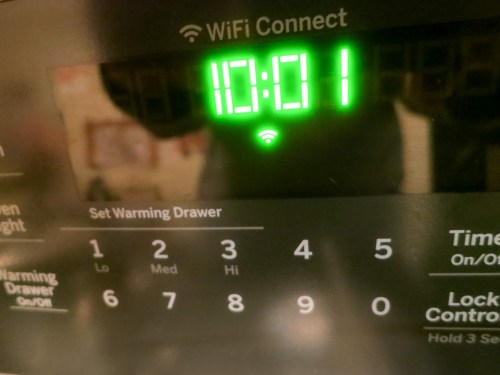
Behold, an oven that has Wi-Fi baked in! I must admit, I was excited and a tad scared to see the Wi-Fi icon pop onto my new GE range’s control pad. But it took a little work for my range to join the Internet of Things…

Behold, an oven that has Wi-Fi baked in! I must admit, I was excited and a tad scared to see the Wi-Fi icon pop onto my new GE range’s control pad. But it took a little work for my range to join the Internet of Things…

I must report I’ve obtained the power to burn down my house remotely using an app on my iPhone. Okay… calm down. That’s not really what this app is intended for… In fact, it’s an innocent app with the good intention to help me control my new GE oven when I’m not at home.

The idea is you can preheat your oven before you arrive home to get your dinner prep started. You can even start cooking that roast you popped in the oven before you leave for work.
(Example used for illustrative purposes only…I don’t know how well a raw holiday ‘Roast Beast’ would last in a cold oven.)

Observing from a Distance
So for those of you in the market for a new range, it’s a Wi-Fi enabled shiny
GE Profile 30” Convection Range. (Model PGB940ZEJ1SS)

And yes, my wife and I just bought one.
No… our decision was not significantly affected by its Wi-Fi capability.
(Secretly, I was pretty pumped.)

But the Wi-Fi value for me isn’t that I can cook dinner while I’m still at work.
(Though I know it theoretically sounds appealing)

What I really want is the ability to randomly check and make sure I didn’t accidentally leave the oven on when I’m not at home.
(The app doesn’t control the gas stovetop.)

Intentionally Disconnected from my Connected Oven
The GE app’s default mode is to simply monitor the status of the oven. You have to opt in to take over active control from your smartphone.

And that… I haven’t done…yet.

I feel a bit like Bruce Wayne in “The Dark Knight Rises.” He built a revolutionary energy generator, but was unwilling to turn it on, because he feared he couldn’t control its use.

And to quote another superhero franchise…
“With great power comes great responsibility.”
(Are we sensing a theme here?)

To be fair, the app has a safety setting, which automatically turns off the oven after it’s been cooking for six hours.
(Looks like the oven’s designers had some of my same concerns.)

So for now, I will observe my oven from afar.
And perhaps one day, I will summon the courage to control it from a distance as well…

How to Turn on the Wi-Fi Feature
You might be wondering how one sets up Wi-Fi on a GE oven.
(It doesn’t exactly operate like a computer.)

And as that’s the subject of this post, it’s probably time to get to the point!

I was a bit puzzled where to begin…
(The one-page instructions on “Connecting your Wi-Fi Connect Enabled Oven” wasn’t especially clear.)

GE calls the feature “Wi-Fi Connect”
and tells you to visit GEAppliances.com/connect to “download the appropriate app” on your smartphone.

On the website, you’re strangely greeted by advertising for more of GE’s Wi-Fi-enabled kitchen devices.
(Including refrigerators and dishwashers)

But in fact you’ve arrived at the right place. It’s the starting line to a process you need to go through if you want your range to join the Internet of Things. So after going through the exercise myself, here are the required steps to connect your oven:

  • On the webpage, click on “More About the Wall Oven & Range App.”
  • On the bottom of the next page you’ll see “What You Need- GE Kitchen App” and two links to download the app on Apple’s App Store or on Google play.

GE Kitchen App


Then, using your new GE Kitchen App…

  • Choose “Add an Appliance.”
  • Choose “Range.”
  • Then turn on the range’s Wi-Fi by pressing the “Remote Enable” button.
    (Yes, it creates a mini Wi-Fi signal that your smartphone can connect to.)

GE Kitchen App Step 1 of 5


  • Join your smartphone to the stove’s network using the password printed on the sticker on the inside edge of the warming drawer.

At this point, I ran into a little trouble…

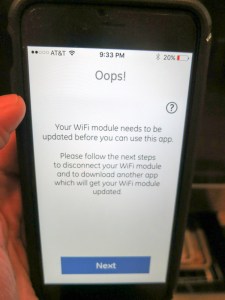
I received the following message from the GE Kitchen App after trying to connect to my stove’s Wi-Fi signal…

GE Kitchen App Oops


What?!

My stove is brand new. It already needs a firmware update?
Why yes…. Yes it does.

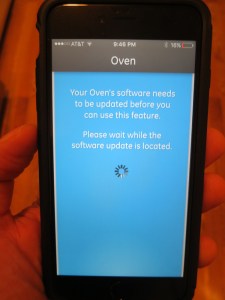
GE Kitchen App Says Update Software


So what’s the fix…?

If this happens to you, you’ll next need to download another app that has the power to update your stove’s Wi-Fi module.

  • This one is called, “GE Brillion App.” The GE Kitchen App is supposed to automatically direct you there, but my iPhone 6 Plus got stuck for some reason. So I navigated to Apple’s App Store, found the new app and downloaded it myself…
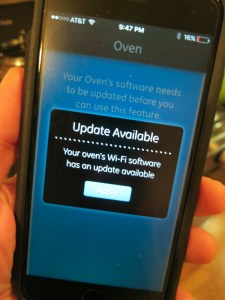
  • The GE Brillion App then went through the same early steps, but when it ran into the roadblock, it magically offered to do the firmware update.

GE Brillion App to the Rescue


  • And update my oven… it did!
    (And while the update chugged along, the Brillion App displayed a muffin joke. Really.)
  • And then it said my oven was happy.
    (How can you be mad after that kind of proclamation?)

GE Brillion App Says You Have a Happy Oven


  • Once the Brillion App was done bringing my oven back to the future, I successfully connected my iPhone to the oven’s Wi-Fi. Then I got my range onto my home network’s Wi-Fi and finally finished the setup to connect the oven to the app.
    (Quite the little dance)
  • Next, the GE Brillion App offered to run my oven like the GE Kitchen App, but as it appeared to be an older app, I successfully switched back to using the GE Kitchen App.
    (And as I’ve already said, I haven’t yet fully activated the app to ‘control’ mode.)

And I was on my way…

Adding to My Virtual Presence
The whole Wi-Fi setup took about half an hour. And though the firmware update wasn’t a huge roadblock, I’ve got to say the process wasn’t especially intuitive. You’ve really got to pay attention to the twists and turns…
(Though I must admit, the GE Brillion App’s light banter did take the edge off of my growing annoyance.)

So now I have yet another connected device to help me know that my home is healthy when my house is on its own:

And for now, my Wi-Fi connected GE range will simply reassure me wherever I am… that all is cool…

Happy Oven.

Happy Home.

Happy Barrett.

A Digital Memorial

My friend Christopher Kubofcik in Atlanta in 1998

My friend Christopher Kubofcik hanging poolside in Atlanta back in 1998

My long-time friend Chris Kubofcik passed away last month. As I struggle to process the loss, I’ve started to think about the topic of someone’s “life print” living on… online after he or she is gone.

Should their online presence disappear, because they have?
I don’t think so.
(Their memory hasn’t suddenly evaporated.)

I know lots of folks maintain the identities of people online after they’re gone.

I have to admit it’s something of a mind-bending topic. One that I’ll spend more time on right here… after giving it a little more thought.

For now, I’ve decided to create and post this little photomosaic of Chris in his memory…

Peace.