At Home with Tech

Unlock the power of all your technology and learn how to master your photography, computers and smartphone.

Category: Tech Trends

Strengthen Your Computer with a New Year’s RAM Boost

As you consider your New Year’s resolutions, don’t forget about the health of your computer. It might need a little more memory and a lot less dust!

As you consider your New Year’s resolutions, don’t forget about the health of your computer. It might need a little more memory and a lot less dust!

My iMac has been acting somewhat sluggish lately… lots of spinning beach ball action. I first thought it was simply because I had so many family photos jamming up my Aperture photo management software. But I eventually realized there might be more afoot than a memory-hogging program.

I can’t believe it, but my iMac is already kind of old. It’s a mid-2010 vintage with 4GB of RAM. (random access memory)

My iMac hadn’t been to the Genius Bar at the Apple Store for a long while.
(ever?)
So I figured it was time to take it in for a check up…
Why not start off the New Year right on solid digital footing?

My Trip to the Genius Bar
Fast forward to my Genius Bar appointment, which I had easily booked online.
My designated Genius ran a few diagnostics on my iMac, and within twenty minutes she gave it a clean bill of health. I asked her if installing more RAM might help my digital companion reclaim some of its original pep.

My Genius looked a bit skeptical and said that 4GB should be enough to run memory-intensive programs like Aperture, but she decided to bring in a second opinion to confirm her perspective.

Enter Genius #2…
This Genius looked at me knowingly and without missing a beat said, “Oh yes. You definitely need more RAM.”

My iMac has 4 RAM slots. Two of them contain 2GB RAM chips, and the other two of the slots are empty. Genius #2 suggested putting in four 4GB chips for a total of 16GB.

I said, “Great! Let’s do it.”
It’s common knowledge you can buy RAM memory elsewhere for less and install it yourself, but I wasn’t feeling especially adventurous. I was willing to pay a premium for a little official Apple love.

But the gesture wasn’t returned… this Apple store didn’t stock this older RAM.
(D’oh!)

I think I may have started to hyperventilate, because Genius #2 took me aside and quickly began typing into one of the many humming iMacs surrounding us…
www.macsales.com.

The name of this website he called up is actually Other World Computing, or ‘OWC,’ for those in the know.
Genius #2 told me it was a reputable site to purchase extra memory, and
I could pick up the 16GB of RAM I needed for a great price…$77.99

Impatient Human
So I boxed up my massive iMac and schlepped it back to my car.
(Yes, this is the one time in four years you get to use the original box and packing Styrofoam. How else are you supposed to safely transport this
30-pound monster?)

As I was driving home, feeling mildly dissatisfied without immediate resolution, I scanned my brain for something swifter. Then, I remembered there was an Apple-authorized reseller just down the street from my house. Maybe that store had the RAM I needed…

And in fact it did. But the pricing wasn’t quite as competitive as OWC….
Still, I picked up two chips of 4GB RAM there.
(You always want to buy memory in matching pairs.)

That would bring my computer up to 12GB of RAM. Not quite the recommendation of 16GB, but I figured I could always upgrade the other two slots later if I really needed to.

The Dusty Install
Everyone I talked with… from Genius #2 to the helpful sales lady at the third-party store assured me it was super simple to install the RAM chips on my own. I’ve actually done this kind of operation a couple times before on non-Mac machines, and it always made me feel a little queasy jamming a delicate memory chip into a computer slot without breaking something.
(Plus you’ve got to worry about ‘grounding’ yourself so you don’t zap your computer with a little static electricity discharge.)

But I was committed… and I had come this far. So I began the operation…

I place my heavy iMac face down onto a towel on my dining room table. Under the bottom edge of the screen were three tiny Philips head screws, which housed a metal cover protecting the four RAM slots.

Unscrewing them was straight forward, but I wasn’t prepared for what I saw when I removed the cover…

There were these ‘mini-mountains’ of upside-down dust piles on the bottom edges of the two existing RAM chips.

These linty stalactites can’t be good…
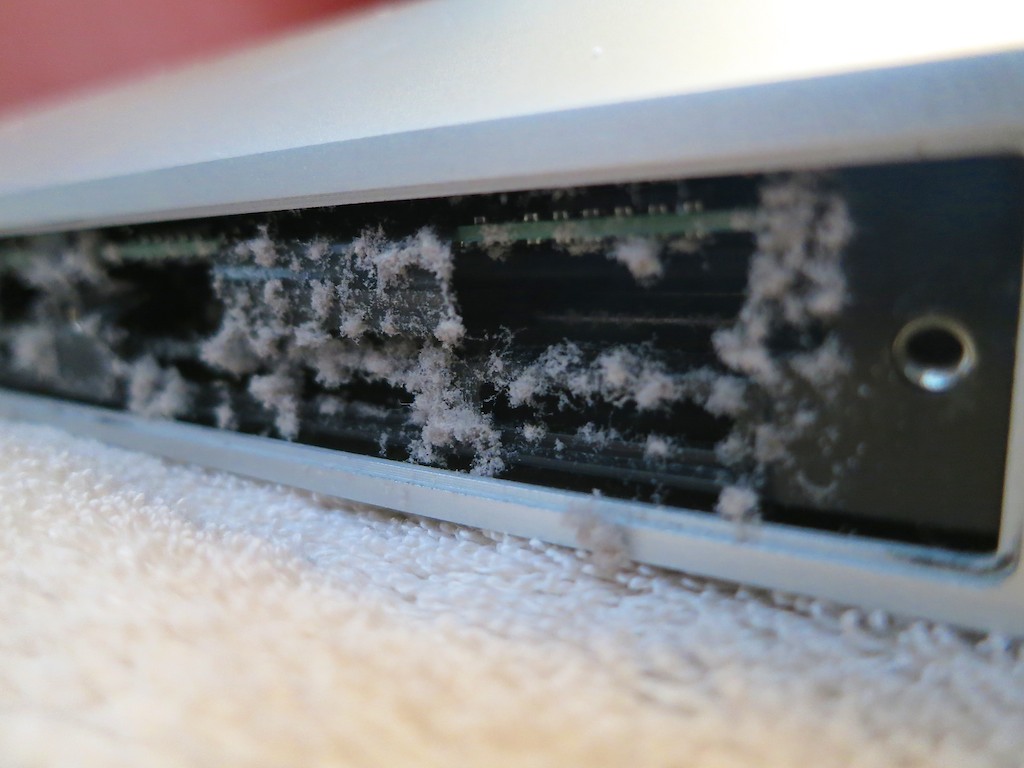
Dust on RAM Chips


Now what…?!
I didn’t have a can of air to blast the dust away.
(That actually might have been a bad idea if I blew some of the dust deeper into the guts of my Mac.)

So I carefully removed the dust with a tiny, soft brush.
As a result, a few clumps of dust fell into the side of the machine, just out of finger’s reach… but I carefully removed these powdery bandits with tweezers.

I wouldn’t exactly call my cleaning an exact science or a perfect execution, but at least there was a whole lot less dust hanging around to clog up my computer’s airflow.
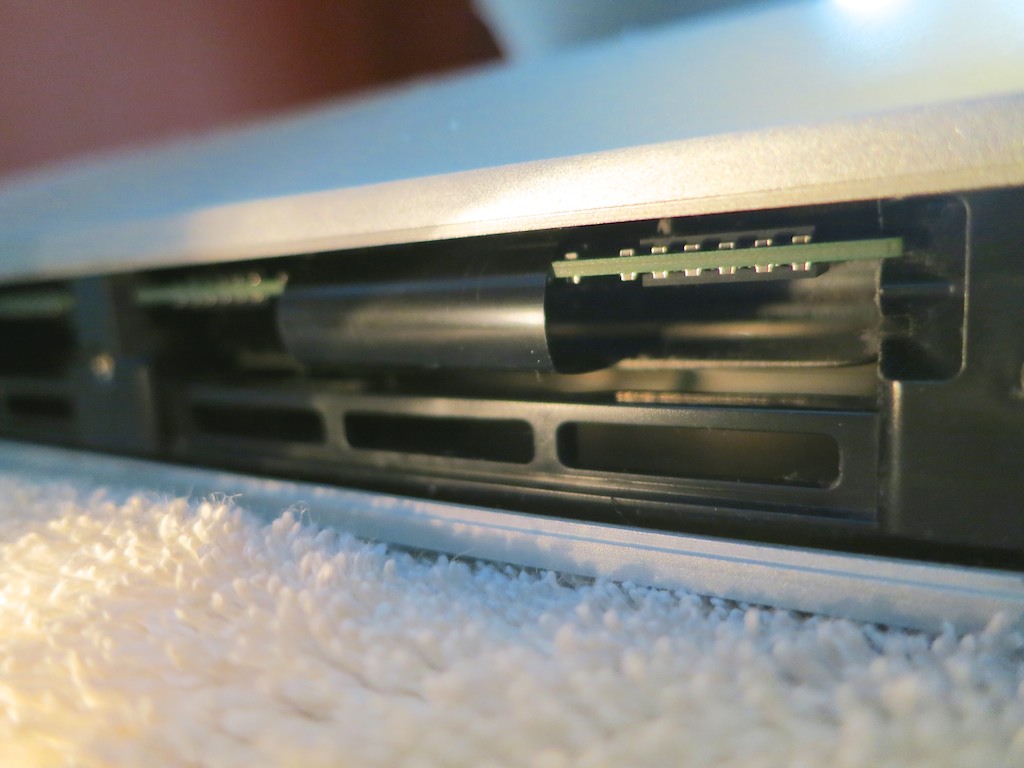
After Dust Cleaning


Now, it was finally time to insert my new RAM.

The Operation is a Success, but…
Yes, it was indeed a pretty straightforward process… you lift out two flexible, plastic tabs that are blocking your way… and then you insert your RAM with increasing effort until you feel that horrible scrunching sound of two plastic parts being forced to bond together.
Apple literature describes it as a ‘click.’
(But it never feels to me so clean and simple.)

And that’s it.

You hope you haven’t done any damage; you screw the bottom plate back on… and you lug your iMac back to its normal location and plug it in.

Then it’s time to turn your buddy back on…

Happy Computer…
“BONG…”

I immediately checked to see if the new RAM memory registered.
(You can click on the Apple icon on the far left and then on “About this Mac.”)

And there it was… “12GB.”

I opened up Aperture and happily saw an immediate improvement. My computer was indeed much more snappy!

Problem solved.

…Happy New Year
So as you consider your New Year’s resolutions, you might want to make sure you’re not waiting around for your computer to keep up with the “new you” this year.

Everybody and everything needs a little boost… every so often.

Those Pictures on Your Fridge

People love to look at photos and art on your refrigerator.  But if the imagery isn’t current, it’s probably time to give your family ‘monolith’ an artificial time-warp update.

People love to look at photos and art on your refrigerator. But if the imagery isn’t current, it’s probably time to give your family ‘monolith’ an artificial time-warp update.

We had a small family get-together yesterday. A little holiday brunch. Nothing crazy…

As my wife and I were doing some prep work earlier in the week, we noticed our refrigerator needed some refreshing.

No, not the food on the inside. My wife had that covered. (yum)
I’m talking about some of the items affixed with tape and magnets to the outside!

A lot of the pictures wrapping around our fridge were a tad out of date, and so my new mission was to bring the general imagery of our son’s adventures with his cousins and friends up to a more current state.

So how easy is that?

Normally, pictures, postcards, and your children’s drawings evolve onto your refrigerator. It simply takes time… just like good wine, right?
You can’t just snap your fingers and suddenly give the outside of your icebox that ‘look.’

Well, of course…you can.
Actually, tapping your fingers on your computer’s keyboard is the way to do it.

How to Refresh Your Fridge Photos
With a little thoughtful photo organization using software like iPhoto or Aperture, the pictures you need are waiting patiently for you in digital form.

And with your trusty home photo printer,
(You do have one of those?)
…it’s super simple to print up a fresh batch of refrigerator pics!

In less than half an hour, my-four-year-old son and I were busily taping a fresh batch of photos onto our refrigerator.

Problem solved.

HAL, Open the Refrigerator Door
But I find it interesting how such an old-school, analog activity centered around the family refrigerator is still alive and well in our high-tech lives these days.

There are lots of forward-thinking ideas surrounding what a ‘smart’ refrigerator should do for you, such as letting you know when you’re out of milk.

I know I’m not the first to acknowledge the fridge as the ‘bridge’ in the starship of your family’s household. It’s like the ‘memory central’ for the Borg of your little population.

It sits there, not unlike the black ‘monolith’ in “2001: A Space Odyssey.”
And people are compelled to tape important strips of paper to it.
So be it.

Bringing Your Icebox into the 21st Century
So what about a fridge that has a digital workspace or interactive whiteboard on its entire door? Then you can take all that taped clutter away and clear the space for a rotating digital photo montage managed from your computer.

Now that’s a concept I’d be interested in paying for!

How expensive could it be?
With flat-screen monitor prices crashing, popping one into a refrigerator door shouldn’t be that costly!

And of course, one that’s ‘connected.’
Okay, so that would jack the price up a bit.

But it would be so sweet…

The 2015 holiday shopping season begins in just a few more days.
(unofficially)
I’m ready to start saving up!

How to Brighten Up the Holidays For an Octogenarian

All flashlights are not created equal. Especially, if you want to feel cool using one of them. And particularly if you’re my father. Move over MagLite, I’ve got some holiday shopping to do…

All flashlights are not created equal. Especially, if you want to feel cool using one of them. And particularly if you’re my father. Move over MagLite, I’ve got some holiday shopping to do…

For years, my father owned a cool flashlight like the ones you see on any number of detective shows on TV. You know… the compact, but amazingly powerful torch you grip over your left shoulder while you extend your weapon in your right hand as you inch towards the hidden bad guy.

He had this CSI-like black flashlight (smaller) and loved walking around at home assuming the ‘shoulder pose’ with his police-grade tool.

It was harmless fun, except for what I thought were sky-high maintenance costs. It needed an expensive battery (CR123a) that is stumpier than a standard AA. And two of these little power cells can cost more than many flashlights out there.

Plus, the whole unit only operated at full blast for about an hour.
No wonder it’s so hard fighting crime in the dark these days…
All a thug needs to do to slip away is wait for a few flashlight batteries to drain down.
(I expect real law enforcement uses higher-end gear.)

Every time my father used his impressive but short-lived beacon, I felt a sense of ‘tech queasiness,’ because even though he was proud of his cool tech, I knew there had to be any number of more efficient choices out there.

But he was happy. So I didn’t say anything.

The Light that Failed
And then one day about a year ago, his flashlight wouldn’t power up.
And the problem wasn’t the battery or the bulb.
(No tech lasts forever.)

I wasn’t there when it happened, but I’m sure there was a significant disturbance in the Force my father follows.
(It didn’t hit me.)

But I noticed it when I came by for dinner one Thursday night and I saw another flashlight sitting on the kitchen counter.
It was nothing special, but it was perfectly fine. Except that I knew it wasn’t.

“What’s this?” I asked with a concern that surprised me.
He pretended to be unaffected by the loss and his entirely unimpressive replacement.

But I knew a cool flashlight held the same significance for him as one of my own geeky tech gadgets… my Logitech UE Mobile Boombox or
my Renny Bluetooth Home Ringer.

Time for Action
I’ve been thinking about this story for months.
I’m not really sure why.
Maybe it’s because my father is 81 years old…

He’s doing okay… but still.
The light is fading a bit.

My father sometimes talks about getting older, and how it’s the little things in life that make more of a difference to him.

So I decided it was time to brighten up his holidays.

Exploring a New World of Flashlights
I took a look online to see what modern technology has done to today’s flashlights.

First off, LED tech dominates. And then I realized there’s an entire line of ‘high performance’ or ‘tactical’ flashlights that people who are really serious about their light buy. And the price tags are serious too. I’m talking over $100.
Sometimes way into the hundreds.

I’m serious, but not that serious.
(My father doesn’t need to light up an entire cornfield during a new moon.)

I just want something better than a $6 Eveready Economy flashlight from Staples and a little slicker than the standard mini MagLite.

Remember, half of the equation here is finding a piece of gear that is somewhat over the top but not ludicrous.

How Many ‘Lumens’ Do You Need?
One big question is how much light does the flashlight need to throw if the flashlight isn’t normally leaving the house. One variable in the equation is the number of lumens it generates. Some ‘experts’ say under 100 lumens is fine. Others say you need two-three hundred lumens or more.

REI has a good write up on other issues to consider when choosing a flashlight.

And yes, if you’re wondering, there are seemingly hundreds of choices out there…

The Research Begins
I centered my attention on a few manufacturers and decided to focus my spend to around fifty bucks.

Here’s what I found:

  • Olympia AD220
    $46.94 on Amazon
    220 Lumens
    (Two CR123a rechargeable batteries)
    210 Lumens
    (One CR123a battery)
  • Fenix LD22
    $55.95 on Amazon
    215 Lumens
    (Two AA batteries)
  • Fenix E25
    $50.95 on Amazon
    260 Lumens
    (Two AA batteries)
  • Klarus RS16 Rechargeable LED Flashlight
    $65.95 on Amazon
    380 Lumens
    (16340 Rechargeable battery and onboard magnetic charging port!)

These flashlights all have multiple brightness settings, which allow you to regulate your lighting needs, but the Klarus RD16 really tickled my fancy, because it’s so easy to recharge.

Click.

Yes I broke through my price point a bit with the Klarus, but hey… this completely solves the problem of having to fiddle with batteries!

Klarus Makes the Holidays Look Bright
I don’t know if there’s another Octogenarian out there who would care to get a silly flashlight for the holidays, but I know my Dad is going to love this one.

I think we can all agree… the Klarus will be an illuminating gift!