At Home with Tech

Unlock the power of all your technology and learn how to master your photography, computers and smartphone.

Category: Tech Trends

What I Learned while Flying to Florida with our Son

The view from 30,000 feet isn’t the only distraction for a three year old. Technology in flight has its own lure…

The view from 30,000 feet isn’t the only distraction for a three year old. Technology in flight has its own lure…

I’ve just returned from a little family trip to Florida.
Of course, the big question was how my three year old was going to handle his JetBlue adventure to the Sunshine State.
(He’s not a frequent flyer yet.)

As it turned out, technology played a big role in his airborne experience.
And mine as well…

Beware the Gobble Monster
Our big mistake was giving him a little knapsack to carry, which housed a few precious toys.
(I thought that would smooth out any rough edges in his experience.)

At the security gate, when it was time to place our carry-on bags through the X-ray machine, he immediately declined the opportunity to give his up.

Then there were tears.

And finally, he demonstrated a finely executed wrestling maneuver, where he locked his mini sack into his tummy, hit the floor, and held on for dear life.

(Would you want to hand over your most important objects in the world to a complete stranger and a cavernous and possibly carnivorous X-ray gobble monster?)

I looked at my watch…

Fortunately, two understanding TSA agents quickly came up with a solution.
They offered to take our ‘situation’ into a little ‘room,’ escorted my son and wife in, and then reviewed each toy by hand.

I’m told he sternly stood by with my wife while his ‘Kitty’ and ‘Blue Bunny’ were caringly given the official once over.
And he refused to give a farewell “high-five” to Agent Gloria

Ten minutes later, we were on our way to the gate… my son’s knapsack repacked and attached to his back.

“That was hard,” he whispered.

The Best $2 You’ll Ever Spend
When we arrived at the gate, JetBlue had a little kiosk where they were selling headsets for the flight.

$2 each.
(Yes, airlines make you pay for everything these days…)

My wife and I knew about the little video screens on the back of each JetBlue seat and had made our peace about allowing him to channel surf (an activity he’s totally unfamiliar with) as a way to get through the three-hour flight.
Now don’t get me wrong… we limited his channel selection between Cartoon Network and Nickelodeon. But there was still plenty of surfing!

So we needed to get him a pair of headphones.
(No, I hadn’t thought far enough ahead to bring one from home.)

But I wondered how good could a $2 headset be?
Then again, how good did it really need to be?
(My boy was still at least a few years out from becoming an audiophile.)

Still, I ran down to the nearest shop to see what they were selling.
(The official story is I needed to pay a visit to the bathroom.)
One swanky headset was going for $20. An even cooler-looking pair could be mine for only $59.

What?!

Headphones have been around forever!
They’re like calculators.
You can probably find them today at the bottom of a cereal box.
They shouldn’t cost more than… a couple bucks.

Exactly.

So I went back to the gate and handed over two singles.
The headsets were fine.
(really)
And they even possessed the normal mini-plug for universal use.

Shortly after we settled into our seats on the plane, my son became immediately fascinated by the built-in monitor in front of him. After he fastened his own seat belt, (four times) he quickly figured out how to operate the channel selector on the seat arm.
Then, he came to a disturbing realization.
This little TV had no audio.

He turned to me…
“Dada? Where is the sound?”

It was time to improve on my 0-1 batting average for the day.

So after the thrill of takeoff, I pulled out the headsets and introduced them to him.
(He had never needed one before.)

“Ooohh…”

He promptly plugged in and slipped them onto his head.
(upside down)
And then he held them in place with both hands for the next three hours as he totally embodied the definition of couch potato.

One might debate our parental decision on how we focused our son’s attention for those few hours.
That said… our flight was dream.

Something Missing on Takeoff
Fast forward to several days later and the return flight…
(And yes, we had a wonderful time in Florida.)

So, we were back in our seats, and I found an open moment to furiously check some iPhone emails before receiving the lights-out signal from the crew.
(We’ve all come to expect the dreaded announcement requiring you to turn off all your electronic toys after the cabin door is sealed.)

As I studied my in-box, a stewardess’ voice flooded the aisle.

I deepened my concentration in an attempt to slow down the space/time continuum, and I lost my ability to decipher outside audio detail. It all became a blurred muffle.

Her otherwise friendly speech degraded into the teacher’s voice in a Charlie Brown cartoon.

When the announcement ended, I noticed that something felt different around the cabin.

I turned to my wife.
“What was that about?”

My wife smiled and replied,
“JetBlue is the first airline to allow you to keep your portable electronic devices on during takeoff.”

What?!

I missed this pivotal ‘PED’ moment in consumer tech history, because I was checking my email?!

How ironic.

I sat there with my glowing iPhone, almost stunned, not knowing what to do with my newly found freedom.

As it turns out, both JetBlue and Delta had released their stranglehold on lightweight electronic devices three days earlier in response to the
FAA’s Halloween announcement allowing the expanded use of PEDs on flights.

On November 1, they became the first US airlines to take advantage of the new rules.
Actually, JetBlue claims to be the very first, but apparently it was a photo finish.

Where Were You when PEDs were Freed?
I continued to ponder this new reality…

Apparently, dangerous interference from active PEDs doesn’t actually exist. And it doesn’t threaten an airplane’s navigation instruments on takeoff and landing.
(The next thing you know, they’ll be telling you trans fats are good for you!)

But you still can’t make a phone call during the flight.
(like I’d be able to find enough bars anyway)

And you’ve still got to stow your laptop during takeoff and landings.
(Hovering laptops in the cabin can be hazardous to your health…)

As I think about it now, the Lester family was actually mid-air to Florida while all of this history was going down.
One day, I’ll tell my son that he had actually participated in one of JetBlue’s last flights operating under the old draconian PED restrictions.
(I’m sure that will really impress him when he’s 10.)

Be Careful What You Wish For
So as our JetBlue plane began to taxi across the runway, I decided to kick back…
(seat still in its upright position)
…and do a little web surfing.

And what did I find?
Amazon had just cut a deal with the state of Connecticut to start charging sales tax for Connecticut shoppers.

What?!!
My gut reaction was to feel both patriotic and rebellious simultaneously.
(maybe a bit more rebellious)

The Marketplace Fairness Act may be stuck in Congress, but some states have taken matters into their own hands to get their piece of Amazon’s revenue.
(Massachusetts has also started receiving its cut of Amazon’s pie as of November 1.)

And with my wallet suddenly feeling 6.35% lighter, I decided to put my iPhone back in my pocket and get my head out of the clouds.
Instead it was time to marvel at some real clouds with my son.

I turned to him, but his eyes were already glued to the video monitor.
(like father, like son?)

I pointed out our window to break the multimedia trance.

“Look at that giant plane next to us!”

“Oooooh!!!”

The journey continues…

It’s Time to Find a Happy Home for your Modem and Router

This green light on your wireless router is a happy sight. Don’t treat the brains of your smart home like a bunch of old books.  Give them a proper space where they can live long and prosper!

This green light on your wireless router is always a welcome sight. Don’t treat the brains of your smart home like a bunch of old books. Give them a proper space where they can live long and prosper!

It’s like a cruise ship’s engine room.
A company’s data center.
A power station that drives the Metro North trains from Connecticut into New York City.
(or not)

If the behind-the-scenes infrastructure doesn’t work, your day goes south pretty quickly.

The same is true for your home’s little ecosystem…
Everyone knows if your power or heat fails, you’re in big trouble.
So they pay attention to those details.

Why then do so many of us ignore the healthy operating conditions needed to support your technology-driven home life?

Perhaps we simply get lulled into a type of digital daze.
Until someone says…

“Why is the wireless network down?!”
or…
“The cable’s out, and the game’s on!!”
(Where’s the IT Guy!?)

Suddenly, everyone’s paying attention to your delicate gear that’s driving your digitally dependent home.
(drat!)

Your Magic Boxes
Usually, we’re talking about the health of those fragile blinking boxes:

  • Your wireless network router
  • Your cable modem, which also may be controlling your
    phone and internet
  • A couple of external computer drives
  • And an army of power-supply cubes that just seem to keep multiplying like tribbles!

In Search of a Home
Where are all those little ‘magic boxes’ and their power ‘minions’ supposed to go?

Well, I bet a lot of this critical tech is scattered about your house right now:

  • Treated like a second hand book, jammed into an already crowded bookcase or cabinet
  • Plugged into the most convenient power supply
  • Hidden away…without much rhyme or reason
  • Or just sitting on the floor somewhere

Yoda would say,
“That is why you fail.”

Tech Clutter
Now, I’m not suggesting this clutter is all your fault.
Most of us don’t have the opportunity to create your own expandable tech closet with nicely dressed cables and an ample supply of wall plugs.

You’ve got to make due with your house’s current terrain.

But you should also do what you can to protect this gear and make sure they’re easily accessible when they go on the blink.

The biggest mistake you can make is stacking one box on top of the other to save on space.
They’re simply not designed to become load-bearing structures.
They’ll overheat with the reduced airflow, and that, in turn, will lead to inevitable disaster.

And guess what?
I found myself doing exactly that.
(Yes, even Barrett is not a Tech Jedi… yet!)

Angering the Tech Gods
Recently, we relocated some furniture around the house as a result of my three- year-old’s growing footprint.

And four of my magic boxes suddenly needed a new home.
It was actually a great opportunity, as they had been languishing in a sub-optimal corner on the floor in my office.

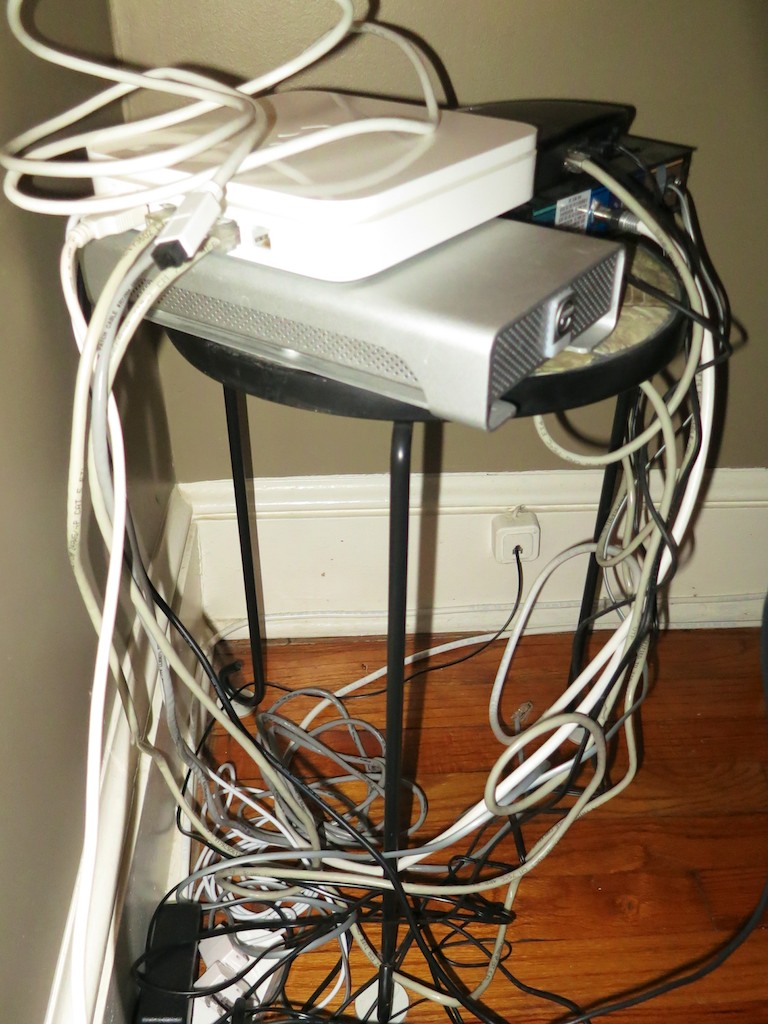
So I stacked all of them, including my Apple AirPort Extreme Base Station and Cablevision modem, on top of a three-legged flowerpot stand.
(It was all I could find in the basement to use!)

Then, I placed this teetering monstrosity behind a desk where my magic boxes would now be living.

Talk about a disaster waiting to happen!

Flowerpot Stand

Fortunately, the tech gods granted me some time to remedy the situation…

Buy a Proper Tech Stand
Everyone needs a sturdy and safe shelving unit for their magic boxes to live in.

What I really wanted was an equipment rack like you’d find in a TV station’s control room. But one small enough to fit in Mini-Me’s bedroom.
Something as small as a nightstand but stacked with lots of little shelves.
Remember, each box doesn’t really require that much space…

Of course that’s not a piece of furniture your average Joe rushes out to get.
But after a thorough search on Amazon, I came up with one wooden standing shelving unit that would do the trick…

Abracadabra!
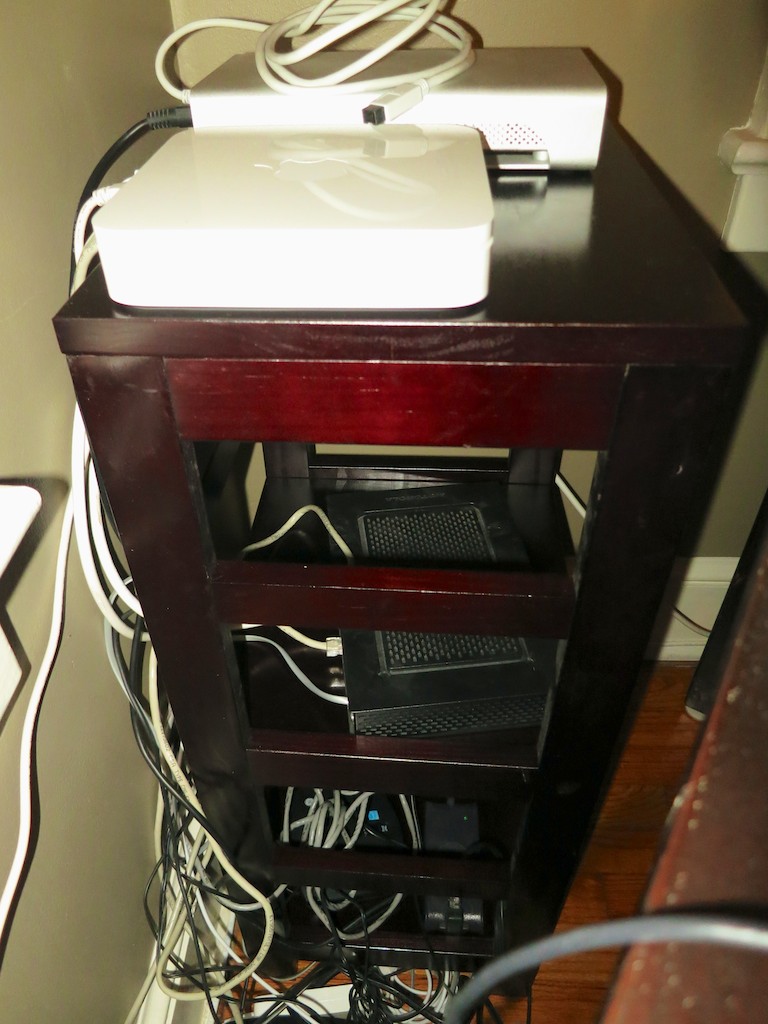
It’s an itty-bitty 3-shelf unit from Winsome Wood’s “Leo Collection.”
Winsome Wood Leo Shelf

The dimensions are only 29.2”x 13.5” x 11.2.”
I can’t imagine what use it would have for most people.

But it would be just about perfect as my new magic box house.

Its three-shelf structure wastes some vertical space, but at least it can provide plenty of breathing room for gear!

As a bonus, its height matched the desk it would be shadowing almost to the centimeter, and the coloring was a close match too!

$48.84

Click.

Two days later, I slipped it into place.
(and unceremoniously discarded the flowerpot stand)

Then I moved my magic boxes moved in.
Their lights blinked with cozy joy.

They were home.

Happy magic boxes in new home

May the Force be with You!
I highly recommend finding a permanent abode for your magic boxes.
It doesn’t have to take up a lot of space or require an expensive solution.

Nobody else even needs to know its there.

But Yoda will…

What’s Up with Samsung Microwaves?

If your Samsung microwave oven is bleeping in distress and displaying the spooky ‘SE’ code, you’re in trouble. Or are you? Your dead tech’s life may rest in the hands of your phone skills…

If your Samsung microwave oven is bleeping in distress and displaying the spooky ‘SE’ code, you’re in trouble. Or are you? Your dead tech’s life may rest in the hands of your phone skills…

My Samsung built-in microwave oven stopped working the other day.
And we haven’t even had it for two years!

Now I know humanity has been able to feed itself for most of its existence without this water molecule-stimulating tech.
(My mom did just fine without it while I was growing up and actually refused to ever try one. She claimed it was unnecessary.)

But I’ve got to admit; they’re pretty darn convenient.
90 seconds to warmed-up leftovers is hard to beat.

So doing without wasn’t quite as disruptive as replacing our dishwasher.
(Doing dishes by hand? Horrors!!)
But after a day of rediscovering the power of pure fire, it was time to put on my inspector badge and my Mr. Fix It tool belt.

The Mystery of the “SE” Code
I wasn’t present at the exact moment my young microwave went on the fritz.
(Samsung model SMH 9187 ST)

However, its aftermath glow simply displayed two letters above the keypad: ‘SE.’

I went online to look the code up, and ‘Ms. Samsung’ from the Samsung support site explained it means “Short Error” on the keypad.

Of course, her first recommended fix was for the owner to unplug the microwave and plug it back in…

Nope.
(Does that ever really work, Ms. Samsung? It might be a temporary fix, but what problem like this ever goes away for good…?)

Next… She broke the bad news that it was time to replace the control circuit board behind the keypad.

Fix It Yourself?
I’m apparently in good company with other owners of this Samsung model experiencing the exact same issue…

One enterprising guy posted a YouTube video on how he ‘MacGyvered’ the problem: He opened up his microwave’s guts, pulled out all the ribbon cables and chips from the keypad circuit board, cleaned the connections and then put everything back together.

Then, I found another YouTube video where a Starfleet engineer-in-training also pulled apart his microwave oven and bought a replacement circuit board from Sears Direct for $35.

So I applaud these efforts, but I also read some disturbing warnings online about the lurking dangers inside a microwave. Specifically something called the ‘capacitor,’ which stores additional voltage, even if the microwave is unplugged.

Do It Yourself has a microwave oven repair 101 page which explains how to discharge the capacitor with a screw driver and jumper wires.

(uhhh…)

Doc Emmett Brown might not shy away from this electrical challenge, but I think I missed his high school class the day he reviewed ‘Flux Capacitors’ and ‘gigawatts.’

So I decided to pursue a different course…

Time to Call Samsung
We’ve owned this microwave oven for just 21 months, and of course the warrantee ran out after 12. And no, I didn’t buy the extended warrantee.

But, hey… a microwave should last longer than 630 days, right?

And it was clear there’s a boatload of other people out there with the same problem.

It was time to call Samsung and ask for a little love.
The challenge would be not paying half as much for a repair visit as it would cost to buy a brand new unit…

Five Steps to Successful Phone Support

Now I can’t guarantee this will always work for you, but here are a few tips how to act when you call up ‘800-Help Me…My Microwave is Broken.’

1.  Ask Nicely
Face it: Your unit is out of warrantee.
Acting all angry and injured will get you nowhere.
It’s going to be an uphill battle, and you’d better be nice.
Remember that hard-to-get date? Yeah… like that.

2.  Ask Twice
When I called Samsung, the phone rep said there was no recall on my microwave, and there was nothing she could offer other than to schedule a repair appointment at full price.

I calmly asked if there was anything at all Samsung could do to ‘work with me,’ since the web was a flurry with so many other customer stories with the same problem.

She said she could bump my question up to a service manager, and I gladly accepted that option.

3.  Do Your Research
When I spoke to ‘the manager,’ I felt prepared, because I had done my homework.
And the fact I was not alone with this particular Samsung failure didn’t hurt.
Also, I tried to act like the two of us were working together on my problem.
(It’s a slight attitude tweak, and it can make all the difference…)

The manager took a few minutes to do her own research, and she returned to continue our ‘negotiations.’

She said my unit wasn’t on their recall list of microwaves.
(There’s a recall list of other Samsung microwaves in trouble?!)

But…
(Let the silence here work in your favor.)

She could offer me a free one-time repair visit, which included parts and labor.
YES!!

Somehow, she could slip my microwave’s failure into their larger recall bucket.
(I didn’t ask.)

4.  Say Thank You
Now that’s some good customer service, right?
I happily thanked the manager for her generous offer…

5.  Take a Picture
So I had unplugged my microwave during most of the SE incident, because the unit was also bleeping in distress.
(like I didn’t know there was a problem)

In fact, I was also ‘bleeping in distress.’
(Though I won’t reveal my actual ‘words’ here!)

Right before the Samsung service technician showed up a couple days later, I plugged the unit back in… to demonstrate its crippled functionality.

My microwave started to cycle on… and then, it just settled… ready for action.
No SE code. No annoying beeps. No problem!

What?!!!
Now, it’s decided to play nice?!

I started to panic.
The technician was due any minute.

I unplugged the microwave again and rebooted it… hoping to duplicate the code.
No luck.

I stood there staring at my mischievous machine.
(grrrrr)

But it couldn’t hold its breath forever.

“Beep, Beep, Beep.”
-SE-

Phew.

Then I quickly pulled out my iPhone and snapped a photo of the naughty keypad.

If it found the strength to act healthy again, at least I’d have a picture to show the tech.

But my microwave remained down for the count, and the repairman finally arrived.  He looked at it…
Yep… time for a new circuit board!

A half hour later he was on his way to save the day for another hungry family.  My ‘mighty’ microwave was ready for action… again.
(I forgive easily.)

Best of all, I had invested 0 dollars towards the fix.

Don’t Forget the Honey
So what’s the big takeaway from my little tale of kitchen suspense?

Well… I’ll do more research the next time I consider buying a Samsung microwave oven.
(That said, two years ago this was a top-rated unit on multiple review sites.)

And what company makes perfect tech?
The fact that Samsung stepped up to exceed my customer expectations goes a long way towards my remaining a Samsung customer in the future…

Although… it’s worth mentioning this ‘incident’ follows
my last Samsung ‘adventure’ by just a few weeks.
(Though I can’t blame Samsung for the disappearance of my Blu-ray Player’s remote. That’s another story…)

And again, it really doesn’t hurt to ask nicely for something.
Customers are so angry these days.
(often with good reason)
Your mother was right… A little honey goes a long way!

Finally, it’s always appropriate to say thanks.

Samsung… thank you!
YOU ROCK!!