At Home with Tech

Unlock the power of all your technology and learn how to master your photography, computers and smartphone.

Category: Tech Trends

Comfort Data to Feed Your Vacation Zen

What's it going to take to make your next vacation as carefree as a three year old experiences it?  Well, you'll need a little tech at your side to maintain a small but steady stream of ‘Comfort Data.’

What’s it going to take to make your next vacation as carefree as a three year old experiences it? Well, you’ll need a little tech at your side to maintain a small but steady stream of ‘Comfort Data.’

As we’ve arrived at the unofficial end of summer, I think it fitting to conclude my season-long investigation on the nexus between:

  • House
  • Weather
  • Home tech
  • and my blood pressure!

Consider this…
You take one last look at your house as you drive away on your late-summer vacation.
You’ve staged your home for low-occupancy use.
(The cats will hopefully use the time to catch up on some sleep…)

But your castle is essentially on its own.
Who knows what tomorrow will bring…
Natural disaster. Power outage. Alien attack.

As you turn the corner towards your relaxing journey, you smile at your family and secretly wonder if you will ever see your house again… in one piece.
(A slightly catastrophic perspective… but don’t tell me the thought has never crossed your mind.)

Are you enjoying your Vacation Zen yet?

Your Tech Always Comes Along for the Ride
Disconnecting from your daily routine is the foundation of recharging yourself on vacation. And that usually means putting down the work BlackBerry and personal smartphone.
But hey, how many of you spend zero time with your iPhone or Droid while soaking up your summer sun?

Exactly.
You’re not disconnected at all.
And you like it that way…

  • Send that text
  • Update your Facebook page
  • Make the phone call

The digital ‘wish you were here’ moments fly off your digits.

So if you continue to keep in touch with every part of your life, why can’t you use the same tech to monitor your house’s life signs?

Well, of course you can…

Comfort Data
I’m back from more beach R&R, and I’m happy to report my house is still in one piece.
(I know you’d be worried for me.)
More importantly, I didn’t have to wait to get home to arrive at this conclusion.  I received enough ‘Comfort Data’ via my iPhone along the way.

I’ve been enjoying the benefits of having made my house a ‘wee bit’ smarter.
Now it shares its vital signs wherever I go.

And this ongoing evolution helped to make this vacation more relaxing than my earlier summer jaunt…

Let’s review my three tech muses that now feed my Comfort Data stream…

Nest – Keeping It Cool
Recently, I installed a Nest Learning Thermostat to give me remote access to my home’s HVAC system.
This vacation was the perfect opportunity to see if my pricey investment was worth it.

Each beach morning, I sat down with my cup of Joe, reflecting a bit while the early sun illuminated the calm water, and then I opened up the Nest app on my iPhone to confirm my house was as temperate as my current surroundings.

(All my windows were closed at home to avoid the possibility of wind-swept rain damage. But that choice also removed the opportunity for my house to breath in all that chilly late-summer night air.
So my Nest really needed to keep things cool without running my AC 24/7.)

The Nest app powered up and showed me the current temperature in my living room. It knew I was away, because it didn’t sense any movement.
(Apparently, its software algorithms can filter out cats.)
Nest was holding the temperature steady just under my ‘Auto-Away’ setting.

Sweet!

Leaving Eyes Behind with Your Foscam
So Nest can make you Lord of the Temperature, but you’re still blind to everything else happening at home.
Well, not exactly…
Remember that Foscam IP baby monitor camera I installed last year…?

  • I walked it downstairs before the trip, so I could take a remote peek at the homestead while building sandcastles with my son
  • I also moved a digital thermometer next to the Foscam so the IP camera could visually confirm my Nest was behaving

This back-up temperature check gave me additional peace of mind to know the cats were comfortable and getting their beauty sleep.

One time, as I was having some fun remotely panning the Foscam about the room, I spotted one of my two felines studying the sudden movement.

I immediately froze the camera so as not to incite more interest and a direct encounter.
(My Foscam didn’t have the optional ‘anti-cat force field’ installed.)

Finally, the simple fact I could successfully monitor the happy status of my Foscam confirmed my home was still getting juice from the street.

Dark Sky Looks for Trouble Overhead
So if you were wondering… no, I wasn’t continuously preoccupied with my offsite tech throughout my vacation.

There was plenty of room left to apply the power of tech to my present environment…

I was forced to navigate a dodgy weather day at the beach, and I really needed some hyper-local weather forecasting.

My friend suggested I try a weather app called Dark Sky, which was created by a couple of cool-looking dudes via
a successful Kickstarter campaign.
(The name sounds like a bad sci-fi movie on late night TV.)

This app’s trick is to take real-time data from the National Weather Service, pair it with your specific location and offer you an accurate rain report for the next hour right where you are.

I downloaded Dark Sky from iTunes for $3.99 and gave it its first test drive the final morning of our trip as I was packing up the car with all our family gear.

The clouds looked a little ominous, and of course, I was curious to see if I’d be schlepping out all our gear in the rain…

I asked Dark Sky…
‘All clear for the next hour!’

So I took my time.

Ten minutes later, the droplets began bouncing off my head.
D’oh!

To be fair, it only rained for the next five minutes, and then it stopped.
The rest of the day’s precipitation held off till later that afternoon as per the forecast.
(An errant rain cloud in need of a diaper change?)

Clearly this rain predictor app wasn’t completely infallible, but it wasn’t entirely wrong either.

I gave it another try last week during lunch at work. I needed to run an errand, and it was pouring out. Dark Sky displayed there was no end to the storm for the next hour.
So I dashed out after waiting as long as I could.

As I made my return protected by my trusty Tumi umbrella, the heavy rain subsided to a drizzle.
While waiting for a red light on Sixth Avenue to change, I felt curious what Dark Sky had to say…

It was ready to impress and let me know we were in a window of drizzle for the next ten minutes.
(eerily accurate)

Okay, this app wasn’t so bad after all…

It’s Getting Chilly Already
So there you have it… my summer… made a bit more relaxing through the power of home tech.

Yes, it’s always a little sad when you have to say hello to September.

But the good news is you can keep some of that summer glow with you
year round with all your Comfort Data.

You’re going to need it…
Old Man Winter isn’t that far off!
The Heart Beats Faster Waiting for the Next Apple Special Event

If you’re like me, I’m eager for September 10th to arrive to see what sweet tech has been growing in Apple’s garden.  This annual fall spectacle is a spectator sport as much as an opportunity to upgrade your gadgets.

If you’re like me, I’m eager for September 10th to arrive to see what sweet tech has been growing in Apple’s garden. This annual fall spectacle is a spectator sport as much as an opportunity to upgrade your gadgets.

For me, September 10th is like Opening Day at Fenway Park.
(The effect of my many years in Beantown occasionally betrays my strong New York identity.)

Just the anticipation makes you feel like a kid again.

What fabulous new tech does Apple have up its sleeve?
iPhone 5S?  5C??
Everyone’s got an opinion…

But my comparison of Apple’s upcoming ‘special event’ to baseball is also apt, because Apple certainly feels like my home team.
And this once-unstoppable franchise needs another hot streak.

Remember the day when absolutely everyone wanted an iPhone?
And if you didn’t have AT&T service, you couldn’t even get one?

Now the competition has taken such a huge bite out of the smartphone market share, Apple is no longer the omniscient tech god it once was…

It kind of feels like the seventh inning stretch, and we’re down 2-1.
I’m ready for some action!

You can hear it from the bleachers…
“Let’s go Apple… Apple let’s go!”
(Stomp. Stomp. Stomp!)

The Apple Still Shines
But that doesn’t mean I’m totally bored with Apple’s current line up.

When the iPhone 5 debuted, I was still stuck in my two-year phone plan, unable to qualify for the upgrade to my 4S.

All I could do was drool and write my Ode to the iPhone 5.

The reality is it’s statistically impossible to always own the latest and greatest tech.  (unless money is no object)
Zippier upgrades hit the shelves every year.
(Sometimes sooner!)

When to Pull the Tech Trigger
Deciding exactly when to jump into the pool of new tech can be a little daunting.

I think the sweet spot is a year or so after a new product launches.
(There are always kinks to work out…)

So that means you’ve got to wait for version #2, which will always be better, though not quite as cool.

(Was anyone out there really that functionally satisfied with the sluggish and tiny-brained first iPhone?)

But you don’t want to wait too long to jump on the bandwagon, because, you know, you’ve got to live your digital life.

And if you tend to time your purchase cycles like me, you’re going to be coveting thy neighbor’s tech more often than not.

All Good Things Come to Those Who Wait
But there is a silver lining…

You may not rush to buy everything that’s revealed on September 10th.
But you will indeed own it all…eventually…one day.
And by the time you get it, it will be even better!

I call that a win/win scenario.

So bring it on, Apple!
I’ve got my popcorn, and I’m ready for the game to begin… again.

How to Find Your Free SD Movie Download in iTunes

When you buy an HD movie in iTunes, did you know you can also receive the SD version for free?  And why would you need the SD version?  Ask your iPhone.

When you buy an HD movie in iTunes, did you know you can also receive the SD version for free? And why would you need the SD version? Ask your iPhone.

I’d like to point out three universal truths:

  • You can never have too much knowledge,
  • Too much joy,
  • Or too much digital memory for your multimedia needs!

As a Road Warrior, I happen to like having a few movies at any given moment in my iPhone.

I really haven’t had any media management concerns on my iPhone 4S over the past couple of years, because I’ve got the full boat… 64 GB of memory.

So I feel I can live a little large and jam some extra cinema into my iPhone’s playlist if I prefer.

And I don’t mind admitting I’ve downloaded a few flicks lately.
The last one was “Skyfall,” the latest James Bond and arguably one of the best.

The Evil Secret of High-Definition Video
Then last weekend while uploading some fun photos of my three year old, I realized my iPhone barely had enough memory for Siri to blurt out one of her snarky retorts.

By Grabthar’s Hammer, what happened?!

So I checked out my iTunes library and realized Mr. Craig’s high-definition Bond adventure had targeted almost 6 GB of precious flash media on my iPhone.

One movie… 6 gigabytes?!

Well that didn’t seem right.
I know HD content can create large files, but I thought with compression technologies, the movie studios wouldn’t be offering up digital files quite so big.

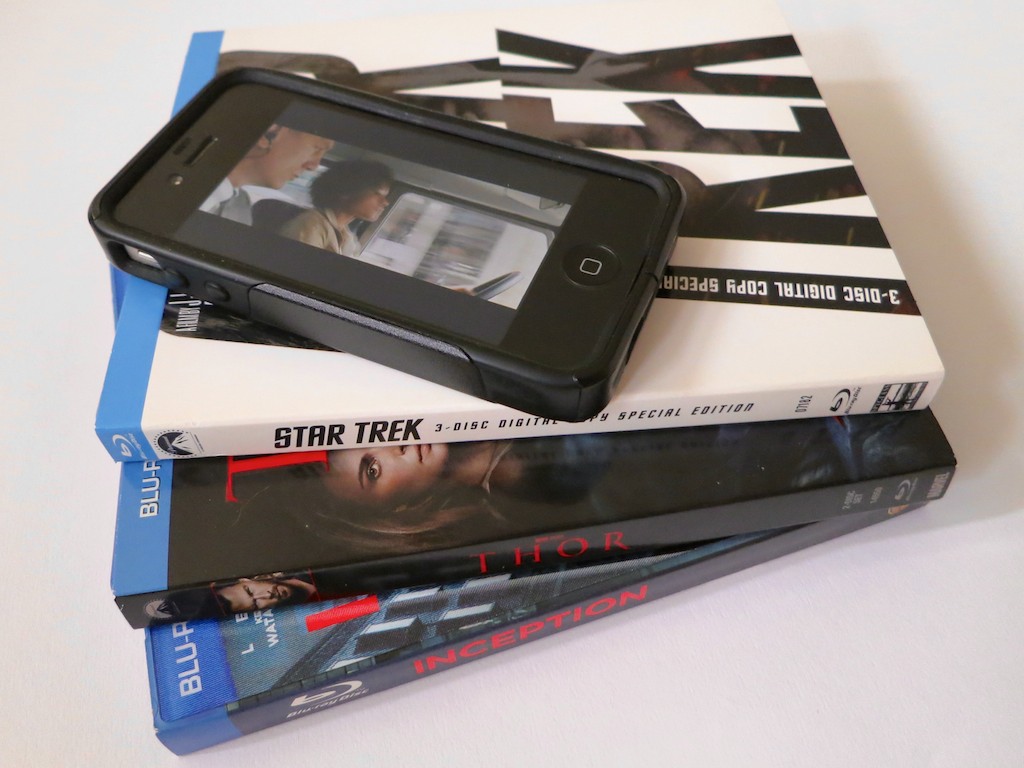
I reviewed a few of the other movies I owned in iTunes:

“Star Trek” – 1.96 GB
“Inception” – 2.19 GB
“Thor”- 1.73 GB
“Apollo 13” – 2.22 GB
(Yes, you may notice a genre pattern here.)

So why were all these films so much smaller than “Skyfall?”

The only difference was the other movies were downloaded via an iTunes code packaged with the Blu-ray Discs I had bought.

And “Skyfall” was purchased directly from iTunes.
Apple had been running it at a special price.
(Sweet.)

The Blu-ray Disc Dream is Not All in High Definition
I sprinted over to my Blu-ray Disc shelf and studied the cases.
As I looked more closely at the packaging, I came to the uncomfortable realization that my bonus ‘digital copies’ via iTunes had not been downloaded in HD after all.
The iTunes movie codes inserted in the Blu-ray Disc cases only unlocked the standard definition files.

What?!

Well, in fact, the fine print does only say, ‘Digital Copy.’
(not HD Digital Copy)

Hmmmm.
Well, I guess that explains the size discrepancy.
They’re just SD movies.

So… iTunes SD movie downloads provided by glorious Blu-ray Discs in HD?
That doesn’t feel quite right.

But it’s a discussion for another day…
And a new data point for my ongoing struggle to decide
whether I should stick with buying physical Blu-ray Discs or give in and go all in with iTunes movie purchases.

There’s No Room for HD in Your Smartphone
As much as I prefer to own HD movie files for use on my larger displays, I don’t believe smartphone screens really show a significant difference between HD and SD.

But more importantly, my iPhone (or any smartphone for that matter) can’t handle more than a few HD movies at a time.

It’s simple math.
If you only own a 16 GB smartphone, it’s toast after you feed it two movies.

Using an SD file would appear to be the only reasonable option when loading up your movie collection to your smartphone…

Time to find the ‘Mini-Me’ version of 007.

SD Still Has its Place
So your simple media management solution is to own two files for each movie you buy.

  • HD for your HDTV or computer
  • SD for your smartphone

But how do you locate the SD peer file, once you’ve bought and downloaded the HD movie master?

Sure, you can easily find the SD version in the iTunes Store.
But you don’t want to pay again to download the SD sibling, once you’ve already had to pony up for the HD version.

Don’t do that…!

Where’s Your Free SD File?
The location was not entirely obvious to me even after some online research and a quick review of iTunes itself.

But buried in an Apple support page, I found a cryptic answer….

“To download the SD version, you need to download the video again from your Purchased page.”

Well that seemed simple enough.

So I took at look at my ‘Purchased page’ in iTunes and observed all my movie icons happily waiting for their next screening.
But there was nothing to indicate an additional free SD download of my HD Bond.
Hmmm…

Then I saw it!

Here’s the trick:

  • Go to your ‘Purchased’ page in the iTunes Store
  • Click on ‘Movies’
  • On the bottom right there’s a box that say, “Download HD When Available”
  • Unclick that!

Suddenly the SD versions appeared as available for download!

It was like having the keys to the candy store.
I clicked, and before you could say, “shaken but not stirred,” I downloaded my SD movie file.

2.45 GB.
Thank you.

One final step…

Then in the ‘Summary’ tab of your iPhone (in iTunes):

  • Go to ‘Options’
  • Click on “Prefer standard definition videos”

Et voilà!
The SD files finally show up for syncing to your iPhone…

Load Up on Your Mobile SD Content
So to access your SD content, you simply have to tell iTunes you don’t ‘prefer’ HD… twice.
(which kind of goes against everything you believe in)

You just don’t want HD… right now.
(Don’t forget to switch that setting back when you go to buy your next HD movie.)

It’s just not that intuitive…
And all this from a tech empire that designs products my three year old could operate well over a year ago.

Anyway, that’s how you do it.

Your iPhone can now experience some Hollywood Zen.
…and still have some room left to answer your next phone call!