At Home with Tech

Unlock the power of all your technology and learn how to master your photography, computers and smartphone.

Category: Tech Trends

The Best Way to Order Lifetouch Photos after Picture Day

Take it from a parent who has done this four times already… you’ve got to keep it simple when approaching your Lifetouch photo order. And it all boils down to one important detail…

It’s that time of year again at my son’s elementary school… Picture Day. Lifetouch photographers arrived to take individual photo portraits of all of the students. And of course, I’m one of the parents who’s always guaranteed to buy a picture package. I’m not exactly sure why it feels so important… why I need my son’s official fourth-grade photo. It’s not like I don’t have any pictures of him. Heck, I’ve even got a cool collection of pics I snapped as he walked into his first day at school this year. Couldn’t one of those be his fourth-grade picture? Apparently not.

I think I still suffer from a 19th-century belief-system that a posed and sometimes awkward-looking photograph is the official way to visually document a family’s history. And I’m not alone. But today, we don’t really need a professional photographer to take a simple shot of our children in front of a green screen. We’ve got skills, right? Even a smartphone could get the job done. In fact, why couldn’t kids simply take selfies of themselves on school picture day? It would be fun, easy and essentially free.

I know I might get a few nasty letters from angry parents and Lifetouch (now owned by Shutterfly) even for suggesting this radical idea. But if I could put on my futurist hat for a moment…. I wonder how solid the annual school photo business model will be in a few decades when today’s kids grow up and become elementary school parents.

But I’m getting ahead of myself…

So Many Hurdles
It’s still today, and I’ve again got some Lifetouch photo-ordering decisions to make. I’ve gone through this exercise for the past four years… As simple as the photo-package choices appear, every year it’s still a relatively complicated online purchasing process to figure out exactly what you’re getting. And it’s expensive.

The truth is, all I really want is the one digital file of my son’s photo. I can handle the rest. But that’s not a business model for any kind of profit… so the digital file is never something you can purchase just by itself.

So, I inevitably select a more expensive photo package than I need, and I’ve tried to maximize the value of my orders by choosing different backgrounds for as many of the physical photos I end up getting.

And I’ve done all of this without the benefit of seeing my son’s actual portrait ahead of time. (This blind-selection process is also a business model that really shouldn’t stand the test of time.)

And now, as I go through all of this again for a fifth round, I’ve had a parental epiphany… I’ve realize I’ve been looking at this all wrong!

Let the Background Tell the Story
I thought I was being clever by ordering lots of different digital backgrounds in my photo package. In fact, that detail is entirely irrelevant. You’ve got only one image of your kid to work with. One background is all you really need, because different backgrounds really can’t obscure the reality that it’s still the same picture!

And the other mind-bending reality I’ve finally figured out is the image of my kid is mostly irrelevant. As long as he looks okay and isn’t mid-blink, that’s not the central element of the photograph. This picture isn’t really about him…

I’ve realized the most important part of my son’s school portrait is the ‘when!’ It’s his ‘fourth grade’ photo.

And to reflect that, this year I’ve chosen the digital background that says…
“4th Grade.”
That’s it. That’s the piece that matters most.

Maybe you’ll prefer the background which displays the year. I think that’s okay too. But in future years, you’ll later need to do the math about which grade that was.

Future-Proofing
For me, all that matters is the digital background choice that displays the school grade. That’s the whole point of the picture.

And that also gives the photo some long-term value. Otherwise, it becomes just another one of thousands of photos that will briefly cycle through your consciousness or social media stream.

Finding the Joy of Simplicity
So suddenly, this whole Lifetouch ordering exercise is so simple. Just choose the background with your kid’s grade. Everything else is like buying the extra undercoating on a new car.
(They don’t really do that anymore, but you get my point.)

Try not to buy a bigger and more expensive package than you need, and please don’t forget to select a package that gives you access to your digital file via Shutterfly.

Pencils down.
It’s time for juice and cookies…
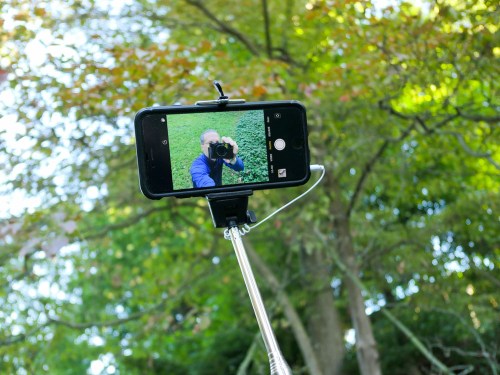
How to Take a Great Family Selfie without a Selfie Stick

If you love using your selfie stick, please allow me this opportunity to show you another way to the perfect family photo…

I don’t know about you, but the idea of using a selfie stick freaks me out. Having to attach your expensive smartphone onto a fragile grip mount and then extending it way beyond your reach on a long pole… all in the name of being able to snap a good selfie is downright frightening.

Sure, you might get a good photo out of it, but there could be other consequences if the unexpected happens. What if you lose control of your selfie stick, and your smartphone falls from ten feet up? I bet you’re assuming I’m talking about the shattering impact on an unforgiving cement surface. Not necessarily…

During our recent vacation to Niagara Falls, I observed scores of selfie sticks in action and extended over what I would consider a no-fly zone… the Niagara River! You’ve got to believe that over the years, there have been at least a few unfortunate smartphones that have taken the plunge over the Falls after capturing the perfect selfie…

Now, lots of folks love using their selfie sticks. And I grant that I may be in the minority on this topic. But if I may, I’d like to offer a few other ways to generate a great group family photo without using a selfie stick…

Ask a Stranger
First off, you may not actually have to take a selfie. It should go without saying that it’s okay to ask a stranger to take your photo. You can also simultaneously offer to take their photo as a reciprocal gesture.
(Chances are you’re not the only one who’d like to take advantage of a photographic opportunity.)

And assuming the stranger can frame the shot and get everyone’s eyes open, it should be a pretty good picture, simply because it’ll likely be wide enough to reveal the background.
(Where you are is always an important part of any group photo.)

I find most strangers actually err by not zooming in enough or walking forward. But that’s okay, because you can crop the shot later.

Use a Wider Lens
If nobody else is around, and you’re on your own, the trick is to make sure you’re using a camera with a wide enough lens. It needs to be able to see your entire family when you stretch out your arm to attempt the selfie.
(My Panasonic Lumix LX10 has a zoom lens that starts at 24mm, which is perfect to capture my family and me. I’ve also successfully jammed eight people into my Lumix selfies, but it’s a snug shot.)

Not all cameras and smartphones use lenses that wide. So, you’ve got to pay attention to this detail. (I understand the iPhone 11 has a wider front-facing camera for horizontal group selfies.)

Don’t Look at the Screen
Of course, it really helps if you can actually see what your selfie is going to look like. This isn’t a problem when using a smartphone, because the front screen is always right there. But if you’re holding a standalone camera, it’s much better if its rear screen can flip up for you to see.

Either way, you’ve got to instruct everyone to not look at the screen, but at the lens. Otherwise, you’ll capture this odd moment of your family looking someone distracted. They’ll be sort of looking at the lens, but not really.

Don’t Forget the Basics
Once you’ve figured out how to get your whole family framed in the shot, here are a few more tips to get the best selfie possible-

  • Always snap several photos.
    (That helps ensure someone isn’t blinking at the wrong moment.)
  • Try to make sure there’s enough light hitting you from the front to keep you well lit.
  • Avoid harsh, direct sunlight that’s sure to make someone in your shot squint in pain.
  • Frame the shot to include the key parts of your environment.

Granted, you may not be able to architect your shot to include all of these factors. If you’ve got to compromise, don’t give up the ‘where.’
(When you’re at Niagara Falls, you’d better show some water in the background!)

Finally, taking a good selfie with any camera takes practice. So, you’ve got some homework to do if you’re using a new camera.

Maintain Control
The most important point is you don’t have to use a selfie stick to get the shot you want. You could choose to rely on the kindness of strangers, or you may need to stretch your arm out to the edge of its sockets…

But your smartphone will remain firmly within your sphere of influence.

Why I Chose Amazon Photos to Archive my Family Photos in the Cloud

Good photo organization means having a plan that allows you to quickly and easily access your most important photos from anywhere. Here’s why I chose Amazon to help me out…

I’ve talked about how important it is to maintain your most important pictures in cloud-based photo albums that you can access from anywhere, including your smartphone. These are the photos that reflect back on your life’s big moments… not necessarily the best few pics from your recent family vacation.
(Your smartphone’s local photo app and your index finger can handle that.)

If you sit down for a few minutes and think about which groups of pictures you’ll always want available at a moment’s notice, you’ll probably come up a short list of categories.

I decided to create this group of cloud photo albums that I can also share with my wife:

  • Our son’s first day of school each year and his annual school portraits
  • Our boy’s birthdays
  • A sampling from our best vacation photos
  • My mom’s photo archive
  • My dad’s photo archive
  • My photo archive of me growing up
  • Our wedding
  • Other weddings
  • Group shots at big family events

These nine photo albums will hopefully cover most moments when I’m talking with family or friends, and I want to magically access a photo from my life to support the conversation using my iPhone.

But there’s one important technical detail you’ve also got to have in place to ensure your cloud photo albums grow properly over time. And I must admit, I forgot about this piece until I realized it wasn’t there…

Retaining the Constant of Time
Your photos in each cloud folder still need to be sortable by date. That will allow you to keep the chronology of a photo group in order when you add other pictures to the album that are out of sequence.

This may seem like a minor detail, but believe me, it isn’t. The natural order of any group of archival pics is the constant of time. Without that, you’ll eventually end up with what appears to be a random group of photos.

Sure if you start this project when you’re five years old and keep going in perfect order until you’re ninety nine, you’ll be fine. But I’m still sorting through my family photos from many years back.
(I’m sure I don’t have to tell you how much time it takes to keep up with all of your life’s incoming pics.)

Some photos inevitably get integrated into long-term storage faster than others. And the last thing you want to worry about is having to process them in the order in which you took them.

iCloud Photo Streams aren’t the Answer
I thought I was all set using Apple’s tools when I began creating shared iCloud photo albums through Photos to handle this archival need. But then I realized these sharable photo albums were essentially just sharable photo streams. The photos simply positioned themselves in the order in which I uploaded them.

I quickly decided that this wasn’t going to work as I build out these albums over time.
(For the record, Apple does provide a solution if you decide to sync your entire Photos library to iCloud. But that would immediately eat up my 5GB of free iCloud storage.)

So, I set out to explore other cloud photo-album solutions with the ability sort the photos by date…

Photo Archiving for Free
There are lots of choices out there, and some have certain limits or costs. So, I decided to first see if I could get the job done without adding a new monthly fee to my digital life.

And in fact, I could!

Three top choices quickly immediately emerged…

Google Photos

  • Free and unlimited storage as long as you’re willing to let Google compress your photos to a max size of 16MB. (Unless you’re processing huge RAW photos, that shouldn’t be a problem…)

Flickr

  • Free, but only up to 1,000 photos.
  • This limit is a little tight for any long-term plan, although if you’re really talking about the most impactful pictures to represent an entire life, who’s really going to want to look at more than 1,000 pics?

Amazon Photos

  • Free and unlimited storage. Period.
  • The big catch is you’ve got to be an Amazon Prime member.
  • And I suppose that means you’re intending to be an Amazon Prime member… for the rest of your life. (Well, you could migrate your photos somewhere else when a better option comes along.)
  • Amazon offers a solid app for smartphone use.

Primed to Use Prime
I gave Amazon Photos a try a few weeks back, mostly because I already live in the Prime ecosystem. Also, the ‘limitless,’ and ‘no-compression’ structure was appealing.

And though, I am, in fact, paying for Amazon Photos, it’s money I’m already spending on Amazon Prime. And that’s, of course, just another way to make Amazon Prime more than just ‘free shipping.’

I found it really easy and quick to create my cloud albums and upload my photos to them, and the Amazon Photos app works great on my iPhone.

So far… I’m really happy with Amazon Photos.

I’m sure the other options would get the job done as well. The critical element is simply putting a cloud-based solution in place where you can best archive and easily sort through your photos that tell your ongoing life’s story.

Leave the Stream Behind
Ensuring your pictures show up in the right order is essential to the plan. And using the linear nature of time as your organizing principal needs to remain in place.

Cloud-based photo streams simply don’t provide that basic level of functionality.