At Home with Tech

Unlock the power of all your technology and learn how to master your photography, computers and smartphone.

Category: Technology

Don’t Fall into this DPI Rabbit Hole when Printing Your Photos

iCloud Photo Library makes it easy to sync and print your photos (like this New York City moment). But if you’re worried about maintaining image quality and DPI settings, it’s time to review a few facts…

One of my in-laws emailed me the other day and asked this: When iPhones sync their photos through iCloud Photo Library and then to the ‘Photos’ Mac app… is the resolution maintained? The big concern was whether Apple’s automatic digital file copying to iCloud wasn’t somehow cheating by transferring lower resolution copies.

Because when it comes time to print your photos, you’d want to be sure to have access to the full-resolution versions, right?

The answer is yes. Full resolution, baby!
Apple explains it right here.

Does DPI make a Difference when Exporting a Photo File?
As it turns out, I usually transfer pictures off of my iPhone to do photo management without the iCloud Photo Library ecosystem. I take them directly to Adobe Lightroom via USB along with the pics from my Panasonic Lumix LX10.

So I decided to do a little experiment with iCloud…

I have iCloud Photo Library activated on my iPhone as something of a default. So, I clicked on one of my iPhone’s synced photos on my iMac using the Photos app. Then, I exported the pic to check out its specs.

Yep… it had the same pixel dimensions as its duplicate that I also exported from Lightroom.

Case closed.
But…

I noticed that there was one difference between the two photo files when I compared the specs via ‘Inspector’…

The picture from the Photos app had a 72 Image DPI value, while the sister file from Lightroom displayed a 300 Image DPI value.

Huh?
So, were these two photo files the same or not?

The Fine Print on DPI
DPI stands for dots per inch and is relevant when you’re printing out a photo. It’s a piece of information that tells a printer how high a quality to print at.

I’ve typically exported my photo files from Lightroom at 72 PPI (pixels per inch) for web use and 300 PPI for a full resolution copy when I want to print it.
(PPI and DPI are related, and many use 300 DPI as a printing standard.)

And while you always should print your photos at 300 DPI (if you can) to maintain its printed quality, the fact that your photo file has 300 DPI in its metadata has absolutely nothing to do with the quality of the photo file itself.

What’s important is the pixel dimensions of the photo. The more pixels the better!
(Newer iPhone pics are 4,032 x 3,024 pixels.)

So, when the Photos app inserts 72 DPI into the metadata of its exported photo files, that’s actually meaningless to the quality of the digital photo files.

But will the 72 DPI setting affect the quality of a printed photo?

DPI ABCs
This is the center of some ongoing controversy out there. I found this blog post by Dara Skolnick, who did a really nice job explaining the facts and misperceptions about DPI.

But to cut to the chase… the simple answer is no.
If you’re only trying to print out a 4×6, 5×7 or even an 8×10 photo using the photo file’s original pixel count, it shouldn’t matter what the DPI is set to. Your computer and printer will still jam all of the megapixels into your photo, ensuring its quality.

But things will get trickier if you want to create a wicked-large print. That’s when the DPI issue comes into play. If you want to maintain a 300 DPI print quality, there will be a limit to the size of the photo you can print. (Remember, your photo file has a finite number of pixels.)

Yes, at lower DPI numbers, you’ll be able to print larger… but you’ll also begin to sacrifice image quality.

Another important detail to remember is you don’t have to print at the DPI number embedded in the file. Many folks out there say it’s just a meaningless piece of metadata. You can always change the DPI setting when printing…

The bottom line is there’s nothing wrong with simply exporting a file at 300 DPI. But there’s also no real difference when the same photo shows up with a 72 DPI setting.
(As long as the pixel dimensions are the same)

When DPI Does Matter
If you’re planning on sending your files to a professional photo shop to print out huge prints, then DPI can become an important factor.

Otherwise, if you’re like me printing out a few family pics on the home printer, I think you can pretty much forget about DPI.

72 DPI and the Web
And is 72 DPI the right setting for web photos?
Apparently that’s also irrelevant. That number is more of a holdover from the old days.

Let’s move on…

It’s Safe to Print
So, do yourself a favor and don’t fall down the DPI rabbit hole like I just did while researching the facts for this post.

Feel free to print out as many standard-sized photos from your iCloud Photo Library as you like without worrying about DPI and maintaining image quality…

Your photos will look great!

Use these 7 Tech Tricks to Free Up Time

Tick tock. That’s the sound of your day not being spent the way you want. Here are 7 ways to reverse that soul-sucking trend.

I don’t know about you, but there never seems to be quite enough time to get it all done. Sure, we’ve all got the typical obligations that come with 21st century life. But there are also so many “electives” to explore.

Time is still a finite commodity.
(As far as I know)

So, the trick is finding ways to be more efficient with it. Yes, there are countless folks talking about this very topic, but I’d like to just zero in on how technology can be your friend and help you squeeze some precious minutes back into your day.

Think you know it all? Well, to be sure…
Here are 7 tech tips to help you focus more of your life into your happy zone:

#1
Order Stamps Online
Why would you ever choose to waste a fraction of your existence in the post office buying stamps?
The lines are endless. It’s like Purgatory in there.
Even the stamp-dispensing square autobot will drain your life force.
Why not simply purchase your stamps from your home computer?
It’s wicked quick…

#2
Withdraw More Cash from the ATM
Yes, there was a time before time when there wasn’t easy money on almost every corner. But today’s 24/7 access to an ATM is a mixed blessing. Who wants to always be thinking about where the nearest one is when you need twenty bucks?

I know this idea may not appear like a fiscally responsible suggestion, but if you can control your spending urges, I think you should withdraw more cash than you think you want.

Here’s the trick:

  • For those of you who haven’t fully embraced our cashless society yet, try visiting your favorite ‘magic money box ‘ less frequently… say once a week. Take out enough cash to get you through this interval and pledge not to return for another seven days.
    Rationing the use of this tech will save you time and can prevent you from going to the well more than your budget dictates.

#3
Shop for Your Groceries Online
I know… it goes against your hunting-gathering instincts.
And there’s a delivery fee.
But not having to go to the supermarket,
then not struggling with that damaged cart,
and not having to wait on a long line at the checkout…
Isn’t that worth a few bucks?

#4
Avoid Greeting Card Aisles
Stop feeling like you have to troll for greeting cards at the local CVS or Walgreens.
You know what I mean… searching up and down that forest of disorganized generic thoughts. Finding that perfect card, only to realize there’s no matching envelope, and having to start all over again.
It’s no longer a badge of honor to say to your loved one… “I spent an hour looking for the perfect card!”
(My mom used to like to say that.)
There’s got to be a better way!
Well, of course there is…

Go to Touchnote, Paper Culture, or even Hallmark online.
These websites contain virtually all the greeting cards you could ever want.
Plus they’ll mail them for you!
Whoah…. Now that’s really a paradigm shift.

#5
Don’t Wait On Line to Pay for Parking. Go Online!
Remember how you felt right after you missed that train, because you first had to wait online to pay for parking?
Let’s erase that recurring stomachache from your life.
Use an app and pay on your smartphone.

I use PayByPhone.
Brilliant…

#6
E-ZPass or Bust
All right, who here doesn’t have E-ZPass yet?
Please stand up and walk upstairs.
Now go to bed…. There’s no dinner for you.
And the rest of you should go get a good night’s sleep too!

Before you start your snooze, you should probably check in on your E-ZPass account just to make sure it’s current.
You don’t want E-ZPass to list the car you owned a decade ago.

#7
Greenlight Your Own Reruns
If you’re a blogger, repurpose ideas from older and underperforming posts for the other 7 billion people who didn’t read it the first time around.
(What? You hadn’t noticed?)

Now, you’ve suddenly got time to prepare to go skiing with your family!

See ya…!

My Life in 10 Seconds

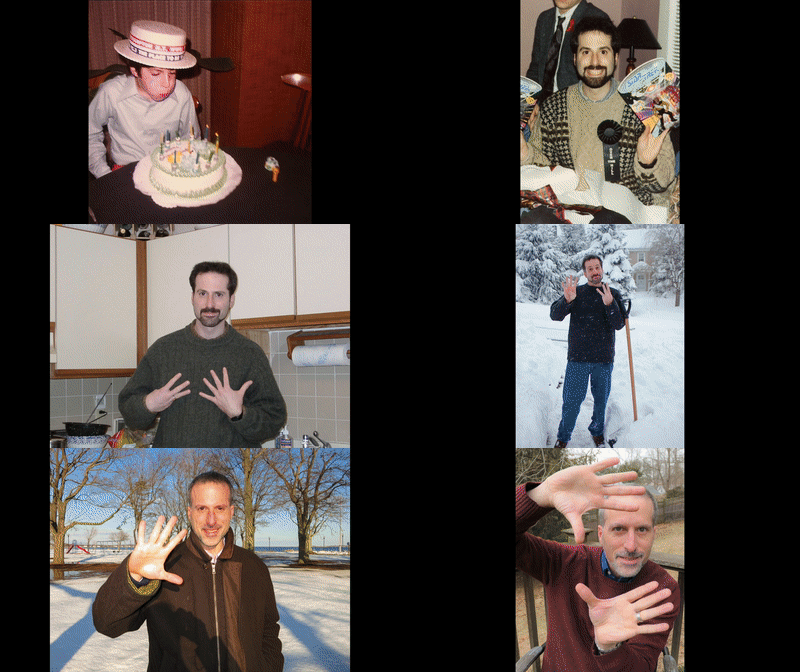
We snap birthday pictures to celebrate the passage of time. So why not string together all of those birthday photos to create a visual story of your ongoing life? And then how about creating a fast video sequence that captures it all in 10 seconds? Would that actually work? I decided to find out…

I had this crazy idea a few decades back that I would pose for a photo on every birthday and hold up my fingers to identify each new age I was sporting. And then at some point, I would stitch together all of these pictures into a blistering fast video montage.

Decades of my life to date in 10 seconds. Whoa! How cool is that?!
Well, it’s my birthday. And this year, I’ve decided to give it a go…

Are you ready? Here it is…
Barrett's Birthdays
So, first off… while collecting my photos for this sequence, I realized that I didn’t have access to many of my pictures from before Y2K. The ones I could locate were hidden in buried photo albums and photo boxes… in the attic… in the basement. Many more are still in my father’s apartment in New York City.

And if you think I’ve complained about digital photo organization, my jaw has been hanging open at the disarray of my analog-only photo prints.
(I switched to digital photography in 2000.)

Sure, my mom created some great photo albums when I was a kid, but I haven’t yet digitized most of those pics.
(That’s going to be quite the project!)

All this said, I feel somewhat satisfied that I was able to pull together all of my birthday pictures from 30 years old on and a few from my earlier years.

And I’ve come to the realization…
…that my little visual opus is actually not as interesting as I had anticipated.

Birthdays are for the Moment
Experiencing birthdays can be exhilarating, because they’re your special day. I remember how important those early parties that my parents threw for me felt. Even the birthdays I’ve had as an adult have been lots of fun.

But looking at this montage just doesn’t capture any of that energy.

Perhaps once I get all of the years together… Version 2 may take on a more time-travel-like quality. But the reality is many of my birthdays took place at home. Cozy, but hardly revealing of anything more.

At best, you get you see my aging process. And that I can count on my fingers.
(Actually in some years, I reversed the numbers on my hands.)

This sequence doesn’t tell the story of my life.
At all.

What’s the Background?
I thought a bit and realized that the missing ingredient is context. Each of these pics only represent me at the same moment year after year, but they don’t say much else.

A series of the photos that captures my various ‘adventures’ should reveal multiple chapters in a larger story.
(Where am I? What am I doing?)

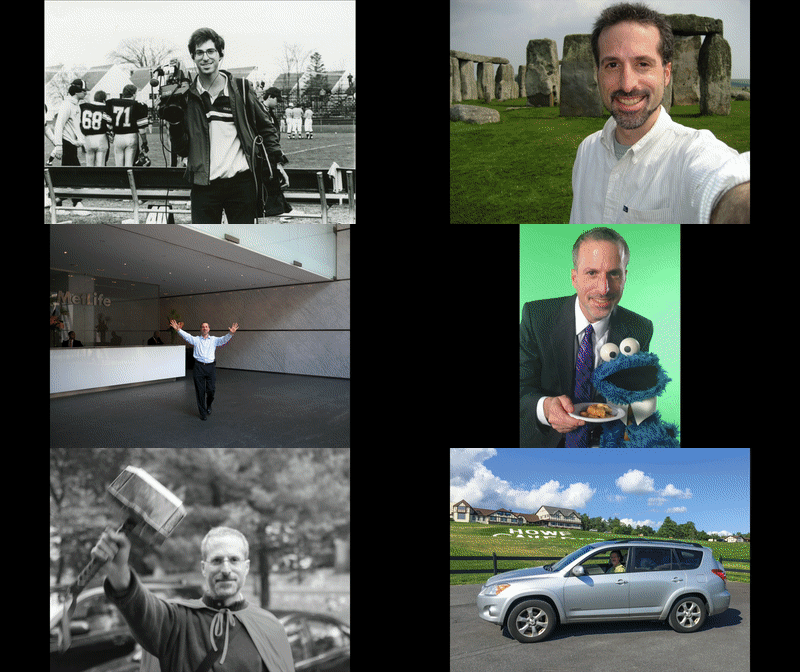
So, I turned to my Adobe Lightroom photo library and poked around to pull together a separate set of pictures from my adult years, and this is what I came up with…
Barrett over the years
Well, this certainly provides a lot more visual depth, but which photos to choose can become a mind-boggling process, even if you had organized access to every photo ever taken of you.

And the time it takes to intentionally pick only a few from the hundreds of choices…
To do this thoroughly, it could take someone a whole lot of time to do.
(So, let’s regard this as an early draft.)

But before moving forward to properly complete this multi-decade project, I still felt the design was not complete. There was something else missing.

It’s Not Only About You
Anyone’s life is defined by the people around them. You need to include your own personal community to build out your visual story with any sense of authenticity!

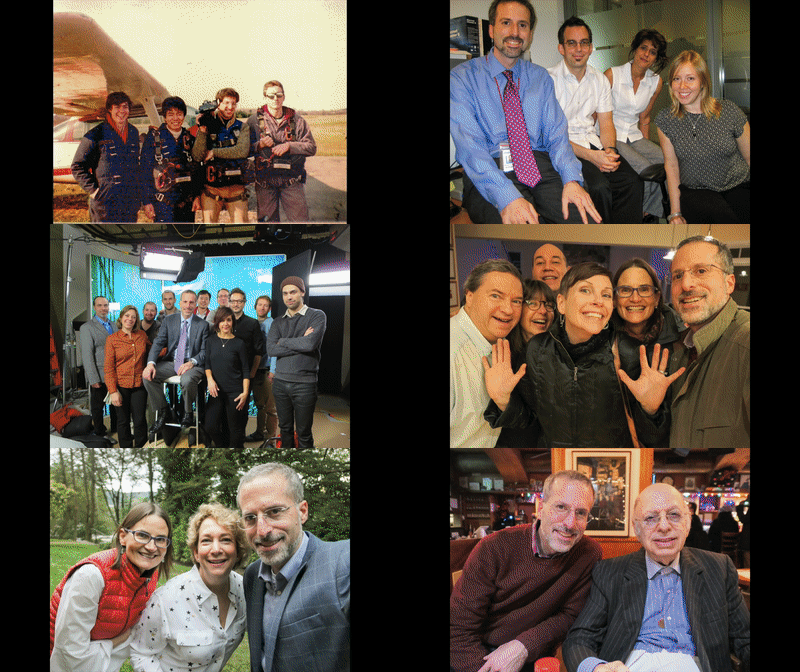
So, I went back again to Lightroom and pulled together a third set of photos that didn’t really focus on me, but on some of the people in my life…
Family and Friends
I know it’s mostly a blur with way too many faces to focus on.

At best this version provides just a feeling. An impression of a life to date. Of the many folks who’ve been on the journey with me at different points in time.
(And this version is absolutely incomplete with lots of missing family and friends)

But I think this third design has the most potential…

Which one do you like the best?
(Perhaps a combination of all three?)

Look Back Before Looking Forward
So clearly, I still have more work to do on my “life in photos” project.

But you might be asking yourself why you should also commit to such a complex archival endeavor.

Well, first off… I think a photo sequence housed in video or animated GIF form (especially if it’s slowed down a bit) can be an amazing way to organize and share your most important pictures.
(My 10-second exercise can easily be adapted into a more leisurely pace.)

If you want to find a way to tell your story, this is absolutely one method to use!
And if you’re not sure about your story, this can be a great process to figure it out.

The truth is anyone’s story is constantly evolving, and a little context is always helpful. And this type of project forces you to evaluate your journey on an ongoing basis.
(Or at least every year)

I think it’s always important as you look forward to take some time to look back.
You might remember a few things… a few people… a few moments.

It can help remind you who you really are.
…Who you’ve always been
And who you will be…

And isn’t that the best birthday present you can give to yourself?