At Home with Tech

Unlock the power of all your technology and learn how to master your photography, computers and smartphone.

Category: Technology

This Visual Upgrade will Instantly Improve your Experience Working from Home
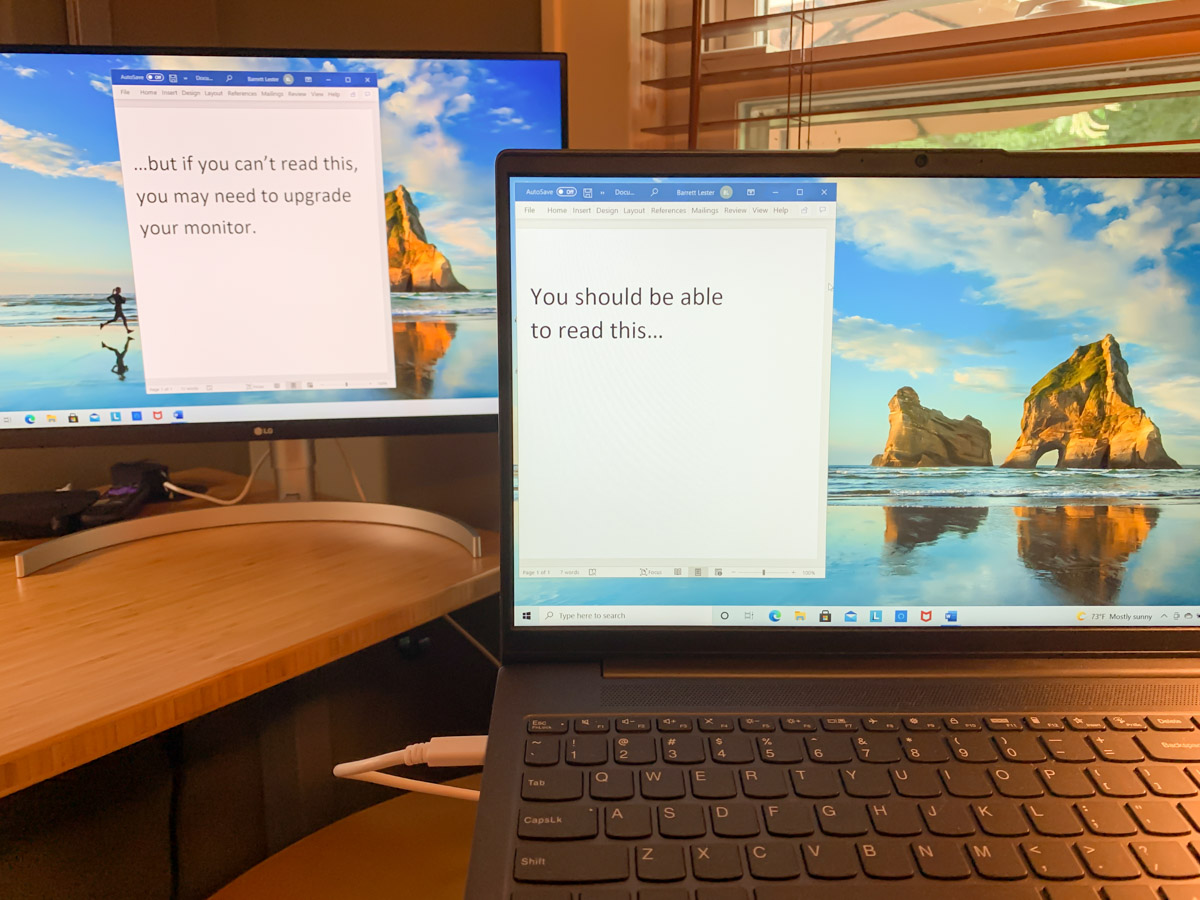
It may be finally time to build out a multiscreen home office work space. Here’s what I did.

Ironically, working from home during the pandemic has contained some silver linings. But not having access to a fully decked-out office computer station with multiple monitors can be limiting.

So, I bought myself a new second monitor for my home office. It paired up with my work PC laptop’s screen to provide more room for all of the open windows that collect throughout the work day.

During the early months of the pandemic, I repurposed my old Sony 21” LCD TV and connected it to my laptop via an HDMI cable. I thought I was so clever MacGyvering it, but its non-HD resolution wasn’t doing me any favors. Sure, I could extend my laptop’s screen, but the clarity on the Sony wasn’t there. If I came across small text, I often had to move it over to my laptop screen to be able to read it.

Favoring one screen over another adds unnecessary complexity.

Though I did eventually have another monitor solution temporarily in place, it was clearly time to upgrade my own gear. Not to mention a long-overdue reset surrounding my mindset over these many months.

Post Pandemic Mindset
The pandemic forced me and so many others to instantly adapt to a 100% work-from-home lifestyle. There were inevitable compromises where functionality trumped form.

  • Were you connected?
  • Did you have a comfortable location to do your home video conferencing?
  • Could you simply get your work done?

It wasn’t perfect, but it didn’t matter. My laptop’s second screen wasn’t great, but I didn’t feel it was an important enough limitation. (So I needed to squint a little.)

But thankfully, we’re moving away from that bunker mentality as life begins to return to normal in the US. Coming back to the office is on the horizon for many. But it’s going to be different.

Band-Aid Solutions No Longer Needed
Hybrid work will include working from home as a new norm as opposed to an occasional convenience. Even though remote work existed long before the pandemic, I think many of us viewed it as an infrequent arrangement that didn’t require fully-built-out technical solutions. Again, function over form.

But the pandemic forcibly evolved the very concept of working from home as a new standard. New hybrid work schedules are on the horizon. So, if you haven’t already done so, it’s probably time to finally focus on form over function when working from home.

For me, that meant upgrading my second screen for today and into the future.

The Power of a USB-C Connection
My first thought was to simply purchase a computer monitor with 1080 HD resolution and connect it via HDMI. That’s a cost-effective strategy to get the job done. But it’s based on older tech.

Newer computer monitors include a USB-C connection. Sure, that makes the screen more expensive, but it opens up a huge opportunity for your computer.

Laptops are notorious for not having enough outputs for peripherals. But if there’s a UBB-C port, that connection can do much more than simply connect to a monitor.

You can multipurpose one USB-C connection:

  • Feed your second computer screen
  • Power your laptop through that same USB-C feed
  • Connect an external keyboard and mouse via the monitor’s USB-A ports

It’s a no-brainer.

After I came to that conclusion, my next challenge was figuring out which monitor to buy.

Billions of Choices
I’d like to say that I combed through every option on the market. I didn’t. That’s an overwhelming exercise. Instead, I called B&H and asked for some help. And I got it. The affable sales consultant and I agreed on these specs:

-27” screen size (based on my own workspace)
-4K (Future-proofing choice)
-USB-C input (the golden connection)

Then, he offered me a few options, and we quickly landed on this LG 27” 4K screen:

The LG had everything I needed, and I liked it because it has built-in speakers. (The B&H consultant also mentioned he was partial to LG monitors.)

I said, “Let’s do it!”

And my new LG screen arrived two days later.

You’ve Got to Have Some Trust
Now, I know what you’re thinking. Barrett blindly took a salesman’s recommendation. Ha!

Well, not entirely. The LG does get good reviews. But yes, I followed the salesman’s lead.

You can’t be an expert on everything. There’s simply not enough time. Instead you’ve got to find some trusted support systems to help you along with certain decisions.

B&H has always offered me great advice and customer service. I’ve been buying my tech there for years. I trust their recommendations.

Multi-screen Home Office for your Hybrid Future
Adding the right monitor for a multiple-screen setup instantly creates a more effective home office workstation.

After I plugged in my new 27” LG computer monitor and connected it via the USB-C port, I felt like I had just bought a new pair of glasses.

Perhaps it’s also time for you to have a larger and clearer digital canvas to work on at home, even if your new hybrid work schedule means it won’t be used every day.

Not to repeat the term, but consider all of this as part of the new normal.

TV Shows to Stream with your Kids this Summer

Finding the right programming for your tweens to watch can be a difficult exercise. Here’s a list of shows that have worked for my family.

Without the rigors of school and related activities, summertime can often be a time for children to ask for more screen time. So, it’s important for parents to stay one step ahead and have some solid choices up their sleeves. Searching for family-friendly programming at the last minute can be really stressful.

I’ve certainly tried to be ready whenever I hear the question from our eleven-year-old son, “So, what are we watching tonight?”

If you’re looking for a TV series to stream with your kids in their tween years, here’s what my family has been watching:

“Loki” on Disney+
This show, based on the Loki character from the MCU, is the best of the Marvel series on Disney+ to date.

It’s smart, character-driven and benefits from Loki’s well-established storyline from the Marvel movies. Yes, there’s a little bad language, but the violence factor isn’t as intense as what some of the other Marvel properties serve up.

The plot to protect the ‘sacred timeline’ is delightfully unexpected, and “Loki” demonstrates the true potential of a Marvel series the same way “The Mandalorian” did for a Star Wars series.

It’s so good.

“The Mysterious Benedict’s Society” on Disney+
Based on the popular books, this series follows the adventures of four gifted orphans on a mission to save the world from ‘the Emergency.’

It has the same quirky feel and cinematic flair of “A Series of Unfortunate Events” on Netflix. But this show is not as dark.

After watching the premiere, my son complained that the show’s characters had been significantly altered, compared to how he envisioned them from the books. That said, he was eager to watch episode 2.

So, we’re in for more.

“His Dark Materials” on HBO Max
This series, based on the books by Philip Pullman, contains complex themes. But if your kids like this type of storytelling challenge, this show is a must watch. There’s no bad language here, but we’ve got some violence (though not at the same level of a Marvel movie).

The emotional intensity surrounding two children in parallel universes is high. Be ready for pain and loss.

It’s big, bold and cinematic. My son and I loved it.

Season 3 comes out next year.

“Lost in Space” on Netflix
This reimagined take on the classic ‘60s sci-fi series is a pure roller coaster ride. There’s nothing campy about this version. And every episode has a major cliffhanger.

There are only a couple of ‘language moments,’ and while there’s some violence, it’s not really part of the show’s fabric.

Dr. Smith (Parker Posey) is really creepy, but the series stays true to offering pure family adventure. “Danger, Will Robinson!”

Season 3 is being released later this year.

“A Series of Unfortunate Events” on Netflix
It’s been a few years since the last of the three seasons came out, but if you haven’t checked out this fabulous show yet, you should. My son couldn’t “look away.”

Even though its plot is entirely depressing, it still manages to be a whole lot of fun for the entire family.

Neil Patrick Harris as Count Olaf is especially great.

“WandaVision” on Disney+
I expect to get to “WandaVision” with my son later this summer. I prescreened it myself earlier this year after getting burned by “The Falcon and the Winter Soldier” on Disney+. (That show proved to be not for my tween. It was too violent and dark. Even he didn’t want to watch more than the first episode.)

It’ll be interesting to see how he handles the early “WandaVision” episodes, which are total throwbacks to early television sitcoms, which he’s never been exposed to.

Fun? Boring? We’ll find out…

In Search of the Next Series
Yes, there’s a fair amount of great content available for tweens. The only problem with the above series is they don’t contain that many episodes. So I’m always in search of new shows to stream with our son.

Would you have any recommendations to share? I’d appreciate it.

Thanks!

The Secret to a Successful Remote Work Experience

Here’s my #1 insight as an employee who never physically met a colleague during the pandemic.

I just left a great job where I worked with a lot of talented people. I always felt connected to those colleagues. We talked regularly, explored the creative process in real time and produced strong video storytelling together.

But I never met any of them in person. Not once.
(Well, I actually did meet one in the New York City office during my interview process right before the world shut down.)

That, of course, was due to the pandemic and some coincidental timing during this chapter in the journey of my career.

Connectivity Denied
I came on board a few weeks into the pandemic.

Like many employees during the forced separation of our Covid-19 experience, my colleagues and I worked from home and relied on the magic of technology to stay tethered.

In many ways, it was remarkably straightforward. Email and instant messaging have been in place for years as the main way to communicate in the corporate environment. So that translates perfectly into any work-from-home scenario.

Using the phone can certainly keep you connected, but the art of the phone call has been on the decline. Many people prefer not to use voice comms when tapping down their thoughts and using an emoji or two will do just fine.

But, of course, I experienced no in-person group meetings in corporate conference rooms. No one-on-ones in the same space. No water-cooler chats.

All of that in-person connection opportunity. The ton of visual communication cues. The raw physical experience. It never existed.

Initiating a video conference meeting (like Zoom, Teams or Webex) was really the only tech tool available to replace the massive gap.

The Power of Video Conferencing
It’s not like remote work and video conferencing from home never existed before. But often, there was an in-person meet-and-greet along the way.

But remote employees hired after March 2020 have been part of this unscheduled social experiment of extreme work isolation over these past fifteen months.

I was one too.

Regular webcam meetings were absolutely essential to building and maintaining my work relationships. And I’m not just talking about group video conference meetings that I hosted or attended. It’s often the impromptu chat that can make all the difference. And I believe that one-on-one conversations are most effective when you can see the other person on your computer screen.

A couple former colleagues liked to poke fun at me for my insistence at always having my webcam turned on during our meetings and impromptu conversations. That’s fine. That’s what I needed to do.

Interestingly, I ran across more than a few people who chose to never turn on their webcams. They existed to me only as disembodied voices. Some apologized for not being ‘camera ready.’

For those of you who have similar inclinations, I would say we’re all Zooming from home with limited conditions. No one lives in a professional TV studio with perfect lighting and an art-directed background.

Using a virtual background can help, but I gave up that imperfect trick months ago. I now prefer showing it like it is. My home office may appear a tad cluttered. So what? (Hey, I’m the parent of an eleven-year-old boy, and I’m the home IT guy. It’s my reality. It’s my authentic space.)

But if you feel that using a virtual background to mask ‘imperfections’ will help you to turn on your webcam, then I’d say it’s worth doing.

Can You See Me?
Call me old fashioned, but I prefer to see the people I work with. (Even projecting a photo icon helps.) Visual communication is so critical to build solid working relationships. And I think this is true for most of us.

For those people who I never got to see, I’m not here to judge their choice. I’m sure they have good reasons. (We were all struggling through a pandemic!)

That said, I must confess that I just couldn’t develop as strong a connection with those individuals as I wanted. Maybe that’s my own problem. But I do think we all need a little visual now and again to help make it real.

It Shouldn’t be a Secret
By now, I’m sure it won’t surprise you to read that my secret to a successful remote work experience…

…is to just turn on your webcam! The rest follows.

They say simply showing up is a key to success. If that’s true, then I think you’ve got to show up for your close up. It’s as easy as that.

This will apply beyond the pandemic. I’m sure video conferencing from home isn’t going away as the workplace shifts into a new post-pandemic norm.

And for those co-workers who don’t report to the same office, this best practice couldn’t be more relevant. (Lots of my former colleagues live in different cities.)

Day 1
And as I look forward, I take these important visual communication tech tips to the next chapter in my career.

I’ve got my webcam set, my lighting prepped and my audio triple checked.
(Yes, it’s important to be seen, but they’ve also got to hear you clearly!)

Testing. Testing. One… two… three.
Here we go!

My anticipation feels like the first day of school.

I love it.