At Home with Tech

Unlock the power of all your technology and learn how to master your photography, computers and smartphone.

Category: Technology

How to Use Microsoft Word as a Teleprompter for your Next Zoom

This easy reformatting trick in Microsoft Word will help you present better when reading your notes during your next Zoom meeting.

It’s always important to establish eye contact with your audience if you want to create a strong connection. The same is especially true when talking via Zoom and other video conferencing platforms. And the only way to do that is to stare directly at your little webcam. That can be difficult when you’re also trying to pay attention to all of those little boxes of faces on your screen.

There’s also the reality that many of us have had to Frankenstein together more advanced work stations at home with multiple monitors, creating even more eyeline complexities.

In short, a lot of people aren’t following the best practice of looking directly at their webcams these days. If you’re even close, I think most folks on the receiving end are relatively forgiving.

Now, I’m not saying that’s okay. I’m saying that’s what I’ve seen happening. And because it’s generally become acceptable to look slightly off camera while Zooming, there’s a huge opportunity to exploit in that little space between where you should look and where your eyes are likely focusing .

Create your own Teleprompter
If you’re presenting to your Zoom audience, and you’ve got notes or perhaps a full script to read, you should position them on your screen right under your webcam to reduce the effect that you’re reading. A physical page of notes taped under your webcam can work, but I’m not talking about an analog solution. Move that Microsoft Word window up. Keep it all digital.

The closer you can get your Word doc to your webcam the better. It’s like activating your own little teleprompter. The result will be remarkably close to the appearance that you’re effortlessly talking to your audience and not reading your script. And because your audience has been conditioned to seeing others look off screen, they likely won’t notice your visual trick.

Don’t Let your Eyes Ruin your Illusion
That said, they will see you reading your notes if your Word window is still at its normal width. Your eyes will clearly be moving left to right and from line to line. (Then, the jig will be up!)

You need to make your Word window thinner… only 8-10 words across to correct the problem.

But then how are you supposed to see a complete line of your script if only part of it is now visible?

Here’s the fix:

Use Web Layout
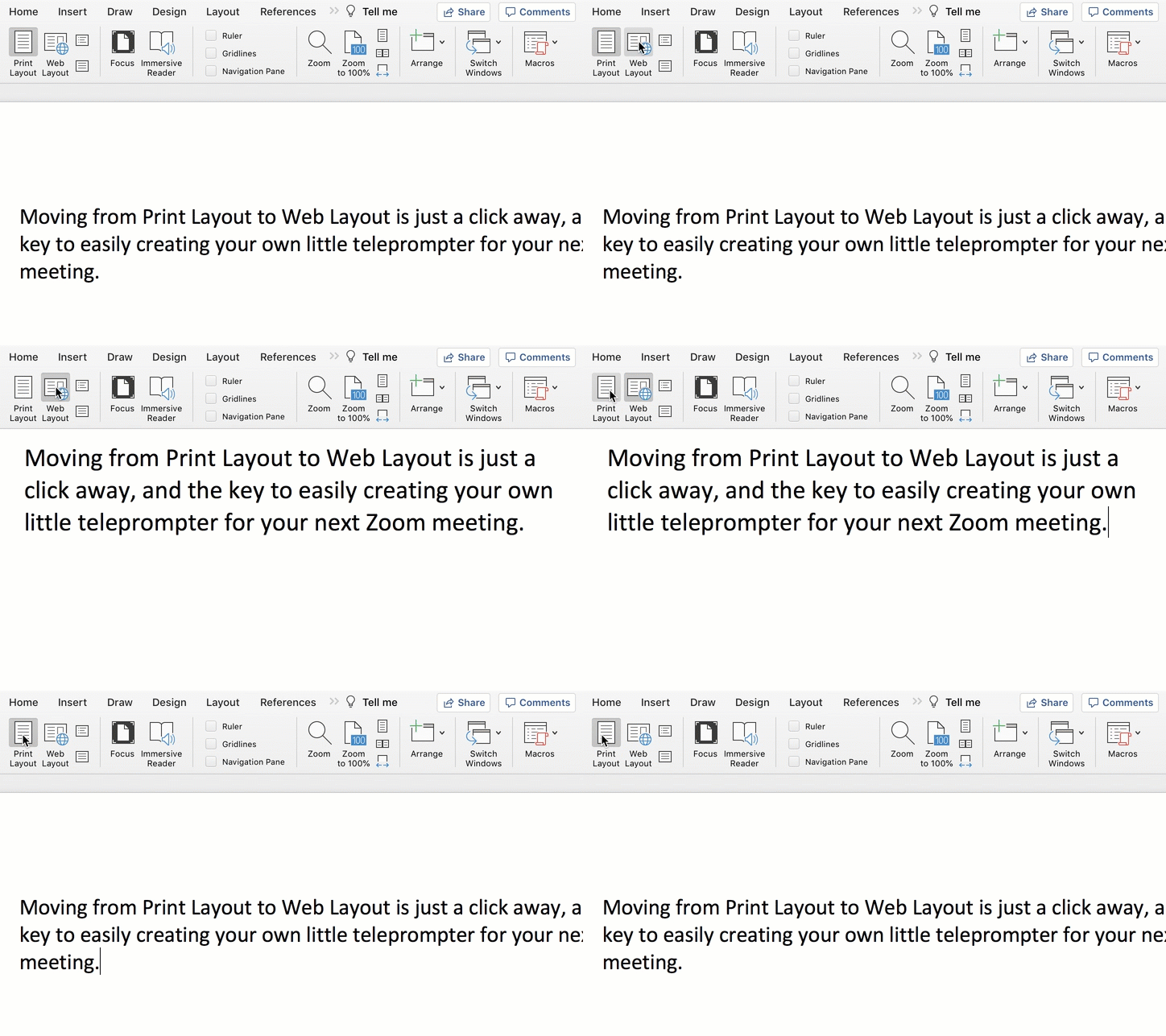
Change the view in Word from Print Layout to Web Layout.

Once you do that, you can shrink the width of your page, and the text will automatically wrap to fit your thinner Word window.

Then, all you need to do is scroll down the page using your mouse or trackpad as you’re reading.

Congratulations, you’ve effectively created your personal teleprompter!

How to Adjust the Default Settings
Here are the easy steps to make the change to your Word doc:


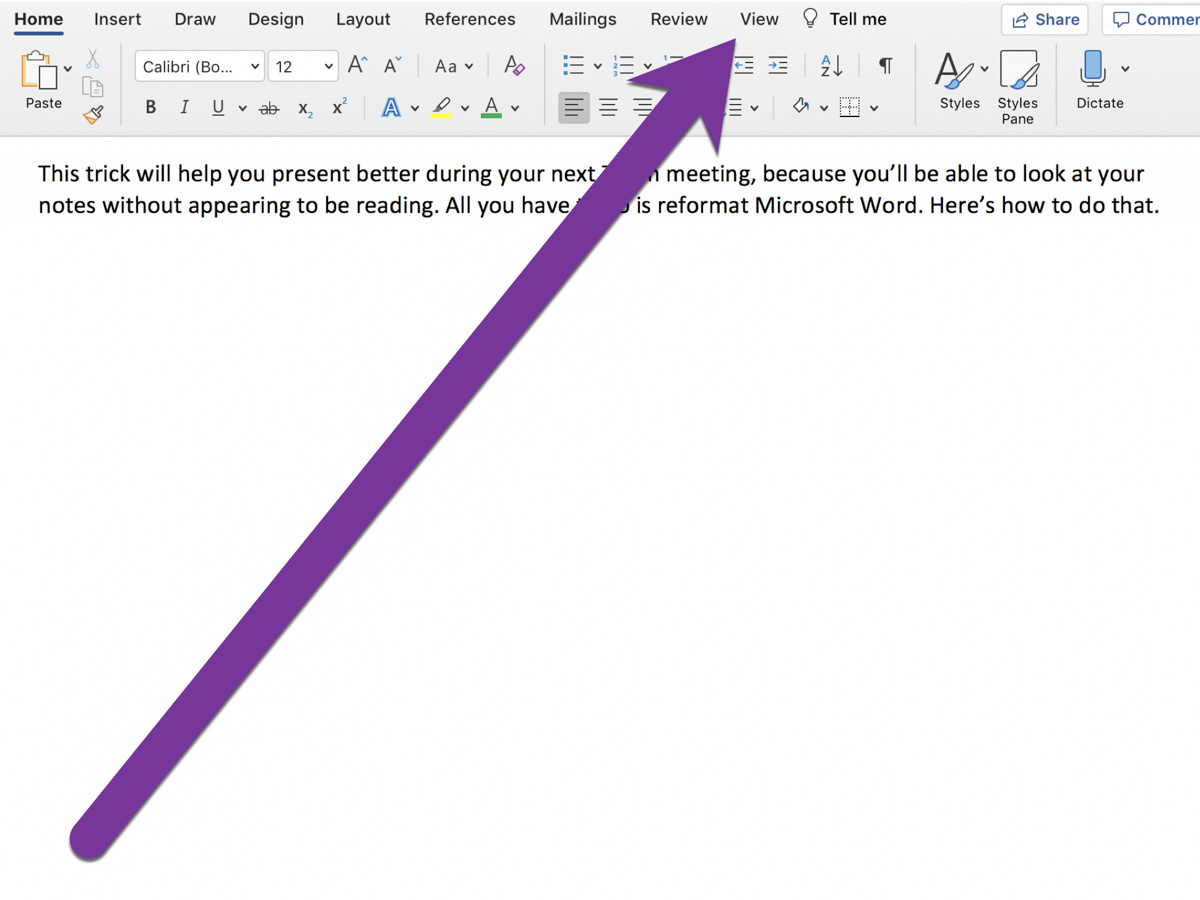
On Word’s top menu bar, click on View from the Home menu.


On the left, you’ll see Print Layout and Web Layout. Click Web Layout.


Then, click on Zoom to adjust the size of your text so you can easily read it.

That’s it!


Advanced Tip: Minimize the Ribbon
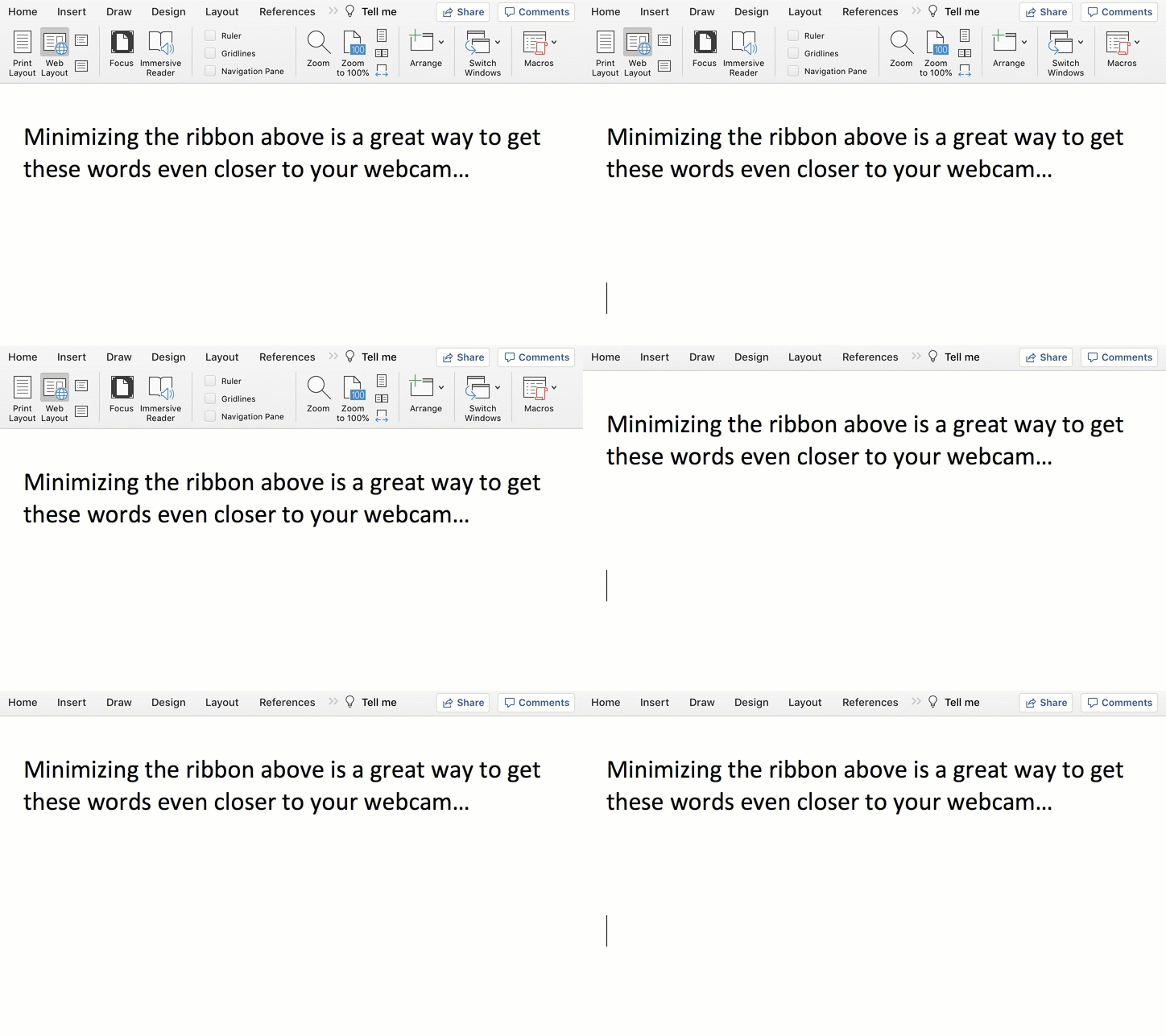
To get your notes even closer to your webcam, collapse Word’s top ribbon.

On a Mac, press Command + Option + R.
On a PC, press Control + F1.

Another Tool for your Virtual World
Living life on Zoom during these many pandemic months has been draining for all of us. Reformatting Microsoft Word to serve as your pseudo-teleprompter is one way to make your Zoom presentations a lot easier.


4 Ways Tech Helps Me Adapt During the Pandemic

The pandemic has forced me to reevaluate my relationship with my technology. Here’s how I’ve adjusted my focus.

I’m so happy there’s light at the end of the tunnel now that Covid-19 vaccines are being rolled out. And while there’s still a long road ahead, I can begin to think about how some of my technological adaptations during the pandemic might continue into the future.

I Rewired my Hunting and Gathering Instincts
I used to think that spending extra money for online grocery delivery was an unnecessary luxury. We’re genetically encoded to hunt and gather. So spending decades going to supermarkets had seemed like the natural way to acquire food.

But since the pandemic began, I’ve relied on FreshDirect for the bulk of our weekly grocery needs. I know folks go to the grocery store wearing masks and practicing responsible social distancing. I simply went in a different direction.

Sure, there are other online options for grocery delivery, but when times were especially tough at the beginning, and open delivery slots were hard to find, FreshDirect came through for me more often than the others.

And even when the pandemic is over, I plan to continue using FreshDirect. I’ve already signed up for the $129 annual membership (DeliveryPass), which unlocks free delivery.

Whole Foods technically offers a better deal, because free delivery is already bundled into my Amazon Prime membership. That said, finding an opening in the limited two-day delivery windows can still feel like you’re playing the slots in Vegas.

No, it’s not like I’ll never walk into a grocery store again, but there’s real value to having the bulk of your groceries regularly delivered to your doorstep. (I’ve also appreciated the time saved from not having to shop and wait on line at checkout.)

I Learned to Live without Two-Day Shipping
Once upon a time, it felt so empowering being able to shop online and receive purchases within one or two days, often for no additional shipping costs. How convenient was that?!

But there was a hidden tradeoff. I no longer had to be especially organized. Whenever I ran out of something, I could almost magically have a replacement quickly show up.

But when the mail slowed down and two-day delivery became ‘you’ll get it when you get it,’ it created a shock to my system. I realized that I suddenly needed to plan more… like I once had to.

So, I built back that muscle of self-reliance and tracking my own supply chain. It’s felt good being more conscious of the specific resources that my family requires and when.

Blurting out to a Siri or an Alexa that I need more milk when I’m holding the empty carton maybe isn’t so empowering after all. Not when you’re already out of milk.

Free two-day delivery is great. Two-hour delivery is incredible. Drones dropping boxes from the sky at my every shopping whim feels like a future shopping nirvana. Who needs to worry about what you need if you can have more of it within hours?

Well, remember that now, maybe you can’t have it for a couple of weeks or months. And you’d better not forget how to live that way. 2020 was a cautionary tale in so many ways.

I Forced Myself to Keep my Webcam On
I don’t have to tell you about the isolation. The loneliness. The feeling of being cut off. In many ways we’ve been living in our own little bubbles.

Of course, that’s not how it’s supposed to be.

Our little webcams are one of the few safe ways we are able to break out and communicate face-to-face, if only virtually. My iMac’s webcam is my lifeline to my outside world.

Sure, it takes effort to be ‘on camera.’ And you should always put those Zoom best-practices to use, no matter who you’re Zooming with.

Yes, it’s easier to turn off your webcam and communicate via audio only. But I say it’s a bad tradeoff. You’re losing so much without sharing your face and your visual cues.

So, if you’re concerned about really staying connected with those who matter, use that webcam and let them see you!

I Paid for More Bandwidth
Did you also face a barrage of complaints from family members that your home Wi-Fi network couldn’t handle the increased load of endless Zoom meetings, online learning and Netflix streaming?

The culprit is probably not your home Wi-Fi network. It’s your Internet service plan. So, go check it and then upgrade your bandwidth to the next level. That should do the trick.

I was paying for the base plan of 100 Mbps. So I spent $10 more a month to double it. That stabilized the Lester family really quickly. (There are faster plans, but I say that you should buy only what you need.)

I Focused on the Essentials
If there’s a lesson here, it’s realizing the true value of technology when life gets turned upside down.

It’s not so much about the conveniences. It’s about how technology can support the essentials like food and communication.

If your technology is supporting your fundamentals, you’re on track! The rest is just a distraction.

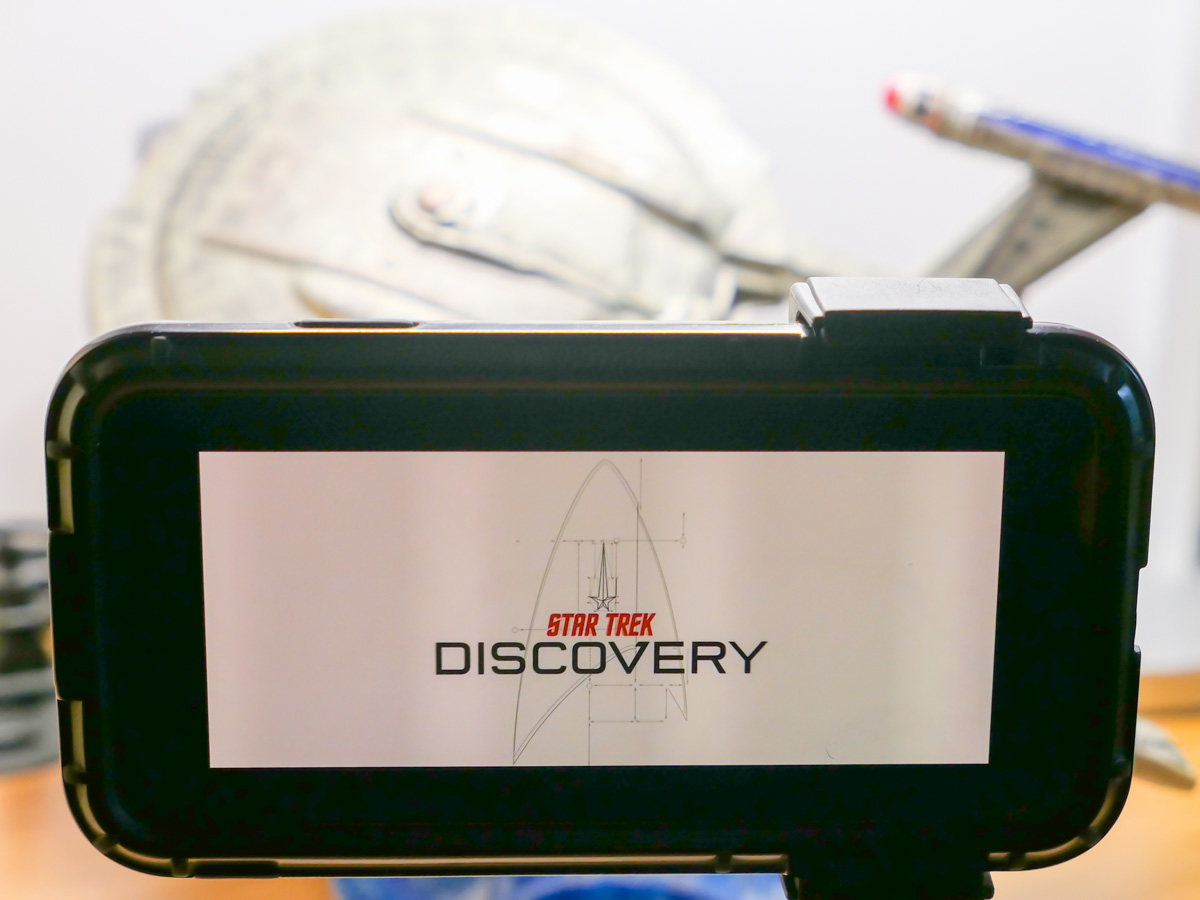
Feeling Burned by Star Trek: Discovery’s Season 3?

After watching the season finale, this Trekkie’s got some thoughts to share about the latest season of “Discovery.” Here’s my review:

You can’t blame “Star Trek: Discovery” for not trying. Season 3 attempted to envision a universe 930 years into the future, tackled big social themes and finally decided to give a little more screen time to its supporting cast of regulars.

This CBS All Access series originally insisted that is was not your parent’s “Star Trek.” It tried to be darker, edgier and bolder. Characters used four letter words, though not very convincingly (and far more awkwardly than in “Star Trek: Picard”).

The writers spent much of season 3 trying to return into the fold. There were multiple references and story devices from the old “Star Trek” manual. And in the end, we found ourselves right back where we started, with the same closing music as the original series.

This return continues a long overdue course correction. It was so obvious that there was no real need to separate itself from its heritage when we saw how the best episodes from season 2 focused on Captain Pike from the original Enterprise.

And you can’t say “Discovery’s” season 3 wasn’t earnest. No way. There was so much hugging and crying. Crying and hugging. I lost track how many times “I love you” was in the script. The writers were clearly working hard to finally evolve this crew into a “Star Trek” family.

And “Star Trek” at its core has always been about family. I just don’t know that I needed the “Discovery” writers constantly telling me that.

Warning Signs
As the credits rolled at the end of season 3’s finale, I’ve got to admit, I wasn’t pumped. But I didn’t feel burned either. Season 3 was… fine. For me, “Star Trek” is always better than no “Star Trek.” But I can’t deny I’m still a wee disappointed.

It’s not that season 3 was bad. It just couldn’t quite elevate itself beyond its own unremarkable storytelling.

The writers put a huge effort into building a diverse and inclusive set of relationships. In fact, in many ways, that’s really what season 3 was about. The Burn and (minor spoiler) rebuilding the Federation was just something for this group of Trek characters to focus on. And that’s all great.

But then, the writers ran out of steam (Dilithium?) when it came time to come up with some cutting-edge science fiction storytelling worthy of the “Star Trek” universe.

Why So Far?
Moving the story 930 years forward is a huge leap. Unfortunately, this future doesn’t look all that different. Sure, personal transporters are cool and organic tech is nice, but I would expect something more dramatic a millennia out. And that requires more writing muscle… not special effects.

Yes, I understand that the writers needed to warp Discovery into a new era that was not burdened by existing Trek canon where the Discovery doesn’t exist. (A downside of creating a prequel series.) But a hundred years forward past Picard is all they really needed to do.

Back to the Future
And it’s ironic that the writers ultimately created a new “Star Trek” future that in many ways had gone back in time.

They were pulling on the same storytelling threads as the creators of “Star Trek: Enterprise” when space was truly the final frontier… again.

Missed Opportunities
I’m happy to allow a series some leeway in plot development as long as the writers stick their landing by the end. Over the course of 13 episodes, I feel that season 3 was not entirely successful. (Spoilers ahead.)

Tilly
“Discovery” has painfully stuck with this character and promised some future payoff. I understand that Ensign Tilly (Mary Wiseman) is evolving, but after three seasons, it’s not fast enough. When Tilly finally got her big chance and sat in the captain’s chair, she essentially blew it. Later, her moment of redemption wasn’t all that satisfying.

The Mirror Universe
You know there’s a problem when “Discovery’s” best episodes focus around the linked alternate universe. But by now, this Trek storytelling device is feeling a bit tired. Even though it was the main reason that Georgiou (Michelle Yeoh) had anything to do in season 3, watching the alternate versions of our other characters as two-dimensional opposites grew boring. Sure, Georgiou evolved, but her own universe wasn’t able to.

The Source of the Burn
Really? I expect we’ll see some therapy sessions in season 4 for someone.

The Discovery’s Big Brain
Remember when Discovery’s computer acquired 100,000 years of data from the alien sphere in season 2? The only influence from that upgrade was when the computer pointed Discovery to meet up with Carl. There’s a lot of untapped plot potential that the writers ignored.

Carl
Again… Really? You can’t recycle a classic Trek plot device like that and simply rewrite it as Carl. A ‘Q’ character would have been better.

The Bad Guys
A 1960’s biker gang with a really big ship. Is that what capitalism eventually evolved into? Osyraa (Janet Kidder) needed more screen time to develop beyond her two-dimensional antagonist.

Saru
Captain Saru (Doug Jones) sits at the center of the heart of “Star Trek: Discovery.” His humanity, even in Kelpien form, shines bright. He’s the perfect Federation captain on paper.

But his evolved and balanced perspective isn’t ultimately suited for this future frontier. Not as captain of the Discovery. It’s a bittersweet conclusion.

The Good News
So, I wouldn’t be a Trekkie if I didn’t prove how geeky I am by nitpicking. Sure, season 3 could have been better, but it still had a lot going for it. The special effects were great, although I would have appreciated a few more closeups of the new starships.

It benefited from a generally strong cast. (I really liked the addition of Book’s character played by David Ajala.)

Of course, Sonequa Martin-Green is the star of the ensemble. Her Michael Burnham has often created more problems than she’s solved, but her passion and sense of purpose and drive to do what’s right has continued to power this entire series forward. Martin-Green provides almost limitless emotional and physical energy in this regard.

As it turns out, breaking the rules in the 31st century is seemingly okay as our new Prime Directive. It’s an odd conclusion that doesn’t quite fit with what the writers have otherwise been trying to accomplish. But it continues to fuel Burnham’s success. So, in what has become a season-ending Discovery ritual, it’s time to switch up the captain’s chair again.

Let’s Fly?
I’m happy that “Discovery” is embracing his own heritage.

And I’m always pleased to be watching more “Star Trek” after all of these decades. It hasn’t gotten old. In fact, its familiarity is more comforting than ever, especially in today’s unstable reality.

There’s also something to be said for watching science fiction and not feeling depressed as a result. You can count on “Star Trek: Discovery” for maintaining its sense of Trek-infused optimism.

I don’t think season 3 is the best of the series. (I prefer season 2.) It’s certainly not the boldest. But “Discovery’s” imperfections ultimately didn’t prevent me from still enjoying the ride.

Oh… and that last line in the season finale…
“Let’s fly.”

Really?
(Just go with it.)