
Six Ways to Improve your Recorded Zoom Videos

If you’re preparing to use Zoom to record a conversation or a group video message, welcome to the world of video directing. Here are a few tips on how to get the most from your recording session.
So you’ve decided to use Zoom or another video conferencing platform to handle your next video shoot due to social distancing. The quality won’t be as good as having an actual video crew on location, but it’s something, right?
And it’s remarkably simple. You just press the record button during your Zoom meeting to capture the content. Depending on your plan, your video files will get uploaded to the cloud or downloaded to your computer as soon as your meeting ends.
Welcome to the Director’s Chair
But what isn’t necessarily as intuitive is how to use Zoom as a live video production switcher if you’re handling multiple ‘live feeds.’
One example would be creating a virtual ‘talk show’ with an interviewer chatting with two guests.
Another is “The Brady Bunch” multi-box effect using Gallery View. It’s a great way to visualize that we’re all in this together during these difficult times.
If you’ve decided to go down this road, and you’ll be using Zoom as your virtual TV studio to switch between multiple video sources in a live environment, congratulations. Now, you’re a video director.
Here are six tips to help ensure your success.
#1
Hide Self View
If you want to show multiple people in Gallery View but you don’t want your own shot to be included, then you need to activate ‘Hide Self View.’
You’ll find this option in the drop down menu after you hover over your video box and then click on the three-little-periods icon in the upper right corner.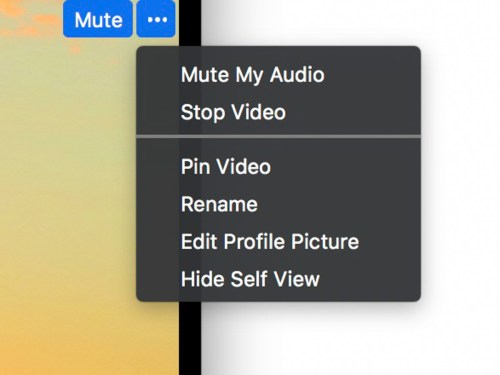
Hiding your shot will not mute your audio. So you can still talk with everyone to give them instructions as the director. You also might want to mute your audio while the others are being recorded.
#2
Use the Waiting Room
If you’re working with a large group of participants, and not all of them will be part of the same conversation, use the Waiting Room feature. It essentially puts them on hold.
When you’re ready for them to contribute again, you simply bring them back in to the conversation.
#3
Pin Video
If you want to record a conversation in full screen as opposed to using Gallery View, Zoom’s Active Speaker View will choose the shots for you. But it’s not always perfect. So, if you want to control your shots manually, then you can ‘pin’ each shot you want as you go.
(Again, this only affects what you see and record.)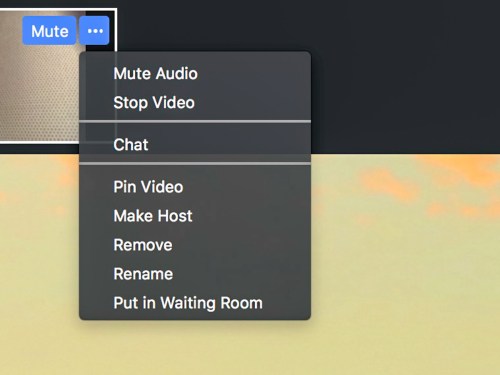
You’ll find Pin Video in the same three-period drop down in the upper right corner of the person’s box.
You’re not really working in HD
Let’s face it, even though you’re recording your Zoom clips in 720P HD video, a lot of the little boxes that pop up will look and sound like they’re from 1972.
Webcam frame rates are going to vary, and the audio quality may sound like it’s coming out of a tin can. You’re simply at the mercy of the ‘Gods of Bandwidth’ and the Internet in general.
You’ve just got to go with it.
#4
Get Multiple Takes to Capture Clean Audio
It’s ironic that the mediocre image quality will likely not be a problem for your viewers. They’ve come to expect glitchy-looking video as part of this webcam communications medium.
Instead, it’s actually glitchy audio that will stand out like a sore thumb. If you can’t understand what someone just said, that’s a real problem.
So, if you can, record the same lines a couple times. Then, you’ll have a higher likelihood of capturing ‘clear audio’ moments. Later, you can extract the cleanest-sounding audio fragments and then ‘Frankenstein’ it all together through audio dubbing during your editing process.
#5
Webcam Video Can Be Your Friend
Speaking of editing, bad-looking webcam video does have one upside. It’s much easier to edit together. You can easily combine two sections of someone talking without running afoul of the ‘jump-cut’ rule.
Since webcam shots with low frame rates already look jittery, an actual jump cut will likely evaporate into the larger webcam ‘experience.’
#6
Don’t Worry About…
The yellow outline that pops onto the person’s frame who’s speaking…
- It’s not in the final recording.
People’s names in the boxes…
- The words don’t show up in the actual video file either.
How I Learned to Love Terrible Webcam Video
Sure, there are multiple flaws inherent in this suddenly wildly popular communications tool. But using an app as a live TV studio with access to anyone around the world (with connectivity) is still a rather remarkable concept (even if the technical capability isn’t entirely new).
And the resulting raw moments you’ll get can be compelling, because they are truly genuine.
Imperfection is irrelevant as long as you’ve got your own video basics covered.
So just be sure that when you wear your Zoom director’s hat to bring it all together, you’re familiar with using the app as a multicamera switcher and recorder.
You still need to be at your best.


 At Home with Tech