At Home with Tech

Unlock the power of all your technology and learn how to master your photography, computers and smartphone.

The Best Way to Fix the Lighting for your Next Zoom Call
If video conferencing has become part of your daily life at home, you’re likely going to need additional gear to light your shot. Here’s what I did…

It seems like everyone has discovered Zoom (or a similar video-conferencing app) to stay socially connected in our new age of physical disconnection.

I think the big leap forward here is its sudden use at home and how every generation has almost instantly needed to figure it out to integrate it into their lives while they’re sheltering in place.

  • My son has been staying connected to his teacher and fourth grade class on Zoom while his school is closed.
    My wife and I have been keeping in touch with family and friends on group Zoom calls with the participants ranging from Millennials to the Greatest Generation.
  • Yes, it’s taken a few weeks, but by now, everyone’s pretty much figured it out.
    (Just make sure your audio and video icons aren’t muted!)

But just because you’ve got the technology working doesn’t mean you’ve optimized it.

Follow the Basic Rules of Video Production
Of course, the key part to video conferencing is… video. And so you should really pay attention to how you show up.

Usually, that takes a certain amount of ‘preproduction’ work to set up a shot and background that creates a clear and ‘pleasing’ image of you. And if you think that shouldn’t matter, well it does.
(Come on… everyone wants to look good when a photo gets snapped. So why would video be any different?)

You should always follow these important prep tips to create a flattering video image:

  • Your webcam should be level to your face and not peering up at you.
  • Your background should be relatively uncluttered.
  • You need to have light in front of you to properly illuminate your face.
    (Never sit with windows behind you, because the daylight will silhouette you.)

Avoid the Common Lighting Mistakes
Now, I know that many folks have already figured much of this out on their own over the past few weeks.

But the lighting factor requires more effort than you’d think. If you really want to look great on your next video conference call, you need pay more attention to the kind of light that’s hitting your face and how harsh it is.

Simply pointing a desk lamp with a 800-lumen bulb at your face will likely overwhelm your webcam and make you look like you’re on the surface of the sun.

The key is finding a softer light source to gently bathe your image.

One trick is to use daylight from your window as long as the sun is not directly shining on you. (Again, that would be too harsh.)

But I know that moving your home office around to get you closer to a window may not be practical. So, you’re left with the option of adding in artificial light.

Using a ceiling light may be helpful as long as it’s not directly over your head. If it is, the lighting will create some really deep and unflattering shadows on your face.

Trying to split the difference between an overhead light and a window is also a bad idea, because the two types of light have different color temperatures. Combining both in your video shot will likely confuse your webcam, creating unnatural coloring on your face.

So don’t do that.

Buy a Webcasting Light
I actually had that exact problem with the way my home office was set up, trying to use my ceiling light on one side of my face, a window on the other side, and the glow from my iMac hitting me directly from the front.
(I looked like I was on the dark bridge of an evil Romulan ship on “Star Trek: Picard.”)

So, I finally decided that it was time to buy a soft ‘webcasting’ light that would become my main light source for video conferencing.

Of course, I went through my usual rabbit-hole experience of online research where I couldn’t find exactly what I wanted across dozens of options. Much of what I found used traditional light stands that were simply too cumbersome and couldn’t easily integrate into my limited home-office desk area.

Elgato Key Light Air
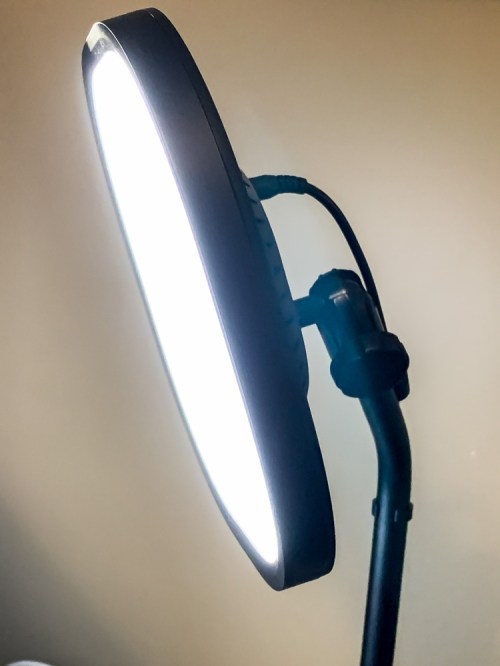
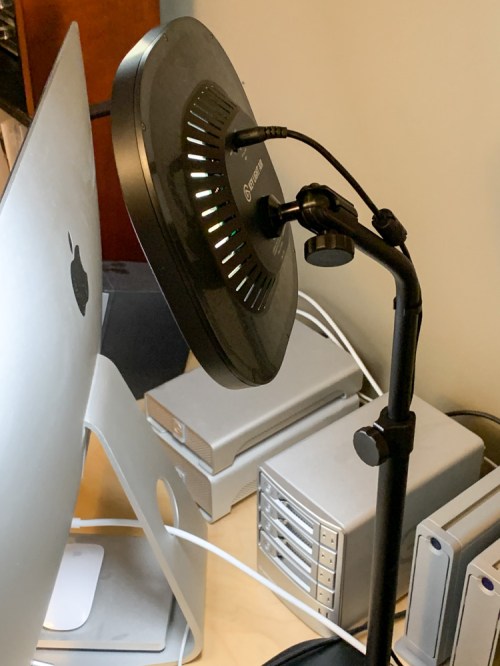
Then, I came upon the Elgato Key Light Air. It was exactly what I was looking for. It stands on your desk like a small lamp with a telescopic pole and offers multi-layer diffusion for it’s 80 little LEDs.

  • 1,400-lumen output (more than you’ll likely need)
  • 2,900-7,000 K color range

You control the Key Light Air entirely through its smartphone Elgato Control Center app, and you can easily tweak its light output and color temperature to help you look your best!

The Key Light Air costs $129.99 on Amazon Prime.

It was perfect.
Click.

Here’s what I look like on Zoom with just my overhead light and window:

And here’s the big visual upgrade using my new Key Light Air:

Just like Scotty on “Star Trek” used to say… “The right tool for right the job!”

Another Elgato Option
If for some reason the Key Light Air isn’t powerful enough for your needs, it’s got a bigger sibling. The original Elgato “Key Light” ($199.99 on Amazon Prime) is larger and brighter, but it’s entirely overkill for my set up and little iMac webcam.

Plus, the Key Light’s desk-grip mount makes it less functional if I want to move it around to another surface.

Lume Cube
The Elgato Key Light Air not an inexpensive solution, but it certainly gets the job done. That said, there are cheaper choices out there that will still improve the lighting of your shot…

My friend recently bought the little Lume Cube 2.0.
($89.95 on Amazon)

The Lume Cube’s strength is its portability. You can easily throw it into your laptop bag.
(Not that you’re probably going anywhere right now.)

My friend tested it with me on Zoom using his laptop, and I thought it worked relatively well, although it definitely needed its little diffusion attachment.

LumeCube also offers a softer-throw Video Conference Lighting Kit.
($69.95 on Amazon)

Illuminate Properly
Face it… no room in your home was designed to serve as a video-streaming studio. Sure, following some basic rules of video production will help improve how you look on your next Zoom call.

But to really step it up, you’ve got to add in the right kind of light as your ‘key’ light source. And that means buying a specific light made for the job.

For me, it’s my new Elgato Key Light Air.
Seven Tips for Online Food Shopping during COVID-19

The coronavirus has affected how we need to shop. I’ve got a few suggestions on how to get what you want delivered to your doorstep as quickly as possible.

I think it’s clear that if you’re able to stay at home during this COVID-19 pandemic, then you absolutely should. And for me, that includes an ongoing attempt NOT to go to the supermarket to buy food and supplies. I know you could debate whether my choice is too extreme, but it certainly isn’t hurting the larger problem. In fact, in my small way, I’m happy that I’m doing my part to help flatten the curve.

My wife and I successfully stocked up on our essential needs three weeks back before the coronavirus in the U.S. changed life as we knew it. And I felt great that we had enough food and toilet paper to keep us comfortable for over a month.

You may recall the original social distancing recommendation was for a two-week window. In hindsight, of course that was way too short.

Navigating the New Uncertainty of Online Shopping
Over the past days, I’ve come to the realization that since our new reality is going to last some number of months, the only way to access ongoing essential supplies without visiting brick-and-mortar stores is to buy your food online.

But I’m sure I don’t have to tell you that finding an open home delivery slot is really difficult and a lot of perishable inventory is sold out. I’ve also found this to be true for important non-perishable items that can simply be shipped out.

The other variable when shopping online is whether the items you’ve successfully ordered are still going to be available when it’s time to deliver them.

There are many unknowns, and the situation is likely to remain extremely fluid.

Extend your Supply Chain
So, it’s clear me after considering all of this, that you’ve really got to plan ahead! And that means rethinking how you’ll go about buying your food.

I’ve quickly come to the realization that this challenge is similar to how a company might source and manage its own supply chain. In fact, I think that’s exactly what it all boils down to… how to extend and maintain your own personal supply chain.

So, if you’re using online ordering as your primary method to bring in your home supplies, here are seven tips to help improve your haul.

#1
Set Up Several Home Delivery Choices for your Perishable Foods
I’ve put in place:

  • Peapod
  • FreshDirect
  • Instacart (a couple of markets I use rely on this service)
  • Whole Foods Market (Amazon)

#2
Maintain Multiple Website Vendors to Ship Non-Perishable Items
I’ve got:

  • Amazon
  • Jet
  • Costco
  • Boxed

#3
Snag Your Delivery Timeslot!
Finding an open delivery slot is the most important piece of the equation. You can usually adjust your order up until the day before your delivery. But if you can’t claim a specific day, your food will just sit in your cart.

#4
Expect Inventory to Vanish at the Last Minute
So, to avoid disappointment, you should order the same items across your different supply chains. The worst that can happen is you’ll receive more than you need. If it’s perishable and you can freeze your extra inventory, great. If not, then you’ll just need to figure it out. It’s a better problem to handle than not having enough food, right?

#5
Plan Out 2-4 Weeks
I’ve found that delivery windows are usually booked solid and only show availability 1-2 weeks out. So, to keep your supplies stocked, you’ve got to think further into the future than that. For me, it’s an entirely new way to ‘hunt and gather.’
(Yes, what’s old is new again.)

#6
Check Available Delivery Slots Several Times a Day
You’ve got to catch new slots shortly after they become available and before they’re scooped up. Keep trying!

#7
Remain Flexible and Tenacious
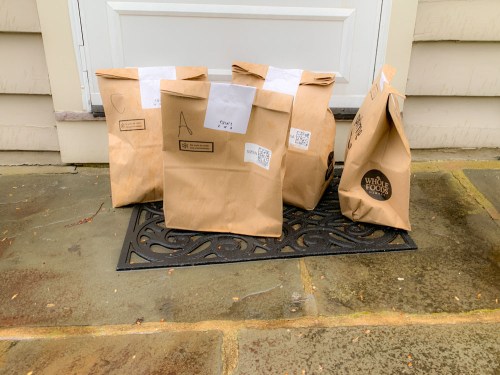
Today, I happen to be a bit annoyed with Fresh Direct, because I’ve not been able to find a delivery slot for two days. And I’m also pleasantly surprised that I was able to catch a same-day delivery opportunity from Whole Foods Market via Amazon. That said, I couldn’t find most of the produce I wanted. Still, I received part of what we needed in three hours, not two weeks.

It’s all relative. We’ve simply got to apply a different mindset to shopping now. Forget about ‘one-stop-shopping’ convenience. That’s so 2019.

When I was a kid, my mom would proudly talk about visiting several supermarkets in our New York City neighborhood until she was able to find everything she was looking for… exactly the way she liked it. I’m not sure I’m going to be getting anything exactly the way I like it, but applying my mother’s mindset of ‘tenacious search’ should serve me and my family well in the months to come.

Specialty Food Companies
Another supply-chain option is identifying online businesses that specialize in sourcing and selling specific foods direct to you.
(Think seafood or fresh produce.)

I’m still exploring this. More thoughts soon…

Ethics
So, I know there’s a ‘slight’ ethical snag to this whole system. It’s all based on someone else going shopping for me or working onsite at a company that’s shipping me my supplies. And that means they’re not at home protecting themselves and their families like I’m trying to do. By taking less risk, I’m necessarily transferring some of that to someone else.

It opens up huge economic and social questions. I’m doing my part to flatten the curve, but I know my actions will still create ripples into a much larger pond with endless repercussions I will never know about.

What’s for Dinner?
These are scary times, and there are few easy answers. Considering everything we’re dealing with, if we can take advantage of technology to help us put food on the table while keeping us and our loved ones away from the coronavirus, I think that’s essentially a good practice.

You’ve just got to put together a dependable supply chain online with multiple sources and keep track of it all!

And then stay tenacious… like my mom.

Now, it’s time to get to work.

One Way to Handle the Isolation

It’s time to take a breath and focus on staying centered while we travel through these uncharted waters of the coronavirus pandemic. A good step is simply to look up. Here’s why…

This existence is hard to imagine. You’re supposed to stay at home. Everything is shut down. Don’t touch anything. If you’re outside, don’t get near anyone. And never touch your face. This all sounds like a premise for a sci-fi flick.

It’s barely more than a week since COVID-19 has radically changed life in the greater New York City area. Even a trip to the grocery store feels like you’re taking a risk.

And I know that we’re just getting started.

Maintain Virtual Connections
Our sudden new norm is extreme physical isolation. And except for the truly dedicated introverts amongst us, that’s hardly a normal state.

The good news is there are still lots of ways to stay connected… virtually. Even if you can’t reach out and touch someone, you can still pick up the phone. (That old AT&T marketing campaign now feels so prescient.) And for those today who despise old-school phone use, video chats are great. Suddenly, I’ve seen Zoom become a common household tool for group video calls with family and friends.

It’s bad out there, but technology has certainly cushioned the blow from necessary social distancing. I can’t fathom what true isolation really felt like back in 1918 without smartphones and web connectivity.

Find the Beauty That’s Still There
As I write this, it’s still okay to go outside for a walk, as long as you avoid others. If you’re close enough to nature, that’s always a great destination to visit. Beyond the obvious physical and emotional benefits of hiking in a park or walking on a beach, these locations can offer other opportunities.

I’ve brought along my tiny DJI Osmo Pocket camera to shoot time-lapse videos of some of the beautiful environments I’ve passed through recently during my walks. I’ve found it to be an especially calming practice.

Take a look at these nature shots with three sunrises…

Stay Centered
Nature doesn’t skip a beat. Time flows. And if you look closely, people are still around. Many patterns continue as before.

Our daily routines have been shattered. No doubt. But I find it nourishing to observe some of the larger norms of existence still firmly in place.

So, If you can, it’s time to go out and take a walk.