At Home with Tech

Unlock the power of all your technology and learn how to master your photography, computers and smartphone.

Repetitive Key Strokes Can Be Dangerous to Your Mental Health

If you hear your Mac laughing at you, it’s probably a clue you’re doing something wrong. For example, the ‘Option’ key on your keyboard can really ruin your day if used accidentally...

If you hear your Mac laughing at you, it’s probably a clue you’re doing something wrong. For example, the ‘Option’ key on your keyboard can really ruin your day if used accidentally…

How many times have you tried to erase a word or two while typing away on your Mac and repetitively hit your ‘Delete’ key? All the time, right? It’s almost like an autonomic gesture… where you barely think about it.

But have you ever tapped the wrong key and somehow disabled your keyboard?

I have.

In fact, it happens to me every six months or so.
That’s just long enough to forget the fix.

And it’s impossible to Google the ‘problem,’ because you’re keyboard is frozen!
D’OH!
(And then it’s time for your iPhone or iPad to come to the rescue…)

Disable Mouse Keys
So for quick reference, here’s the solution:

  • Tap your ‘Option’ key five times

That’s it.
Your keyboard should come back to life.

It all has to do with an accessibility feature called ‘Mouse Keys’ which turns your keyboard off and morphs it into a pointer controller.

Every time you hit your Option key five times, it toggles this feature ‘on’ or ‘off.’

‘X’ Marks the Spot?
I often tap the ‘X’ key a few times as a placeholder for something I intend to write later.

If you look down at your keyboard, you’ll see that the Option key is rather close to the ‘X’… perfectly positioned to receive your slightly misaligned finger.

So chances are you’re eventually going to fall into the same trap…

Listen for It
A big clue you’ve made this infuriating mistake is an audio effect that announces Mouse Keys has just been enabled.
(It sounds like an amused robotic mouse scampering across your desk.)

Option to Resume
So the next time you hear the chuckle of a computerized rodent, you shouldn’t be confused why your Mac has suddenly stopped working.

No, it isn’t frozen with fear.
You just need to provide a gentle reminder five times with the ‘Option’ key to keep on going…

How to Never Pay for Your Printer Ink Cartridges

Would you like to operate your home printer for free?  As in not paying for another ink cartridge ever again?  Well, you can… if you own a Discover credit card and you like to shop at Staples…

Would you like to operate your home printer for free? As in not paying for another ink cartridge ever again? Well, you can… if you own a Discover credit card and you like to shop at Staples…

We all know how painful it is to plunk down big bucks to keep feeding your home printer. Whether it’s a simple model, or a higher end photo-printer, you’re probably spending hundreds of dollars a year replacing those damn ink cartridges.
(My Epson photo printer gets really hungry spitting out photos of my five year old.)

A while back, I found a way to get my ink cartridges for free.
(I have your attention, do I…?)

Here’s how it works…

Discover This!
The first step to my ‘secret strategy’ is to use my Discover credit card and earn cash back on my day-to-day purchases.
Yes… lots of credit cards give you cash back or other rewards. So what’s so special with Discover?

The reason I like my Discover card so much is its cash-back plan can be redeemed through a variety of store gift cards. And one of the stores I like to frequent for my tech supplies is Staples.

…And yes, Staples sells printer ink cartridges.

Party at Staples
So I go about my life…. using my Discover card… building up my cash back… and then I simply go online to my Discover account and order a few Staples gift cards.

When they come in the mail, I drive down to my local Staples store, do a little shopping and pay for my ink with the gift cards.
They can also be redeemed through staples.com.

Technically, I haven’t spent a dime!
(How easy is that?!)

But it gets better…

20% Bonus
Signing up for a $25 Staples gift card only costs you twenty bucks.
(What?)

That’s right…Discover gives you a $5 discount on each Staples gift card.
(In fact, Discover offers discounts with many other store partners, but the deals vary.)

I don’t see it so much as a discount… It’s more of a gift!
Discover is actually giving you 20% on your cash-back dollar!

I’d say that’s a pretty sweet deal.

That was Easy
If you follow my little economic ‘dance,’ you can create your own 20% sale on printer cartridges (or whatever else you buy) at Staples.
And then, you get it all for free.

So where’s the catch…?

Well, of course, you’ve got to spend money on your Discover card in the first place to build up your cash-back balance.
Thus, technically, ‘Barrett’s ink-scheme’ isn’t quite ‘free.’

But I’d say it’s really close!
(It’s all a matter of perspective…)

And I can’t tell you how great it feels when I pick up my ‘free’ ink cartridges at Staples…
(I highly recommend it!)

File this one under the category of Q.E.D.
(Quite easily done!)

Upgrading the Chandelier from Hell

One of these bulbs is not like the other. One of these bulbs just doesn’t belong… The good news is my father’s fifty-year-old chandelier has just entered the 21st century… invigorated with LED bulb tech.

One of these bulbs is not like the other. One of these bulbs just doesn’t belong… The good news is my father’s fifty-year-old chandelier has just entered the 21st century… invigorated with LED bulb tech.

For 50 years, the chandelier in my father’s dining room has been chewing up light bulbs. Year after year… Decade after decade…
It’s like the Guardian of Forever on “Star Trek.” Sitting there… as time streams about it, causing its fourteen bulbs to randomly fizzle.

Poof!
As a boy, I always felt like a day wouldn’t go by when one of these old school incandescent bulbs blew out.

In the chandelier’s early years, my parents happily fed it with a fresh supply of tiny candelabra bulbs. But recently, I’ve taken over the responsibility to maintain this relic.

My dad is quick to whip out his cell phone and call me every time one of the little 15-watt flames burns out…!
(Not that I mind coming by for dinner after I screw in a light bulb or two for him… He’s not quite nimble enough at 82 to climb the stepladder to reach the chandelier.)

And this is not the only electronic antique still hard at work in his apartment…
For example, the Sony cassette player from his ancient sound system was just fixed for the billionth time. Actually, the repair shop gave him a new ‘used’ unit instead of attempting to rebuild the old monster.
(Why a repair shop had a working cassette player hanging around is beyond me. But I digress…)

Time to Upgrade
I’d say over the last half century, the Lester family has literally screwed in over 2,600 bulbs into this freaking chandelier.
(That’s an average of one bulb a week for fifty years.)
Last week, I finally decided I’ve had enough…

It was time to make a change and find a more permanent lighting solution for the dining room.

The fix?
Upgrade to LED bulbs!
You know I have a soft spot for shiny LED tech.
(Plus, these bulbs last for years…)

Unfortunately, as I started to shop around on Amazon, I realized there wasn’t a lot of choice out there for this kind of replacement bulb. Though frustratingly fragile, little candelabra incandescent bulbs with their tiny bases are actually quite elegant. Their simplicity is difficult to replicate with the additional guts baked into the LED structure.

The closest I found in form factor was GE’s Energy Smart Bent Tip LED.
But this handsome replacement costs $15.21 per bulb!

That’s a huge jump in price from the standard GE incandescent 12 pack we’ve been buying. The short-lived beasties are easy to forgive when they net out at just over a buck a bulb.

As I pondered the value proposition of an expensive LED bulb replacement program, I thought I heard the evil song of the ‘incandescent bulb sirens.’ It gently compelled me to continue throwing dollar bills at our chandelier from hell.

But I remained undeterred in my mission…

An Eighteen-Year Fix
I eventually came upon this more affordable LED solution:

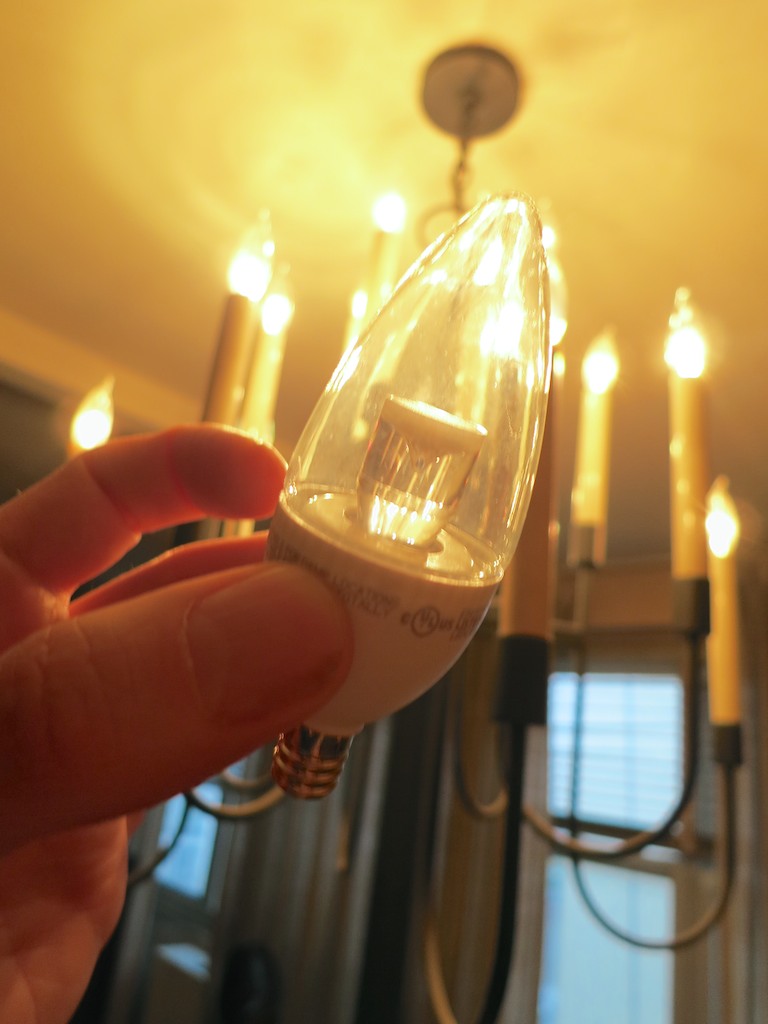
The TCP 3 watt non-dimmable bulb
It’s $11.99 for a six-pack.
We’re talking two bucks a bulb.
That’s still a big jump in price compared to Thomas Edison tech.
But it’s a ‘permanent’ fix.
(These LEDs are rated for an eighteen-year life span. When my father hits 100, I’ll buy him more bulbs for his birthday!)

Click.

Problem solved, right?

Not quite…

The Show is About to Begin
This particular LED’s form factor is different from the its incandescent cousin:

  • It doesn’t have a matching bent tip.
  • It’s built with a stubby, white base.
  • And it doesn’t dim.
    (Which isn’t a problem for my dad’s on/off chandelier)

So these TCP LEDs don’t really match the old bulbs…
…At all!!

After I considered the obvious discrepancy, I had a solution…

I decided to simply ignore the problem and rationalize it as a transitionary limitation! One day soon, my replacement program will be complete, and uniformity will be restored throughout the chandelier.

One remaining question:
Would my father actually buy into my evil plan to fuse LED tech onto his 1965 chandelier?
(No, I didn’t tell him I was about to create a ‘Franken-Lamp!’)

Fast forward to the moment of truth as I screwed in the first LED bulb…

It’s Alive!
I stepped back and looked at the ugly duckling.
Its light quality matched the others.
But who was I kidding…? It still stuck out.
The Ugly Duckling LED


Oooh… maybe this wasn’t such a good idea after all.

I turned to my father.
He looked up.
I listened for a response…

“Good. Let’s get some dinner.”
And then he walked away to get his coat…

Did I mention my dad’s vision isn’t quite 20/20 anymore?

Hey… he’s happy.
I’m happy.
The planet is happy. (We’re saving energy with LEDs.)

Our Guardian of Forever is set to shine bright through 2033…

Problem solved.