At Home with Tech

Unlock the power of all your technology and learn how to master your photography, computers and smartphone.

Tag: Anker

Is There a Wireless Charging Stand for iPhone SE?
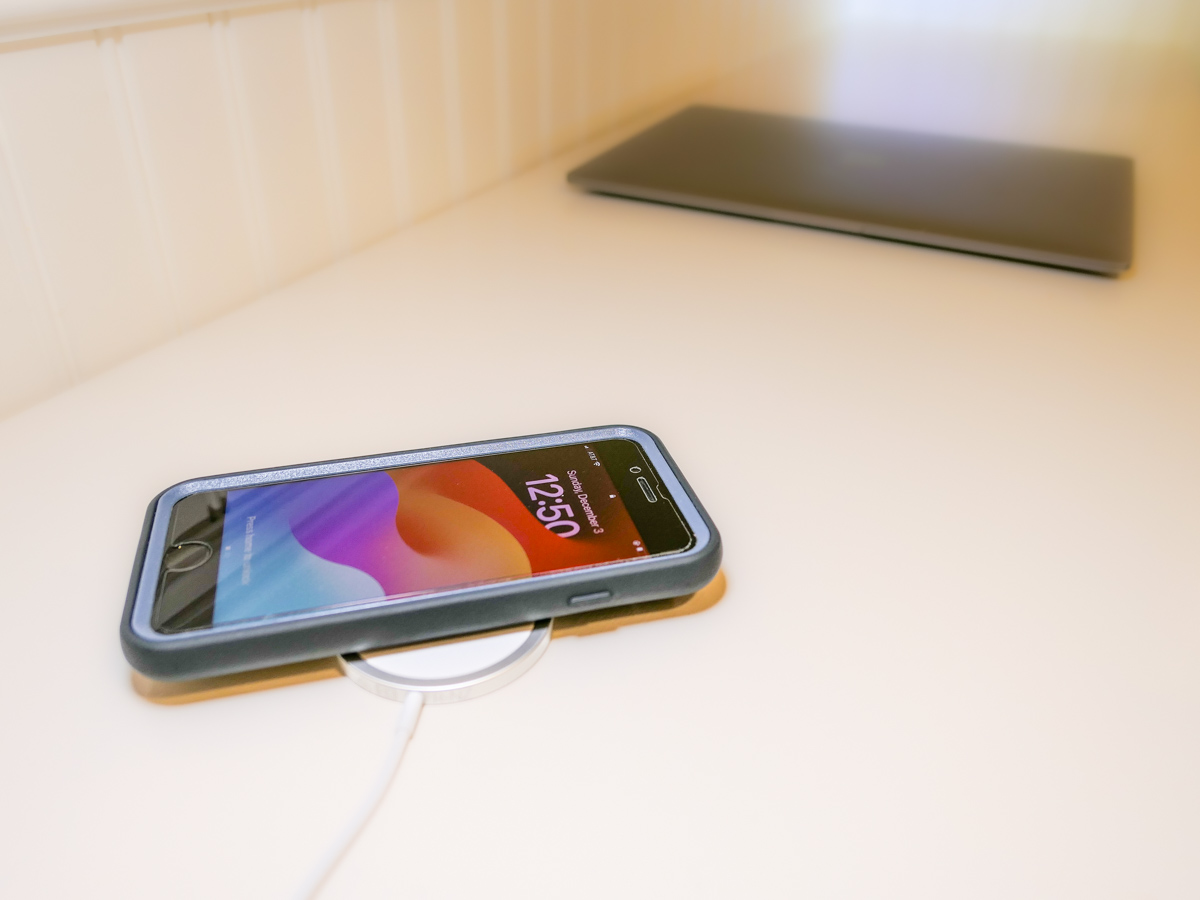
Even though iPhone SE isn’t built with MagSafe magnets, you can still charge it wirelessly. But it won’t stick to a charging pad. Thus begins my journey for a workable solution.

By now, it shouldn’t be this hard to figure out how to charge up all your gear. But if you’re like my family, you’ve got different versions of the same device (like iPhones) running simultaneously. So, over the years, I’ve collected various chargers that could keep powering newer tech. That’s good, right?

But the charging equation is complicated now that the tech industry sells much of its gear with the ‘bring your own charger’ sales strategy. Then, you’re forced to figure out how to power your new device. You need to immediately run through the compatibility equation with your existing power blocks.

Yesterday’s chargers may not be strong enough to handle today’s power-thirsty tech. And in a family where the kids are likely using older gear than the adults, every charger won’t work across the board.

And the complexity doesn’t stop there. There’s fast-charging technology and wireless-charging to also consider.

Wow. Do you also feel it’s hard keeping up?

Barrett’s Recent iPhone Purchases
Some months back, I had a little kayaking mishap, and my old iPhone XS Max drowned only weeks before iPhone 15s came out.

So, I decided to buy myself a new iPhone SE to hold me over with the plan to later gift it to our 13-year-old son.

For that period, I stuck with the standard Apple 20W USB-C Power Adapter and lightning cable. But when I ordered my new iPhone 15 Pro Max, of course I quickly upgraded to Apple’s MagSafe wireless circular charging pad.

No Click-and-Stick for the SE
When I had a moment to stop fixating on my new flagship iPhone, I turned my attention back to the scrappy but still totally capable new SE. I wondered whether it couldn’t also charge wirelessly. (Yes, I was totally enamored with the belated joy of wireless charging.)

Unfortunately, the basic iPhone SE doesn’t contain the magnets for MagSafe functionality. But yes, it actually can wirelessly charge if placed properly on top of a Qi charger.

That last detail didn’t thrill me. Without that magnetic ‘click-and-stick,’ you can easily miss the charging connection lock by a few millimeters and end up in the morning with a smartphone that’s not ready for the day.

Stand vs. Pad
But I figured if I could find a solution where the iPhone SE fit more snugly into place, like on a stand vs a pad, that could be a better system for charging success.

Unfortunately, Apple does not sell a wireless charging stand without a MagSafe connection requiring iPhone levitation. So, I had to turn to other manufacturers…

Fortunately, I found two brands I trust that offered what I needed.

Anker 313 PowerWave Wireless Charger Stand
Anker makes a Qi-certified, tilted stand that an iPhone SE can safely lean on without relying on MagSafe.

The stand is boxed with a Micro USB to USB-A cable that connects to a USB-A wall charger. But it doesn’t come with the charger. You’ve got to provide that separately.
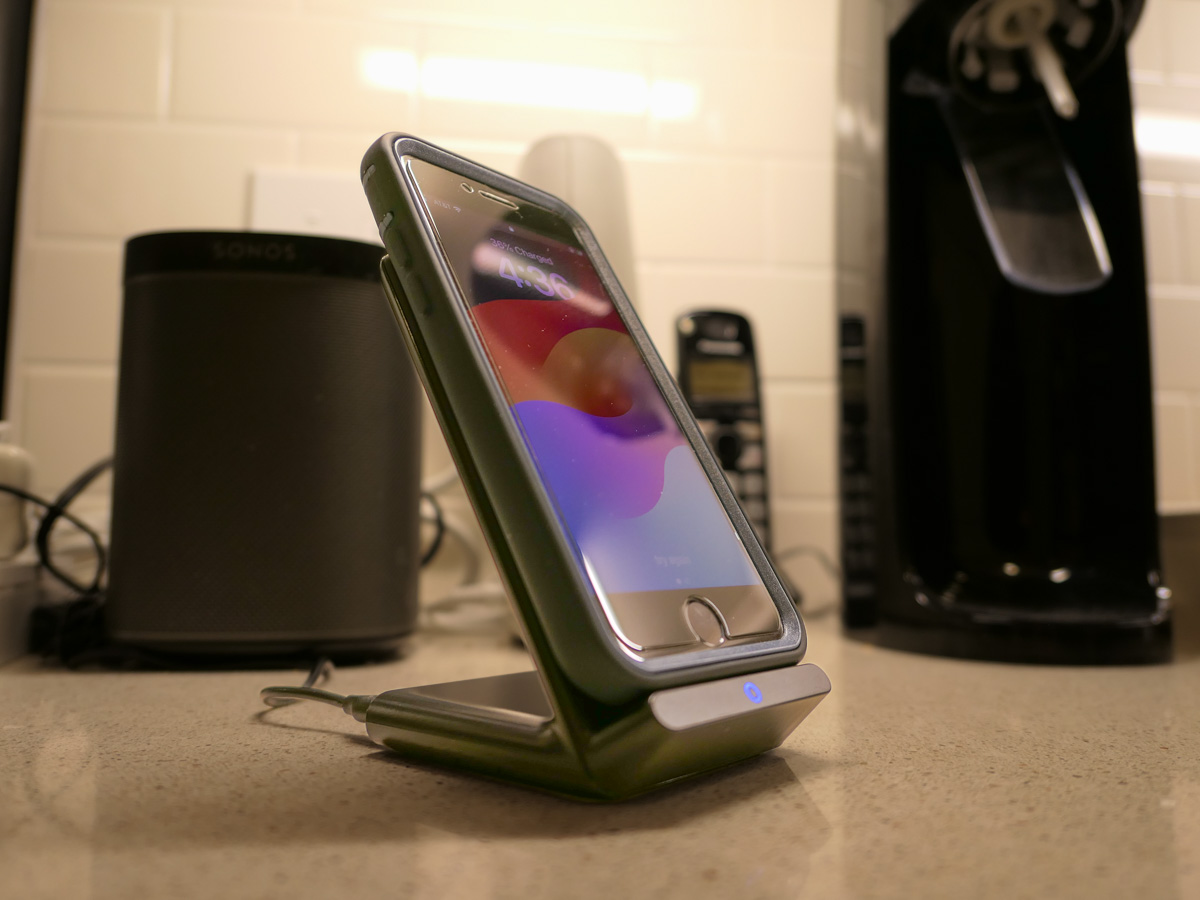
Anker states that you can’t use one of your old Apple 5V/1A stock chargers (the original tiny white block). Not powerful enough. You need a minimum of 5V/2A output. An iPad charger will work if you believe in sharing one charger for different devices. (What could go wrong with that plan?)

So, I knew I also needed a new power block.

Anker PowerPort+ 1 with Quick Charge 3.0
I read the fine print on the Anker stand’s power requirements to maximize its capabilities. My mind started to melt.

I immediately searched for a shortcut and landed on Anker’s only small USB-A charger. (All of their other models are USB-C.)

With both stand and charger, the Anker price is $30.38.

Belkin Boost Charge Wireless Charging Stand
Belkin offers an all-in-one solution, which you may feel is more elegant that my MacGyvered Frankenstein Anker plan.

You don’t have to figure out which charger block to buy. A Belkin charger comes packaged with the stand (which is similar to the Anker model, though more rounded).

I Bought the Anker Wireless Charging Package
I think both the Anker and Belkin options are solid choices. That said, the Anker stand and charger is only 30 bucks vs $45 for the Belkin option.

Based on this pricing differential, I went with Anker.
Click.

Fast-Charging is Always Helpful
All I really wanted was an overnight wireless charging solution for our iPhone SE. And now we’ve got that.

But as it turned out, I’ve also put in place a fast-charging solution with the Anker 313 Stand and PowerPort Quick Charger for any number of our current and future devices.

As much as I prefer the overnight charging rule for our son, what could possibly go wrong with that rigid strategy combined with the complexities of busy family life?

We all sometimes need a little quick boost of power in the morning.

And so do our devices.
Which Portable Projector for your Backyard Movie Night?

If you’re thinking of inviting friends over during this summer of COVID-19, staying outside is a good idea. Setting up a backyard movie night is one easy way to maximize the visit. But choosing the right projector can be difficult. Here’s what I bought…

I expect we’re probably into this for the long haul. So, I’ve made the decision to partially release myself from seclusion (to my wife’s great joy). I know that some have seemingly forgotten about COVID-19, but I’m not in that group… believe me.

In fact, I’m still having all of our groceries delivered from FreshDirect and Peapod. The fact that I no longer feel like I’m playing the lottery to find an open delivery slot is a good indication that more people are shopping for themselves again. I should mention that we live in Connecticut, which is currently not a hot spot. And that’s certainly good news. And maybe reason enough for me to take advantage of the relative calm and take care of some business… like getting a haircut! Who knows what the future will bring.

The Limits of Social Distancing
I think it’s fair to say that I’ve been particularly conservative about navigating in our new COVID-19 world. But you really can’t entirely isolate your family for an entire summer and prevent all outside social interactions beyond Zoom chatting.

And it’s not even just the summer we’re talking about… it could be another year… or two!

People need some social connection!

Expanding your Safe Circle
So we are now ‘interacting’ with a few other families we know who are also ‘being careful.’ We’re trying to follow social distancing rules, but of course it’s imperfect when there are fifth graders in the equation.

Yes, it’s increasing the risk, but I have to develop a long-term plan that’s reasonable. Sheltering at home for two weeks is easy. Four months is hard. How about asking your family to continue on for some unspecified future?!

Turn Your Backyard into an Outdoor Movie Theater
As we thought about the Lesters’ ‘reopening plan,’ we considered how we would handle playdates. Clearly, those interactions should be outside.

We brainstormed about what they might look like, and we came upon one quaint option of hosting outdoor family movie nights in our backyard.

That’s a perfect idea, right?!

And, of course, it’s the newest challenge for Mr. At Home with Tech…

Looking for a Needle in a Haystack (Again)
As I Googled through what seems like a complicated and vastly oversaturated market of portable projectors that range from $90-$2,000 (really), I immediately felt overwhelmed.

First off, you’ve got to decide exactly what you’re looking for. This tech category can have a variety of names:

  • Pocket projectors
  • Portable projectors
  • Pico projectors
  • Mini projectors
  • Battery-powered projectors

They mostly refer to the same general product line. So, I tried to focus on several key needs:

  • Battery power
    (No extension cords stretched across my backyard, please)
  • An image of at least 720P HD
    (Come on… I’ve got standards!)
  • Bright enough to do its job at dusk
  • Sufficient onboard sound so I wouldn’t also want to use a separate speaker
    (Less clutter)

Everything I found in the sub $200 price bracket didn’t really seem cut out for the job.

My spending cap was $500. Anything more felt too expensive for just a fun outdoor activity. Sure, it would certainly be a big help during this ‘Summer of COVID,’ but you’ve got to draw the line somewhere.

Facing the True Cost
The biggest challenge I created for myself was the need for battery power. That requirement really limited my choices.

And my options dwindled even further as I looked for bright enough projection chops to handle a twilight screening as well as a strong enough battery to make it through an entire movie.

And then the killer: My $500 price point.

The truth is, you’ve got to spend more (sometimes a lot more) to get a bright-enough projector that gives you any flavor of HD, runs long enough on its battery and projects decent sound.

Hello, Nebula Mars II Pro
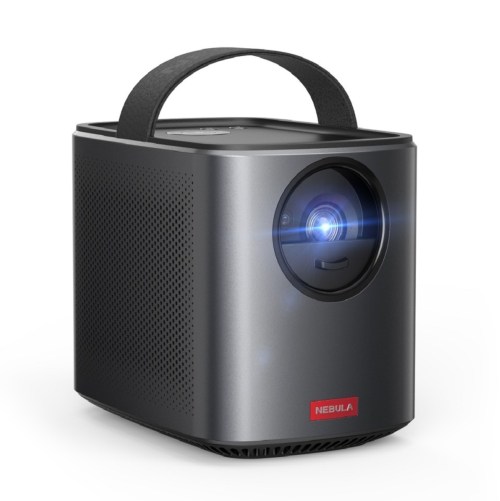
It’s ironic that with so many supposed choices, only one projector came close to meeting my requirements:

Nebula Mars II Pro
by Anker
$549 on Amazon

It’s effectively an all-in-one solution to launch our movie-night series:

  • 720P Video
  • 3-hour battery
  • 500 lumens (which isn’t the brightest, but is at the top this category)
  • Dual 10-watt speakers (a huge differentiator)
  • Horizontal and vertical keystoning (important to get a squared image)
  • Some cool streaming options through its Android 7.1 OS
  • Can also hard connect through USB and HDMI

And it didn’t hurt that both Wirecutter and Rolling Stone called out the Nebula Mars II Pro as a top pick.

Plus, I already have solid brand loyalty to Anker.

Budget Friendly Choices have Limits
There are more powerful options to consider if you’ve got a bigger budget, but I kept my research focused on more affordable choices. I found a couple contenders, but they couldn’t match the Mars II Pro’s specs:

The price is right, but this AAXA not as bright as the Nebula and the sound output is weak.

  • Viewsonic M1+
    $299.99 on Amazon
    854×480 (WVGA)
    300 lumens
    6 hour battery
    3W (x2) speakers

Good price and great battery, but it’s not true HD and this Viewsonic is even dimmer than he AAXA. The speakers are better than some, but the M1+ still can’t compete with the Mars II Pro.

The Right Tool for the Job
So, I’m going with the Nebula! Yes, it broke my budget cap, but it’s also worth it to have confidence in your choice.

Click.

I could have spent less, but then I’d be setting myself up for disappointment with gear that’s not powerful enough to handle an outdoor environment.

Dealing with the Great Outdoors
When designing a backyard movie-night experience, you should always remember that you’re not trying to create a ‘home-theater’ equivalent. Otherwise, you’ll need to spend a whole lot more.

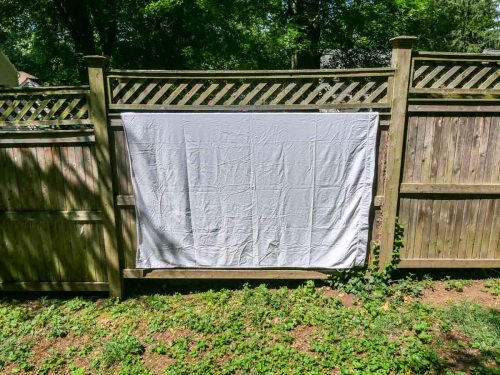
And your event is inevitably going to be rough around the edges. (I’m only planning on using a white sheet hung from my backyard fence.)

And who knows if our guests will quickly lose interest in our outdoor movie in favor of chasing fireflies? Maybe a swarm of mosquitos will tank the whole screening.

There can be any number of variables that may prevent this investment from finding true success. But, if you’re going to go for it, don’t skimp too much on the oomph of your visual and audio projection.

Open for Business?
I’m excited to have my Nebula Mars II Pro for our Lester backyard movie nights.
Come on over… But don’t get too close.

For me, this is real progress during this Summer of COVID.

Seven Packing Tips for Successful Winter Business Travel

Some business trips are more challenging than others. And cold weather never helps. So packing smart can make all the difference…

Some business trips are more challenging than others. And cold weather never helps. So packing smart can make all the difference…

I recently had something of an adventure at my job, and it involved enduring more than a little bit of extreme cold. I flew to the World Economic Forum in Davos, Switzerland to support our communications team on the ground.

It was an amazing week for me. Not only for being a part of the WEF experience and being immersed in the theme of responsive and responsible leadership, but also because it took me out of my comfort zone… in more ways than one.

Going Back to my Roots
My contribution called for some hands-on video skills that I hadn’t practiced in some time and then employing them with tight deadlines in the frigid outdoors.

And as the week progressed, my successful experience reminded me there are many ways to bring your best self to any challenge…

Grace Through Adversity
Life will test you. On any day… a moment can unexpectedly knock you off balance. So how should you handle the curve balls?

First off, how you approach them always makes a huge difference. But there are also certain precautions you can take to help prepare for the unexpected.

Here’s my list of packing tips to help you succeed during a challenging winter business trip.

#1
Bring a Travel Plug Bar
First off… I didn’t…

What I failed to realize when I was packing my type ‘J’ power plug adapters for Swiss outlets is these adapters are really bulky. So I wasn’t able to get more than one to fit next to other existing plugs in the wall outlet.

So if you’ve got multiple devices to power in one location, you’re going to need some help with a portable multi plug bar.

Here’s one good option:

#2
Pack Portable Power
So halfway into my trip, I ran into some additional electrical difficulty. I plugged in my iPhone charger next to the bed and tripped a circuit breaker. The power remained out in my room for the remainder of the trip.

Typically, I charge up my iPhone every night and also use it as my alarm clock for the morning.

So that would have been a problem without my wakeup alarm if I had to change my iPhone elsewhere overnight. Fortunately, I brought along some portable power via my trusty Anker Astro battery power bank.

I charged up the Astro during the day at another location and then used it at night to keep my iPhone up and running.

Thank you, Anker!

#3
Don’t Forget a Small Flashlight
See dark bedroom story above…

#4
Have a Good Compact Camera at the Ready
Sure, a smartphone can handle many photographic needs these days, and my iPhone is always there for me and easily accessible in my right pant pocket. But sometimes, you’re going to need a camera with a few more tricks up its sleeve.
Case in point…

Towards the end of my trip, I was called upon to take a team picture. An earlier attempt by a colleague using her smartphone in the dimly-lit space could not generate a usable photo. The question rang out from the group… Did I have a camera with me that could get the job done?

In fact, I did.

Remember my new Panasonic Lumix DMC-LX10?
Bam!

The Lumix’s powerful 1” sensor and ample flash got the job done big time.

#5
Dress Like You’re Going on a Winter Hike
Simply put… Davos, Switzerland is wicked cold in January.
(I began my days at about 2 degrees Fahrenheit.)

And I knew that I was going to be spending a whole lot of time outdoors. So what are you supposed to do when the dress code skews semi formal?

The trick is to use the cutting-edge fiber technologies built into today’s outdoor-sports clothing. Sure, this kind of clothing isn’t cheap, but it’s really thin… and you can wear one or two base layers under a dress shirt and tie.
(As well as a base layer under your pants.)

So in preparation for the extreme environment, I did a little shopping at REI and Eastern Mountain Sports.

#6
Losing Stuff will Happen
But try not to lose the important items.

I dropped a glove more than once, and each time someone ran up and returned it to me. That’s great karma.
(Though I did pack an extra pair of gloves)

#7
Believe You Can
Speaking of karma… this list can’t only be about the tangible objects or tech that you bring with you. As I mentioned above, it’s also about what you bring from within…

In my view, it’s usually better to take a chance and risk failing instead of playing it safe and never trying to stretch yourself.

Now don’t get me wrong… you’ve got to be as prepared as you can be.

And never forget to bring the confidence that you can figure it out… no matter what.

All right, then…

Start packing!