At Home with Tech

Unlock the power of all your technology and learn how to master your photography, computers and smartphone.

Tag: family selfie

How to Take a Great Family Selfie without a Selfie Stick
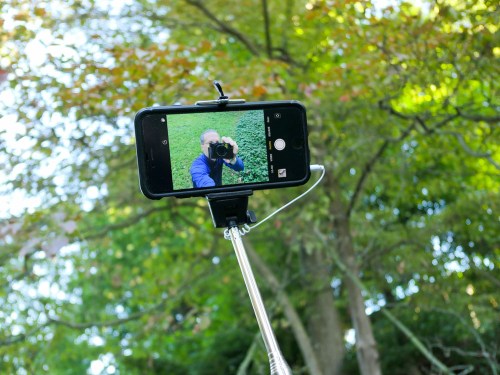
If you love using your selfie stick, please allow me this opportunity to show you another way to the perfect family photo…

I don’t know about you, but the idea of using a selfie stick freaks me out. Having to attach your expensive smartphone onto a fragile grip mount and then extending it way beyond your reach on a long pole… all in the name of being able to snap a good selfie is downright frightening.

Sure, you might get a good photo out of it, but there could be other consequences if the unexpected happens. What if you lose control of your selfie stick, and your smartphone falls from ten feet up? I bet you’re assuming I’m talking about the shattering impact on an unforgiving cement surface. Not necessarily…

During our recent vacation to Niagara Falls, I observed scores of selfie sticks in action and extended over what I would consider a no-fly zone… the Niagara River! You’ve got to believe that over the years, there have been at least a few unfortunate smartphones that have taken the plunge over the Falls after capturing the perfect selfie…

Now, lots of folks love using their selfie sticks. And I grant that I may be in the minority on this topic. But if I may, I’d like to offer a few other ways to generate a great group family photo without using a selfie stick…

Ask a Stranger
First off, you may not actually have to take a selfie. It should go without saying that it’s okay to ask a stranger to take your photo. You can also simultaneously offer to take their photo as a reciprocal gesture.
(Chances are you’re not the only one who’d like to take advantage of a photographic opportunity.)

And assuming the stranger can frame the shot and get everyone’s eyes open, it should be a pretty good picture, simply because it’ll likely be wide enough to reveal the background.
(Where you are is always an important part of any group photo.)

I find most strangers actually err by not zooming in enough or walking forward. But that’s okay, because you can crop the shot later.

Use a Wider Lens
If nobody else is around, and you’re on your own, the trick is to make sure you’re using a camera with a wide enough lens. It needs to be able to see your entire family when you stretch out your arm to attempt the selfie.
(My Panasonic Lumix LX10 has a zoom lens that starts at 24mm, which is perfect to capture my family and me. I’ve also successfully jammed eight people into my Lumix selfies, but it’s a snug shot.)

Not all cameras and smartphones use lenses that wide. So, you’ve got to pay attention to this detail. (I understand the iPhone 11 has a wider front-facing camera for horizontal group selfies.)

Don’t Look at the Screen
Of course, it really helps if you can actually see what your selfie is going to look like. This isn’t a problem when using a smartphone, because the front screen is always right there. But if you’re holding a standalone camera, it’s much better if its rear screen can flip up for you to see.

Either way, you’ve got to instruct everyone to not look at the screen, but at the lens. Otherwise, you’ll capture this odd moment of your family looking someone distracted. They’ll be sort of looking at the lens, but not really.

Don’t Forget the Basics
Once you’ve figured out how to get your whole family framed in the shot, here are a few more tips to get the best selfie possible-

  • Always snap several photos.
    (That helps ensure someone isn’t blinking at the wrong moment.)
  • Try to make sure there’s enough light hitting you from the front to keep you well lit.
  • Avoid harsh, direct sunlight that’s sure to make someone in your shot squint in pain.
  • Frame the shot to include the key parts of your environment.

Granted, you may not be able to architect your shot to include all of these factors. If you’ve got to compromise, don’t give up the ‘where.’
(When you’re at Niagara Falls, you’d better show some water in the background!)

Finally, taking a good selfie with any camera takes practice. So, you’ve got some homework to do if you’re using a new camera.

Maintain Control
The most important point is you don’t have to use a selfie stick to get the shot you want. You could choose to rely on the kindness of strangers, or you may need to stretch your arm out to the edge of its sockets…

But your smartphone will remain firmly within your sphere of influence.

How Do You Fit the Whole Family into a Selfie?

I’ve listed a few tricks below to help jam everyone into a group picture, but it also doesn’t hurt to extend the arm’s reach of your camera.

I’ve listed a few tricks below to help jam everyone into a group picture, but it also doesn’t hurt to extend the arm’s reach of your camera.

One of the hardest pictures to snap is a simple group shot of your family.
Whether using your smartphone or pocket camera, it’s not that easy to stick your arm out, reverse the camera and blindly click a decent family selfie.

As a result, I’ve shot countless pictures of my son and wife over the past few years, but there are only a few dozen successful Team Lester portraits.

Sure, you could hand over your camera to a stranger, but that assumes there’s someone close by.
And somebody who can take a decent shot.
(The basics of ‘point and shoot’ inevitably take on new complexities when someone else is fumbling with your gear.)

And if you happen to be enjoying a little family hike, you’re probably out of luck, unless you want to train a nearby bear in the art of photography.

The Right Way
Of course you can create a more formal photo setup using a tripod and your camera’s countdown timer.
You can even pull out a little GuerrillaPod or Tiltpod from your pocket to steady the shot.

But that still requires you to run around like a mad hatter.
Then your little snapshot quickly devolves into a lengthy ‘production’ for everyone.

The Easy Way
It’s painless and zippy if you can just stick out your arm and magically get the shot, right?

So given the choice, you’re probably going to go for the selfie.

And if you’ve chosen that path, here are a few suggestions to help you get the entire family unit over the photo finish line with you.

5 Tips to Better Family Selfies

1.  Use a Wider Angle Lens
It helps a whole lot if you have a camera with a wider-angle lens.
That makes it easier for your camera to ‘see’ everyone from the short distance your arm provides.
(unless you’re the more flexible Mister Fantastic)

I know you can’t do anything about your lens specs when you’re trying snap a group selfie in the middle of Times Square.
But you should always keep your lens in mind when you’re shopping for your next camera.

Case in point:
The zoomed-out lens of a Canon PowerShot Elph 150 with its 24 mm focal length (35 mm film equivalent) will see a lot more up close using your outstretched arm than the field of view provided by the more expensive
Canon PowerShot G16 with its 28 mm focal length lens.

2.  Keep the Light in Front of You
Just because you feel all hip and cool shooting a ‘selfie’ doesn’t mean you should forget about the basic rules of good photography.
Make sure you’re facing the sun or your main light source.

You want everyone to look their best, right?

3.  Ignore Personal Space
Lens specs aside, everybody still really needs to scrunch in.
No matter what.
And I’m talking close!

I’ve crammed in up to 6-7 people and still got them all in the selfie.
And if done right, these can become your best pics of the day!

4.  Use a Real Button to Click
If you’re using your iPhone, it doesn’t help to have to guess where the red icon is on your screen when you’ve got it facing away from you. Plus if you don’t have the digital dexterity of Houdini, you have a pretty good chance of dropping your smartphone before you even get the shot.

The good news is the side volume button doubles as the camera’s trigger.
Use it!
(It’s really that much easier…)

5.  Extend Your Arm’s Reach with a Selfie Stick
If you arm just isn’t long enough to get the job done, it’s time to stretch your ability by using a little telescoping pole with a camera mount on the end.

This can be especially useful if you’re using your smartphone.
Its fixed lens likely offers a tighter field of view than your digital camera.

There are a lot of these mini poles on the market and some extend out more than others. I suggest buying only the length you need, simply because you don’t want to lug around extra weight.

A few choices out there include:

The QuikPod Pro
I finally decided on the $24.99 Digipower TP-QPPRO QuikPod Pro.
($21.48 on Amazon)
It seemed a little sturdier than the competition, and it extends 20 inches.
But that’s plenty for my basic selfie requirements.

You might have been wondering how useful this kind of contraption is if you can’t see the framing of your shot.
Well, you can.
(kind of)
It’s got a tiny mirror, which reflects your image back at you.
But you still have to make sure the camera tilt is appropriate and facing you.

More importantly, the QuikPod can mount digital cameras, the GoPro camera as well as your smartphone!

CLICK.

One caveat:
Using the QuikPod (or any other monopod assistance) does require you to use the timer on your camera or download a countdown app for your iPhone.
(I downloaded ProCam 2 from iTunes for 99 cents.)

Second caveat:
Extending the QuikPod out straight at a level angle will ensure the pole gets in the shot.
You’ve got to position the pole at a 45-degree angle to hide it from view.

Otherwise, you’re good to go…
Just don’t drop the camera when you’re unscrewing it from the QuikPod’s base, like I did!
(seriously)

Fortunately my stunned Canon Elph still had a heart beat.
(It just fell on my rug.)
And I didn’t have to rush to reread my own post,
“I Dropped my Camera. Now What?”

The Family Selfie is in the Palm of Your Hand
So now equipped with the power of a longer arm and these tips to follow, you’ve got a fighting chance to capture that group selfie you’ve been looking for!

And when you say you’ll go to any length to get your shot, I’ll know you’re not kidding!