
If you’re doing a little research about vacationing to Niagara Falls, I’ve got a few tips to share that should improve your experience…
My family and I have just returned from a great vacation to Niagara Falls. Yes, we stayed on the Canadian side, as it was clearly nicer. That said, we did spend one day on the U.S. side, and it was well worth it… The state park surrounding the American Falls is absolutely beautiful, and the “Cave of the Winds” experience where you walk right up to the base of a section of the Bridal Veil Falls was my favorite from the whole trip.
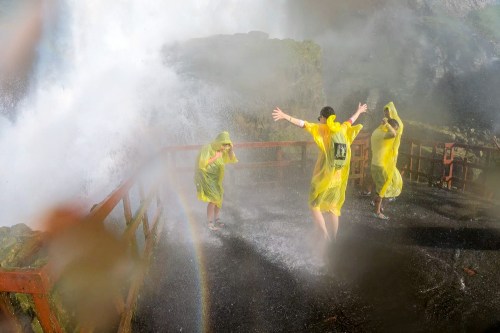
Warning: you will get soaked if you attempt to walk into the section of the wooden walkway called the “Hurricane Deck”… so dress accordingly. (It’s a big clue when they give everyone souvenir sandals and a plastic rain poncho to wear.)
If you’re planning your own trip, here are four other learnings from my experience…
#1
Canadian Money
The way I understand it, the going wisdom when you use your American credit card is to try to pay in U.S. dollars as opposed Canadian dollars. That’s supposed to end up costing you less in conversion fees. But I found that most of the mobile credit card terminals I came across slapped a 5% tax on top of my purchase if I selected the U.S. dollars option. So I ended up just charging in Canadian dollars.
#2
Tourism Tax
Speaking of taxes, did you know that businesses in Niagara Falls, Ontario have the choice to add an optional “Tourism Tax” to your purchase? And I don’t mean optional as in some businesses do it and others don’t (which is true).
I mean… you as the consumer have the option to pay it… or not. That’s right, you don’t have to pay the Tourism Tax. You just have to politely say you’d like to decline paying it. And then they take it off your bill.
(We got this tip from a waitress at a restaurant. Thank you!)
It’s actually an optional tourism fee that’s generally 3% of your bill, although it can be much more, and it looks like just another tax.
It’s not a tax. So, buyer beware.
#3
Taking Photos with All that Water
You might expect I took a ‘few’ pictures along the way. And let me tell you, it wasn’t difficult to take a magnificent photo by just pointing my camera in the right direction. That said, it was sometimes hard to capture exactly what I wanted.
Why?
In three words… all that water.
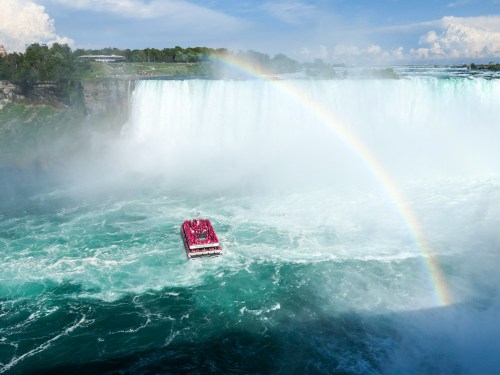
If you’re going to ride on the Maid of the Mist or the Canadian Hornblower boat, it’s about all that water… up close and spraying in your face and onto your camera.
Most of our best Niagara Falls moments were connected to the visceral experience of the power of Niagara Falls and the spray from all that water.
If you want to capture those moments with a photo, you’re going to need a waterproof camera. Using a newer iPhone? No problem. They’re waterproof.
But let me tell you, the touch screen doesn’t work so well when it’s dripping wet. And you really need to keep water droplets off the lens. Otherwise, your photos will look like your phone was covered in Vaseline. But quickly wiping off a tiny smartphone lens is hard to do when your fingers are all wet.
The only option I had was to find the driest piece of clothing I was wearing and then rub off the lens on the precious cotton fibers.
#4
The Limitations of your Smartphone
Ultimately, I think you should prepare for the need to take more action photos vs. scenic pictures. It’s easy to take a shot of Niagara Falls. It’s much harder to get the shot of your family experiencing Niagara Falls.
That said, I also had my GoPro with me, and that was a great choice. I don’t know about you, but as ‘bulletproof’ and waterproof as smartphones have become, they can still break if you drop them (even with a protective case).
And the risk of being so up-and-close to Niagara Falls is there’s no net… for either you or your smartphone. I wonder how many smartphones have been dropped by careless tourists and taken the infamous plunge.
I’ve happily used my GoPro with the expectation that one day, it could get swept away in one of our family adventures. As sad a moment as that will be, I’ll take solace that it wasn’t my iPhone.
Don’t Give Up
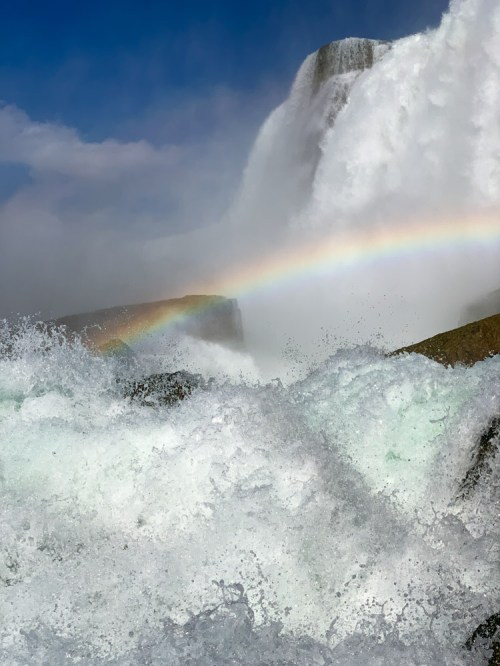
This all leads to my conclusion that to capture your experience as opposed to a few simple family selfies with Niagara Falls in the background… you’ll need to take lots of shots. Many will fall short… and if you’re lucky, you’ll capture a few gems.
That’s what I did, and I wasn’t entirely disappointed…

Keep it Real
It was ironic that all of the tourist activities include an almost mandatory green screen “say-cheese!” photo opportunity while you wait on line. And when you’re done, they’ve magically got your family digitally keyed into a beautiful shot of Niagara Falls… that you can buy.
While you might consider this option and not have to worry about risking your own gear to get a similar shot, you need to know that it’s not at all the same!
Smiling in front of a green wall does not at all approximate your truly disheveled, drenched and delighted look when experiencing the real moment.
Hold on tight to your camera, bring a dry cloth for the lens and go capture your moment!
Enjoy your adventure to Niagara Falls!





 At Home with Tech