At Home with Tech

Unlock the power of all your technology and learn how to master your photography, computers and smartphone.

Tag: family vacation

How to Prep Your Tech for a Vacation to Europe

The last thing you want when you’re on vacation is frustration with your tech. Either you leave it all at home and go off the grid or do some easy prep…

Bon Dia! My family and I are back from our little trip to Barcelona, and as you might expect, I ran across a few learnings that might be useful for your next holiday overseas…

Eight Tech Tips to Make Your Tech Work For You in Spain

1.
Before You Leave, Download Media for Local Viewing on Your iPad
I discovered that certain streaming video services didn’t work overseas. Amazon Prime Video failed the test. But Netflix worked like a champ! Before we left and without knowing which apps would work for sure, I downloaded a few episodes of my son’s current favorite video series… Amazon’s “Gortimer Gibbons Life on Normal Street.”
(My hedge paid off.)

2.
Not All Streaming Music Apps will Work Either
Pretty much the same story as video apps. Pandora choked in Barcelona, but Amazon Music worked just fine.
(I brought along my portable Logitech Bluetooth speaker to stream some local tunes during my morning coffee.)

3.
Avoid 3% Currency Conversion Fee When You Use Your Credit Card
The way to do that is pay in ‘Dollars’ instead of ‘Euros.’ I found that many of my MasterCard transactions in Barcelona offered the choice. You just have to tap the ‘Dollars’ option on the mobile terminal when it’s offered. (And sometimes for some reason, it wasn’t.)
Thank you, Mastercard for the suggestion.
(I had called customer service before I left to let Mastercard know I would be using the card in Barcelona.)

4.
Don’t Forget to Bring Your Earphones Onboard for Airplane Screen Time
I think by now… most planes that offer seatback monitor viewing are outfitted to use standard mini audio jacks. So your EarPods will work just fine. In fact, they’re a far superior option than using the free earbuds the airlines hand out with your free drink and snack.
(Actually, Delta fed us very nicely… and the stewardess also gave our son his very own Delta wings!)

5.
Clear Up Space on Your Smartphone for Vacation Photos and Videos
One quick way to find large files to remove is to delete a movie or two you’ve previously downloaded from the cloud.
(You can always reload them later.)
You really don’t want to run out of room on your smartphone when you’re snapping that amazing photo of la Sagrada Familia.


6.
Take an Extra Memory Card for Your Camera
If you also carry a separate camera beyond the one in your smartphone, (good for you!) the same rules apply as above. You don’t want your camera to run out of space either! Better yet… treat yourself and start with a brand new memory card! You’ve spent how much on your plane tickets? I say add an extra twenty bucks into your budget for a fresh flash card!

7.
Bring Portable Power to Keep Your Mobile Gear Going
Why risk it? Power stick for your smartphone. Extra battery for your camera. It’s a practical move but also designed to relieve stress. You’re on vacation… right?!

8.
Don’t Forget to Get Your Smartphone an International Plan Before You Leave
If you don’t, your next mobile bill is going to shock you. Alternatively, I don’t recommend hobbling your smartphone and only using the occasional free Wi-Fi hotspot to check in with your world. Again… you’re on vacation! Enjoy your smartphone if you want. Give it full access and stay connected.
(I signed up for the International Day Pass plan for $10/day from @AT&T.)

Release Your Photos!
And when you get back from your big trip, I’ve got one more suggestion for you…

Start sharing your pictures!
(People don’t care about last year’s vacation!)

How to Feed Video to any HDTV with Your iPhone or iPad

If you want the ability to take over any HDTV in the universe sporting an HDMI connection, your iPhone or iPad can actually do the trick directly without AirPlay mirroring through an Apple TV. Your portable Apple devices just need a little help….

If you want the ability to take over any HDTV in the universe sporting an HDMI connection, your iPhone or iPad can actually do the trick directly without AirPlay mirroring through an Apple TV. Your portable Apple devices just need a little help….

Once upon a time I would go on vacation with a small army of tech gear to create an on-demand multimedia viewing experience for my entire family.
(The irony here is there has never been any demand for this capability. But of course, that hasn’t stopped me.)

First I brought my Panasonic portable DVD player along with 8,012 Lester-documented cable combinations to handle any possible TV configuration in the wild.
(Only slight exaggeration)

When iPads showed up, that made my packing so much easier. Who can argue with bringing a portable TV the size of a book? You just have to make sure it’s preloaded with all the videos you’d need.
(Assuming there’s no local Wi-Fi to stream with)

Problem solved.
(Well, not quite…)

How Many People can Sit in Front of an iPad?
The remaining issue is only one person can comfortably sit in front of an iPad. Maybe two…
(Of course I’d bring an audio splitter for two sets of ear buds, so my wife and I could watch an episode of “Downton Abbey” while our toddler dozed. But in those days, our little guy didn’t really doze, and by the time he got to sleep in a new hotel room, it was time for us to get some Z’s too!)

But recently I was introduced to a more advanced solution by some friends using their own iPad. This family is very much at home with their tech….
(I swear they come from an alternate universe where consumer technology always works.)

Vacationing with the Jetsons
Earlier this summer our two families took a short vacation together at a little beach house in Rhode Island. On the second morning, the adults were busily preparing breakfast.

The kids? Well, they were experiencing some early morning energy ‘bursts.’ They needed some focusing in this new and somewhat compact space. I’m not proud to admit this, but I suggested powering up thirty minutes of Disney Junior programming on my iPad Air 2.

I looked around for the 9.7” screen, knowing it wouldn’t be an ideal solution for our three young viewers.
(two five-year-old boys and a three-year-old girl)

Simultaneously, the other dad reached for a compact case of cables that was conveniently positioned by the large, flat screen TV set in the living room. For a second, I had a flashback to my own monster pile of travelling cables I had long ago abandoned. But it was immediately evident that this moment was about to reveal something entirely different.

A solution that made real sense…

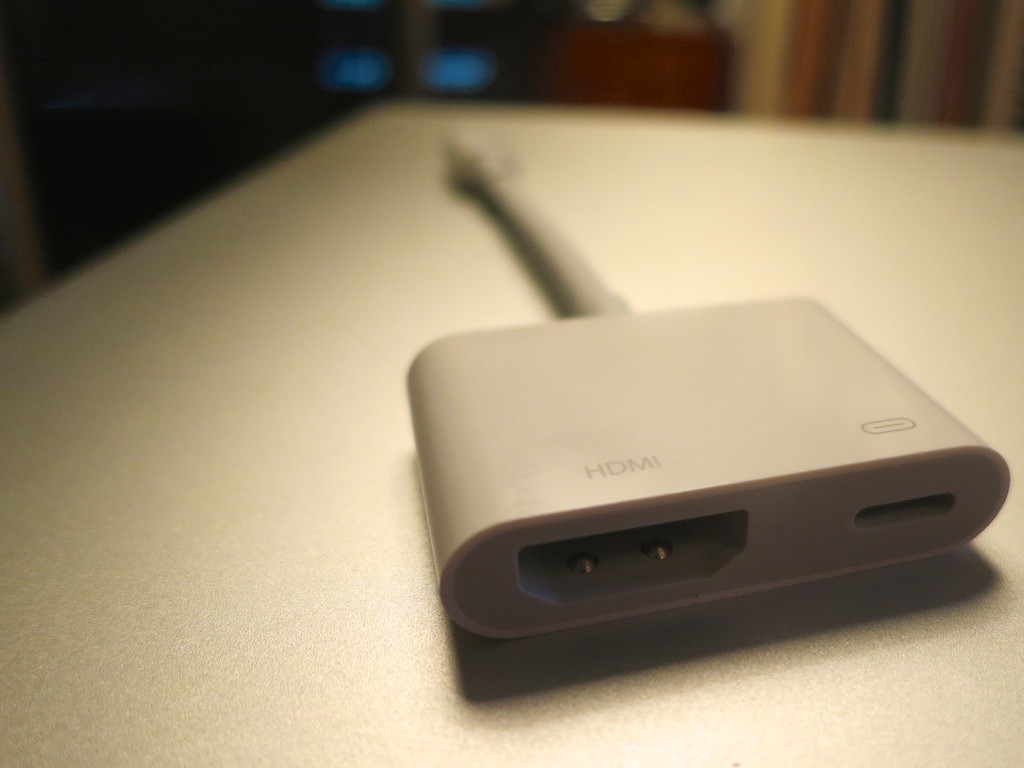
The dad carefully revealed a sleek, white adapter cable. It was barely 4.5”” long. More of a mini adapter box with a short Apple lightning cable attached to it.
(What was this?!)

Apple Lightning Digital AV Adapter

It was Apple’s Lightning Digital AV Adapter that allows you to mirror the display and audio from your iPad or iPhone to an HDMI-fed TV or screen.

It looked so simple….
(of course)

It was constructed with a lightning connector on one end for your source Apple device, and a little white rectangle on the other with a hole for a HDMI cable and a hole for a second lighting connector to run power from a plug.
(Keeping your Apple device flush with energy)

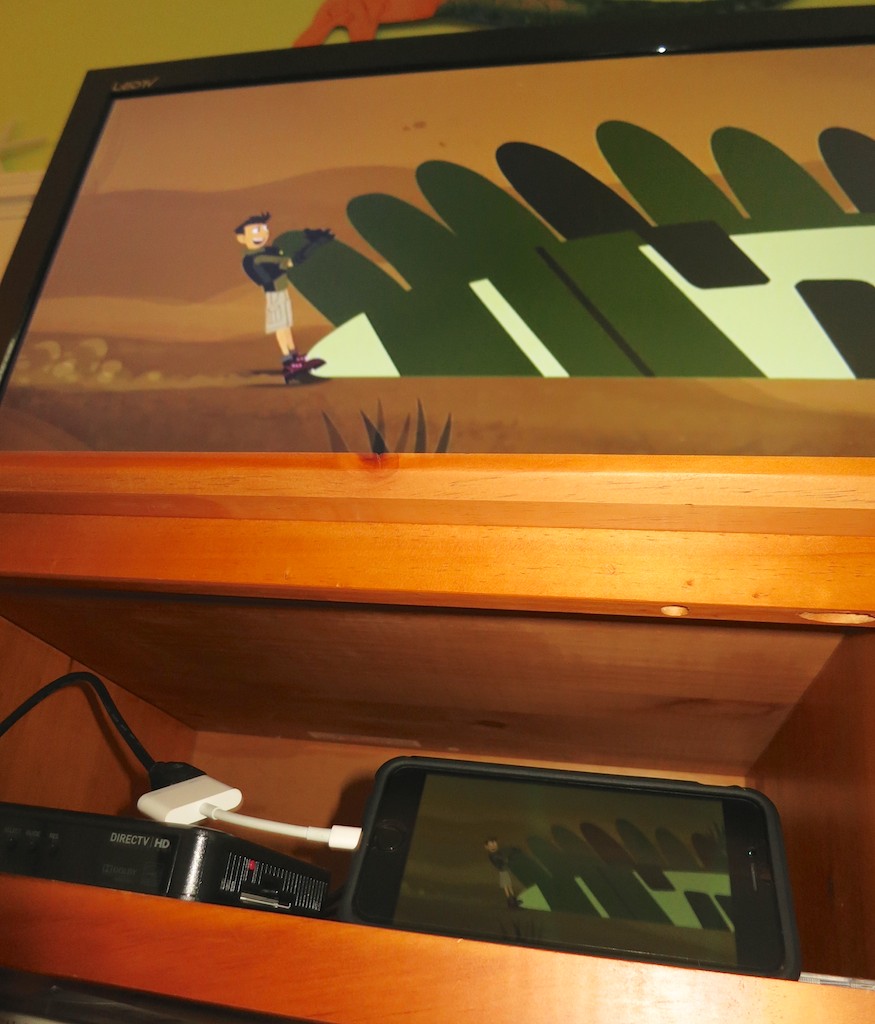
I watched as my friend effortlessly performed a little tech surgery, slipping the HDMI cable out of the back of the DIRECTV box and connecting it to his iPad. And then, as if by magic, the iPad took control of the TV.

I think I heard the three children coo simultaneously. They immediately settled in on the couch to watch their favorite Disney show in this newly created movie theater, powered by the iPad… streaming off of the house’s Wi-Fi.

I started to drool….

Late to the Party
Look, this Lightning Digital AV Adapter isn’t especially new.
Deep down, I think I knew it’s been available for the past couple years. I just hadn’t entirely understood how it could help me.

But to see it in action during a live field test…
Brilliant!

In many ways you can think of it as your own portable Apple TV.
(Without the need for AirPlay Mirroring)

Sticker Shock
But this magical convenience comes at a price.

Apple sells it for $49.
(Really? For just a cable…?)

Yup.

Of course, I Googled about, hoping to find another manufacturer with a knock-off at a lower price point.

Nope.
(Not even AmazonBasics)

I did some additional research and came upon the reason…

Apparently, this adapter is doing some really heavy lifting converting the signal from Apple’s native H264 video format to an HDMI signal for your HDTV. Apparently, if you took a buzz saw to the white adapter box, you’d find something that approximates a mini computer inside.

The exact process of the video conversation is something of a mystery, and whether the video quality is entirely maintained is a bit of a debate online.

All I care about is that it works.
And it’s 49 bucks.

To ease the painful price point a bit, B&H Photo has it for less- $44.99.

Click.

Ready for the Next Vacation
So I now own the ability to take over any TV I come across in the universe with my iPhone 6 Plus or iPad.
(An iPod touch with a Lightning connector works too.)

Will I ever actually do that?
Just knowing I can is worth the two Jacksons.

Call me crazy…