
How Much Screen Time Should Your Child Get?
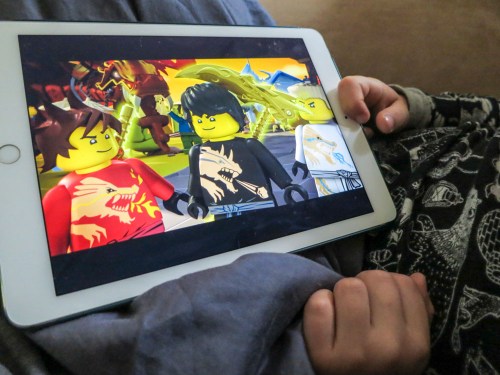
Once upon a time, my six-year-old son lived happily in a limited universe of video exposure. Now, he’s asking for more. What’s a parent to do…?
How much TV did you watch when you were a kid? As for me… I wasn’t allowed a whole lot of television, especially during my elementary school years.
That said, I do remember watching “The Wonderful World of Disney” on Sunday nights after I took a bath and got into my pajamas. There was also “Mutual of Omaha’s Wild Kingdom,” which my parents green-lit.
A few years later, I began to stretch when I got my TV time. For example, I watched the half-hour animated “Star Trek” series on Saturday mornings if I had made a noticeable dent in my homework.
I recall a few other shows, including “H.R. PuffnStuf,” “The Monkees,” and the original “Star Trek,” which was on WPIX TV in reruns at an inconvenient time slot on Saturdays at 6pm… my family’s dinner hour. So my mother had to figure out some fancy dinner scheduling to allow me to sneak into my parent’s bedroom to watch the next adventure of the crew of the Starship Enterprise while my dad ate his dinner.
(Remember, there was a time before VCRs existed.)
Lean TV Diet
Certain ‘educational’ shows also passed muster with my mom. A few were fun like “Sesame Street.” Others were kind of boring… but I was told they were good for me…so I struggled through.
I also remember the occasional Sunday afternoon black and white movie ‘classic’ on TV.
(Like 1939’s “The Hunchback of Notre Dame” with Charles Laughton.)
But I think it’s fair to say, my relationship with TV viewing when I was young was fairly limited.
(It was certainly not an all-you-can-eat buffet.)
Not an Expert
So I take this past experience and try to use it today for reference as my wife and I try to figure out how much screen time our-six-year-old son should be allowed to watch a week.
It’s such a complicated media landscape with the potential for my son to access so much screen exposure both at home and at school.
I know I’m not the first parent to contemplate such questions, and I’ve got to admit I don’t have rock-solid answers.
I expect this is going to be something of a Pandora’s box, but let me share what is most certainly NOT the final word on this topic.
(It’s extremely fair to say it’s a work in progress.)
I gladly invite other opinions to help guide my own perspective…
But a reader brought the topic to me last week.
So I thought I’d give it a go…
Consistency Matters
The core of my answer over the past couple of years has simply been this:
- Disney Junior app
(“Jake and the Neverland Pirates,” “Miles from Tomorrowland,”
and “Octonauts”) - PBS Kids app
(“Wild Kratts”) - On my iPad
- Only on weekend mornings before breakfast
But as our son has gotten older, that simple recipe has been challenged…
First off, the length of time between when he pops out of bed and when we end up having breakfast can vary anywhere between 45 and 90 minutes.
That variance creates an inconsistent number of shows he gets to watch from week to week. And that doesn’t work so well for him.
So we’ve had to adjust the morning plan to a specific and consistent number of videos.
Okay… that particular adjustment wasn’t so hard to handle.
But…
Outside Influences
Recently, he’s started asking about programming that isn’t quite age appropriate for him yet. I imagine he’s simply been exposed to the existence of this other content through conversations with his kindergarten friends.
My wife and I have successfully held the line on these requests and not introduced other content simply because other kids in his class are talking about it.
For example, he’s mentioned “Scooby-Doo and the Alien Invaders” a few times. Not that Scooby-Doo and Shaggy are really going to rot his brain, but I know there’s better content out there.
LEGO Assault
More challenging scenarios have developed when he’s personally uncovered new video opportunities. This has recently begun happening through the main page of Netflix Kids.
(‘Top picks for kids’)
Then, he’s really pumped up.
The major example to date has been through the universe of “LEGO Ninjago.”
A few months back, he ran into one of the Ninjago books at the library and was immediately enchanted with the four little Lego Ninja warriors and their Sensei Wu. It didn’t take long for him to figure out that there was a companion animated LEGO series available on Netflix Kids.
(“LEGO Ninjago: Masters of Spinjitzu”)
And yes, after he found it, we tried out the first episode together.
Guess, what…?
It was like eating sugar for the first time.
If we let him, he would have binge-watched all three seasons on Netflix on that first day. He really loved the continuing storyline.
(Seasons 1-6 are available on Cartoon Network.)
We wrestled a bit over how many episodes he could watch per sitting.
But even one or two episodes a pop totally disrupted the peaceful pace and balance of his previous media consumption patterns.
(We had all been cast out of our gentle Garden of Media Eden.)
After he finished Ninjago, Netflix offered up a “LEGO Bionicles” series (“The Journey to One”) based on the Bionicles he loves to build.
(Netflix, please stop being so helpful!)
Parental Guidance Required
I gave it a thumbs up, but I had my doubts…
Commonsensemedia.org gives this Bionicles’ series a reasonable review, although they do rate it as age 7+.
(There’s a lot of cartoon robot fighting.)
Technically, by that standard, our boy is still a year out from when he should be watching this level of content.
But I also recognize that children mature at different rates, and their ability to absorb challenging content and imagery varies.
(Ultimately, I was okay with my six year old and “The Journey to One.”)
I know a couple parents who took their six year olds to “Star Wars: The Force Awakens.” My boy is nowhere near ready for that level of screen intensity. I’m certainly eager to introduce him to the Force, but it will first be through the much gentler “A New Hope.”
(Still, Darth Vader is a pretty scary dude.)
Family Movie Night
One successful idea my wife and I have used to guide the direction of new video content for our son has been the creation of our ‘family movie night.’
I put the iPad away and power up our hulking HDTV on the occasional Saturday…
We treat it like something of an event, and we all settle in together to watch an age-appropriate movie that my wife and I choose.
My son has generally enjoyed family movie night on the big screen, although he’s still getting used to the idea of being presented with ‘unknown’ content.
One time, he wasn’t so sure he would like 2006’s “Charlotte’s Web.”
(There weren’t any cool robots in it.) But this irresistible movie with an all-star voice cast for the animals quickly melted away any doubts.
Questioning the Rules
So I know my wife and I are still at the beginning of our journey to guide my son through a limitless supply of video opportunities and to help him consume ‘quality’ and age-appropriate content during his early years.
I imagine what I’ve documented here might draw a few opinions. Some may point out the discrepancy between my own upbringing and the relative loose set of rules I’ve employed to date.
Guilty.
(Welcome to parenthood.)
But if sharing my story has been of assistance to anyone with some of the same questions, then perhaps I’ve contributed my small piece towards the greater good.
Let me know your thoughts…

 At Home with Tech