At Home with Tech

Unlock the power of all your technology and learn how to master your photography, computers and smartphone.

Tag: iPhone battery

Is It Bad to Fully Charge your iPhone Every Night?
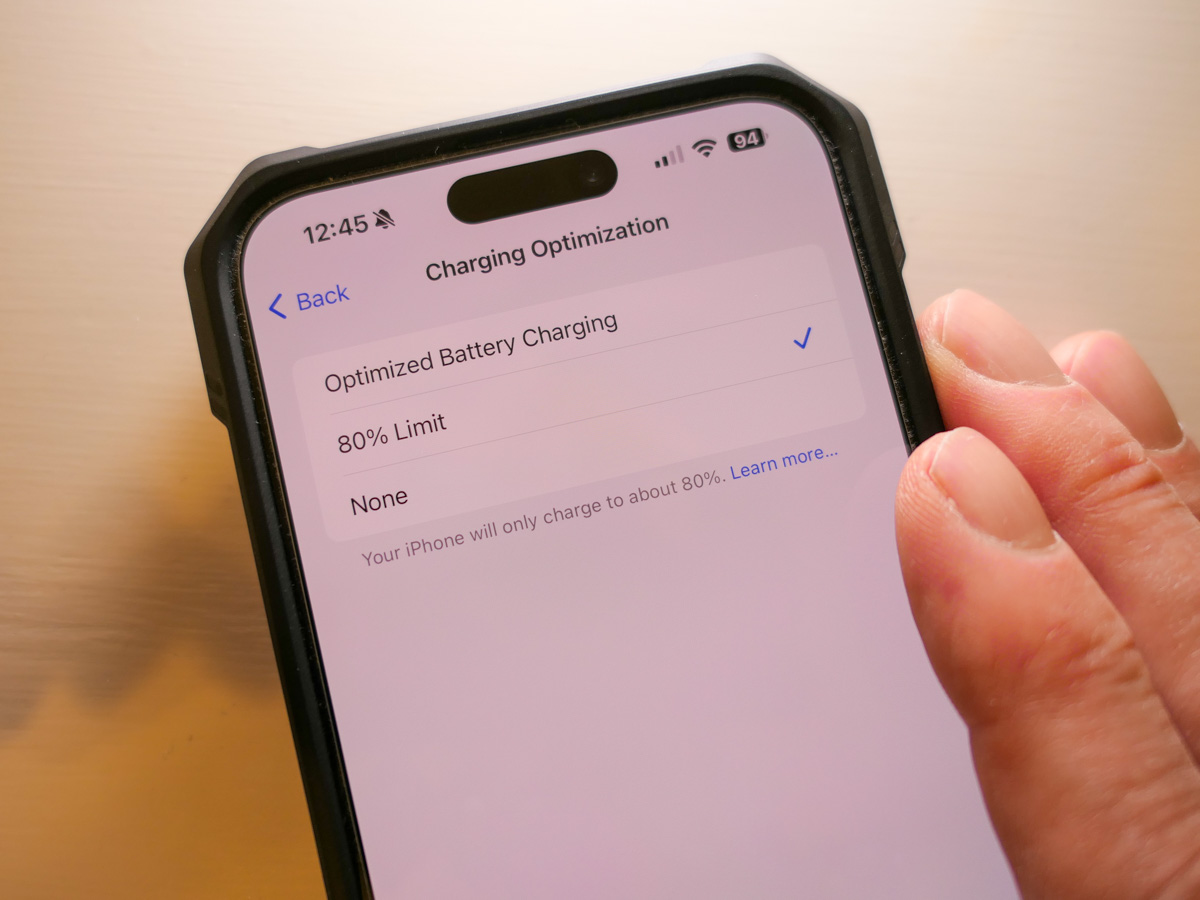
With new iPhones, now you have the option to throttle back the battery’s charging limit to just 80%. Is that good? Let’s find out.

Once upon a time, rechargeable batteries, however magical at the time, came with ‘memory’ problems. If you kept topping off your device with a bit electrical juice every day without really using the rechargeable battery, it would ‘forget’ how to fully recharge.

Today, Apple says of its lithium-ion iPhone batteries, “You can charge your iPhone every night even if the battery isn’t fully depleted.”

Well, that’s progress. So, what’s the problem here?

Should You Charge your iPhone to 100% Each Night?
On the one hand, yes, our friends from Apple say it’s okay to charge up your iPhone’s lithium-ion battery every night.

On the other hand, Apple has now offered a new feature in its iPhone 15 line to limit charging to just 80% to help reduce the drain on battery life.

The reality has always been that full-charge cycles accelerate the eventual reduction of an iPhone’s lithium-ion battery’s lifespan.

In fact, fully charging up and completing discharging your iPhone’s battery… that’s actually bad. Charging up to just 80% will, in fact help your battery last longer.

The 80% Solution
Here’s how you activate the 80% Limit mode:
Click:

  • Settings
  • Battery
  • Battery Health & Charging

Choose between:

  • Optimized Battery Charging
  • 80% Limit (sometimes it still goes to 100%)
  • None

Apple’s default setting is – Optimized Battery Charging

The Value of Optimized Battery Charging
So, yes, you can choose the 80% Limit setting, but Apple also talks a lot on its support pages about how useful the Optimized Battery Charging setting can be to maintain your iPhone battery’s health.

How Optimized Battery Charging actually works… I do find confusing. Something about learning algorithms based on your use. The setting doesn’t always get your iPhone’s charge level back to 100%, and it can delay when the actual charging is happening overnight. (I think there could be some borrowed “Flux Capacitor” or “Borg” tech involved. Who knows.)

But it’s all supposed to be good for your iPhone’s battery. (And that’s all that really matters, right?)

Plus, the name implies it’s the best setting. It’s ‘optimized.’ And it’s the default setting.
What more can you ask for?

80% is Technically Better than 100%
So why is there now the 80% setting? Well, it’s not totally clear to me other than charging up to 100% is simply not optimal for a lithium-ion battery. (Yes, there’s some irony here.)

I imagine the 80% solution is technically best for your phone’s battery, but then you’re constantly denying yourself the dopamine hit when you see that 100% glow to start your day.

Optimized 100% is Better than Regular 100%
So ‘optimized’ charging is designed to minimize the inevitable long-term damage of the 100% solution.

Optimize. Yes. That’s the camp I’m in.

Live your life. Minimize the damage.

As nuanced as all this may feel, what is crystal clear is to never go with the third battery-health option – ‘None.’

Then, you’re just charging up… old school. You’ve got yourself the 100% solution with no benefits from optimization. Your iPhone’s battery will flame out (not literally) more quickly.

Optimize Me!
So where does all of this leave us?

  • Is it bad to charge your iPhone to 100% every night. YES.
  • Can Apple minimize that problem by optimizing it? YES.
  • Should you go ahead and keep charging every night in Optimized Charging mode? YES.
  • Is that better than the 80% Solution? PROBABLY NOT.

But where’s the fun in 80% of anything?
I want 100%!

Plus, I want it to be optimized, even if it’s just a word to make me feel better about making the wrong choice. Well, second best.

Happy charging.
How to Make Your Old iPhone Act Like New

Is your iPhone having trouble holding a charge? If you’ve owned it for long enough, that’s inevitable. Now it’s time to take your phone on a little trip…

Is your iPhone having trouble holding a charge? If you’ve owned it for long enough, that’s inevitable. Now it’s time to take your phone on a little trip…

My iPhone was in big trouble. After not even two and a half years, the battery in my old iPhone 6 Plus was showing some serious wear.

It just couldn’t make it as long anymore without a little pick me up. And never for more than a day. Sometimes it couldn’t even get to lunch. And then there were the times the battery level would suddenly go from 30% to zero.
(What?!)

In the cold… forget it. My iPhone would shut down faster than you can say,
“I am one with the Force, and the Force is with me,” five times fast.

Time to Make the Doctor’s Appointment
So I brought my ailing companion to the Genius Bar at the Apple Store. The Genius ran the diagnostics on the battery and reported it was almost due for replacement… but not quite yet. I asked if it would last me until this fall.
(Yeah, I’m planning on pulling the trigger on the latest and greatest then.)

“Definitely not,” she said.

“How much for a new battery?”

“Eighty dollars.”

Huh.
So the way I saw it, I had a choice:

I could nurse my iPhone with a power drip and carry around an external battery or stay close to power outlets for as long as possible. And then rush back to the Apple Store for the operation when there was no longer an alternative…

Or I could electively do the battery swap out now.

Is that even a choice?

The Cost of Living in a Digital World
Look, no battery lasts forever.
It would have been nice for my iPhone to go a full three years on its original power cell, but it’s not like I didn’t get a lot of use out of it.

Is there any other device you depend more on every day?
Exactly.

Is $80 a lot of money for a silly battery? At one level… yes.
But considering the original cost of the iPhone, not at all.

Think of it as a simple maintenance cost…
(The thing doesn’t run on Pixie Dust.)

Tech Zen Restored
So my iPhone was whisked away to the back of the Apple Store for a ‘Battery Replaceadectamy.’
(No, you can’t do it yourself… or at least, you’re not supposed to.)

Now… my iPhone is back to its old self again.
And I’m a whole lot happier… not having to stress about all this.

Look at all of the time I’ve brought back into my life not having to always figure out how to feed my smartphone a little more juice.

I think it’s the best eighty bucks I’ve ever spent.

Brother, Can You Spare a Battery to Power my Phone Call?

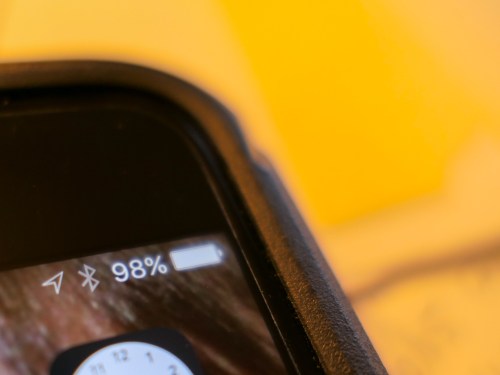
Is this what your smartphone’s battery icon displays at 3:30pm? You really need help from a Mophie battery case.

Is this what your smartphone’s battery icon displays at 2:55pm? You really need help from a Mophie battery case.

Red Alert!
Smartphone batteries can’t get you though your day anymore.
Everybody out there seems to need a battery with more ‘mAh’ capacity.
(‘milliamp hour’)

Whenever someone shows up for a meeting with me,
the first comment I often get after “Hello!” is
“Can I plug in my phone somewhere?”

Worse yet, they often ask if I can loan them my iPhone charger for a quick hit.
It feels like they’re bumming a digital cigarette off me.
Now, I’m their personal power refueling station?!

Your Smartphone is Hungry!
This isn’t a new problem, but it seems to be getting worse.

Once upon a time, I could get through two days on one iPhone charge.
Then, as I discovered more apps to use, I wasn’t so sure.
So I made it a point to juice up every night.

Now with iOS 7, my little partner seems even hungrier.
I watch its battery percentage icon drain away throughout the day, and I often have to ration my afternoon email check-ins to keep the phone alive until I make it home.

And I don’t really consider myself a power user…

Better Keep that Smartphone in your Pocket
I think the good news is it’s okay to admit you can’t get through your day without a little extra juice…
I’ve always felt I was somehow hiding this deep, dark secret that I couldn’t keep my phone going all day long.

But there’s really no shame in it.
You’re not some sort of malcontent who can’t control your impulses to overuse your smartphone.
(If you are… sorry for calling you out!)

Sure, there are ways to cut back on the power drain:

  • Close unused apps
  • Turn off Wi-Fi and Bluetooth if your not using them
  • Don’t check your email with a poor signal
    (That makes your phone work harder.)

But the truth today seems to be that smartphone batteries just can’t keep up with the normal drain that’s put on them.

So until that problem improves, you’re going to have to take matters into your own hands.

You Need Some Portable Power
Last year, I got the tiny Innergie PocketCell for my iPhone to help keep it alive on the road with me.

This elegant $60 white ‘stick’ is small enough to slip into your back pocket and is great as a portable power back-up solution for lots of your hungry digital devices.  The one big downside is you always have to carry it around with you.

Plus, it’s cumbersome to set up your little digital MASH unit in the wild and execute a power transfusion whenever your smartphone runs low.

Feed your Digital Beast!
So I finally decided it was time to get with the program and upgrade to an augmented and elegant onboard battery solution…

Unfortunately, smartphone manufacturers don’t offer this tech through their own brands.  (That would suggest their technologies are somehow lacking.)

The added juice you need comes hidden in the bodies of
third-party smartphone battery cases.

And the good news is… There’s a lot of choice out there for you.

Size Doesn’t Matter
Sure, battery cases will inevitably make your smartphone’s footprint a bit larger.
But today, that’s not so much of an issue.
In fact, if anything, bigger is better.
iPhone users are drooling over all the larger screens out there.
Have you seen the size of these Phablets?
They’re huge!

So a little extra heft is really not a deal breaker anymore…

Mighty Mophie to the Rescue
A digitally enlightened friend of mine has happily used
the Mophie Juice Pack Plus.
So instead of going through my usual painstaking research before pulling the trigger on a battery case, I quickly settled on the Mophie.

Mophie_juice_pack_plus

Call me impulsive.
Or maybe it’s just the time of year, where you don’t have a lot of spare time to brood over the perfect power accessory for your smartphone.
(If you do, you should know that Mophie also offers a couple other design flavors.)

All my right-brain decision-making aside, Mophie is still highly regarded.

It’s Going to Cost You
Of course there’s a catch…
Convenient battery back up from Mophie doesn’t come cheap:

  • $100 to fuel the 4/4s
  • $120 for the 5/5S
  • $100 if you’ve got the Samsung Galaxy S4

But can you really put a price on having enough power to get you through your day?  Mophie claims to almost double the runtime of your iPhone.
Sweet!

Discovering a Great Last-Minute Tech Gift
What choice do we flawed, digitally dependent humans really have?

  • If you’re going to get caught on a few long phone calls throughout the day
  • If you like to stream a little Hulu video or watch part of a movie you downloaded from iTunes
  • If you pay a fair amount of attention to your email
  • And if you don’t want to plot your day based on where you can plug in

…You really need one of these battery cases.

And who wants to spend this time of year worrying about your power limitations?  Open up your brain space for more important concerns.

Like….
Time is running out and you don’t have all your presents yet!?
If only it was easy to find a great last-minute tech gift.
Wait a minute!

Got to run…