At Home with Tech

Unlock the power of all your technology and learn how to master your photography, computers and smartphone.

Tag: iPhone

How Parents Can Take Control of Notifications on the Family iPad

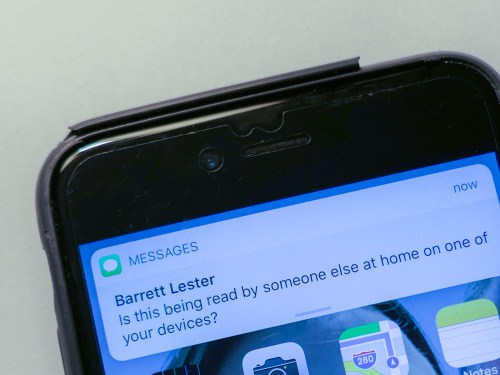
If your children are starting to read iMessages on your iPad or iPhone that aren’t meant for them, it’s probably time to change the settings in your device. Here’s how…

So, my almost eight-year-old is playing Minecraft on my iPad in the living room, and he turns to me and says, “Mommy is writing me a message!”

“What?!”

I’m a little alarmed, because even though my wife wasn’t at home, she never uses electronic communications with our son and certainly not using something like Minecraft.
(You can probably guess that I’ve been thinking a lot lately about who he will be interacting with when he eventually engages in multiplayer video games online.)

I jump over to take a look.

Phew.

It’s a simple text message banner that popped up at the top of the iPad screen from my wife to me about camp plans for our second grader this summer.

It has absolutely nothing to do with the Minecraft platform.

The Early Taste of a Texting Stream
My wife referenced our son’s name in the text, which is why he mistakenly thought it was written to him.

Yes, he can read now, but he got confused by the style of my wife’s texting banter with me.
(Plus, it’s probably one of the first texts that he’s encountered.)

So, this wasn’t really a problem other than an iMessage to my iPhone also showing up on my linked iPad that my son happened to be using.

Ironically that feature is supposed to be a nice iOS bonus provided by Apple.
But it was clearly time to turn the option off on my iPad.

Our son doesn’t need to be privy to the Lester family texting stream…
(Well, at least… not yet!)

How to Turn Off Pop-Up Text Banners
Using iOS 11.3 –

  • Tap the ‘Settings’ gear icon
  • Tap ‘Notifications’
  • Tap ‘Show Previews’
    You’ll probably find that it’s defaulted to ‘Always’
  • Tap and change to ‘Never’

But that’s not all you have to do…

There is No Global ‘Off’ Switch
I decided to visit the Apple Store in Grand Central Terminal to gather a little more advice.

An Apple Genius told me that you also have to individually turn off each app from proactively trying to send you banner notifications on your device.
(He mentioned that detail to me several times. I imagine I’m not the only one who might be confused by the extra step.)

To ‘completely’ halt your iMessage banners…
While in Notifications, go down your list of apps until you find ‘Messages.’

  • Tap ‘Messages’
  • In ‘Allow Notifications,’ slide the little circle to the ‘off’ position

And that will finally get the job done!

Now, you’ve got to repeat this step for your other apps…

There are a few other settings to consider if you want to be a little less draconian about muffling your iPad or iPhone, but I was satisfied with hobbling my iPad to keep my young Padawan away from the constant buzz of the Net. My iPhone was providing that Borg-like public service to me quite sufficiently, thank you very much.
(I know I’m mixing my science fiction metaphors.)

But then I began to think about my own experience with my iPhone’s many chatty apps…

Less is More
After considering the issue for a moment, I decided that I was, in fact, being interrupted by way too many banners from apps wanting to share ‘critical’ news.

Perhaps I should take a few minutes to review all of them and silence the ones I didn’t want to hear from all of the time.

And that’s exactly what I did!

Of course, I kept ‘Messages’ fully activated, but I did turn off ‘Repeat Alerts’ from ‘Once’ to ‘Never.’
(I usually get it the first time.)

You Can’t Hide Your Child from the Connected World Forever
Now, I find that my iPhone is a little less ‘disruptive.’

My iPad shares nothing from the outside world with my son.

And I fully acknowledge that this is only the beginning.
It’s a long journey ahead for me and my boy.
(I know that as a parent, I can’t keep the ‘off switch’ activated forever…)

My son has asked for multiplayer mode in Minecraft for his 8th birthday… so he can play remotely with his friends.

To be continued…

5 Camping Tips from a City Boy

Thinking of going camping for the first time? On the fence? Here’s the good news: You don’t have to entirely ‘get away from it all’ if you don’t want to. Here’s how to keep your mobile tech alive and well…

I was a city boy growing up. I was raised on the Upper East Side of Manhattan. My only real exposure to nature was camp outside of the city. And that wasn’t camping.

My wife loves camping.
She introduced me to its allure. I gave it a shot and found it wasn’t so bad.
(Although we endured a terrible thunderstorm over our first night.)

We did a bit of camping, but it wasn’t a ‘thing’ for us. But then our son came along…

Two years ago, we tried family camping with our then five-year-old boy. Specifically, at the annual Grey Fox Bluegrass Festival in Oak Hill, New York.

I think the sweet spot for any family camping location is to go somewhere that already has built-in activities to do as a family. So, the idea of a music festival that includes a family tent for kids was perfect.

Our kid really digged it. The concept of pitching your own little ‘house.’ It was magical for him.

Now, family camping is absolutely a ‘thing’ for us.
Grey Fox has become an annual event…
(We just returned from our third Grey Fox camping adventure.)

So I think it’s fair to say that today ‘we’ love camping.

But…

My iPhone Goes Camping Too
I haven’t totally played fair. I’ve also spent the last couple of years figuring out technology tricks on how to stay ‘connected’ while on our camping excursions.
(I’m sure purists might fault me for this intention.)

My reality is I simply can’t leave my iPhone behind. My life doesn’t easily let me disappear for a few days. If my 84-year-old father needs to reach me, I’ve got to be able to answer the call.

Fortunately, the giant field we camp on at Grey Fox gets one to two bars of AT&T cell coverage.
(Other service providers are noticeably absent.)
So, my iPhone didn’t fall off the grid.

The bigger challenge was keeping my iPhone powered up.
(Plus, my wife’s iPhone)

Looking to the Sun with Goal Zero
As long as the sun shines, it’s a great idea to bring a portable battery station that recharges with a solar panel to nurse multiple smartphones over the course of days. A while back, I did my research and decided to go with some nifty gear made by Goal Zero.

Goal Zero Sherpa 50 Power Pack
Capacity: 50Wh, 5,200mAH
$178.48 on Amazon

I paired it with the Goal Zero Nomad 20 Solar Panel, which has a 20W solar capacity.
$159 on Amazon

And I added in the Light-A-Life 350 LED
$32.00 on Amazon
to illuminate the inside of our REI Kingdom 400 tent.

Goal Zero Upgrade
We were camping with another family this year, and I found it especially convenient that the other dad was also at home with his tech.

My friend brought the newer and more powerful models that Goal Zero offers:

The Goal Zero Yeti 150 Portable Power Station, which provides 150Wh and 14Ah of battery power
$199 on Amazon

He paired it with the Goal Zero Nomad 28 Plus Solar Panel, which has a 28W solar capacity.

Important note: Solar-powered battery solutions are not cheap!

You’ll notice that the Sherpa 50 and Yeti 150 are essentially the same price, but the Yeti 150 gives you a much bigger bang for the buck. The only downside to the Yeti 150 compared to the Sherpa is the Yeti is much bigger. But if you’re car camping, that shouldn’t really be a consideration.

We tethered the two Nomad solar panels together and successfully created our very own solar ‘FrankenPower’ Grid.

It worked great and easily kept four iPhones going over four days with plenty of power to spare.


A Cheaper Choice
Over the course of multiple camping excursions, Goal Zero gear becomes less expensive per use. But if you want a cheaper way to power your gear on your first camping adventure, just bring a few basic (inexpensive) power sticks.
(You just need to bring enough since you won’t have a solar recharging capability.)

Last year, I picked up this beefy RAVPower battery pack as a backup option-
RAVPower 26800 Battery Pack (26800mAh)
$49.99 on Amazon
(It has three USB ports and is rated to recharge an iPhone 7 nine times!)

So, you can probably get away with spending less than fifty bucks to power your smartphones on a family camping trip. It all depends on your needs and your desire to generate additional power in the field.

Glamping
You might be thinking about now… “Maybe Barrett doesn’t really love camping if all he talks about is how to maintain his ‘normal’ life with all of his companion tech.”

And you might be right.

But I’ve decided that for me it’s not about loving the camping experience.
It’s about proving to myself that I actually can camp. And enjoying the fact that I can step out of my comfort zone and rough it for a few days.

To successfully ‘survive’ in the ‘wild’ and provide your family dry shelter… that’s a useful skill.
(Just don’t take all the credit when your more-qualified spouse is also there pitching the tent.)

And to MacGyver your mobile tech to stay connected with the world…That can make you feel a tad clever, although I guess that’s not in the spirt of true camping.

Perhaps this all falls under the category of ‘glamping.’
(Guilty as charged!)

Tips to Take with You
The truth is I’ve not really taken my family that far away from civilization.
(Our car was located a whopping fifteen feet away from our pitched tent.)

So, I’m not pretending to be some kind of Grizzly Adams.

The point of my story is you can teach a city boy some new tricks.

And for all of you out there who think they may hate camping, remember there can be a lot more to the experience than just spending a few days in a tent.

To review, here are my 5 family car-camping tips that will brighten your days in the ‘wild.’

  • As long as there’s a bar of cell phone coverage out there, you don’t have to disconnect from the world if you don’t want to.
  • Just bring battery and/or solar powered backup to keep your smartphones going.
  • Camp with someone who knows more about camping than you do.
  • Camp near a festival or event that can fill your day with baked-in activities for the family.
  • Don’t stress. Remember, you’re really only fifteen feet away from the rest of your world.
    (As long as your car’s battery doesn’t die)

Jump in… the water’s warm!

What is Apple CarPlay?

If you step into a newer vehicle and suddenly feel like your iPhone has been taken over by the car’s computer system, don’t freak out (like I did). There’s an explanation…

So I was riding as a passenger in a car, minding my own business. Except I wanted to top off the juice in my iPhone. I noticed a USB plug, and I had a Lightning cable with me. So I took the liberty to plug in and power up.

Then my father happened to call me. I put my iPhone up to my ear to talk.

“Hey, Dad! What’s doing?”

To my surprise, I heard my father’s response blare loudly through the car’s speakers!

I wasn’t too keen on publicly sharing our conversation.
(My 84-year-old father can sometimes be a little cranky.)

So I said, “Hold on for a moment, Dad…”

I checked my iPhone’s Wi-Fi connection. Had it somehow paired with the car’s speaker system?
No.

Maybe Bluetooth?
Nope.

Then how the heck was my iPhone connected to this mysterious ‘Car-Net?!’

Plugging into a Strange Car
Of course, I was missing the obvious connection. Remember, I had just jacked in my iPhone with the Lighting cable.

I looked at the cable and yanked it out to sever the connection as if I were taking an ax to a hive of cables powering a massive super computer that had just been hacked.

My iPhone took back its audio, and I had my private chat with my dad.
He needed some ‘tech support’ on how to mute and unmute the ringer on his own iPhone.
(Sigh)

Hello, CarPlay
So what the heck had just happened to me and my trusty iPhone?

Well, if you don’t own a newer model car, you may not know this, but I had simply experienced the iPhone capability called, ‘Apple CarPlay.’

Actually, it’s more about the capability of your car… if it has a built-in touchscreen that can ‘talk’ to your iPhone.
(The presence of a touchscreen does not, in itself, guarantee CarPlay compatibility.)

If your vehicle works with CarPlay, the touchscreen will display certain native iPhone apps like Maps, Phone, Messages, and Music, as well as other apps like Audible, Pandora and Amazon Music.
(It’s an easier and safer way to use your iPhone in the car.)

The apps have been reimagined for your car’s display.
(It’s not a mirror of your iPhone’s screen.)

Your car’s buttons and knobs can also be used, such as when you want to use Siri for voice control.

Newer Cars Only
Again, older wheels can’t play with CarPlay.
I love my older Toyota RAV4, but it only knows how to ‘CarDrive.’

Yes, I’ve got tech envy.
(It was clear there were tech stunts it couldn’t do when I had to MacGyver it to stream music from my iPhone via Bluetooth.)

Most auto manufacturers began integrating CarPlay in 2016 and 2017, and some are still ramping up.
(For example: 2018 for the Subaru Outback and Volvo XC60.)

Plus, CarPlay only works with iPhone 5 or newer models.

Some vehicles support CarPlay via a Lightning USB connection; others can do the trick wirelessly.

Aftermarket Solutions
But all is not lost… There are aftermarket CarPlay systems that you can install in your car’s dashboard. Apple lists Alpine, Carion, Kenwood, Pioneer and Sony for suggested systems.

The price tag ranges from $400 to over $1,000.
Zac Hall from 9to5Mac has this review of his favorites.

Add It to the Shopping List
So if you’re driving, CarPlay is clearly an important upgrade when you want to interface with your iPhone.

But if you’re simply a passenger in someone else’s ride and need to find the nearest USB jack… just remember your iPhone can become something of a more ‘public’ user experience.

Do you see CarPlay in your future…?