At Home with Tech

Unlock the power of all your technology and learn how to master your photography, computers and smartphone.

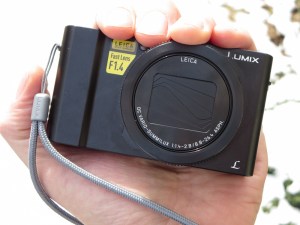
Tag: Panasonic Lumix LX10

Do You Have 29 Seconds to Spare?

Whoa!! It’s all gone by fast! Allow me a moment to wish you Happy Holidays!
I think that’s probably all that anyone has time to read right now.

Well, perhaps I could ask for another 29 seconds to watch a little video I edited together that captures a bit of my own experience…

I call it “Holiday Blur.”

Each photo is a moment that contributed to my holiday season’s overall whole.
At the end, it always feels like a blur, right?

In case you’re interested, here are the tools I worked with:
I used my trusty Panasonic Lumix LX10 for most of the photos, tweaked the images with Adobe Lightroom, edited the video with Final Cut Pro on my iMac and used music from freemusicarchive.org.

The locations:
Norwalk, CT and Westport, CT. In New York City: Bryant Park, Grand Central Terminal, Finnegan’s Wake Pub, Radio City Music Hall, Rockefeller Center, and Times Square

Fun.

(To watch more of my videos, check out my Vimeo channel.)

The Power of a Video Freeze Frame

Today’s story spans generations and species. And it all begins with a faulty memory card in my camera as I record an important video moment that foretells the arrival of our new kitten.

The memory card in my Panasonic LX10 camera blew it big time. This kind of problem has only happened one other time for me, and that was many years ago. But sometimes memory cards go bad and don’t correctly record your photo or video file.

And of course, fate requires those exasperating moments to occur when something really special happens… yes, a magic moment.
(You know, like when aliens from Mars land in front of your house looking for directions.)

An 18-Frame Conundrum
I missed this particular magic moment recording a video, which ended up having an inexplicable visual glitch every second or so.
(Actually, every 18 frames)

Here’s an example of the glitch.



The videos and photos recorded immediately after were fine. So this appeared to be a one-off problem. Nevertheless, I retired the SDXC card the next day and popped in a new one.
(I didn’t even want to consider the possibility that the culprit
was my still new Panasonic camera.)

Welcome Home, Kitty
And what exactly was this particular event? It was when my wife and I revealed to our seven-year old son that we were getting a kitten, something he’d been wanting for quite some time.

We decided not to simply tell him or reveal the cat like in a magic act.
(No, we would go to the animal shelter together to adopt our kitten.)

Instead, we brought him into the room upstairs where she’d be hanging out during her early days with us. And I had staged that room with all of the cat paraphernalia you usually need… water and food bowls, litter box, cat toys, scratching post, and a cozy bed puff.
(Thank you, Petco.)

I hoped it would be one of those Aha moments where the realization bathed over our son. I wanted to capture that happiness for posterity.

And that’s exactly what happened. It was priceless. He was so psyched. The video was amazing. Except that it wasn’t…

Keep It in Perspective
You might be thinking that this isn’t such a big deal. It’s just one of many great “moments” in a child’s life. There are literally hundreds (thousands?) of others.
(It’s not like you’re recording your own “Truman Show.”)

As a parent, you’re going to miss some along the way. Sometimes due to user error… Other times because your technology fails you.

Years from now, I know not having this video isn’t going to matter.
…I’ve already got videos of the new team in action.
(A boy and his cat)

And you move on.

The 18-Frame Solution
But for some reason I couldn’t totally let go of this.

Was the faulty video file a total loss?
Well, not necessarily…

Sure, you could still make out what happens. But it’s jarring to watch. So it’s value is limited.

But if the video glitches every 18 frames, that means there are plenty of good frames of video remaining.

Frames that could make for a good photo.
Hmmmm…..

What about extracting some of those frames and using them as photos?

So I gave it a try…

How to Grab a Frame from Video
I had shot the video in 1080HD… not as high res as the photos my camera generates.
Maybe that’s another reason to start recording videos in 4K.
(Wasn’t that why I said I bought this camera over the Canon G7 X Mark II?)

There are a few ways to grab a frame off of your video file on your Mac.

  • You can do it with Final Cut Pro X or iMovie.
  • Or using QuickTime, first go to your desired frame and then to copy it… select the video window portion on your desktop with Apple/Shift/4. That creates a PNG file, which you can easily convert to a JPG or TIFF.

Q.E.D.
(Quite easily done)

Can Your Camera Do This?
Happily, my Panasonic LX10 and its new memory card have been doing fine over the past month. So I feel comfortable that the original phantom glitch is behind me, and I don’t have to worry about grabbing video frames as a back up plan.

That said, I’m not the first one to stumble upon this idea. In fact, some cameras (like my LX10) include the capability to natively generate frame grabs when you go back and review a video in-camera.

A Video Freeze Can Create a Great Portrait
Surprisingly, I’ve just realized that this technique can be quite useful when trying to capture a more natural portrait of someone who has a difficult time posing for the camera.

Sure, it’s hard to choose a frame when someone’s talking, but the trick is to grab a freeze immediately after a sentence. If it’s also at the end of a complete thought, there’s usually a second of a pause to select from.

Case in point… my eighty-four-year-old father.
He’s not one these days to happily pull off a Cary Grant smile.
(It’s usually more like a Clint Eastwood mug during his Dirty Harry days.)

So I put my new tech technique to work…
I pulled out a frame from a video I just shot of my father proudly talking about his 1962 Red MG.



I think he’s as proud of that car today as ever, and it shows!

Happy Twist of Fate
Isn’t it interesting to see how one frustrating moment of tech failure can open up a whole new world of opportunity?

Sometimes you’ve just got to go with it and see where it all takes you…
(Is there another choice?)

How to Handle a Compact Camera That’s Still Too Big

Premium compact cameras are larger than you think. How you carry them can make all the difference in how you use them…

I have a confession to make. My shiny, new premium compact camera (Panasonic Lumix DMC-LX10) isn’t really… all that compact. Sure it’s a whole lot smaller than a DSLR, and it does just fit in the palm of my hand. Plus, it takes great pictures.
(For the price tag, it should!)

Technically, it fits the description of a pocket camera. But here’s the thing… It’s really too big to fit into the front pockets of my pants.


Sure, you can jam it in. But come on… that’s not comfortable. Especially if the pocket is already holding something else like your wallet.

My LX10 fits a little better sliding into my back pocket, but that still feels a little precarious. Especially if I were to sit down and forget it’s there.
(Crunch!)

Which Pocket?
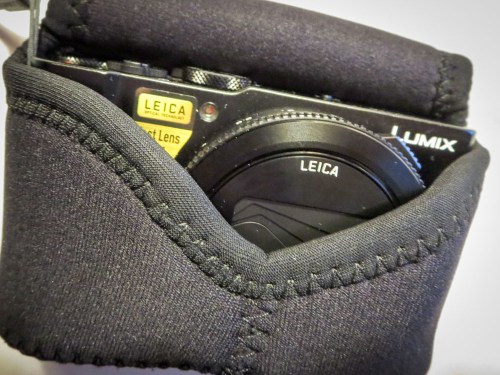
To be fair, I’m using a neoprene case with it, which adds some bulk.
(OP/TECH USA Digital D Soft Pouch, Micro – $17.95 at Amazon)

The material stretches tight around the camera, which creates something of an odd shape, because the lens juts out a bit. Still, it can slide in and out of a pocket as long as the pocket is large enough.

Jacket pocket?
Fine.

Coat pocket?
No problem.

But ideally, I want to be ready for action when I’m out and about. And the only way to guarantee that is to carry the camera in my pants like I do my iPhone.

And I don’t want it hanging off my shoulder with a strap. That’s not as convenient a solution.
(I think of a DSLR for that.)

Premium Compact Cameras Aren’t So Compact
You know what…? You can’t always get what you want.

I’m sure camera technology will get there one day, but if you want a big-time sensor in a small camera with a wide enough lens (24mm), today’s ‘premium compact camera’ is going be a little bigger than a true pocket camera or a lot thicker than your smartphone.
(I believe this also applies to the Sony RX100 V and Canon G7X Mark II competition.)

So deal with it.

How Fast Can You Get Your Camera Out of Its Case?
That’s the question today… How can I best handle the little beasty?

One way is to see if there’s a case with better functionality.

My OP/TECH USA is fine, but the fit is a little snug, requiring me to take an extra few seconds to pull the camera out. And as parents of young kids know, those priceless moments you want to capture only last for a few seconds. Fumbling with your camera to get it out of its case will often let that perfect picture slip away…
(I’m sure OP/TECH USA would remind me that you don’t want your camera to easily fall out of its case. That kind of defeats the point of having a protective covering to begin with.)

Also, this particular case has two snaps. And sometimes it’s a little wonky snapping them both once the camera is back in. Often, I just go for one. So that’s not perfect either…

MegaGear to the Rescue
The obvious choice is to buy the case that Panasonic makes for its Lumix LX10 camera, right?

Wrong.
Panasonic doesn’t make one. Not yet…
(Really)

So you’ve got to continue to travel the third-party route to see if there’s a better case solution.

In my research, I came upon ‘MegaGear,’ which appears to design camera cases for specific camera models.
(As opposed to generic cases that will ‘generally’ work. Ugh.)

I found their version of the stretchy neoprene case…

What’s the difference compared to the OP/TECH USA version?
It’s got a Velcro strip instead of two snaps to close the flap.
Is that significant?

Well, you’d probably save two seconds or so pulling at the Velcro instead of two snaps. And assuming the fit is a bit less snug, I think you’d have the camera out and focused on the ‘moment’ while it’s still happening.

I’d say that’s worth fifteen bucks.
Click.

Back to the Future
Then, there’s an old-school MegaGear leather case option that connects to the bottom of your camera and has a molded flap with a snap release that covers the lens. What I like about this choice is it offers more protection since you’re not sliding the naked camera in and out of a case.
There’s always that instant where if you momentarily lose your fine motor skills or you perform a clumsy handoff, the camera could enter free-fall mode.
(No, that’s not in the manual.)

On the down side, this MegaGear case is definitely not going to make the Lumix LX10 any more svelte. I don’t think it’s going to be hanging out in pants.

But if you’re already resigned to that reality, why not add some protection to your solution? Plus, the one snap flap release design satisfies my speed requirement.

And yes, if you’re okay with the idea of swinging it over your shoulder, this case is perfect for that too…

Click.

Functional Upgrade?
So I picked up a couple extra cases for my Panasonic Lumix LX10.
Is that extravagant?

More importantly, will they really upgrade the camera’s usability and safety factor for this parent of a six-year-old boy?

I think we should all agree on a firm “Maybe.”

Until someone offers me a better solution, I’ll take those odds.

#FiguringItOut