At Home with Tech

Unlock the power of all your technology and learn how to master your photography, computers and smartphone.

Tag: Raspberry Pi

How to Fix Your Piper Computer Kit’s Corrupted Software
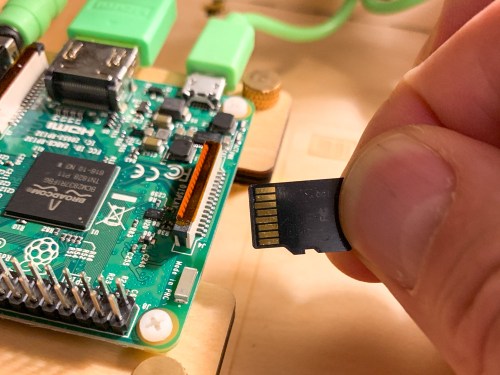
My son brought his new Piper to life, but its software quickly began glitching. So, it was time to help keep the learning experience on track. That means figuring out how to reflash the Raspberry Pi’s OS onto the MicroSD Card. (what?) Here’s what I did…

A few weeks back I proudly bought my nine year old a Piper Computer Kit for his birthday. I was so excited for him… He would build his very own computer, powered by a Raspberry Pi and then learn programming and other computer skills through a Piper-specific Minecraft StoryMode interface…

I felt it was the best birthday gift a dad could give his kid… ever!
(Okay, maybe I got a little too excited.)

The truth is all my boy really wanted was a big stack of Pokémon cards.

Pokémon cards!?

Come on… I was about to give the young Lester the tools to create a virtual universe if he desired… and all he wanted… were some glittery cards.
(Clearly, I don’t understand the Pokémon phenomenon.)

So, of course, we got him the cards… too. And during the next few days, our boy was fully immersed in his Pokémon world.

The Piper Computer Kit sat unopened in the corner.
(Sniff)

…Cue the tumbleweed shot.

Then…

The next Saturday morning at breakfast, he turned to me and said with a big smile,
“Let’s build my computer!”

Finally!
We were on…

The Piper’s Stormy Maiden Voyage
He opened up the massive blueprints, spread them out on the floor, and began constructing the Piper with the intensity of engineers racing to build the spaceship in the 1951 sci-fi movie, “When Worlds Collide.”

In little more than a couple of hours, we had a heartbeat.

He activated the Piper’s Minecraft ‘Story Mode’, and before I knew it, he was testing circuits faster than you can say, “Scotty, I need warp speed!”

It was just glorious.

And then suddenly, it all just… stopped. Minecraft had crashed, and we were just staring at the desktop.

My son turned and looked at me.

Frack.

I suggested he double click on the icon to get back into the teaching game.
Nothing.

Hmmm….

Then, I took the next logical step… I checked for any software updates and downloaded those.
Still nothing.

The computer itself was still seemingly working okay… but we couldn’t get back into the Piper Minecraft teaching program…

Piper, we have a problem!

Time to Reinstall the Software
My son was still feeling pretty pumped about building his Piper, but understandably a bit deflated by this glitch. He powered down his creation, and I pledged to do some research to find a fix…

The next day, I emailed Piper customer service asking for a little support…

After sharing my details, the prognosis came back that somehow the software on the Piper’s microSD card had gotten corrupted, and I needed to “reflash” the SD card.

Huh?
(Reflashing the card means reinstalling the Raspberry Pi’s operating system image back onto the card.)

Okay… So how do you do that…?

How to Reflash the SD Card
Taylor, from Piper Customer Care emailed me links to the Raspberry Pi software and instructions on how to reflash the SD card.

Beyond the obvious need to first download the image of the operating system, there were three other key steps…

  1. I also had to download Etcher, which is a graphical SD card writing app that flashes OS images onto SD cards.
  2. I needed to remove the MicroSD card from its Raspberry Pi slot, slip it into a larger SD card adapter (which I happen to have from my GoPro kit) and then insert that into my iMac’s SD card reader.
  3. When it was time to find the downloaded Raspberry Pi operating system image in the Etcher interface, I first needed to drag it from my ‘Downloads’ to my iMac’s desktop. After that, it was easy to locate.

Then, you click on ‘Flash,’ and you’re on your way!

Within five minutes, the operation was compete, and I reinserted the MicroSD card back into the Raspberry Pi.

I powered up the Piper, and BAM!
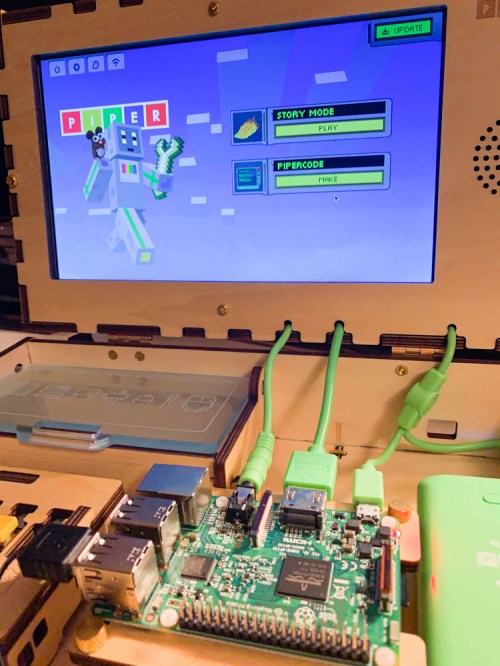
It was all working again…!

A Computer Kit May Require Some Hands-On Maintenance
So, even though the Piper was now fully functional, part of me still wondered how much of a problem it was that I had to reinstall the operating system.

Shouldn’t a new computer not crash after 20 minutes of use?

On the other hand, I had to remind myself that I was working with a $300 computer kit centered around a $40 Raspberry Pi motherboard… not a $2,000 iMac. The rules are a little different!

And isn’t the entire idea behind a build-your-own computer that sometimes you’re going to have to roll up your sleeves and get your hands dirty?

At the end of the day, reflashing the SD card was super simple, and our Piper works like new again.

If my son were a little older, I would have had him do all the reflashing work. That would have been an excellent project for him!
(I just wanted to make sure I flashed the SD card and not my iMac’s hard drive.)

Taylor from Customer Care was super responsive and even offered to mail me a replacement SD card. I’ve got to say that’s pretty good support…

Thank You, Piper!
So, what have we learned from all of this…?

There’s often a fine line between worrying that you’ve made a bad technology purchase and feeling helpless to fix the problem… and taking control to find a solution and making the repair yourself.

It just takes the right point of view…

That’s a lesson children of all ages can learn… and one that I’m really happy my Piper experience has reinforced in my own life.

Play on!
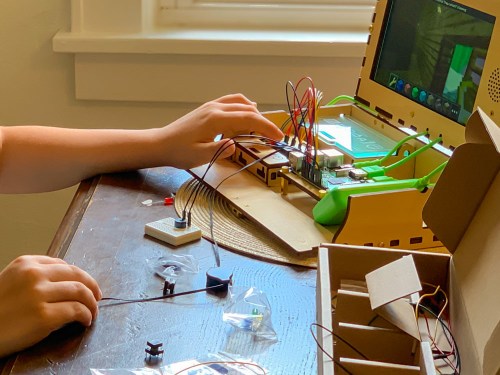
Piper Vs. Kano Computer Kit as a STEAM Toy Birthday Gift

If you’re not sure what to give your third grader for a birthday present, consider a build-your-own computer kit. There are two choices on the market right now. Here’s my own journey to pick the best one for my son…

I’m sure it’s no surprise to hear that my third grader loves to play in the digital world. Minecraft is his reality of choice during ‘screen time.’ And I’ve got to say it’s pretty impressive what he’s built throughout that amazing universe. He enjoys it so much that he spends his allowance to buy new ‘worlds’ in the Minecraft store. And while I originally bristled at the idea of spending real money on virtual items, I recognize it’s very much the way our tech-infused reality.

What a Nine Year Old Wants for his Birthday
My son’s 9th birthday is coming up, and I’ve got to admit that I’ve struggled a bit with deciding what to get him as ‘the birthday present.’ He’s asked for a whole bunch of Pokémon cards, as that phenomenon is surging throughout his peer circle.

Okay… sure. We’ll get him some cards.

And maybe as a parent, I should just go with what’s top of mind for him. Why would I want to overengineer my decision? Well, I’d prefer to give him a gift that might have a more meaningful impact on his development and future….

My son enjoys reading, and so I’ve already bought him several books that I expect he’ll love. And maybe with them… I’m done. There’s probably no better gift, right?

A few books… some Pokémon cards… He’ll be happy.

Well…

What a Father Wants to Get for his Son’s Birthday
Why am I stressing that somehow this is not enough? So, there’s this idea stuck in my head that I’ve got to get him a ‘bigger/better’ gift.
(My wife has gently pointed this out.)

I recognize that this particular issue for me as a father is likely that it’s just a reflection back on me… when I was a child. (Maybe I didn’t get a ‘great gift’ when I turned nine.)

And perhaps that’s the challenge I’m trying to meet…
I want this gift to be memorable enough so that he will simply remember it.

So, maybe this more about me and ‘legacy.’
Okay… let’s just say guilty as charged… and leave it at that.

I need to keep shopping for gift ideas.

Holding the Line
Screen time on the family iPad is the center of how our son currently interfaces with the digital world. There are some obvious ways that we could take him to the next level with more tech hardware…

  • Is it time for a gaming platform?
  • Perhaps his own ‘tablet?’
  • Maybe we repurpose one of our old iPhones that’s gathering dust.

Not yet.

My wife and I are aligned on holding the line against this inevitable next step and not rushing our boy towards more tech reliance. All in good time…

In Search for the Perfect STEAM Toy
Beyond the joy of building (and coding) in Minecraft, our boy has always enjoyed building in the real world. Whether it’s been with LEGOs, cardboard boxes or rolls of scotch tape and paper… he’s always loved to construct.

So, I began Googling for STEAM toys that he could build. I figured that might be the sweet spot for my search…

And then I came upon a startling concept (for me)…
The idea of children building their own computers and learning about design, circuitry and coding by using them.
(And it’s all based on the wildly successful and inexpensive
Raspberry Pi platform.)

Which Build-Your-Own Computer Kit for a Nine Year Old?
I came upon two choices:

Piper Computer Kit 2
$249.00 on Amazon Prime

Kano Computer Kit Touch
$195.00 on Amazon Prime

Both of these kits have received strong reviews. The major difference between the two is the Piper focuses more on the construction and component-interface experience, and the Kano operates more like an actual computer (tablet) once it’s up and running.

The Kano comes with its own keyboard… while you would need to attach your own to the Piper if you wanted one (though its design doesn’t require it).

Both are programmed to teach kids about coding and use Minecraft as a learning interface. And both are targeted for kids around his age.

Time to Make a Decision
I don’t think you can go wrong with either choice.

That said, I like the idea of the more robust construction phase of the Piper kit. I think our son will really enjoy that. And the learning experience is more ‘hands-on’”

The fact that the Kano may have more long-term value as an actual computer connected to the Internet doesn’t interest me right now. Though you can connect the Piper to WiFi, I’m happy not focusing on that and just having our son tinker with the standalone experience.

Another plus for the Piper is the version 2 can be powered directly with an AC cable as well as its rechargeable battery.
(The Kano Touch relies entirely on the battery pack.)

The Piper is the Better Fit for my Son
The gift of building and coding with your very own computer…
And the journey that goes with that…
Doesn’t that sound cool?
Sure does!

Yep… that’s the gift for my son.

I’ve decided on the Piper Computer Kit 2.
Click.

I know. I know…
Both the Piper and Kano are pricey.
(There are Kano configuration choices that are less expensive, but you need to provide your own screen.)

You’re paying a premium for an experience tailor-made for kids.
That’s the deal… and I’ve bought in.

Time Capsule Birthday Message to be Read in 2059
Hey Bud,
You probably don’t remember what I got you for your 9th birthday.
(Yes, in addition to those Pokémon cards)
It was a make-your-own computer kit.
I know that was an extravagant choice. (Well, it was back then.)
And it may or may not be relevant to the life you’ve grown into as a man.
But as a kid, you loved to build. And I expect you will always be a builder of some sort.
So, I was just trying to tap into that spark and nurture it.
You rock. Always have. Always will!
Happy Birthday.
Love, Dad