At Home with Tech

Unlock the power of all your technology and learn how to master your photography, computers and smartphone.

Tag: Tron

Why Would Anyone Make the Next “Tron” Movie without Tron?

“Tron” is the odd science fiction movie franchise that spans 43 years with decades between installments. That’s certainly a hard way to build momentum. The third film, “Tron: Ares” comes out in theaters on October 10th.

The first two, “Tron” (1982) and “Tron: Legacy” (2010) weren’t especially successful, though they offered cutting-edge visual effects for their time. The original “Tron” hasn’t aged well at all, but the analog execution of a digital civilization inside a computer video game was still remarkable. “Tron: Legacy” stretched the technology limits from those days to “de-age” Jeff Bridges in parts of the movie.

“Tron: Legacy” was the Sequel We Wanted
I really enjoyed “Tron: Legacy.” Though it didn’t quite stick the landing, it got most everything else right. This wicked-cool sequel successfully continued its own core storyline almost three decades later and brought in new, engaging characters. The movie was fun, and the visual effects, other than the de-aging tech, were slick.

But it didn’t make enough money at the box office. So though “Tron: Legacy” ended with something of a cliffhanger, Disney never made the next film. I was disappointed.

I thought that was it for “Tron.” But never say never.

“Tron: Ares” is Not the Sequel I was Hoping For
And then seemingly under the radar and without much fanfare other than the normal prerelease marketing hype, this third “Tron” movie got made. Fifteen years later, we have another “Tron” ready for release. 

It’s apparently a soft reboot for this franchise. And that makes sense at one level. Who else other than a science fiction geek like me will remember its predecessor that’s as old as my teenage son?

In the trailers for this new film, the premise is flipped. Instead of going into the “Grid” of the computer universe, the digital characters and machines are released into our world. And they’re not friendly. Mayhem ensues.

Okay…

Truthfully, I’m not feeling that excited.

How Can You Have “Tron” without Tron?
Where’s Tron, the character played by Bruce Boxleitner in the first two movies?

Where’s Jeff Bridges’ Kevin Flynn? He does show up (surprisingly) in the trailer. So, there’s a connective thread. But it looks pretty thin. Sadly, the other characters from “Tron: Legacy” are all absent.

The trailers tell us that “Tron: Ares” centers around Ares, an AI program in humanoid form played by Jared Leto. And he has questions. 

He says, “I’m looking for something. Something I do not understand.” That’s pretty vague. 

Will he destroy the world? Will he save it? The trailer suggests he’s the good guy. Maybe he’s the new Tron?  (I don’t think so.)

The plot seemingly leans into the topic of AI. But weren’t all “Tron” characters (‘Programs’) always AI-enabled?

Good Characters Matter More than Special Effects
I don’t know if “Tron: Ares” is a good film. I do know the trailers are not compelling. And that’s usually not a positive sign for a movie (but not always).

Strong science fiction flicks are always character driven. Sure, the special effects are important, but they’re never enough to carry a film. And besides, the special effects displayed in the “Tron: Ares” trailers only feel like incremental updates to “Tron: Legacy.”

Maybe the producers feel nobody will remember. So why not rinse and repeat?

That’s fine, as long as there’s a stated story that will draw the audience. And interesting characters. Unfortunately, the trailers just focus on the special effects and pounding music.

Is Being Tron-Adjacent Enough?
Yes, I’m disappointed that this “Tron” will be mostly ‘Tron-less.’ At best, it will be ‘Tron-adjacent.’ 

Sure, one could praise this effort to narratively break from the mothership and forge ahead in a different direction, but still in the same universe. But I can’t help feel a sense of loss that so much has been jettisoned from the core of this franchise.

No, I shouldn’t prejudge “Tron: Ares.” I should watch it first and then offer an informed opinion. And I intend to (even if the reviews are scathing).

And of course, this type of movie is best seen on the big screen (IMAX). There are so few films being released in theaters these days. So, why not?

But as we approach the release of this new “Tron” flick, this ‘User’ wants to feel more excited. 

Game over? Well see…
10 New Tech Terms to Learn

Prepare to be mystified… I don’t think you’ve heard of these words before. That’s because I’ve made them up. But before you immediately lunge to evaporate this web window, you might find something here you can use…

Prepare to be mystified… I don’t think you’ve heard of these words before. That’s because I’ve made them up. But before you immediately lunge to evaporate this web window, you might find something here you can use…

While writing this blog over the past few years, I’ve taken certain liberties with the English language. Along the way, I’ve manipulated, repurposed or fused together words, acronyms and phrases to boil down the essence of what I’m talking about as a user of technology.
(Or if these words already exist, I’ve warped their meaning for my own Frankensteinian delight.)

I’ve picked ten to offer up for your own use.

Clever, corny or worse?
You decide…

#1
Transitionals
Analog folks who grew up without the Web, but have successfully made the digital transition to social media.
(Source: Laptop Time Machine)

#2
Preapplenary Era
Our lives before Apple and the iPhone.
(Source: I Am a Road Warrior)

#3
Quadrotriticale Paradox*
The more vacation pictures you bring home that clog up your computer, the smaller the chance is you’ll actually share your best photos.
(Source: Five Tips to Rescue your Best Summer Family Photos)

#4
Tronalicious**
That dopamine high that comes from owning cutting-edge tech.
(Source: I Don’t Know Why I Want Ultra HD)

#5
C.D.I. = Core Digital Integrity
Your moral code that limits how much you’ll touch up pictures with your photo-editing software. My bottom line: “Don’t mess with the core integrity of someone’s ongoing image.”
(Source: With Great Power Comes Great Responsibility)

#6
E.R.S. = Extreme-Reconnect Syndrome
Baby boomers’ unique experience of reconnecting with long lost childhood friends through Facebook.
(Source: Open Letter to My Generation – Social Media is Good)

#7
B.T.B. = Beware the Blips
Consumers who feel frustrated and ignored when they want convenience and simplicity when watching purchased media on their home tech. My message to the media moguls: “There are a lot more of us ‘blips’ than you think…”
(Source: Blinded by the UltraViolet Promise in Your New Blu-ray Movie)

#8
Tech Group Think
The search for informational conformity*** when researching new tech to purchase.
(Source: Please Rate This Product…or Else)

#9
Techdentity
Your tech identity index… or how you self identify via different forms of technology.
(Source: My New Area Code Twists my Techdentity)

#10
Techtastrophe
(Isn’t this self evident?****)
(Source: I Don’t Know How to Install my Wireless IP Camera, Part 1)


*If you’re not a “Star Trek” geek, it’s a reference to “The Trouble with Tribbles” episode.

**Yes, I’m referring to “Tron” or “Tron Legacy.”
***You’ll never find unanimous opinion on anything online.
****Perhaps ‘Techtastrophe’ is what I should have titled this blog post!

What Photomosaic Software is Best?

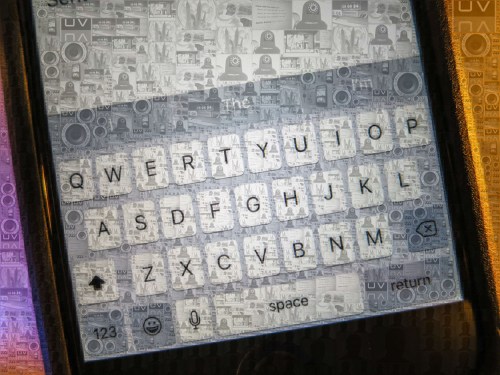
This photomosaic of my boy is better seen as a larger image.  Then its groovy complex structure really stands out.  But you get the picture.

This photomosaic of my boy is better seen as a larger image. Then its groovy, complex structure really stands out. But you get the picture.

Remember that magical moment back in the mid ‘90’s when you were mesmerized by seeing your first computer-generated photomosaic?

Also called photo-tiled pictures, they’re large image tapestries made up of many, many tiny photos.
All of the chaos when viewed up close dissipates into one clear image when seen from a distance.

How cool is that?
Kind of reminiscent of the world in the movie “Tron.”

Then technology advanced, and the voodoo trickled down to the masses.
A couple of years back, Apple even threw in a photomosaic screen saver into its OS X.

Clearly, computer-processing power had advanced sufficiently to handle this once monumental task.

So as I recently struggled with a gifting decision, I figured I would create a photomosaic and frame it.
How hard could it be?
And if there’s one thing I was overflowing with, it’s thousands of pictures that would fuel my new art project.

No Obvious Solution for a Complex Picture
As I sat down with my coffee mug,
I figured there must be tons of software available out there to choose between.

Heck, I was even hoping Apple’s OS X had incorporated a simple way to take a snap shot of what I knew my iMac could already do.

No such luck.

And as I continued my research, I strangely found there were only a few paltry options out there.

And those were either-

  • Free shareware
  • Inexpensive but flawed Mac App Store apps
  • Or pricey solutions that no one was really talking about
    (maybe because the cost was too steep for the typical art project)

My biggest concern was finding software that would integrate easily with Apple’s Aperture photo program. (iPhoto’s more powerful cousin)

To create a decent photo mosaic, you’ve got to use a lot of photos…hundreds of pics. I didn’t want to have to take the extra step of exporting all those pictures into a separate folder on my desktop for a program that won’t talk to Aperture or iPhoto.

Low Cost Options
There are several choices available in the Mac App Store for a few bucks.
But while perusing the user comments, I saw a lot of complaints about these programs freezing up.

I have enough trouble keeping my computer happy. I’m not going to intentionally throw it a curve ball.
Plus, I don’t have the time to try half-baked software over and over again on the off chance that it will work on the fifth try.
(Who does?)

How Good is Free?
I don’t know.
I figured if the low-cost options were ravaged by reviewers, how good could the free ones be?

For those of you more intrepid than I, here’s a list of
8 free photomosaic software choices on Bright Hub.

The Two Expensive Heavyweights
Not that expensive always equates better, but I hoped the phrase
“You get what you pay for” was going to apply here.

Based on price alone, the Hertz and Avis of photomosaic software are:

I was initially horrified at the thought of spending this much coin, but after I dismissed the less expensive choices as likely failures, my wallet loosened a bit.

Look, I just wanted the software to work, and I was willing to pay for this sometimes-elusive convenience.

Image is Everything
So how did I choose between the two?
Of course, I immediately went to their respective websites, inviting myself to be wooed by their slick marketing presentations.

Now, simply ingesting advertising without analysis isn’t really a smart way to determine how good the item actually is, but it’s a start.

As they say, “You don’t get a second chance to make a good first impression.”
And, boy, was I unimpressed.

Both websites looked like they were designed by your clever tween niece.
Good as a first attempt, but hardly the center of a business’ marketing campaign.

Also, both companies had crummy-looking promotional videos on YouTube.
(One used a voice simulator for its audio track. They couldn’t even find a human willing to push the product!)

So I was forced to roll up my sleeves and do my own research.

Mazaika
There were two factors favoring Mazaika.
One was it actually had a bona fide review from a reputable website-
Macworld’s review from Chris McVeigh
And he really liked it.

Mazaika also claims to give you more manual control than any of its competitors.

The downside was its flexibility could also be its Achilles’ heel.
Too many operational choices might make it overly complicated to navigate.
(Remember, I’m impatient. I want software to work, but I also don’t want to take forever figuring out a program designed for designers.)

Plus you have to buy and download it from their clunky-looking website.

And then I wondered why Mazaika didn’t have its flagship product in the Mac App Store.

Instead, there was Mazaika Lite (for $2.99) and Mazaika Free.
The free version had more one-star reviews than anything else.
The light version hasn’t been updated for ten months and had only one review.
It’s a one star clunker titled “Big Nasty Bugs.”

I was not impressed.

Plus, after these two clear fizzles, you’ve got to wonder how good the $50 version really is.

And I hate the name.

Photo Mosaic by cf/x Software
Their big marketing line on the top of their website is-
“Does one thing. Well.”
Well… that’s good.
I hope.

I also had trouble confirming if Photo Mosaic would work with Aperture.
Buried deep in their website was their Hint #7 from July 2011 that makes a passing reference to the fact that Photo Mosaic does indeed communicate with Aperture.

(Here’s my suggested Hint #8-
Please list this important detail on your home page!)

Look, I know that these companies are probably run by geeks with massive brains.
But they’ve really got to find a Morlock who understands basic web design and how to market a product to the average consumer who’s probably struggling right now at home with their tech.

The good news is Photo Mosaic is available through Apple’s Mac App Store.
Now, that doesn’t by itself make it a great product, but I assume it had to pass certain Apple standards.
(Overly naive of me?)

Yes, the “Better the Devil You Know” phrase applied to me here.

Eenie Meenie Miney Mo
So I decided to go with Photo Mosaic.
Click.

And guess what?
After all my hemming and hawing…

Photo Mosaic worked great!

  • Yes, it plays nicely with your Aperture and iPhoto albums
  • Yes, it’s fast
  • Yes, it has a variety of photomosaic presets to choose between to vary the look of your final image
  • And no, it didn’t crash on me once!

My photomosaic gift was a huge success.
Happiness.

Not that I want to be a one trick pony, but for now, my gifting strategy has just received a major update!

Fickle User I Am!
Has anyone else out there had success with the other photomosaic choices?

I’m sure I haven’t earned any brownie points with the big brain programmers of the software I’ve so heartlessly shunned.
(I bet they’d like to use their programs to scatter my image into a billion pixels.)

If I ever find myself zapped into the Grid because of this post,
I’m really going to need some protection from Tron.

“User.”