At Home with Tech

Unlock the power of all your technology and learn how to master your photography, computers and smartphone.

Four Great Tech Gifts for the Geek in Your Life

Are you having trouble adding tech gifts to your shopping cart? I’ve got four winners at three different price points that can get you to the finish line!

Are you having trouble adding tech gifts to your shopping cart? I’ve got four winners at three different price points that can get you to the finish line!

I know… it’s sometimes pretty difficult buying the right tech for that lovable ‘Tech Geek’ in your family. He/she knows what rocks their world, but you may not have total access to all of that ‘unique’ perspective. So how are you supposed to buy the perfect gift?

You’re going to have to ask!
(And that’s okay… you really shouldn’t have to guess…)
And then get started creating an old-fashioned list to work from.

If you want to see my list, I happen to have it right here!
(And feel free to use it!)

I’ve got four picks in three price categories:

  • Under $50
  • Under $200
  • Under $400

On Barrett’s Tech Wish List Under $50

You usually can’t go so wrong on a gift at this price point. Especially if the recipient has given you a clue that he/she wants one…

iPhone Lightning Dock
Let’s face it…Your iPhone can’t always make it through the day on its own.
(There’s no shame in admitting it.)

Sometimes, you just need to plug it in for a little extra juice. Wouldn’t it be nice to stop treating that need as an emergency and instead formalizing it with a dedicated device on your desk?

An Apple iPhone Lightning Dock can certainly get the job done.
(Just make sure your iPhone’s case isn’t too thick to use this lightning dock.)

apple-lightning-dock-white


Apple iPhone Lightning Dock – white
$39.00 at Apple

apple-lightning-dock-grey


Alternately, you can get one of the newer metal versions for ten bucks more.
$49.00 on Amazon

Or…

You could go rogue and look at a sturdier option called the HiRise 2, which doesn’t use such a minimalistic approach. It offers ‘back support’ and also has the flexibility to work with any iPhone case or your iPad…

highrise-2


The HiRise 2 made by Twelve South
(black or silver)
$22.00 on Amazon.com

I really like the adaptability of the HiRise 2 and think the silver model would look great on my desk…
(Plus, because your iPhone sits higher on your workspace, it saves your arm from supporting your Facetime and Skype video chats.)

Just don’t forget to bring along your own lightning cable.
(Alternately, you can buy the HiRise 2 Deluxe, which also comes with Lightning and Micro-USB cables and a heftier $39.99 price tag.)

Touchscreen Gloves
Geeky-gloves with special conductive fingertips that can operate your smartphone have been around for a while now.
(So nothing new here.)

Plus, you’ve got to admit that gifting gloves in general is almost as boring an idea as getting someone a tie.

That said, being able to use your smartphone while wearing your gloves does have real value. I can think of several important moments over the past few years when having the right pair of gloves on a cold winter day would have been so sweet.

I came across this cool-looking wool pair from Mujjo:

mujjo-double-layer-touchscreen-gloves


Mujjo Double Layer Touchscreen Gloves
$34.95 on Amazon

If you wanted to upgrade to a more formal leather look, Mujjo also makes a pricier version:

mujjo-leather-touchscreen-gloves


Mujjo Leather Touchscreen Gloves
$99.00 on Amazon

On Barrett’s Tech Wish List Under $200

Okay… At this price point, we’re getting more serious…

Sennheiser RF Wireless Headsets for the Family Room’s HDTV
Once upon a time, I envisioned a shining man-cave, and I would build myself an immersive home theater with massive sound that would shake the core of my house (and sooth my geeky soul).
Then I became a daddy, and everything changed.
Now, I’m in eternal stealth mode. It’s not about how loud…. It’s about how quiet.

On the few occasions when I’m consuming TV/video in the family room on my own, it’s usually at night, when our six-year-old son is sleeping.
So I need to wear headsets to maintain evening Zen.
I’ve been using wired headsets for years, and I’ve got to admit… it’s a pain.
It’s time to upgrade to wireless headsets…

Previously, I’ve addressed the same question for my home office and went with a relatively inexpensive solution using a long-in-the-tooth Sennheiser RF wireless model. (RS 120)

As I look at the landscape today, there are a crazy number of choices out there. And honestly, I can’t possibly figure out the very best one at the most reasonable price for my needs.

That kind of research stretches even beyond the amount of time available here at the world headquarters of ‘At Home with Tech.’
(I think I’m on family dinner duty tonight.)

Plus there’s really no one answer…
(I know there are lots of solid choices out there.)

But that said, I decided to stick with Sennheiser and see what they had going with their more current over-ear RF wireless models.

Here’s the current line up:

For me the sweet spot hits at something under $200. So that points to the RS 175 model. Even though the RS 185 really isn’t that much more expensive, the higher-end model is an open headphone design, which leaks more sound, potentially disturbing others in the same room.

sennheiser-rs-175


I prefer to stick with the closed design of the RS 175, which will assist in my stealth media consumption plans.
(Just being practical.)

On Barrett’s Tech Wish List Under $400

Okay… If someone really wants to blow the bank on me, here we go…

GoPro Action Camera
You may have heard I recently trashed my Canon point and shoot camera when I wiped out on my bike while videotaping my six year old riding his new bike.
(I’m okay… other than some road rash. Still healing…)

Yes, I’ve learned the hard way that holding a camera while moving fast isn’t good for my health… So I should probably get an action camera that I can more safely use.
Time for a GoPro?
Think so…

GoPro currently makes three models:

  • GoPro Hero Black – $399
  • GoPro Hero 5 Session – $299
  • GoPro Hero Session – $199 (rebranding of older Hero 4 Session)

As you can guess from the price, the GoPro Hero Black is the flagship model. It gets great reviews, including this Wired video review by Brent Rose.

gopro-hero-5-black


For me, a huge plus is having the small screen on the back.

The others don’t have screens at all. You can view your live shots via an app, but then you’re working with a second device…
(Granted, I know the whole point is you’re not supposed to worry about framing your camera at all. It’s point and go. I guess I’m old school and want to see the framing before a shot begins…)

So in something of an unusual move for me, I’m partial to the most expensive model.

If you also buy GoPro’s ‘’The Strap,” you can then attach your GoPro to the top of your hand or arm, which frees up your hand to pay attention to keeping you safe!

GoPro Hero 5 Black
$259 on Amazon

The Strap
$59 on Amazon

Sure, it’s a costly gift set, but I also call it protection…
(And how can you put a price on safety?)

Plus, my six-year-old isn’t getting any younger. There are more adventures to come. If I want to capture them, I really need to be better prepared…

And going with the latest and greatest will go a long way towards future proofing it.
(At least for the next few years)

Barrett’s Wish List
So, to recap…
I crave the following:

  • The HiRise 2 Lightning Dock
  • A pair of the Mujjo Double Layer Touchscreen Glove
  • The Sennheiser RS 175 RF Wireless Headsets
  • The GoPro Hero Black
  • Along with the GoPro Strap (to help me not wipe out again)

What’s on your list?

Good luck with your shopping, and may your loved ones act surprised when they get the tech gifts they were hoping for!

Best Recipe to Bring to Family Holiday Gatherings

Whipping up a batch of cranberry sauce from scratch is a quick and easy way to contribute to the holiday meal. But if you really want to make a bigger impact and don’t have the cooking chops, you might want to turn to your tech skills and use my recipe for success…

Whipping up a batch of cranberry sauce from scratch is a quick and easy way to contribute to the holiday meal. But if you really want to make a bigger impact and don’t have the cooking chops, you might want to turn to your tech skills and use my recipe for success…

I started to sweat… It was our turn to host Thanksgiving dinner this year. We set the table for fifteen. My wife cooked up a perfect twenty-pound turkey. Family members and in-laws brought incredible side dishes. And what was my contribution…?

Let me simply say I’m not a gourmet chef.
Others in my extended family are far more accomplished in this arena.
(Although I can whip up a fine stack of banana pancakes… Which, of course, did me no good here.)

I’ve also previously created some mean chocolate bread pudding for the desert table, but I wasn’t on desert duty this year.

Suffice it to say, I checked the box by making some decent cranberry sauce from scratch…

It’s actually super simple…

  • 24 oz of fresh or frozen cranberries
  • 2 cups of sugar
  • 4 tablespoons of water
  • A little orange zest

Cook it up, keep stirring and about a half an hour later… you’re done!
(Here’s the official recipe at foodnetwork.com.)

More than Good Food
It was a decent effort… though hardly a culinary stretch by any means.
I didn’t embarrass myself, and I received a dozen polite compliments.

But that wasn’t it for me.
It simply couldn’t be…

I had to contribute something more significant to this family gathering.
I had great intent… just not the skills in the kitchen.

Because at the end of the day, it’s not really about the meal, right? It’s about getting family together. It’s about remembering the good times… and giving thanks.

Bring Your Tech Smarts to the Holiday Meal
So the feast began to break up after all of the yummy deserts had been consumed. All of the young cousins had long departed the dining room, and my six year old was leading the children on some noisy adventure in the family room.

Then, the adults wandered in…

I was a few steps behind the pack, and when I got there, I witnessed them all hovered around my old 42” plasma Panasonic HDTV.
My family members were all smiling and reminiscing about what they saw…

A Trip Down Memory Lane
My HDTV displayed a magical, morphing photomontage, courtesy of my Apple TV’s screensaver. The series of 125 photos represented all of the kids over the past seven years at different family activities and events.

This digital display of recent family history was my true contribution to this gathering.

I brought the gift of remembering good times…

‘Cause let’s face it. Life is messy.
Thanksgivings are rarely perfect.
(Growing up, mine certainly had major flaws.)

Life just isn’t a holiday card.

But on the other hand, there are still plenty of amazing moments.
You’ve just got to remember them. Isn’t that part of what giving thanks is about?

And if someone could simply gather up all of those memories and serve them up… wouldn’t that be nice?

Well, that’s exactly what I did.
I served up some great family memories.

This is my pièce de résistance for large family meals.
And what’s my recipe…?

iCloud Photo Sharing on your Apple TV
If you often worry about what you’re going to do with all of those photos you’ve been collecting, (and sometimes not having the time to share) this can be your moment of reckoning…

It’s actually not at all difficult to pull off. The major ingredient is taking all of those photos over the years and keeping them organized in a program like Aperture 6.

Then, you simply export your group of photos into a new iCloud shared photo album that your Apple TV can access.

Here’s how you complete your visual feast using Apple’s connected ecosystem…

  • Go to your Apple TV and click on ‘Settings.’
  • Click on ‘General.’
  • Click on ‘Screensaver.’
  • Click on ‘Type’.
  • Click on ‘My Photos.’
  • Click on your new iCloud shared photo album.
  • Click on ‘Set as Screensaver.’
  • Your Apple TV will ask you to confirm. Click ‘Yes.’
  • Then, step back a few times to the main menu screen on your Apple TV.
  • Press the Menu button again. That will activate the screensaver program, and your photos will start to scroll up the screen in random order.

Voilà!

A few other notes…

  • You don’t have to use full-res photos.
    (The pics look great at a fraction of the size.)
  • Your Apple TV will also activate its screensaver automatically after a few minutes of non-use
    (depending on what delay length you’ve set in your screensaver settings).
  • You can also enjoy your shared photo album on your other Apple devices
    (though not as a photomontage).

Problem Solved
As you may know, I fret a lot about how to manage and share my growing mountain of family pictures.

A good solution is to regularly funnel them through digital photo frames.
(Currently, I’m a fan of using Nixplay digital frames, although I’ve had some connectivity issues with them in the past.)

So why not expand on this plan and simply use your HDTV as a giant multi-image photo frame?
(Just use a connected 4th generation Apple TV to perform the trick.)

I think it’s a great way to fuel all of those good feelings when family and friends get together for the holidays.

It’s a recipe that can’t be beat!

Use Old Tech to Find Lost Memories

Much like many of your memories, old tech may be discarded, but not actually forgotten. Did you realize that yesterday’s tech can sometimes evolve into a time machine to help you rediscover joy from your past? Here’s how…

Much like many of your memories, old tech may be discarded, but not actually forgotten. Did you realize that yesterday’s tech can sometimes evolve into a time machine to help you rediscover joy from your past? Here’s how…

Do you recall the adrenaline rush you get when you open a box for the first time containing that new piece of must-have tech? It’s like pure joy. But then, it often dissipates as your brain looks for the next must-have tech bling.

That’s a problem on a variety of levels, but I’ve chosen not going to confront any of those concerns in this moment.
Instead, I’m going to focus on the fleeting goodness…

My good news is I’ve discovered that emotional memories of ‘new tech joy’ doesn’t have to entirely disappear!

If you are of a certain age, I invite you to a take a trip back in time with me…

Find a Time Machine
My family and I recently visited a series of artist open houses in Bridgeport, Connecticut, where artists opened up their studios to the public.
(I had no idea that Bridgeport had such a thriving artists community.)

And hidden in the middle of all of the amazing studios was a magical room filled with video arcade games from the 1980’s.
(To be clear, this wasn’t an art space… it was a company that rents these old relics for parties.)

But to me, it was something else.
It was an actual time machine!

I stepped in, took a few more steps… and was suddenly transported back to my college days at Colgate University, when I would hang out in the basement of K.E.D. in the common space and play video games for a quarter a play.
(Or was it fifty cents?)

Specifically… I played ‘Galaga’ and ‘Atari Star Wars.’

Remember Your New Tech Joy Using Forgotten Old Tech
As I walked deeper into the dark room, I spotted those same games! I walked up.
And then something happened…

I realized you could actually play them… right there!
(For free, no less)

What?

galaga


I pressed the start button on Galaga.

Holy cow.
The little laser blasts.
The sounds.
The feel of it all…

atari-star-wars


And then I walked up to a Galaxy Far, Far Away and launched my X-Wing to destroy the Death Star.
(It took me three passes, but I eventually got it done!)

All of those past quarters spent. All of those forgotten skills…

The Past is the Present
I never thought I would ever play these arcade games again.

And yet here they were.
It was if I was in a temporal nexus.

The memories all rushed back.
I felt it.
All of it.

Whoah.

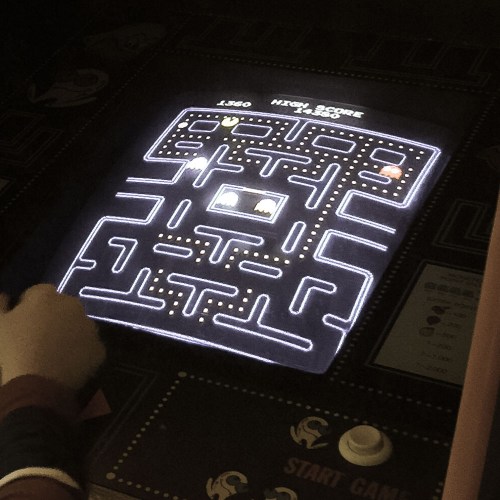
This dark, seemingly endless room must have been crammed with fifteen other favorites.

pac-man-arcade


We all had our go-to game, right?

Pass the Baton
What a treat.
And an amazing demonstration of both the emotional and experiential memories your brain holds onto.

But my rewarding trip down tech memory lane inevitably had to end, right?
Well, not necessarily…

There was someone else in there with me.
Somebody who had never played a video arcade game from the ‘80’s.

I then watched my six year old play Pac-Man for the very first time.

21st-century-six-year-old-meets-pac-man


I felt the universe re-centering itself.

(If only for a moment)
And then it was time to say goodbye to this Guardian of Forever…

Keep the Memories Alive
It’s funny how you can run into your past in the most unlikely of places and reactivate your tech joy from long ago.
(And a testimonial for the ongoing value of old tech)

Plus, if you really pay attention, I think you could easily walk by someone else’s past magic tech joy and experience a bit of their own euphoria.

century-studio-camera


Wooden Century studio camera, anyone?
Perhaps… a camera obscura?
No?

All right. Maybe I’ve gone back a little too far…