At Home with Tech

Unlock the power of all your technology and learn how to master your photography, computers and smartphone.

The Heart Beats Faster Waiting for the Next Apple Special Event

If you’re like me, I’m eager for September 10th to arrive to see what sweet tech has been growing in Apple’s garden.  This annual fall spectacle is a spectator sport as much as an opportunity to upgrade your gadgets.

If you’re like me, I’m eager for September 10th to arrive to see what sweet tech has been growing in Apple’s garden. This annual fall spectacle is a spectator sport as much as an opportunity to upgrade your gadgets.

For me, September 10th is like Opening Day at Fenway Park.
(The effect of my many years in Beantown occasionally betrays my strong New York identity.)

Just the anticipation makes you feel like a kid again.

What fabulous new tech does Apple have up its sleeve?
iPhone 5S?  5C??
Everyone’s got an opinion…

But my comparison of Apple’s upcoming ‘special event’ to baseball is also apt, because Apple certainly feels like my home team.
And this once-unstoppable franchise needs another hot streak.

Remember the day when absolutely everyone wanted an iPhone?
And if you didn’t have AT&T service, you couldn’t even get one?

Now the competition has taken such a huge bite out of the smartphone market share, Apple is no longer the omniscient tech god it once was…

It kind of feels like the seventh inning stretch, and we’re down 2-1.
I’m ready for some action!

You can hear it from the bleachers…
“Let’s go Apple… Apple let’s go!”
(Stomp. Stomp. Stomp!)

The Apple Still Shines
But that doesn’t mean I’m totally bored with Apple’s current line up.

When the iPhone 5 debuted, I was still stuck in my two-year phone plan, unable to qualify for the upgrade to my 4S.

All I could do was drool and write my Ode to the iPhone 5.

The reality is it’s statistically impossible to always own the latest and greatest tech.  (unless money is no object)
Zippier upgrades hit the shelves every year.
(Sometimes sooner!)

When to Pull the Tech Trigger
Deciding exactly when to jump into the pool of new tech can be a little daunting.

I think the sweet spot is a year or so after a new product launches.
(There are always kinks to work out…)

So that means you’ve got to wait for version #2, which will always be better, though not quite as cool.

(Was anyone out there really that functionally satisfied with the sluggish and tiny-brained first iPhone?)

But you don’t want to wait too long to jump on the bandwagon, because, you know, you’ve got to live your digital life.

And if you tend to time your purchase cycles like me, you’re going to be coveting thy neighbor’s tech more often than not.

All Good Things Come to Those Who Wait
But there is a silver lining…

You may not rush to buy everything that’s revealed on September 10th.
But you will indeed own it all…eventually…one day.
And by the time you get it, it will be even better!

I call that a win/win scenario.

So bring it on, Apple!
I’ve got my popcorn, and I’m ready for the game to begin… again.

How to Find Your Free SD Movie Download in iTunes

When you buy an HD movie in iTunes, did you know you can also receive the SD version for free?  And why would you need the SD version?  Ask your iPhone.

When you buy an HD movie in iTunes, did you know you can also receive the SD version for free? And why would you need the SD version? Ask your iPhone.

I’d like to point out three universal truths:

  • You can never have too much knowledge,
  • Too much joy,
  • Or too much digital memory for your multimedia needs!

As a Road Warrior, I happen to like having a few movies at any given moment in my iPhone.

I really haven’t had any media management concerns on my iPhone 4S over the past couple of years, because I’ve got the full boat… 64 GB of memory.

So I feel I can live a little large and jam some extra cinema into my iPhone’s playlist if I prefer.

And I don’t mind admitting I’ve downloaded a few flicks lately.
The last one was “Skyfall,” the latest James Bond and arguably one of the best.

The Evil Secret of High-Definition Video
Then last weekend while uploading some fun photos of my three year old, I realized my iPhone barely had enough memory for Siri to blurt out one of her snarky retorts.

By Grabthar’s Hammer, what happened?!

So I checked out my iTunes library and realized Mr. Craig’s high-definition Bond adventure had targeted almost 6 GB of precious flash media on my iPhone.

One movie… 6 gigabytes?!

Well that didn’t seem right.
I know HD content can create large files, but I thought with compression technologies, the movie studios wouldn’t be offering up digital files quite so big.

I reviewed a few of the other movies I owned in iTunes:

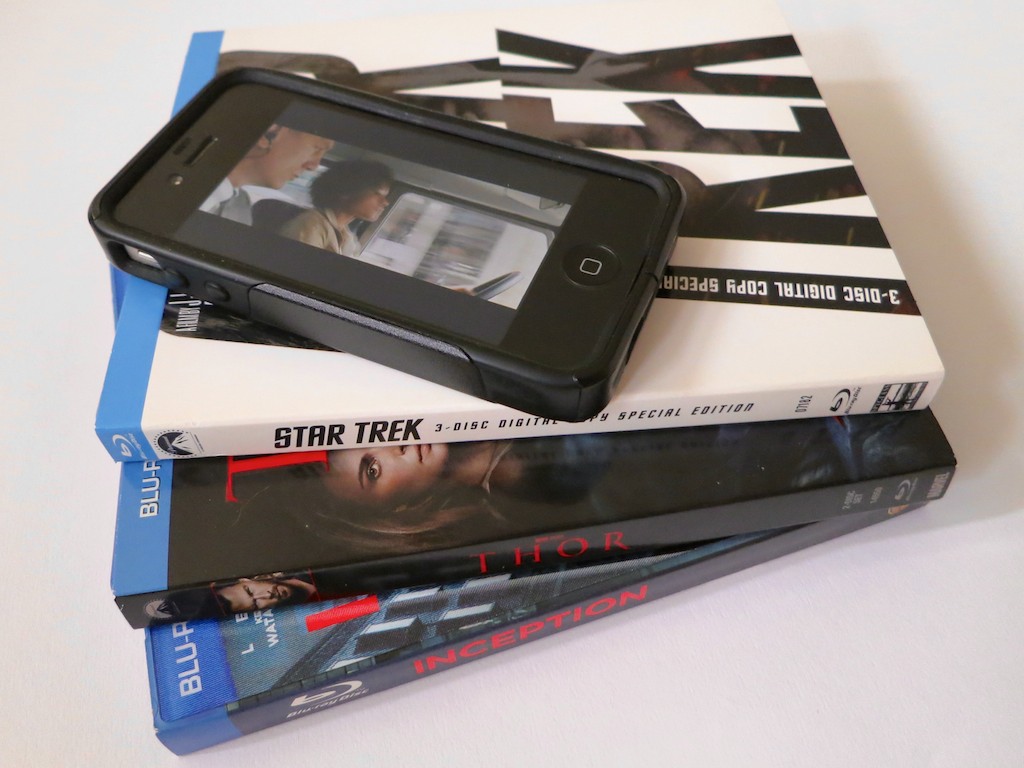
“Star Trek” – 1.96 GB
“Inception” – 2.19 GB
“Thor”- 1.73 GB
“Apollo 13” – 2.22 GB
(Yes, you may notice a genre pattern here.)

So why were all these films so much smaller than “Skyfall?”

The only difference was the other movies were downloaded via an iTunes code packaged with the Blu-ray Discs I had bought.

And “Skyfall” was purchased directly from iTunes.
Apple had been running it at a special price.
(Sweet.)

The Blu-ray Disc Dream is Not All in High Definition
I sprinted over to my Blu-ray Disc shelf and studied the cases.
As I looked more closely at the packaging, I came to the uncomfortable realization that my bonus ‘digital copies’ via iTunes had not been downloaded in HD after all.
The iTunes movie codes inserted in the Blu-ray Disc cases only unlocked the standard definition files.

What?!

Well, in fact, the fine print does only say, ‘Digital Copy.’
(not HD Digital Copy)

Hmmmm.
Well, I guess that explains the size discrepancy.
They’re just SD movies.

So… iTunes SD movie downloads provided by glorious Blu-ray Discs in HD?
That doesn’t feel quite right.

But it’s a discussion for another day…
And a new data point for my ongoing struggle to decide
whether I should stick with buying physical Blu-ray Discs or give in and go all in with iTunes movie purchases.

There’s No Room for HD in Your Smartphone
As much as I prefer to own HD movie files for use on my larger displays, I don’t believe smartphone screens really show a significant difference between HD and SD.

But more importantly, my iPhone (or any smartphone for that matter) can’t handle more than a few HD movies at a time.

It’s simple math.
If you only own a 16 GB smartphone, it’s toast after you feed it two movies.

Using an SD file would appear to be the only reasonable option when loading up your movie collection to your smartphone…

Time to find the ‘Mini-Me’ version of 007.

SD Still Has its Place
So your simple media management solution is to own two files for each movie you buy.

  • HD for your HDTV or computer
  • SD for your smartphone

But how do you locate the SD peer file, once you’ve bought and downloaded the HD movie master?

Sure, you can easily find the SD version in the iTunes Store.
But you don’t want to pay again to download the SD sibling, once you’ve already had to pony up for the HD version.

Don’t do that…!

Where’s Your Free SD File?
The location was not entirely obvious to me even after some online research and a quick review of iTunes itself.

But buried in an Apple support page, I found a cryptic answer….

“To download the SD version, you need to download the video again from your Purchased page.”

Well that seemed simple enough.

So I took at look at my ‘Purchased page’ in iTunes and observed all my movie icons happily waiting for their next screening.
But there was nothing to indicate an additional free SD download of my HD Bond.
Hmmm…

Then I saw it!

Here’s the trick:

  • Go to your ‘Purchased’ page in the iTunes Store
  • Click on ‘Movies’
  • On the bottom right there’s a box that say, “Download HD When Available”
  • Unclick that!

Suddenly the SD versions appeared as available for download!

It was like having the keys to the candy store.
I clicked, and before you could say, “shaken but not stirred,” I downloaded my SD movie file.

2.45 GB.
Thank you.

One final step…

Then in the ‘Summary’ tab of your iPhone (in iTunes):

  • Go to ‘Options’
  • Click on “Prefer standard definition videos”

Et voilà!
The SD files finally show up for syncing to your iPhone…

Load Up on Your Mobile SD Content
So to access your SD content, you simply have to tell iTunes you don’t ‘prefer’ HD… twice.
(which kind of goes against everything you believe in)

You just don’t want HD… right now.
(Don’t forget to switch that setting back when you go to buy your next HD movie.)

It’s just not that intuitive…
And all this from a tech empire that designs products my three year old could operate well over a year ago.

Anyway, that’s how you do it.

Your iPhone can now experience some Hollywood Zen.
…and still have some room left to answer your next phone call!


Extend your Personal Multimedia Bubble with Wireless Headphones

Warning: Your world is smaller than you think. If you can’t see it, and now you don’t hear it, does anything even exist outside your Sennheiser-induced Bubble?

Warning: Your world is smaller than you think. If you can’t see it, and now you don’t hear it, does anything even exist outside your Sennheiser-induced Bubble?

Once upon a time, I thought I knew what I wanted.
I craved tech that screamed bigger and louder.
Didn’t we all?

My dream was to create the ‘man cave’ where I’d have the biggest flat screen hanging proudly on my wall, bookended by some awesome surround-sound speakers.
What could be better than creating your own little movie theater from Elysium?

Then I became a parent, and of course my priorities shifted…
…along with how and when I consumed my media.

Good Bye Home Theater
Fast forward to three years later, and I’ve finally decided the only reliable way to consume a complete TV episode is to turn the whole equation on its head and forget about my aging 42” plasma screen.

The fickle fancy of consumer tech has been innovating in a different direction anyway.

Big is so yesterday…

Hello, Personal Multimedia Bubble
Today, it’s all about how small you can go!

  • Your shrinking smartphone
  • Your tiny music speakers
  • Your light laptop
  • Your pocket-friendly digital camera

This ongoing evolution of smaller tech allows your multimedia consumption to become ever more personalized ‘for your eyes only.’

The result is the creation of your own ‘Personal Multimedia Bubble.’

A good pair of noise-cancelling headphones, and you’re in your own world.

As a road warrior on my daily train commute, I’ve accomplished just that with my Bose headphones and iPhone.

Who needs a home theater, when you can watch whatever you want in your little mobile tech bubble wherever you go?

Extend Your Bubble at Home
And that Bubble has great value even when you haven’t left the house.

Today, people are consuming vast quantities of content on their smartphones and tablets from the comfort of home.

But the personalized multimedia experience served up for one isn’t a new concept.
Throw on a pair of earbuds and jack them into your computer, and you’ve got the same experience… just more tethered.

Which brings me back to the other immobile screens in your home.
Your TVs.
If they had feelings, I’m sure they’d be really lonely.
And very jealous of their tiny digital cousins you’ve been hanging out with lately.

I’ve got one little fellow to the left of my iMac in my home office.
He’s a cute, 21” Sony flat screen connected to my cable TV box.
I only have to swivel slightly to readjust my gaze between the two.

And he often sits there, dark… brooding… staring at my always-active iMac.

Even my three year old doesn’t ask to turn the Sony on.
He finds Disney programming on my iPad much more compelling.
(I’m not kidding.)

This TV’s only hope to avoid complete obsolescence is to join
the Barrett Bubble.

Wireless Headphones for your TV
Of course, the simple answer is just plug a pair of headphones into the TV.
That way, I won’t disturb the rest of my world when catching a noisy scene from The Bourne Legacy on HBO.

Here’s the problem:

  • My silly Sony TV doesn’t have a headphone jack.

The solution:

  • Time to buy a pair of wireless headphones.

How to Make the Connection
Cordless headphones usually roam free by relying on their transmitting partner/base to remain connected your audio source with an old-fashioned cable.

But without a headphone jack on the TV, you’ve got to access your audio source another way.
Typically, you can locate other audio outputs on the back of your TV or cable TV box via the following jacks:

  • Line audio outputs (2 RCA connectors)
  • Digital audio connections (Coaxial/Optical)

The Three Amigos of Wireless Headphones
Today, there are three wireless technologies to choose between:

  • Bluetooth
  • Infrared (IR)
  • RF

Bluetooth is all the rage, but the quality isn’t as good as the others.
IR is only a solid choice for shorter, direct line-of-sight distances
RF-based wireless technology is mature, but it can suffer from interference from other tech in your home.

All this said, RF appears to be the standard bearer if you want to own a great pair of wireless headphones.
(Supporting technologies like ‘Kleer’ enhanced sound quality have given RF wireless a boost of late.)

But it’s going to cost you…

There’s Always a Price to Pay
You can easily spend somewhere between $200-$600 for top-rated wireless headphones.
If you’re ready to break your piggy bank, there’s no shortage of suggestions listed on:

Baby Needs a New Pair of Shoes
I like great tech as much as the next nerd.
But let’s be honest here:
Extending my Bubble to include my little TV isn’t at the top of my tech budget.
But I also don’t want to buy a cheap pair of headphones that hardly work.

As I considered my conundrum, I kept coming across a pair of old 900MHZ RF Sennheisers online that were once at the top of their class, but have long been bested by newer versions.

Sennheiser Saves the Day
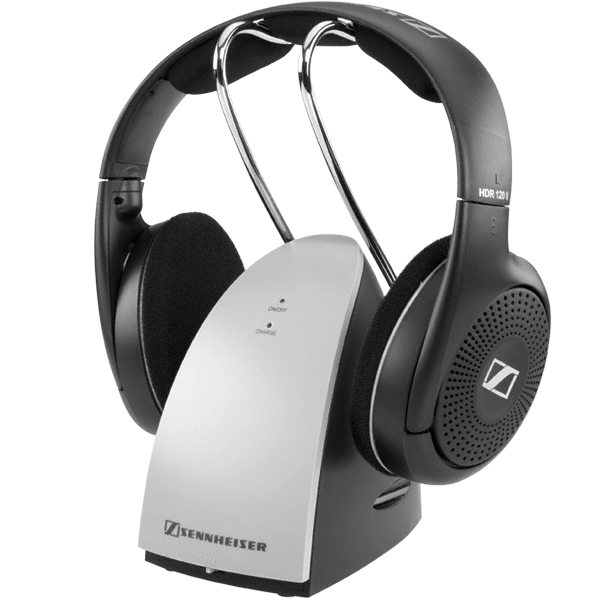
They’re the Sennheiser RS 120.

They retail for $99 on Sennheiser’s website.
(They used to cost more.)
But you can pick them up on Amazon for $79.95..

They still get great reviews
And at that price point, they’re hard to beat.

Sure, they can’t compete with Sennheiser’s top-of-the-line RS 220.
But I don’t need them to rock my world.

I’m not building a home theater.
An empty tin can with a string would probably do if I could figure out a way to connect it.

As Scotty liked to say on Star Trek,
“The right tool for the right job!”

Click.

Little Sony flat screen- welcome back into the Bubble.

Crank up the volume!
What are we watching tonight?