At Home with Tech

Unlock the power of all your technology and learn how to master your photography, computers and smartphone.

Category: apple

Try This Instead of Revealing Your Wi-Fi Password to Friends

If you feel like you’re divulging something secret when a guest asks for your home Wi-Fi password, well… you are. You may think you only have two choices in how to respond, but, in fact, there is a third option…

How many times has a guest in your home asked you for the password to your Wi-Fi network? And how many times have you coughed it up? If you’re like me, that’s usually a one-to-one relationship, right?

And when I haven’t, let me tell you, the response always creates an awkward moment.

I call it the ‘Wi-Fi Faux Pas.’

It’s simply a little rude to refuse someone access to your internet connection for their smartphone. What are they really going to do with it that’s so nefarious?

The answer is… probably nothing, but you don’t really know what could come from the password travelling forever on that mobile device. And over time, and depending how many friends and acquaintances come to visit, your private Wi-Fi password will get entered into more and more smartphones that you don’t control.

How does that feel?

One choice in trying to stem that flow is to simply say that you forgot your Wi-Fi password. I must admit I’ve done that. The irony, of course, is that I actually do sometimes forget the password… especially when I need to log into my own network.
(Don’t worry. I’ve got it written down on a fraying piece of paper.)

The Solution to Keep Your Party Happy
So, why have I really become the ‘Wi-Fi Grinch…?’

Inviting in an ever-growing number of mobile devices to feed off of your Wi-Fi bubble must carry its risks. I don’t really know the cumulative negative effect on my Wi-Fi network security. And yes, I worry about it. There’s a lot of scary news out there about internet security.

And changing my Wi-Fi password every so often as a precaution is time consuming with so much tech in my ‘connected home.’
(In fact, it’s a major project, even to remember all of my hungry IoT devices that will need reconnecting!)

There’s got to be another way to address this issue.
Well, there is!

…Create a guest Wi-Fi network.

Guest Wi-Fi for Your Visitors!
I was so excited when I upgraded my old Apple Airport Extreme to the Netgear Orbi RBK50 mesh Wi-Fi router ($298.97 on Amazon) and then realized I had the option to create a guest Wi-Fi network. My guest Wi-Fi would live right alongside my main web bubble.

That sounds useful, right?

Being able to create another access point with a different login password that I could easily change (once and done) was the perfect solution to my ‘Wi-Fi Grinchness.’

So, I quickly set up my guest network on the Orbi app on my iPhone, and I was in business and ready to handle “the question.”

I’ve got to admit it does feel a bit like I’m running my own B&B, but I certainly feel much more comfortable now sharing my guest network password along with crudités.

Etiquette problem solved.

No More ‘Wi-Fi Faux Pas’
At the end of the day, I’m not so sure my home Wi-Fi network is technically any more or less secure with the addition of my guest Wi-Fi.

My online research turned up several heated Orbi conversations about the guest network option led by clearly knowledgeable IT types. They all expressed different concerns… all of which included geeky details I couldn’t follow.
(The essence of the threads question how ‘separate’ the guest network is from the main network.)

For me, the giant leap forward is to simply hand out a separate password to my guests. I know that’s just scratching the surface when it comes to truly maintaining a secure network, but it’s an important start.

And for now, I’m also avoiding the ‘Wi-Fi Faux Pas’ with my family and friends.

My visitors are happy.
I’m less nervous.

Let the party continue…

How to Give Money to a Friend Using a P2P Payment App

If you want to pay back a friend but you don’t have cash or a check, don’t despair. Here are a couple of ways to do it using a digital wallet in your iPhone….

Isn’t it a drag when you have to write a check to pay back a friend if you don’t have cash? Perhaps that’s okay if you carry around your checkbook. Otherwise, it becomes at least a two-step process that can really linger…

You’ve got to go home… write the check… put it in the mail… or have to wait until you see your friend again to hand over your money.

There’s got to be a better way through technology.

Well, of course there is…

Peer to Peer Transactions
Welcome to the world of peer to peer (P2P) money transaction services… a cashless way to electronically transfer money to family and friends through a mobile app on your smartphone.

I haven’t had the need for this type of financial person-to-person interface… until one day I suddenly felt like I had transported to an alternate universe where cash and checks never existed…

Where’s Your Digital Wallet?
My wife and I were offered a payment by another family to split the cost of swim lessons for all of the kids as part of an ongoing group playdate.
(Yes… swim lessons that are baked into a playdate… how efficient of all of us!)

And the payment offer was via the Venmo app.

Huh?

Sure, I had my iPhone XS Max in my pocket.
I was proudly wearing my Apple Watch Series 4.

And I was blindly holding onto the false impression that I’m up to speed on all of the current tech trends.
(Pop)

So, with my little bubble burst, I went home to do a little homework.
I knew I had some catching up to do…

Venmo
Venmo is the well-known P2P mobile payment service owned by PayPal and has about 27 million users.

Signing up was a snap.

And if you just want to receive money and then use those same digital dollars to pay someone else, that’s also super simple.

But if you need to pull some of your own money into Venmo, then you have to link your Venmo account to your bank account, credit card or debit card.

While that’s not technically difficult to do, there’s sometimes a fee attached…

  • Bank account – free
  • Credit card – 3% fee
  • Debit card – free

When you want to transfer money out of Venmo into your checking account, there’s also a 1% fee if you chose the ‘Instant Transfer’ option.
(minimum- 25¢, maximum- $10)

Otherwise, it’s free. But you’ve got to wait a couple of days, just like waiting for ‘an old-school check to clear.’

My First P2P Payment
The next step was to ‘friend’ people you want to pay in Venmo.
(It’s always a good idea to only friend folks you actually know.)

I searched for our swim class friends who got me started down this relatively shallow rabbit hole. I sent out my invite. And faster than you can say PayPal three times… we were “Venmo’d” together.
(Is that a verb? Quick… someone find me a Millennial!)

But I wasn’t over the finish line quite yet. I had to actually use the technology. As if connected by the Force, my friend sensed my need and sent me a prescient Venmo message…

It was a $1 “friend tariff.”

I stared at my iPhone.
Okay… I guess this was the final quiz for my Venmo 101 elective.

I tapped and paid the buck.

It was official.
I had joined the P2P payments world.
Yay, me.

To celebrate, my friend paid me a dollar.
It was very exciting.
(And there was no disturbance in the Force)

In case you’re worrying about the swim lessons payment, my wife had already taken care of that particular Venmo transaction.
(Yes, I must admit that I often rely on “Mrs. More-at-Home-with-Tech.”)

How Social Do You Want to Be?
There’s also a social media component to Venmo. You have the choice to ‘share’ your Venmo activity…
You can post your activity to the Venmo world or just to your Venmo friends.

Or you don’t have to share it at all.

I know I might be revealing a wildly out-of-touch perspective here…
But why would I want to tell the world that I paid out money?
Is that really a social moment I’d want to share… with anybody?

For me, that information only belongs with me and the person I’ve paid.

Apple Pay Cash
A funny thing happened on my way to Venmo. I realized I already had access to another P2P payment app.

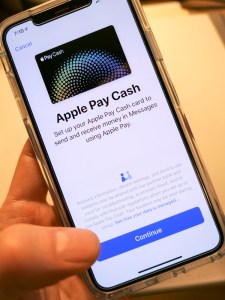
It’s Apple Pay Cash, and it works very much the same as Venmo.
And it was living right next to Apple Pay in my iPhone.

Apple Pay Cash is turned off by default… You’ve got to go into ‘Wallet’ app in your iPhone to simply turn it on.


Once you’ve activated Apple Pay Cash, then you’ve just got to fund it, again much like Venmo.

And just like Venmo, you can transfer your Apple Pay Cash balance into your checking account.

You can also initiate an Apple Pay Cash payment by simply sending an iMessage.
(That almost feels a little too easy.)

One limitation to using Apple Pay Cash is both parties need to be in the iOS ecosystem.

Cash is So Yesterday
My alternate universe existence had quickly evaporated, and I was now armed with both Venmo and Apple Pay Cash and fully functional in the P2P payments game.

Sure, there are competing P2P money transfer systems out there, like Google Pay, Zelle, and Square Cash. But for now, I am satisfied with my choices.
(Which apps do you prefer? Any recommendations out there?)

I’m not so sure this particular form of financial enablement is a game changer for me right now, but at least I can play in the P2P payments’ pond when others insist.

And my toe-in-the-water mentality could change.
(It hasn’t been long since I’ve been actively using Apple Pay at stores instead of my credit card.)

But to simply have the capability to receive money from more ‘enlightened’ humans who want to pay me from their digital wallet…

I am now ready.

(P.S. I still accept cash.)

Four Ways Technology Changed My Life this Year

I’m happy to report that my use of these tech devices has indeed improved my day-to-day life. Here’s why…

Technology is usually meant to make your life better. While it can often be more frustrating than anything else, I find that it does occasionally have a clearly positive impact.

Here are the four tech innovations that made a meaningful difference for me this year…

#1
Apple Pay on My Apple Watch Replaced My Credit Card

I didn’t really feel the impact of Apple Pay when I had access to it on my iPhone. I still had to pull my iPhone out of my pocket… so the physical exercise was mostly the same as sliding a credit card out of my wallet.

Plus, I was still locked into the mindset of having to use my credit card and chipping/swapping it. The concept of contactless payments still felt foreign, and I just couldn’t get comfortable with it.

Then I tried Apple Pay with my new Apple Watch, and I finally experienced my ‘breakthrough.’

By simply double clicking the side of my Apple Watch to activate Apple Pay and then holding my wrist near the payment terminal to complete my payment… that simplicity and convenience really opened my eyes to the obvious benefit of Apple Pay.

It’s so fast. Plus, I don’t have to play roulette with the payment terminal to see if my credit card’s chip (or the payment terminal) is going to malfunction again.

#2
GoPro Became My New Family Vacation Camera

My GoPro allowed me to finally go on vacation with my family and not stress over the possibility of destroying my camera if I tried to snap a photo.

I used to treat the beach like the landscape of a hostile foreign planet. The corrosive nature of salt water was clear and if nothing else , the salty, moist air would quickly cloud the lens. A tiny molecule of sand could fly by and wedge itself into the lens mechanism, immediately immobilizing it.

In short, the beach was a clear danger zone for my vacation photography.

But my new GoPro was essentially impervious to these threats.

  • Sand? HA!
  • Underwater? Now we’re talking!!
  • How about some slow motion video? Yes, please!

I should mention it’s a good idea to wash your GoPro with fresh water after a day of action at the beach.
(Dried salt moisture can seal the little watertight doors in place, making it difficult to pop the battery or memory card out.)

This year, I was finally able to capture some fun family shots at the beach and also have fun while doing it…

Thanks, GoPro!

#3
I Generated Whole-House Wireless Internet Using Mesh WiFi

I lived for years with spotty WiFi in our house. The weakest WiFi signal was actually in our bedroom. That’s such a bummer, right?

I thought about extending the signal of my Apple Airport Extreme many times, but I was concerned about degrading my WiFi. So, I did nothing…

Until I read that Apple had exited the WiFi router business. And I finally decided to make a change…

I retired my Apple Airport Extreme.

And upgraded to a new WiFi mesh system:

My Orbi consists of a base unit, which essentially replaced my Apple Airport Extreme and a satellite device, which I placed in the center of my house. Together, the two devices successfully created a large enough WiFi bubble to reach all corners of our little house.

Suddenly, whole-house WiFi became the standard throughout the Lester universe.

I can’t tell you how satisfying it is to check your email before your head hits the pillow and see strong WiFi bars.

#4
YouTube TV Made Me Cut the Cord

I cut the cord this year.
…Can I say that again?

Yep, I cut the cord this year.
(Thank you.)

I replaced my cable service with YouTube TV, which is an app that streams all of the cable networks I want for just $40/month.

Yes, I’m still paying Cablevision for my internet… so technically the cord is still technically tethered.

But I returned my cable box, and my decades long relationship with an industry that helped to define my existence finally entered a more enlightened reality.

I’m saving money, only paying for what I want, gaining a sense of control and successfully trying something new.

I highly recommend it.

Don’t Forget the Human Factor
I know these ‘headaches’ that technology has helped to alleviate are First World problems.
(I do understand that.)

And I’m thankful I get to complain about these particular issues.

That said, if you’re fortunate enough to have the resources to play with technology, then technology should simply play nicely with you.

And sometimes, you’ve got rely on the human equation to figure out how to really make technology work… for you.