At Home with Tech

Unlock the power of all your technology and learn how to master your photography, computers and smartphone.

Category: family

5 Packing Tips for Your Tech When Traveling Overseas
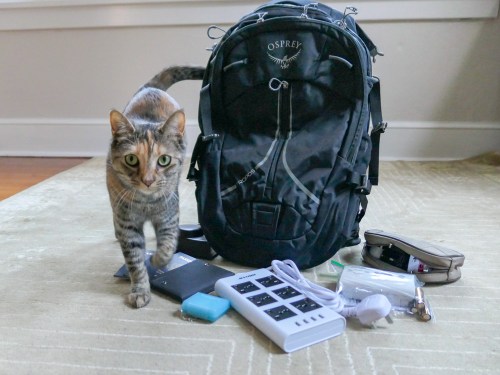
When you’re packing your carry-on bag, here are a few tips to help you focus on the tech you really need to bring along. (Or you can ask your cat.)

My family and I just got back from a fun holiday in London. In preparing for our trip overseas, I asked myself two questions to help decide what technology to pack.

  • How much tech do I really have to bring along?
  • How am I going to protect it?

Of course, you really don’t want to pack anything more than you need. That said, if you want to play with some of your gear while on vacation…well, isn’t that what vacations are for?!

So, it’s a balancing act of sorts.

If you find yourself confronting similar questions, here’s one traveler’s tech packing list to consider…

1.
Portable Power Strip and Surge Protector
It’s likely you won’t have access to as many power outlets in your room as you’d like. Bringing along a portable power strip will certainly help you get all of your tech powered and charged up overnight. And electrical surge protection is a really good idea when you’re staying in a strange place. Finally, make sure the unit can handle different voltage standards.

2.
Compact Portable Charger to Throw into Your Day Pack for On-the-Go Power Back Up
You certainly don’t want your smartphone to choke when you’re traveling through a long day in an unfamiliar land!

3.
New SDXC Memory Card for Your Camera
Yes, standalone compact cameras can still get certain shots that a smartphone will have trouble with… especially in low light.

  • SanDisk Extreme Pro SDXC UHS-1 Card, 64GB
    $20.49 on Amazon Prime
    (Sure, you can manually delete videos and photos from your existing SD card to free up space for your trip. But for only twenty bucks, you can start with a fresh card that’s instantly ready to store as many media files as you can possibly create on your trip!)

4.
Portable, Battery-Operated Carbon Monoxide Detector
You never know, right? If you’re not sure if your room has one of these, it makes sense to pack this.

5.
RFID-Blocking Passport Wallet to Prevent Data Skimming
There’s some controversy as to whether you really need this level of protection, but I say better safe than sorry.

Additional Packing Prep to Consider…

Do You Need a Voltage Converter?
Of course, you’ll need to bring adapters to fit electrical outlets when you’re traveling overseas. England uses Type G electrical plugs, and the voltage in the sockets is 230v.

Since the voltage in U.S. power outlets is 120v, consider the need to take a voltage converter in addition to your plug adapters.

The battery chargers for all of the mobile tech I pack happen to all work in dual voltage modes… 100 – 240 volts.
(Listed on the battery charger in really small print.)

So, I didn’t need to bring a voltage converter to England.
(But the power strip I brought still required plug adapters.)

Add International Service to Your Wireless Plan
My iPhone has AT&T Wireless service. The easiest way to adjust my AT&T plan while overseas is to go with the $10/day “International Day Pass.”

For the ten bucks, you’re essentially mimicking the same plan as you use when you’re home in the United States. You don’t have to worry about data limits or the threat of any additional usage costs. It may not be the cheapest way to use your phone internationally, but I still think it’s a great deal to give your smartphone full functionality.

Bring All of Your Gear Home
It may be an obvious point, but don’t leave any of your expensive tech behind! Stay organized and keep track of all of the little support pieces like battery chargers and cables.

And when you get home, make sure you quickly get to work organizing and sharing the photos and videos you shot on your trip. Family and friends want to see them!

Happy travels!
Why You Need to Build a Kitchen Counter Tech Station

If you’re finding too much of your tech cluttering your kitchen counter, it’s time to get organized. Here’s what I did…

Your kitchen counter made is for cooking, right? But how often do other household items and mail accumulate on it? And how about all of your tech? Don’t tell me that you’ve never had to charge up your smartphone on your counter…

It’s just a mess!
Right?

Instead of fighting it… I say… go with it.
…and officially make some space for it.

Your tech doesn’t have to take a lot of room, but you should really consider creating your own kitchen counter tech station.

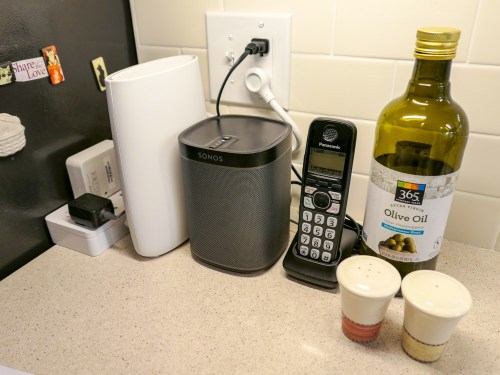
The Lester Kitchen Tech Station
My tech station lives in the corner of our kitchen tucked away on the counter next to the refrigerator. These are the pieces:

  • Sonos Play:1 wireless speaker
    If you dream of having whole-house music functionality, then you’ve got to find a place in your kitchen for a speaker, right?
  • Orbi Wi-Fi router’s satellite unit
    When I upgraded my home Wi-Fi to a mesh system, I needed to find a centrally-located place on the first floor to locate the satellite Orbi to extend its mesh network. The corner of our kitchen counter was the perfect spot.
  • Cordless telephone
    Yes, we still have a landline. (Cough)
  • Compact power strip
    Of course, your kitchen wasn’t designed for your power-hungry tech to take over all of the outlets. So, you’re probably going to need to create a power extension for all of your resident kitchen tech. I went with a compact 4-plug surge protector and 2 USB charger made by NTONPOWER.
    It’s $20.99 on Amazon Prime.

I’ve positioned these four tech supports neatly in a row in the corner of our kitchen counter.

Smartphone Support
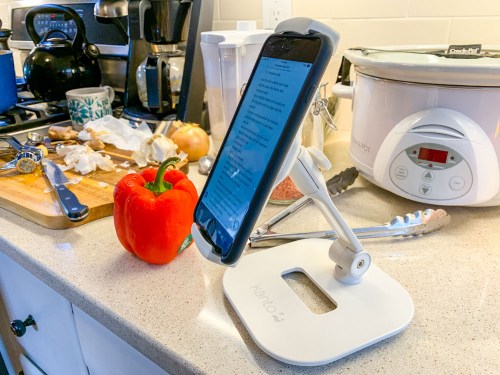
Then, I’ve got a mobile smartphone/tablet stand. It’s easy to attach one of our iPhones to it when cooking from an online recipe. Sure, you can simply place the phone on the counter, but when food and knives are flying around, I find it’s safer for our devices to live slightly above the action. Plus it’s easier to read the recipe!

I went with a stand made by Kanto… It’s $29.99 on Amazon Prime.

Tomorrow’s Kitchen… Today
If you want your kitchen to be a tech-free zone, then good luck to you. Let me know how that’s working out.

For the rest of us, I think it makes a lot of sense to find a corner in your kitchen that’s relatively out of the way and intentionally build your own tech station.

You’ll feel a lot more organized!

A Few Old Photos and the Mystery of My Paternal Grandmother

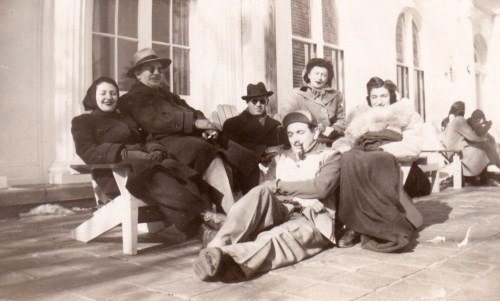
Trying to solve the puzzle of your family’s past with a few fading pictures is hard to do. This photo of my grandfather (back center) and his friends tells a story, but I have no idea what it is. It’s time to stop history from repeating itself…

Some families maintain solid details on their past. For various reasons, others do not. I’m sure I don’t have to tell you that families, large or small, are usually pretty complicated entities. And without going into too much background about mine, I should say that there were fracturing events that left certain folks estranged from others for many years… and in some cases… forever.

And then I came along, and grew up without many details on who was who… let alone actually spending time with many of my relatives.

Let’s simply say that I was born disconnected from much of my family…

With the major exception of my maternal grandmother’s side, which I’ve gotten to know well during my adult years (an amazing story for another time), I’ve had no choice but to rely on spotty intel from my now 86-year-old father.
(My mom’s been gone since 2006.)

Shoe Box Time Machine
The only other resource I have is a small collection of old family photos from my father’s side that was entirely disorganized in a shoe box and envelopes. They were mostly undated and without accompanying notes.

Over the years, I’ve digitized many of these pictures and tried to figure out some of the puzzle of my family’s past through them. Of course, I recognize the major players… my dad… and his parents. But the where and when are often unclear.

Yes, I’ve asked my father for the details… I’ve shown him the pictures multiple times. The problem is I haven’t always gotten the same answers against the same photos. So, I’ve sometimes had to rely on consistency to determine probable facts.

Figuring Out Your Origins in Old Photos
I just held another ‘photo review’ session with my dad and displayed our family photo archive to him on my iPhone while we were having dinner at the local diner. Happily, I had immediate access to the pics on my cloud family photo archive.
(More on that project here.)

I took notes on all of his responses and then brought the detail back to create more metadata for each of the original photo files. They’re officially stored in Adobe Lightroom on my iMac. I adjusted the ‘creation date’ for some of the photos, and I added my father’s new comments into the caption section.

And then I took a step back and looked at the entirety of my adjusted collection… fewer than 100 photos that comprise my father’s side of the family from 1900-1960.
(After that, I’ve got more images and information to work with.)

And let me tell you, every time I go through this exercise, I work out a few more ‘aha’ realizations.

This time, with the date adjustments and brand new background on my grandfather’s family road trip to California to visit a childhood friend, I created a new grouping of photos that brought this story to life.

I’m a detective… figuring out my own origins.

I think most everyone wants to better understand their past… their roots… the basis of their identity.

For me… it’s been one picture at a time.

The Mystery of My Paternal Grandmother
Rachel was my grandmother, and she died when my father was very young. He doesn’t remember her very well.
(I know she was a school teacher, but that’s about it.)

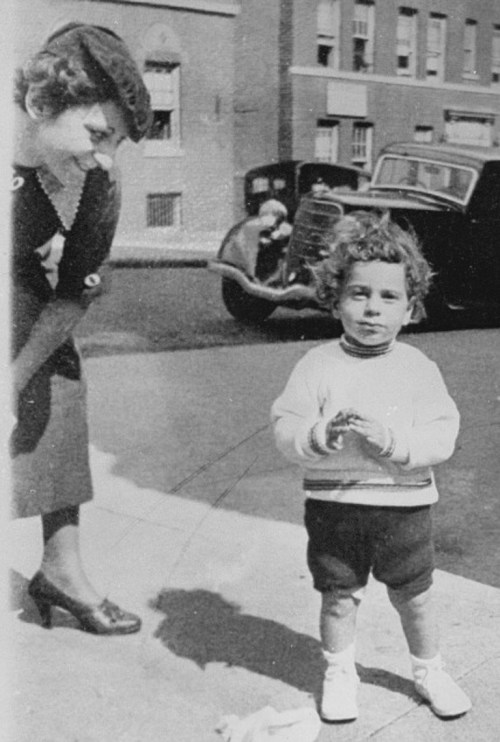
Rachel’s family name was Dworkin, and we have a handful of pictures from several moments of her life in New York City, including two with my father when he was a child. These photos offer clues to who she was. But you can only glean so much from a photo…

One detail I’m still working through is accurately dating her photos. There are certain anchor shots like this one where I can more easily determine the date. My dad can’t be more than two years old here… so it’s probably 1935. Then, I compare how my grandmother looks here to other shots of her to help order them chronologically…

Doomed to Repeat the Past?
I know at some point, I will have mined as much detail as possible. And this part of my family history project will be wrapped (though still very much incomplete).

But family histories are never really finished… are they?

New stories are constantly generated, and now… countless digital photos are snapped to document the lives of our families.

Our decedents should have no problem putting together this chapter of the early 21st century, because there’s so much to work with, right?

Well… I wouldn’t be so sure.

Too many photos can be overwhelming. And too many disorganized photos… almost impossible.

Sure, they’re all digitally time stamped and possibly geotagged, which is a huge benefit. But without other critical information, these pictures will have limited value in the future.

And a forgotten portable drive with archived photo files found decades later in the back of a closet may be an unrevivable dead brick. So, now you’ve gone from thousands of family photos to… zero.

3 Ways to Back Up the Memories of Your Life
I don’t have the perfect solution to creating a bulletproof photo archiving plan that will hold up into the distant future.

But it makes sense to confront the challenge on several fronts…

  • Organize your photos in the days and weeks after you snap them
  • Make photobooks at least every year to document your family’s story
  • Back up the very best of your photo files to several locations, including the cloud

And it still couldn’t hurt to print out a few photos every so often and then jot down the details on the back of them. Finally, throw these pictures into a shoebox and then hide it in the back of a closet to be discovered decades later.
(Yes, I recognize the irony.)

Future-Proof Your Family History Archive
We all want to be remembered.

Even a few photos with key information can provide a tether to the reality of a past life.

I wish I knew more about my beautiful grandmother.


She looked like she was a wonderful person.

Please… do your descendants a favor and try not to make them guess about your life…