At Home with Tech

Unlock the power of all your technology and learn how to master your photography, computers and smartphone.

Category: photography

How to Improve your Zoom Background at Home
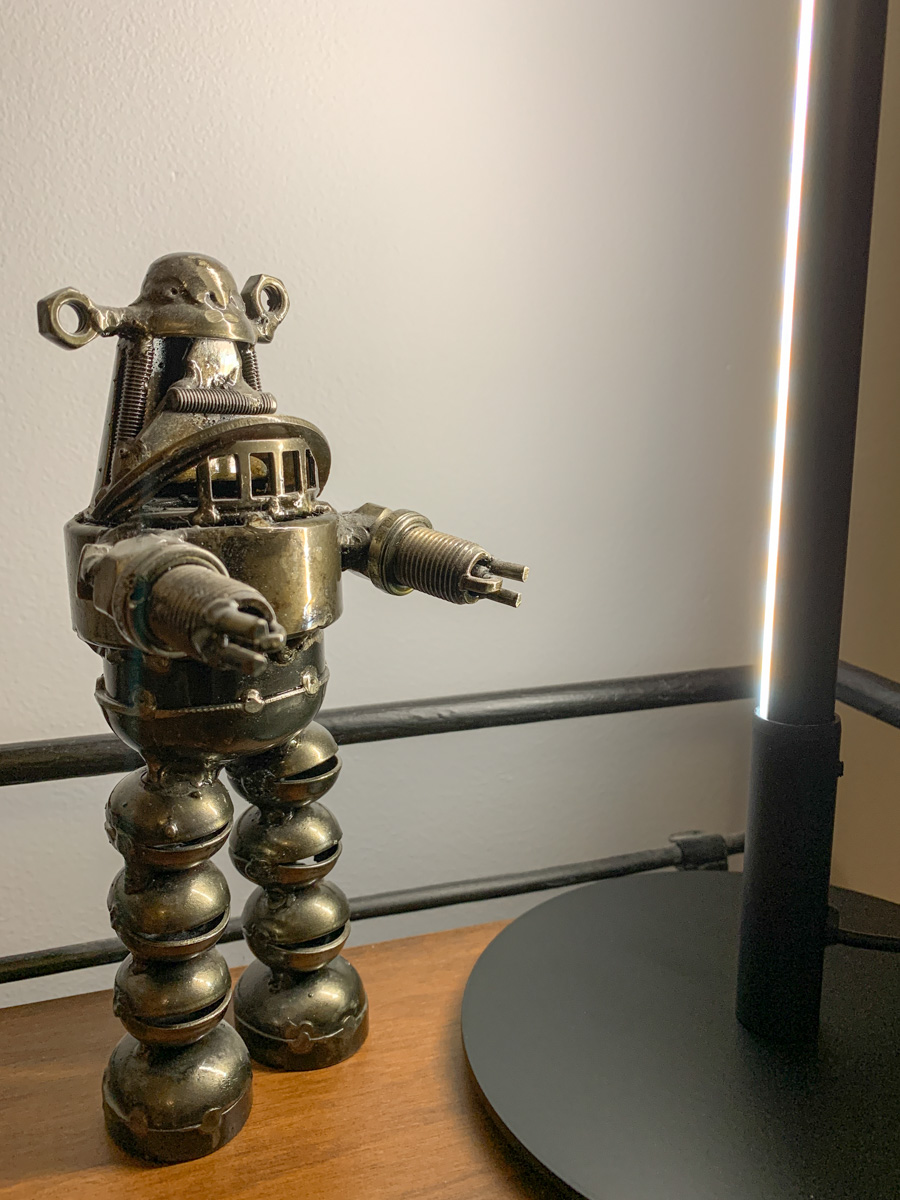
Making sure you’re properly lit in your Zoom shot isn’t always enough. What about the supporting cast in your webcam’s view?

It’s clear we’re at a point where participating in Zoom meetings is a permanent part of home life and a necessary tool to communicate with our world. So, it’s important to create a ‘remote video communications’ home set-up that really works for you and your viewers.

I hope most of us are beyond the chaotic experience of working from home and participating in meetings all day. During those early pandemic months, simply finding a quiet spot to open up your laptop for a Zoom, Skype or Teams meeting was a challenge.

How your shot looked understandably may not have been your priority.

Keeping it Real
But as we’ve settled into our new routines, many of us have improved our Zoom look.

I’m sure you know the basics by now:

  • Make sure you’ve got enough light on your face.
  • Don’t sit with a window behind you.
  • Position your webcam perpendicular to your eyes, not looking up your nose.
  • Declutter your background.

I know many folks are fond of using virtual backgrounds. While that’s okay, I like to keep my shot as authentic as possible.

I’ve tried digital and blurred backgrounds, but I always felt like I was in a science fiction movie.

Can you See my Robots?
So, even though my home office is hardly an ideal space to create the perfect video shot for my Zoom meetings, I’ve continued to tinker with my background throughout these many months.

Recently, I moved the furniture around in my home office, and to a certain extent I’ve created something of a blank canvas to work with.

I repositioned a short bookshelf into my Zoom background, and I used the top shelf to display a few robot statues I’ve collected over the years. (R2D2, C3PO, Robby the Robot and Robot from the original “Lost in Space”)

They’re also nice ice breakers as people sometimes ask about them when they spot my metal robots in my Zoom shot.

The only problem is my robots looked like shadows in my background. That’s because my back wall didn’t have a lot of light hitting it.

Time to Add More Light
Like any professional studio TV set, you’ve got to properly light your entire space, and that includes the background. Otherwise your environment will look drab, no matter what it contains.

And webcams are usually happier if your lighting is more even throughout the entire shot. That means you’ll look better and not over exposed.

So, I needed to figure out how to throw more light on that back wall and my little robot display.

Vertical LED Table Lamp
There are any number of ways to do that. A floor lamp next to the bookshelf would be an easy solution. That said, I didn’t want to clutter my background (or my home office). Instead, I looked for a lighting solution with a smaller footprint: some sort of lamp that could sit on the end of the book shelf just outside of my Zoom frame.

I found a small vertical LED table lamp made by Edishine on Amazon.
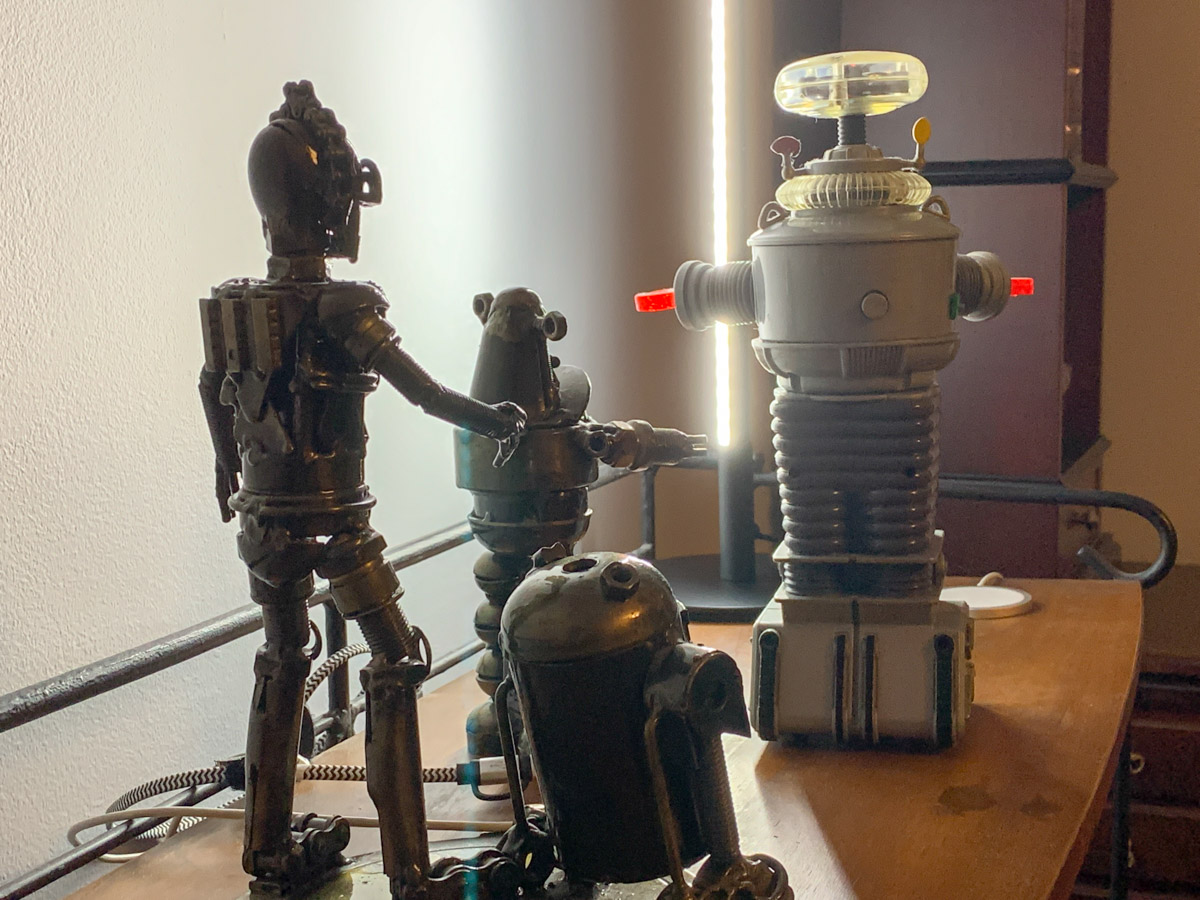
It was the perfect solution. It added the background fill light I needed without overwhelming my shelf. The lamp’s cold, minimalistic look also blended nicely with my little metal companions.

Think of it more like an under-cabinet lighting solution, but designed as a self-standing vertical glow.

Now, my robots are easy to spot in my Zoom background. Plus the extra light also helps my back wall pop.

Zoom-Optimized Rooms
If you want to really show up for your close up during Zoom meetings from home, you’ve got to do more than light your face and wear a nice shirt. Your environment is an extension of you, and it’s important to give it the same attention as you set up your webcam shot.

That means your whole room (or at least the part people see) needs enough light.

I know we don’t live in TV studios (well, most of us don’t). But I think it’s fair to say that when you think about how to decorate your living spaces moving forward, it’s not crazy to plan for the creation of Zoom-optimized rooms.

It’s not science fiction. Yes, reality has caught up.

Looking for our Kicks on Route 66

When you’re driving on Historic Route 66 near Kingman, Arizona, don’t blink. Here’s the Guardian of Route 66 statue we found by the Antares Point Visitors Center.

Of course, our Southwest vacation was all about three amazing national parks, including Grand Canyon. But our journey was inevitably part of the experience.

We rented a cushy Jeep Grand Cherokee, and headed out on our road trip from Las Vegas to Utah and eventually into Arizona and Grand Canyon.

We originally plotted our course south, because we wanted to hit a portion of Historic Route 66, but we ultimately waited for our return route to do that. The lure of Zion National Park and Bryce Canyon National Park in Utah was too enticing. So, we went north instead.

The Roadkill Cafe
Fast forward to the end of our trip. We drove out from Grand Canyon on 64 South and then took I-40 west towards Seligman, Arizona, where we finally picked up Route 66.

In Seligman, we stopped for lunch at the Roadkill Cafe. The pricy diner mostly lived up to its weird name. But more importantly, it satisfied our early expectations for what our Route 66 drive might hold.

But I would soon be disappointed… mostly.

Nothing to See for Miles
We drove for only 87 miles on Route 66 between Seligman and Kingman, Arizona before we needed to pick up 93 North towards Las Vegas and our flight home. Granted, these miles are a relatively small sample size, but unfortunately, this part of the iconic road linking Chicago to Los Angeles did not reflect the quirky, Americana highway with its colorful reputation from its heyday.

The majority of the miles was simply wide open road with Arizona desert views. The few, tiny towns we passed were mostly populated by shuttered stores, restaurants and gas stations from a bygone era (or perhaps the pandemic finally did them in).

Giganticus Headicus
There was one exception northeast of Kingman. It’s the Antares Point Visitors Center, home of the green “Giganticus Headicus” sculpture by artist Gregg Arnold.
This outpost is a mutant gift shop and mini sculpture park in the middle of nowhere, populated with outdoor art and a graveyard of classic cars that aren’t quite qualified for the dump (but close).

The place is something like what you might find in a giant humanoid kid’s playroom somewhere in the multiverse.

We pulled in, mostly because we spotted the giant green head.
It was a welcome distraction from the desolate landscape we had been crossing (and we needed a bathroom break).

An Oddity Worth Checking Out
We probably stayed for half an hour. We did a bit of shopping for UFO-themed trinkets, but mostly meandered around the grounds enjoying the outdoor art and mummified vintage vehicles.
It was all entirely strange and wonderful. Exactly what I was hoping for.

Won’t You Get Hip to this Timely Tip?
This is not your average visitors center. Far from it. But was this all that Route 66 has to offer? Well, it was for those 87 miles.

Antares Point is a taste of Americana. And it was enough for us as we got back in our car and soon came to the on-ramp back to the future.

Yes, I can say we got our kicks on Route 66.

My Timelapse Videos from National Parks in Arizona and Utah

My goal was to capture sunrise and sunset timelapses from our Southwest vacation to three amazing national parks. Here’s what I saw.

I’m not proud to admit that I carried four cameras throughout our Southwest vacation to be prepared for whatever wonders awaited us. I packed my Panasonic Lumix GH5 II, my smaller Panasonic Lumix LX10, my tiny GoPro and my little DJI Osmo Pocket gimbal. Plus I had my iPhone. So that actually makes five cameras.

Good Things do Come in Small Packages
The good news is with the exception of my larger Micro Four Thirds GH5 II, the rest had small profiles and were easy to pack or throw in a pocket. I’m also happy to report that I did find moments to put all of my gear to good use.

That said, besides my iPhone which was always there for me in my front right pocket, my most useful camera proved to be my tiny but mighty Osmo Pocket with its magical timelapse creation abilities… perfect for sunrises and sunsets.

I popped it on top of my Manfrotto Befree Live travel tripod, set up the timelapse for 20 or 40 minutes and let it run while I took photos with my other cameras.

My Osmo Pocket captured some really satisfying timelapse videos.
Timelapse from 3 Southwest National Parks
This edited timelapse video contains my shots from Zion Canyon, Bryce Canyon and Grand Canyon… all amazing places. (Here’s our itinerary.)

Deconstructing my Shots
I took the first Grand Canyon sunset timelapse at the overlook near the Yavapai Geology Museum at the South Rim. This is not the most popular place to go for sunsets, which meant there were fewer people packed into the good spots and more room for me to spread out with my gear.

I positioned the second Grand Canyon sunset timelapse steps away from our room at the Bright Angel Lodge. It was already too dark to start the timelapse and really see inside the canyon, but the cloud movement was magnificent.

I think the second Bryce Canyon timelapse really works because you can see tiny, ant-like hikers moving around in the bottom left corner. It give the perspective the shot needs.

Plan your Timelapse Shoots into your Family’s Vacation Schedule
When you’re traveling with your family, plopping yourself in a space for 30 minutes to capture your next timelapse can be disruptive.

A word of advice: Don’t be spontaneous. Plan ahead and announce your intentions. And don’t do too many across a vacation.

It’s all about balancing your family’s vacation time so that everyone gets an opportunity to do what’s special to them!