At Home with Tech

Unlock the power of all your technology and learn how to master your photography, computers and smartphone.

Category: photography

How to Record Better Field Audio When Shooting iPhone Videos
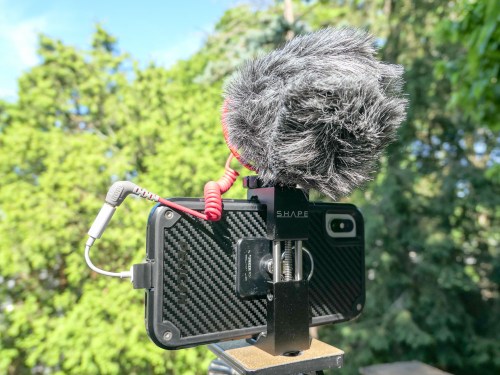
I admit it… I’ve created the Frankenstein iPhone. Why? I simply wanted to enhance its 4K video recording capability with cleaner audio in the field. Here’s how I did it…

Look, I know my iPhone XS Max isn’t a ‘real’ video camera (although it is). And you wouldn’t think it’s supposed to carry the weight of capturing conversation in the not-so-quiet outdoors. But why not?

With the right lighting conditions, an iPhone XS Max can capture beautiful 4K video. And its multiple onboard microphones do an effective job in many situations. Its only real limitation with field audio is handling windy conditions. And that’s the case with any video camera that doesn’t have an attached directional microphone with a windscreen.

So, why wouldn’t the solution be to simply attach a directional mic and windscreen to my iPhone?

And that’s exactly what I set out to do…

The Price for Better Audio in the Field
Audio production is an expensive business, and you can easily spend more on field audio equipment than the price of an iPhone.
(Seriously)

So I gave myself a budget of $100 to see what was possible…

My final ‘creation’ was both hideous and glorious. I’ve truly created a Frankenstein iPhone. I probably should feel ashamed, but I don’t.
Consider yourself warned…

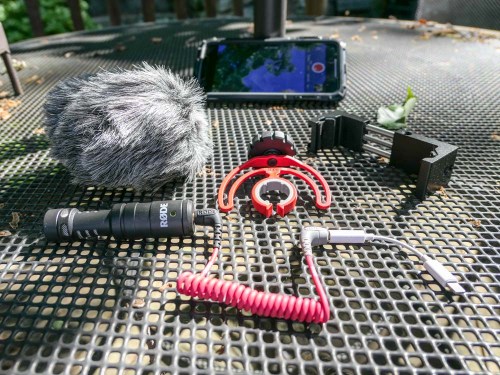
Rode VideoMicro
I zeroed in on the Rode VideoMicro compact on-camera microphone. Rode is well regarded in the audio industry, and this inexpensive cardioid condenser microphone that’s marketed to the DSLR market was a prime candidate for my little project.

Cold-Shoe Clamp
But of course, an iPhone isn’t a DSLR with a cold-shoe mount to easily attach a microphone. So you’ve got to somehow anchor a cold shoe mount to the iPhone…
The Shape Smartphone Aluminum Clamp is one solution.

Lightning Dongle
The VideoMicro uses a 3.5mm plug, which won’t plug directly into an iPhone’s Lightning port. So, the next step is to use an Apple Lightning to 3/5mm Headphone Jack Adapter.

TRS to TRRS Cable
And before you can use the VideoMicro with a smartphone, you also need the TRS to TRRS cable (Rode SC7 Cable). That’s instead of the TRS patch cable that comes in the box… which will not work with the iPhone.

Included Accessories
Perhaps most importantly, the VideoMicro comes with a furry windshield (sometimes called a “dead cat”) to handle the outdoors. It also has a nice little shock mount to suspend it in the cold shoe.

Final Price Tag
Altogether, my Frankenstein plan totaled $104.54. There’s nothing simple or elegant about it, but the Rode should immediately come to life when paired with an iPhone…
Click.

Rode Video Mic Me-L is the Runner-Up
I chose the VideoMicro over Rode’s Video Mic Me-L, which plugs directly into the lightning port of a smartphone. Yes, Rode’s design engineers have actually created the exact product I needed, but I didn’t bite…

The deal breaker was the snug fit required by the Video Mic Me-L that most iPhone cases would prevent. I just couldn’t handle the prospect of having to take my iPhone XS Max out of its cozy Pelican case every time to pop on a microphone.

And even though my VideoMicro is a more cumbersome (and expensive) solution with all of its necessary ‘adapters,’ the fact that it lets me keep my iPhone in its case is the more important feature.

Test Results
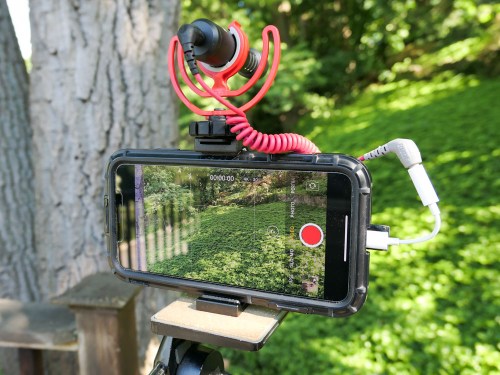
First off, my Rode VideoMicro works just fine with my iPhone XS Max. I saw some online chatter that it’s incompatible…
NOT TRUE.

I also read an online comment that there’s a slight audio delay when using the Rode VideoMicro and an iPhone…
TRUE!

Many people may not notice the two-frame lag, but if you’re a video editor, it’s pretty obvious.
(I’m not surprised with all the necessary cable Macgyvering.)

But it’s not a deal breaker, as long as you intend to edit your video footage. All you have to do is separate (unlock) the audio track from the video and then slip the audio track forward a couple frames.

It’s a straightforward step when using standard editing software like Final Cut Pro X, though an admittedly unnecessary step if there wasn’t an audio lag to begin with.

The VideoMicro provides clean, crisp sound… though it is a bit thin compared to what the iPhone’s onboard microphones capture in otherwise perfect conditions. So, you might also want to add in a little bass while you’re working with it in your editing software.

Perfection Not Required?
At this point, you should be wondering why anyone would want to use this Rode and go through all of these extra steps.

Well, don’t forget why I Frankensteined my iPhone in the first place… It’s to capture more directional audio that’s not as affected by the windy outdoors.

And it does successfully deliver on that value proposition at a decent price point.
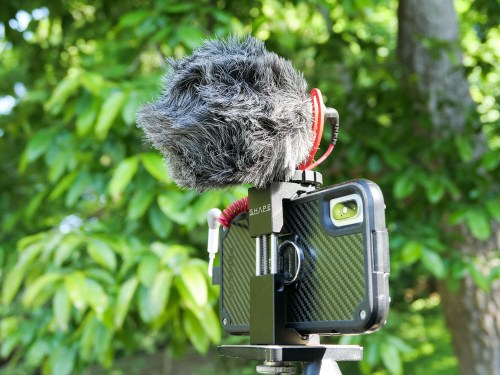
I also must admit that using my iPhone XS Max with the VideoMicro is a still completely imperfect audio upgrade solution, because it doesn’t provide one additional key feature…

You can’t monitor the audio as you’re recording it!
(Don’t forget that the iPhone’s lightning port is already occupied as the microphone input.)

So, if you want to be sure you’ve captured good sound, you need to review your video clips in the moment. And depending on how much time you have, that can be a real drag…

And let’s face it, as much as the VideoMicro can give you better field audio, it’s never going to do the same job of a more expensive shotgun microphone or a lavalier microphone.

Still…

Better iPhone Audio in the Field for $100
When the need presents itself, using the Rode VideoMicro is a clear step in the right direction.
(And if nothing else, the monster you’ve created that was once a sleek iPhone is sure to be a head turner.)

Recording audio has always been the forgotten cousin of video production… and often the Achilles’ heel of any video shoot.

If you’re serious about putting your smartphone to use recording people talking outdoors, you’ll eventually want to invest in some additional audio muscle, especially if you’re shooting in the field with noisy air flow.

For a hundred bucks, Rode’s VideoMicro along with a team of cables and small clamp is a solution that will help get the job done!

Offbeat Photo Moments from our London Vacation

If you’re expecting iconic London photography, there’s nothing more to see here. If you’re hoping for something a little different, well then… I might have something for you. Unique or throwaway? You decide!

My family and I have recently returned from a week’s vacation in London, and yes, I snapped more than a few pictures along the way. As part of my little photographic exercise, I also attempted something a little different…

In addition to finding iconic shots as well as any number of family selfies, I tried to also observe our London experience using a different eye. So, I took a few photos that represented the story of our trip from an alternate perspective… imagery that you might easily miss (as well as a few that were entirely impossible to ignore).

These offbeat moments were right in front of us. I just had to open my eyes a bit wider or turn my head in a different direction to spot them…

Sunrise at Heathrow Airport
When you’re walking off the jetway at 6am after your seven-hour flight, you’re probably not taking the time look out the window towards the airport. Well, you should… a sunrise is beautiful just about anywhere!

Kensington Gardens
As I experienced a little jet lag on our first morning, I stumbled through Kensington Gardens on a cloudy day. Then, suddenly this moment presented itself. My vacation had officially begun!

The Elphin Oak
I found this delightful sculpture filled with fairies, elves and animals at the Diana Princess of Wales Memorial Playground.

British MuseumDon’t forget to look up! This skylight ceiling bathed visitors with blue-cast sunlight seemingly from an alternate reality.

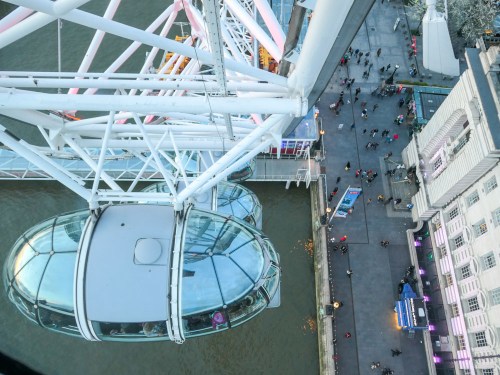
The London EyeWhile everyone else was looking up and over London, this reverse view down was really cool.

Cutty Sark
For me, viewing the hull of this restored 19th century clipper ship from this angle was the true highlight.

Tower of London
Sure, everyone races to see the Crown Jewels. But the Tower of London tour also houses many other treasures, including the opportunity for my third grader to get close to chainmail armor.

Hungry Raven
My son spotted this peculiar moment as this hungry Tower of London guardian tried to figure out how to get inside an already-open Pringles can.

Tower Bridge
I got the complete view by looking up to look down.

Lock Hatters
My father visited this iconic hat store on St. James’s Street 60 years ago and recommended I stop by and ask if they remembered him. While I stopped short of asking the very proper salesman to check their records, I did FaceTime my dad while we were walking through Lock Hatters and facilitated a reunion of sorts.

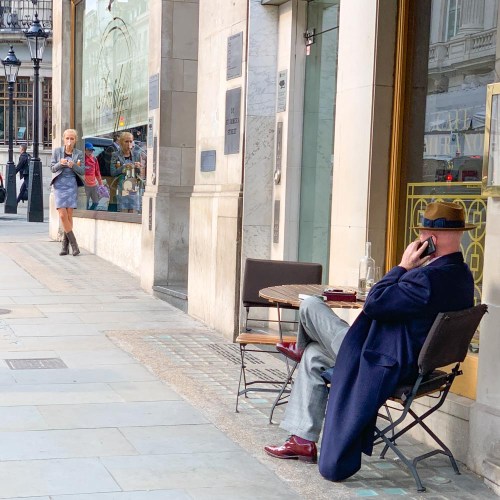
The View on St. James’s Street
This view had a timeless feel. So I quickly pulled out my iPhone XS Max to capture the image.

Ceiling at King’s Cross Station
The grafting of this ceiling extension using such a modern design onto this old structure is both radical and brilliant.

Chilly Night by the Thames
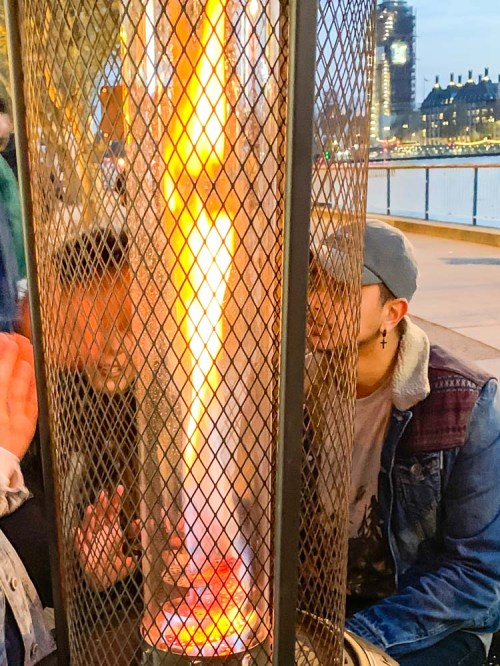
A hot chocolate street vendor provided some additional heat to help this pop-up café also serve as a warming station.

Silent Disobedience
This doesn’t appear to be much of an accident…

The Tube
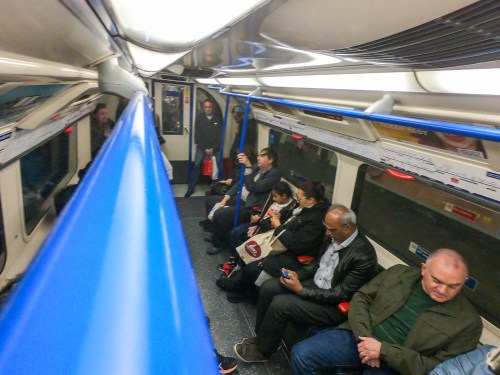
Riding the Underground was our total transportation solution. It felt more cushy than NYC’s subway cars, but the space was also a bit tighter and rounder. Mind your head!

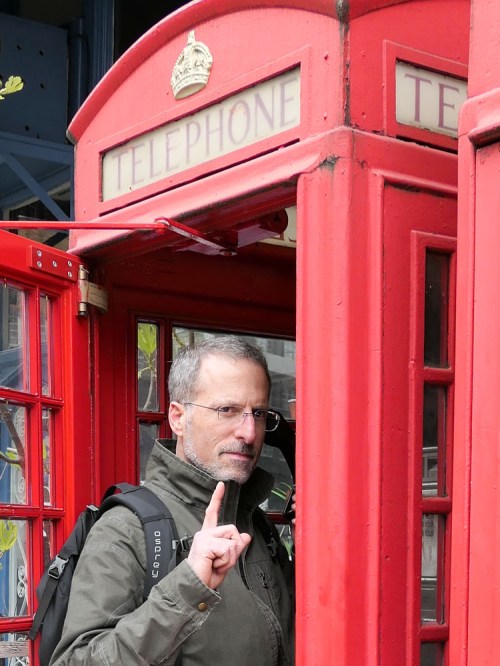
Red Telephone Box
A phonebooth? Still? How quaint.

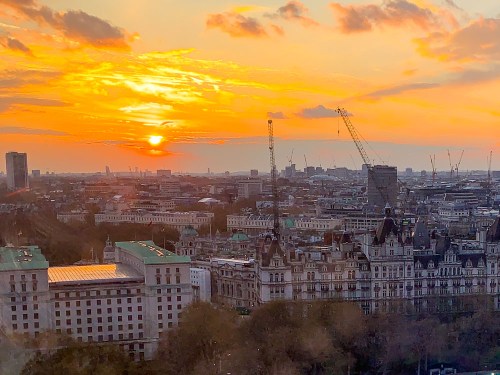
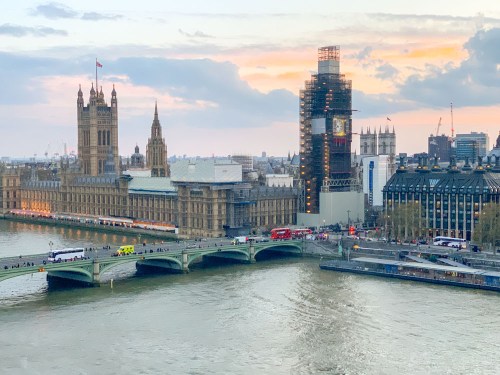
Sunset over London
Both a sunrise and a sunset during a London trip?! That’s definitely worth calling out. And a nice way to end our little photographic journey across the pond!

5 Packing Tips for Your Tech When Traveling Overseas

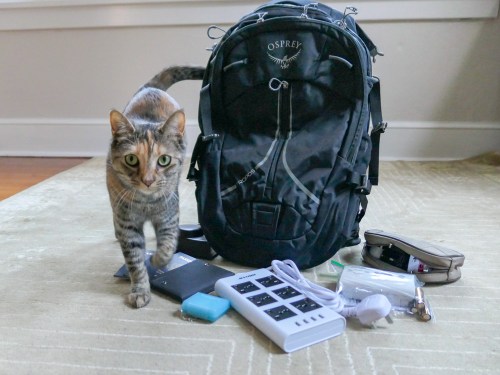
When you’re packing your carry-on bag, here are a few tips to help you focus on the tech you really need to bring along. (Or you can ask your cat.)

My family and I just got back from a fun holiday in London. In preparing for our trip overseas, I asked myself two questions to help decide what technology to pack.

  • How much tech do I really have to bring along?
  • How am I going to protect it?

Of course, you really don’t want to pack anything more than you need. That said, if you want to play with some of your gear while on vacation…well, isn’t that what vacations are for?!

So, it’s a balancing act of sorts.

If you find yourself confronting similar questions, here’s one traveler’s tech packing list to consider…

1.
Portable Power Strip and Surge Protector
It’s likely you won’t have access to as many power outlets in your room as you’d like. Bringing along a portable power strip will certainly help you get all of your tech powered and charged up overnight. And electrical surge protection is a really good idea when you’re staying in a strange place. Finally, make sure the unit can handle different voltage standards.

2.
Compact Portable Charger to Throw into Your Day Pack for On-the-Go Power Back Up
You certainly don’t want your smartphone to choke when you’re traveling through a long day in an unfamiliar land!

3.
New SDXC Memory Card for Your Camera
Yes, standalone compact cameras can still get certain shots that a smartphone will have trouble with… especially in low light.

  • SanDisk Extreme Pro SDXC UHS-1 Card, 64GB
    $20.49 on Amazon Prime
    (Sure, you can manually delete videos and photos from your existing SD card to free up space for your trip. But for only twenty bucks, you can start with a fresh card that’s instantly ready to store as many media files as you can possibly create on your trip!)

4.
Portable, Battery-Operated Carbon Monoxide Detector
You never know, right? If you’re not sure if your room has one of these, it makes sense to pack this.

5.
RFID-Blocking Passport Wallet to Prevent Data Skimming
There’s some controversy as to whether you really need this level of protection, but I say better safe than sorry.

Additional Packing Prep to Consider…

Do You Need a Voltage Converter?
Of course, you’ll need to bring adapters to fit electrical outlets when you’re traveling overseas. England uses Type G electrical plugs, and the voltage in the sockets is 230v.

Since the voltage in U.S. power outlets is 120v, consider the need to take a voltage converter in addition to your plug adapters.

The battery chargers for all of the mobile tech I pack happen to all work in dual voltage modes… 100 – 240 volts.
(Listed on the battery charger in really small print.)

So, I didn’t need to bring a voltage converter to England.
(But the power strip I brought still required plug adapters.)

Add International Service to Your Wireless Plan
My iPhone has AT&T Wireless service. The easiest way to adjust my AT&T plan while overseas is to go with the $10/day “International Day Pass.”

For the ten bucks, you’re essentially mimicking the same plan as you use when you’re home in the United States. You don’t have to worry about data limits or the threat of any additional usage costs. It may not be the cheapest way to use your phone internationally, but I still think it’s a great deal to give your smartphone full functionality.

Bring All of Your Gear Home
It may be an obvious point, but don’t leave any of your expensive tech behind! Stay organized and keep track of all of the little support pieces like battery chargers and cables.

And when you get home, make sure you quickly get to work organizing and sharing the photos and videos you shot on your trip. Family and friends want to see them!

Happy travels!