At Home with Tech

Unlock the power of all your technology and learn how to master your photography, computers and smartphone.

Category: Tech Diary

Piper Vs. Kano Computer Kit as a STEAM Toy Birthday Gift

If you’re not sure what to give your third grader for a birthday present, consider a build-your-own computer kit. There are two choices on the market right now. Here’s my own journey to pick the best one for my son…

I’m sure it’s no surprise to hear that my third grader loves to play in the digital world. Minecraft is his reality of choice during ‘screen time.’ And I’ve got to say it’s pretty impressive what he’s built throughout that amazing universe. He enjoys it so much that he spends his allowance to buy new ‘worlds’ in the Minecraft store. And while I originally bristled at the idea of spending real money on virtual items, I recognize it’s very much the way our tech-infused reality.

What a Nine Year Old Wants for his Birthday
My son’s 9th birthday is coming up, and I’ve got to admit that I’ve struggled a bit with deciding what to get him as ‘the birthday present.’ He’s asked for a whole bunch of Pokémon cards, as that phenomenon is surging throughout his peer circle.

Okay… sure. We’ll get him some cards.

And maybe as a parent, I should just go with what’s top of mind for him. Why would I want to overengineer my decision? Well, I’d prefer to give him a gift that might have a more meaningful impact on his development and future….

My son enjoys reading, and so I’ve already bought him several books that I expect he’ll love. And maybe with them… I’m done. There’s probably no better gift, right?

A few books… some Pokémon cards… He’ll be happy.

Well…

What a Father Wants to Get for his Son’s Birthday
Why am I stressing that somehow this is not enough? So, there’s this idea stuck in my head that I’ve got to get him a ‘bigger/better’ gift.
(My wife has gently pointed this out.)

I recognize that this particular issue for me as a father is likely that it’s just a reflection back on me… when I was a child. (Maybe I didn’t get a ‘great gift’ when I turned nine.)

And perhaps that’s the challenge I’m trying to meet…
I want this gift to be memorable enough so that he will simply remember it.

So, maybe this more about me and ‘legacy.’
Okay… let’s just say guilty as charged… and leave it at that.

I need to keep shopping for gift ideas.

Holding the Line
Screen time on the family iPad is the center of how our son currently interfaces with the digital world. There are some obvious ways that we could take him to the next level with more tech hardware…

  • Is it time for a gaming platform?
  • Perhaps his own ‘tablet?’
  • Maybe we repurpose one of our old iPhones that’s gathering dust.

Not yet.

My wife and I are aligned on holding the line against this inevitable next step and not rushing our boy towards more tech reliance. All in good time…

In Search for the Perfect STEAM Toy
Beyond the joy of building (and coding) in Minecraft, our boy has always enjoyed building in the real world. Whether it’s been with LEGOs, cardboard boxes or rolls of scotch tape and paper… he’s always loved to construct.

So, I began Googling for STEAM toys that he could build. I figured that might be the sweet spot for my search…

And then I came upon a startling concept (for me)…
The idea of children building their own computers and learning about design, circuitry and coding by using them.
(And it’s all based on the wildly successful and inexpensive
Raspberry Pi platform.)

Which Build-Your-Own Computer Kit for a Nine Year Old?
I came upon two choices:

Piper Computer Kit 2
$249.00 on Amazon Prime

Kano Computer Kit Touch
$195.00 on Amazon Prime

Both of these kits have received strong reviews. The major difference between the two is the Piper focuses more on the construction and component-interface experience, and the Kano operates more like an actual computer (tablet) once it’s up and running.

The Kano comes with its own keyboard… while you would need to attach your own to the Piper if you wanted one (though its design doesn’t require it).

Both are programmed to teach kids about coding and use Minecraft as a learning interface. And both are targeted for kids around his age.

Time to Make a Decision
I don’t think you can go wrong with either choice.

That said, I like the idea of the more robust construction phase of the Piper kit. I think our son will really enjoy that. And the learning experience is more ‘hands-on’”

The fact that the Kano may have more long-term value as an actual computer connected to the Internet doesn’t interest me right now. Though you can connect the Piper to WiFi, I’m happy not focusing on that and just having our son tinker with the standalone experience.

Another plus for the Piper is the version 2 can be powered directly with an AC cable as well as its rechargeable battery.
(The Kano Touch relies entirely on the battery pack.)

The Piper is the Better Fit for my Son
The gift of building and coding with your very own computer…
And the journey that goes with that…
Doesn’t that sound cool?
Sure does!

Yep… that’s the gift for my son.

I’ve decided on the Piper Computer Kit 2.
Click.

I know. I know…
Both the Piper and Kano are pricey.
(There are Kano configuration choices that are less expensive, but you need to provide your own screen.)

You’re paying a premium for an experience tailor-made for kids.
That’s the deal… and I’ve bought in.

Time Capsule Birthday Message to be Read in 2059
Hey Bud,
You probably don’t remember what I got you for your 9th birthday.
(Yes, in addition to those Pokémon cards)
It was a make-your-own computer kit.
I know that was an extravagant choice. (Well, it was back then.)
And it may or may not be relevant to the life you’ve grown into as a man.
But as a kid, you loved to build. And I expect you will always be a builder of some sort.
So, I was just trying to tap into that spark and nurture it.
You rock. Always have. Always will!
Happy Birthday.
Love, Dad
5 Packing Tips for Your Tech When Traveling Overseas

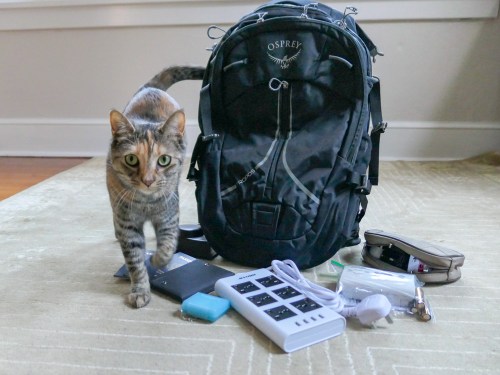
When you’re packing your carry-on bag, here are a few tips to help you focus on the tech you really need to bring along. (Or you can ask your cat.)

My family and I just got back from a fun holiday in London. In preparing for our trip overseas, I asked myself two questions to help decide what technology to pack.

  • How much tech do I really have to bring along?
  • How am I going to protect it?

Of course, you really don’t want to pack anything more than you need. That said, if you want to play with some of your gear while on vacation…well, isn’t that what vacations are for?!

So, it’s a balancing act of sorts.

If you find yourself confronting similar questions, here’s one traveler’s tech packing list to consider…

1.
Portable Power Strip and Surge Protector
It’s likely you won’t have access to as many power outlets in your room as you’d like. Bringing along a portable power strip will certainly help you get all of your tech powered and charged up overnight. And electrical surge protection is a really good idea when you’re staying in a strange place. Finally, make sure the unit can handle different voltage standards.

2.
Compact Portable Charger to Throw into Your Day Pack for On-the-Go Power Back Up
You certainly don’t want your smartphone to choke when you’re traveling through a long day in an unfamiliar land!

3.
New SDXC Memory Card for Your Camera
Yes, standalone compact cameras can still get certain shots that a smartphone will have trouble with… especially in low light.

  • SanDisk Extreme Pro SDXC UHS-1 Card, 64GB
    $20.49 on Amazon Prime
    (Sure, you can manually delete videos and photos from your existing SD card to free up space for your trip. But for only twenty bucks, you can start with a fresh card that’s instantly ready to store as many media files as you can possibly create on your trip!)

4.
Portable, Battery-Operated Carbon Monoxide Detector
You never know, right? If you’re not sure if your room has one of these, it makes sense to pack this.

5.
RFID-Blocking Passport Wallet to Prevent Data Skimming
There’s some controversy as to whether you really need this level of protection, but I say better safe than sorry.

Additional Packing Prep to Consider…

Do You Need a Voltage Converter?
Of course, you’ll need to bring adapters to fit electrical outlets when you’re traveling overseas. England uses Type G electrical plugs, and the voltage in the sockets is 230v.

Since the voltage in U.S. power outlets is 120v, consider the need to take a voltage converter in addition to your plug adapters.

The battery chargers for all of the mobile tech I pack happen to all work in dual voltage modes… 100 – 240 volts.
(Listed on the battery charger in really small print.)

So, I didn’t need to bring a voltage converter to England.
(But the power strip I brought still required plug adapters.)

Add International Service to Your Wireless Plan
My iPhone has AT&T Wireless service. The easiest way to adjust my AT&T plan while overseas is to go with the $10/day “International Day Pass.”

For the ten bucks, you’re essentially mimicking the same plan as you use when you’re home in the United States. You don’t have to worry about data limits or the threat of any additional usage costs. It may not be the cheapest way to use your phone internationally, but I still think it’s a great deal to give your smartphone full functionality.

Bring All of Your Gear Home
It may be an obvious point, but don’t leave any of your expensive tech behind! Stay organized and keep track of all of the little support pieces like battery chargers and cables.

And when you get home, make sure you quickly get to work organizing and sharing the photos and videos you shot on your trip. Family and friends want to see them!

Happy travels!

Why You Need to Build a Kitchen Counter Tech Station

If you’re finding too much of your tech cluttering your kitchen counter, it’s time to get organized. Here’s what I did…

Your kitchen counter made is for cooking, right? But how often do other household items and mail accumulate on it? And how about all of your tech? Don’t tell me that you’ve never had to charge up your smartphone on your counter…

It’s just a mess!
Right?

Instead of fighting it… I say… go with it.
…and officially make some space for it.

Your tech doesn’t have to take a lot of room, but you should really consider creating your own kitchen counter tech station.

The Lester Kitchen Tech Station
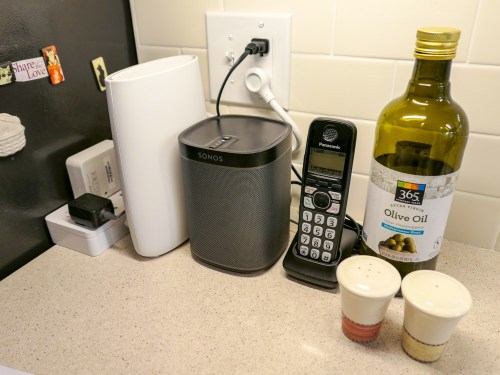
My tech station lives in the corner of our kitchen tucked away on the counter next to the refrigerator. These are the pieces:

  • Sonos Play:1 wireless speaker
    If you dream of having whole-house music functionality, then you’ve got to find a place in your kitchen for a speaker, right?
  • Orbi Wi-Fi router’s satellite unit
    When I upgraded my home Wi-Fi to a mesh system, I needed to find a centrally-located place on the first floor to locate the satellite Orbi to extend its mesh network. The corner of our kitchen counter was the perfect spot.
  • Cordless telephone
    Yes, we still have a landline. (Cough)
  • Compact power strip
    Of course, your kitchen wasn’t designed for your power-hungry tech to take over all of the outlets. So, you’re probably going to need to create a power extension for all of your resident kitchen tech. I went with a compact 4-plug surge protector and 2 USB charger made by NTONPOWER.
    It’s $20.99 on Amazon Prime.

I’ve positioned these four tech supports neatly in a row in the corner of our kitchen counter.

Smartphone Support
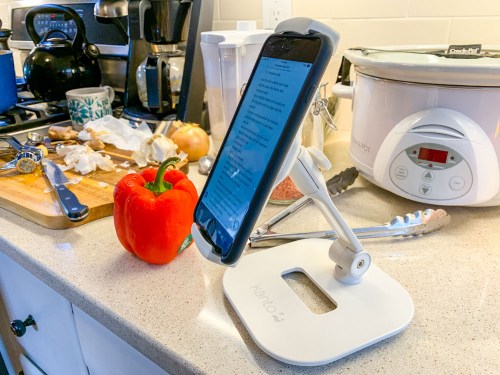
Then, I’ve got a mobile smartphone/tablet stand. It’s easy to attach one of our iPhones to it when cooking from an online recipe. Sure, you can simply place the phone on the counter, but when food and knives are flying around, I find it’s safer for our devices to live slightly above the action. Plus it’s easier to read the recipe!

I went with a stand made by Kanto… It’s $29.99 on Amazon Prime.

Tomorrow’s Kitchen… Today
If you want your kitchen to be a tech-free zone, then good luck to you. Let me know how that’s working out.

For the rest of us, I think it makes a lot of sense to find a corner in your kitchen that’s relatively out of the way and intentionally build your own tech station.

You’ll feel a lot more organized!