At Home with Tech

Unlock the power of all your technology and learn how to master your photography, computers and smartphone.

Category: Tech Diary

Nobody Listens to Work Voicemails Anymore

If you’ve recently left a colleague a voicemail at work, you may want to consider following up using a different communication method…

A few years back, I left a voicemail for a colleague at work. I waited for a response to my question, but after more than a day, I heard nothing back. Then, I ran into her into the hallway and took the opportunity to ask her my question directly.

But when I referred back to my message, she said, “voicemail?”

She stared at me… confused for just a moment. Then, she smiled slightly.
“Oh… I don’t listen to voicemails. Please, just email me.”

I tried to process this moment to understand if this was just one person’s preferred workflow or something else. I decided it must have been an example of a unique relationship with voicemail.

But I think I was wrong…

The Demise of Voicemail
Certainly, in any number of circumstances, some people have to use voicemail as part of their work communication. But if there’s a choice in the matter, I think my little story is an example of a growing shift in the workplace.

Even though I believe it’s easy to quickly leave a voicemail vs typing up the same detail in an email, it’s actually slower for someone to have to wait around and listen to your voice rambling through the few sentences on the other end.

Voicemail is relatively inefficient and lags behind newer technologies that enable faster communication.
(For that very reason, John Brandon from Inc. has declared that “Voicemail is Now Officially Dead.”)

I guess this is today’s reality, even though tech innovations have supercharged the voicemail proposition as some platforms can send your desktop voicemail through to your email as an attached audio file.

Desktop Phones are Gathering Dust
As I consider all of this, I think about my own work experience of late…

I definitely receive fewer voicemails than I used to. And those that I do get are primarily from people outside of my company.

Most everyone else on the inside emails me or uses the instant-messaging platform to reach out.

This trend is not only about employees shunning voicemail. I think it has to do with people also not choosing to use the phone at their desk.

The Rise of the Conference Call
This is not to say that employees don’t talk to each other anymore. Far from it! Conference calls are alive and well…

So are web-based conference calls where you can activate your webcam and visually participate in the conversation as well. Although I must admit I do choose which conference calls get my ‘video’ participation.
(I don’t have to tell you that opening up your live feed to a full video signal requires that you appear relatively attentive.)

But for me, the decision to activate my webcam is more than just deciding whether I want to multitask or not. It also has to do with what type of image I’m projecting to the other participants.

This probably comes from my background in video production and what has become a now instinctual need to present a ‘good image.’

Should Employees Care How They Look on Your Computer Screen?
And I’m not talking about looking good, which is certainly important and why some folks might choose to shy away in the moment from a particular video chat. I’m talking about the shot looking good…

  • Is my shot framed properly to ensure I’m front and center and not a speck in the left corner?
  • Is the lighting soft and hitting me from the front?
  • Is there a window behind me that destroys my shot by overwhelming it with light?
  • Is the angle of the shot level to ensure that the webcam is not looking up my nostrils?

That’s a lot to consider and certainly not what the average person normally takes the time to think about.

In fact, I’ve observed that when people get over the hump of displaying their image to the rest of a conference-call population, some tend to forget about it entirely.

And then I’ve found myself watching people who are seemingly oblivious to the fact that they can be seen. I want to blurt out, “Don’t you know that people are watching you even though you’re not speaking?!”
(Maybe I should text them.)

It’s so interesting to observe public norms shifting to finally embrace and then quickly ignore the once revolutionary promise of the 1960’s video phone.

The Downside to Efficiency
Who’s got the time, right?

Sure, we’ve all got to attend work meetings, in person or virtually.
But beyond that, all bets are off.

People aren’t calling each other. They’re not leaving voicemails anymore. Heck, I see so many instances where colleagues aren’t getting up from their cubes to talk to each other anymore. They’re emailing each other… when they’re sitting fifteen feet apart.

I suppose that is more efficient at one level.

But what are we losing in the process?

Connect to the Conversation
I would say the most important contribution that you make to your workplace is how you support the culture.

  • How do you show up?
  • How do interact with your colleagues?
  • How positive a force do you project through your voice?
  • What do the expressions on your face say?

Sure, I understand that many of you can avoid all of this and get the job done faster with just your keyboard.

But if you don’t take the time to offer others the clues to your own humanity, how can you ever expect to be truly recognized for who you are and what you offer at work?

Without contributing to these public-facing elements, it’s much harder to build your personal brand.

Never forget the human factor.

Voicemail may be one tool that technology has effectively replaced. But there are plenty of other ways to truly connect to the ongoing conversation.
A Few Old Photos and the Mystery of My Paternal Grandmother

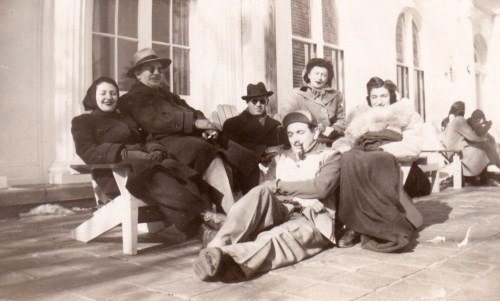
Trying to solve the puzzle of your family’s past with a few fading pictures is hard to do. This photo of my grandfather (back center) and his friends tells a story, but I have no idea what it is. It’s time to stop history from repeating itself…

Some families maintain solid details on their past. For various reasons, others do not. I’m sure I don’t have to tell you that families, large or small, are usually pretty complicated entities. And without going into too much background about mine, I should say that there were fracturing events that left certain folks estranged from others for many years… and in some cases… forever.

And then I came along, and grew up without many details on who was who… let alone actually spending time with many of my relatives.

Let’s simply say that I was born disconnected from much of my family…

With the major exception of my maternal grandmother’s side, which I’ve gotten to know well during my adult years (an amazing story for another time), I’ve had no choice but to rely on spotty intel from my now 86-year-old father.
(My mom’s been gone since 2006.)

Shoe Box Time Machine
The only other resource I have is a small collection of old family photos from my father’s side that was entirely disorganized in a shoe box and envelopes. They were mostly undated and without accompanying notes.

Over the years, I’ve digitized many of these pictures and tried to figure out some of the puzzle of my family’s past through them. Of course, I recognize the major players… my dad… and his parents. But the where and when are often unclear.

Yes, I’ve asked my father for the details… I’ve shown him the pictures multiple times. The problem is I haven’t always gotten the same answers against the same photos. So, I’ve sometimes had to rely on consistency to determine probable facts.

Figuring Out Your Origins in Old Photos
I just held another ‘photo review’ session with my dad and displayed our family photo archive to him on my iPhone while we were having dinner at the local diner. Happily, I had immediate access to the pics on my cloud family photo archive.
(More on that project here.)

I took notes on all of his responses and then brought the detail back to create more metadata for each of the original photo files. They’re officially stored in Adobe Lightroom on my iMac. I adjusted the ‘creation date’ for some of the photos, and I added my father’s new comments into the caption section.

And then I took a step back and looked at the entirety of my adjusted collection… fewer than 100 photos that comprise my father’s side of the family from 1900-1960.
(After that, I’ve got more images and information to work with.)

And let me tell you, every time I go through this exercise, I work out a few more ‘aha’ realizations.

This time, with the date adjustments and brand new background on my grandfather’s family road trip to California to visit a childhood friend, I created a new grouping of photos that brought this story to life.

I’m a detective… figuring out my own origins.

I think most everyone wants to better understand their past… their roots… the basis of their identity.

For me… it’s been one picture at a time.

The Mystery of My Paternal Grandmother
Rachel was my grandmother, and she died when my father was very young. He doesn’t remember her very well.
(I know she was a school teacher, but that’s about it.)

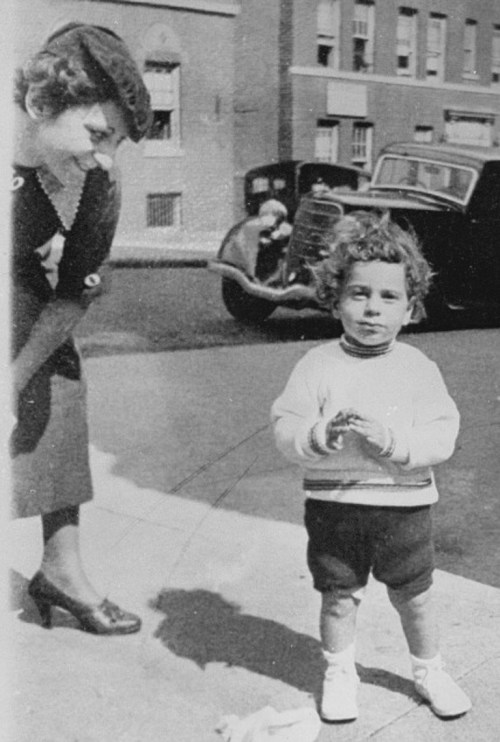
Rachel’s family name was Dworkin, and we have a handful of pictures from several moments of her life in New York City, including two with my father when he was a child. These photos offer clues to who she was. But you can only glean so much from a photo…

One detail I’m still working through is accurately dating her photos. There are certain anchor shots like this one where I can more easily determine the date. My dad can’t be more than two years old here… so it’s probably 1935. Then, I compare how my grandmother looks here to other shots of her to help order them chronologically…

Doomed to Repeat the Past?
I know at some point, I will have mined as much detail as possible. And this part of my family history project will be wrapped (though still very much incomplete).

But family histories are never really finished… are they?

New stories are constantly generated, and now… countless digital photos are snapped to document the lives of our families.

Our decedents should have no problem putting together this chapter of the early 21st century, because there’s so much to work with, right?

Well… I wouldn’t be so sure.

Too many photos can be overwhelming. And too many disorganized photos… almost impossible.

Sure, they’re all digitally time stamped and possibly geotagged, which is a huge benefit. But without other critical information, these pictures will have limited value in the future.

And a forgotten portable drive with archived photo files found decades later in the back of a closet may be an unrevivable dead brick. So, now you’ve gone from thousands of family photos to… zero.

3 Ways to Back Up the Memories of Your Life
I don’t have the perfect solution to creating a bulletproof photo archiving plan that will hold up into the distant future.

But it makes sense to confront the challenge on several fronts…

  • Organize your photos in the days and weeks after you snap them
  • Make photobooks at least every year to document your family’s story
  • Back up the very best of your photo files to several locations, including the cloud

And it still couldn’t hurt to print out a few photos every so often and then jot down the details on the back of them. Finally, throw these pictures into a shoebox and then hide it in the back of a closet to be discovered decades later.
(Yes, I recognize the irony.)

Future-Proof Your Family History Archive
We all want to be remembered.

Even a few photos with key information can provide a tether to the reality of a past life.

I wish I knew more about my beautiful grandmother.


She looked like she was a wonderful person.

Please… do your descendants a favor and try not to make them guess about your life…

Why You Need to Create Your Own Cloud Photo Archive

If you crave instant access your best family photos from yesteryear, here’s how to create your own portable archive…

My family and I attended a little party the other day… a reunion of sorts. It consisted of four families with kids of the same age who spent time together at playdates a few years back. One family then moved to New York City, and we really hadn’t seen them for a while. So, they were the special guests at the party.

Joining the Time Warp
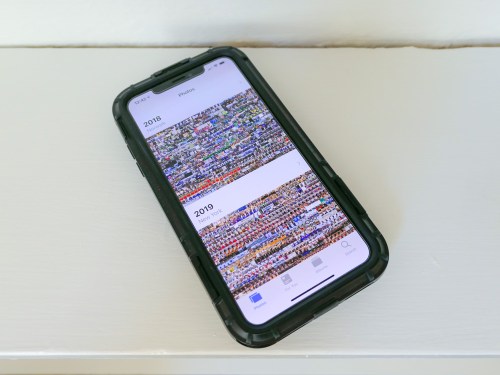
Of course, everyone commented on how big all of the third graders had become. Inevitably, one of the parents whipped out her iPhone and began searching for old playdate photos when the kids were three. I watched her two-fingered gesture slide upwards again her smartphone’s surface as she commanded her iPhone’s photo library to speed backwards in time.

And then another parent activated her iPhone and began her own photo time-warp search. And then my wife did the same…

And before I knew it, the group was excitedly sharing shots and reminiscing about the good old days.

Experiencing Photo Failure
And I just stood there, happy that these iPhones had provided instant gratification, but stunned that mine hadn’t contributed. In fact, I didn’t even try to look for any photos. I knew I didn’t have one to share… not in that moment.

Sure, I could go home and easily find whole bunches of old playdate photos in the appropriate folders organized in Adobe Lightroom on my iMac. But I had no cloud access to any of them from my iPhone. My cloud photo folders through Dropbox and Apple’s Photos all contained more recent groupings of pics. I figured when would I possibly want instant access to photos from five years back? (Cough)

My iPhone’s onboard memory didn’t house photos that old either. I thought I was doing the ‘smart’ thing by not wanting to bog down my device with really old photos.

I stared into space and pondered the absurdity of it all…

If at First You Don’t Succeed…
I’d spent years and countless hours organizing tens of thousands of family photos into folders on my iMac. My focus had been to share relevant photos with family and friends while the pictures were still “fresh.”
(Old photos are old news, right?)

But now, I had encountered a huge flaw in my plan as I watched others suddenly require instant access to photos buried deep in time. Sure, the old photos were hiding in their iPhones and entirely disorganized. But the images were still there in the order they were taken, and a few finger swipes could still access them by simply warping back to 2013.

Huh.

By doing nothing with all of the old photos on their smartphones, these parents had succeeded where I had hopelessly failed.
(So, disorganization does have its benefits.)

I thought a bit more about the irony of my experience. I finally resolved to create another layer of organization on top of my current photo management plan…

If successful, I would give myself easy, mobile access to a percentage of my archival photo content to properly handle this kind of moment next time.
(We’ll get to how much in a moment…)

Create Portable Access
I’d been focused for so long on creating physical photo books as the endgame for archiving all of my best family photos. But that strategy assumed that I’d only want to access these photos from a bookshelf in my living room. That was the problem right there.

Clearly, I also needed ongoing access to some of these photos from my iPhone’s screen.

Sure, that could be accomplished by simply leaving all of my photos on my iPhone. But this limited ‘clutter’ strategy assumes I’m not taking pictures with other devices.

In fact, I’m also shooting pics with…

So, all of my digital photos, including those from my iPhone, need to flow through Adobe Lightroom on my iMac for organization, quality improvements and file backup.

And then some of these photos flow back to my iPhone via cloud folders so I can display what’s been going on in my family’s life. And when a particular cloud photo folder of a family event gets old enough that it’s yesterday’s news, I simply delete the folder.

The only necessary upgrade to this workflow is to leave some of these pics behind in long-term cloud folders as part of a portable and permanent archive of my family’s life.

Build Your Cloud Photo Archive
But I think the trick here is not to move photos out of short-term cloud photo folders into long-term folders. That’s not so simple. It’s an extra step that first requires you to review all of the photos again before you delete the folder. That’s a lot of work right there.

The moment to feed an archival cloud photo folder comes when you’re first picking out your best pics at the beginning of your entire process… not months or years later.

When you first create a short-term cloud photo folder with the pics that you want to show off, also ask yourself if there are one or two that are so great or so relevant to your family’s history that they should always be available in an archival cloud photo folder.

If so, then simply drag and drop them into the archival folder right then and there. That will take you another fifteen seconds. Maybe less.

Done.

Don’t Cut Corners
The next big hurdle to overcome is to resist the urge to simply throw these photos into one big archival cloud folder. Even though you’re only feeding it with a couple pics at a time, it will eventually become massive and difficult to navigate.

So, you have to create a number of permanent cloud folders where you can better organize your best pics.

With all of this in place, you will created a cloud photo archive of your best pics that you can easily access from anywhere!
(Plus, you’ll have an additional layer of backup and protection for these valuable images…)

Look for Efficiencies
Chances are… you’ve already done a lot of the work, especially if your cloud folder categories also exist in the photo folders on your local hard drive.
(Like me, you’ll probably still need to create a few new folders in both locations.)

Once you’ve matched up the categories, you’re essentially mirroring your new permanent cloud photo folders against your local photo folders of the same name.

Carry the Past with You
After you activate this ‘enhanced’ photo-organization plan, you’ll essentially have access to the pictures that tell the story of your life, your family and even your ancestors.
(So… not just from yesterday or last week)

And if you need to pull any of them up on your iPhone… for any reason at all… well now, you can!
(I’m sure you’ll still get stumped now and again when the need for a particular photo pops up unexpectedly. But you’ll always be in the game!)

I’ve successfully made my cloud family photo archive upgrade, and it’s a huge step forward.

Having permanent cloud photo folders to turn to is an amazing resource that everyone should carry around in their pocket!