At Home with Tech

Unlock the power of all your technology and learn how to master your photography, computers and smartphone.

Category: Tech Fixes

Why You Should Bring Home a Nest Cam
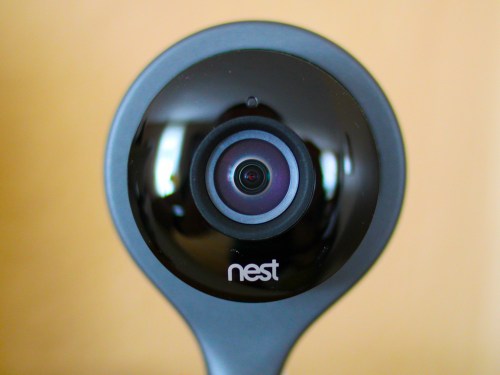
Setting up your ‘android eye’ in the house when you’re not around certainly has its advantages. But getting your own personal HAL hooked into your smart-home’s ecosystem can sometimes be a challenge. Unless we’re talking about tech from the Nest family…

Setting up your ‘android eye’ in the house when you’re not around certainly has its advantages. But getting your own personal HAL hooked into your smart-home’s ecosystem can sometimes be a challenge. Unless we’re talking about tech from the Nest family…

My Foscam wireless IP babycam pooped out the other day. I think it was actually the power supply that blew. The Foscam had been working great for almost four years, and (disclaimer) I think the culprit was an AC surge caused by an electrician trying to replace a ceiling fan in my son’s bedroom.

Okay, he wasn’t officially an electrician…

Cutting Corners
This guy was a general handyman who was doing few other jobs around the house, and said he could handle the fan.

By the time it was clear he couldn’t, we no longer had power in half of the electrical outlets in the upstairs section of our house.
(And no, it wasn’t a popped circuit breaker.)

A few days later, an actual electrician came by to clean up my mess.
(I should thank him for not smirking even once after I told him my embarrassing story.)

Some of the old wiring in my house had been ‘fried’ due to ‘the incident,’ and he ended up having to replace all of the ruined wiring and then the electrical box in the ceiling to bring it all up to code.
(So yes, this homeowner’s original staffing ‘shortcut’ ultimately created quite the expensive repair.)

Lesson learned.
This cautionary tale has made me a true believer in the idea of not cutting corners to save a few bucks when it comes to home maintenance.
(That said, the original handyman was really nice and super apologetic.)

So there was however, one remaining problem….
Our babycam wouldn’t boot up.
Heck, it wouldn’t even blink at me.
It was now just a hockey puck.
(Coincidence? I think not.)

Time to Upgrade
I no longer had a working babycam, which when you think about wasn’t such a problem… My baby boy is now six years old.

Its only use over the past couple of years had allowed my wife and me to check in on him as he slept while we were out on one of our ‘date nights.’

Beyond that, I had used it more as a security cam when my family and I were on vacation to make sure everything appeared normal while we were away.
(Although a view into my son’s room isn’t exactly the best location for a general security cam)

I had actually been thinking of moving it downstairs to improve its view before the power surge…

And now the tech gods, after their big chuckle had given me the opportunity to start all over again.

Hello, Nest Cam
Should I get another Foscam?

Nah…

As much as I had enjoyed it over the years,
my Foscam was actually kind of complicated to set up.

Sure, maybe the newer models would be easier to work with. But I was already leaning in a different direction…

Wouldn’t it be great to simply add onto my growing smart home-by-Nest ecosystem?

That’s right… I’m talking about the cute, 4 ½” tall Nest Cam security camera.

I already owned the Nest Learning Thermostat.
Installation was a cinch.
It’s been great for past three years, although
it did glitch out on me one time eighteen months ago.

Then came my Nest Protect in early 2015 to handle smoke and carbon monoxide detection.
(So far, so good.)

So why not add this little Nest security camera to my Nest family?
It seemed like the logical next step.

Plus, Nest happened to be running a Father’s Day promotion deal for its $199 Nest Cam.
(Nest’s marketing folks were kind enough to let me know via a well-timed email.)

Click.
(Amazon still has it at the slight discount of $193.)

Welcome Home
Installation was incredibly easy using the Nest app I already had on my iPhone:

  • In Settings, tap ‘Add product’
  • Scan the QR code (The app is already set up to do this.)
  • Name the location where your camera will live
  • Plug in the camera
  • Then connect it to your Wi-Fi network as you would with any device

Full directions are posted online at Nest Support.
But that’s pretty much it.

The camera took about 30 seconds to activate and boom!
There it was… fully functioning. I could both see and hear into my living room.

Plus it was both visible and controllable on my Nest app right next to its two Nest cousins.

The whole install took less than five minutes.
Seriously.

How great is that?

Setting Up Your Nest Cam

Once you’ve got your Nest Cam up and running, you’ve got a few more choices to think about…

-Placement
One consideration when deciding where to position your new Nest Cam is there’s no pan/tilt functionality like my old Foscam. For me, that’s not really a problem, because the Nest Cam offers a much wider field of view.

Also, you don’t have to worry about limited night vision. The whole room lights up via infrared when it gets dark.

-Motion Alerts
If your Nest Cam senses motion or sound, it can send you a push notification on your smartphone via the Nest app or an email alert… or both.

So if something happens that’s of interest to the camera, you literally know within seconds.
(As long as you’ve got your smartphone with you!)

-Do You Need Nest Aware?
This is Nest’s cloud-based video recording subscription that captures either the last ten or thirty days of your Nest Cam’s recordings.

You can review a moment that just happened or go back days in time with this little time machine trick.

Nest’s ten-day video history subscription costs $100/year or $10/month.
The thirty-day video history subscription goes for $300/year or $30/month.
(Ten days would be plenty for me.)

A really cool feature is you’re able to select a specific video section, save it, and then download it to your computer.
(You can also share it.)

While I initially thought I wouldn’t want/need Nest Aware, after spending a couple of weeks with the free month-long trial subscription, I was a believer.

Click.

I think the extra hundred bucks a year is a real value add. Plus, you’ve got to remember that most (hopefully all) of the moments you’re going to capture will be happy ones that are family or pet-based. Some of them will likely be worth saving.
(I’ve already downloaded a spontaneous family pillow fight.)

So your Nest Cam security camera will likely serve you more often as a family documentary device. Just don’t go overboard.
(I don’t think you want to start producing your very own, life-long TV series like in “The Truman Show.”)

-Video Quality
You can go with either 1080 or 720 HD video. While whopping 1080 HD sounds great, you don’t want to unnecessarily suck away too much bandwidth if you’re using Nest Aware and constantly uploading your video history to Nest’s cloud.
(Apparently 720p is the most commonly used format by subscribers.
It requires about 200 Kbps to upload, averaging about 60 GB of data per month.)

-Home/Away Assist
This is a feature that can identify when you’re around the house or not through your smartphone’s location tracker.
(So many other apps you’re using already know where you are. Is it really that big a leap to let Nest know too?)

Then, you can set up your Nest Cam to automatically stop recording when you and your smartphone come home.
(Unless you’ve got your own Truman Show going on.)

-Family Account
Of course, the Home/Away feature isn’t going to fully work like I’ve described above if you’ve got several family members coming and going all day long. The good news is you can also set up their smartphones on the Nest app using the ‘Family Account’ feature.
(You just have to invite them through your Nest app.)

So now, not only will your Nest Cam be able to know when everyone has headed out for the day, but they’ll also be able to have the same access to all of your cool Nest products as you do.
(Don’t worry… You still remain the ‘owner’ of the account and retain certain ‘admin’ powers.)

-Better Together
Another benefit to Home/Away Assist is it helps your other Nest gear know what’s going on.

The Nest folks really brag about how Nest Cam, Nest Learning Thermostat, and Nest Protect all work better together.

For me, the obvious upgrade is when my Nest Cam nudges my Nest Learning Thermostat to get with it and better recognize when I’ve left for the day.
(And that will save you a bit on home heating and air conditioning dollars.)

Smarter Home
So there you have it!
My Nest Cam security camera has joined the family.

Is it a total solution for home security?
Of course not.
That’s not why I got one.

But does it significantly add to my ability to remotely monitor and control the health of my home?

Absolutely.

Okay…Here comes the visual-
Light bulb pops on above my head.
And cue the sound effect-
“Ding!”

My house is now smarter.
(My cognitive status remains open for discussion.)

Sure, I needed a little zapping to get me there, but the silver lining was worth it.

Nest Cam… welcome home!

Six Tips to Help You Find Your Best Photos Faster

What are you supposed to do with all those birthday party photos you shot once you download them? A good start is to pick a few and simply share them. But that can be harder than it sounds when you’ve got hundreds. So you’re going to need a few shortcuts…

What are you supposed to do with all those birthday party photos you shot once you download them? A good start is to pick a few and simply share them. But that can be harder than it sounds when you’ve got hundreds. So you’re going to need a few shortcuts…

I took my family to New York City recently to visit my father for lunch. My six-year-old son doesn’t get to spend a lot of time with Grandpa… so I always view these get-togethers as something of an ‘event.’ And as with any family gathering I attend, I typically bring a camera along to snap a few photos.

I should stop right here and admit that my definition of a ‘few photos’ is likely to differ with that of most members of my family… including my dad.

My 83-year-old father is always one to tell it like it is, and as we were wrapping up our visit, he turned to me and whispered with a touch of sarcasm, “Are you sure you took enough pictures?”

He chuckled.
(I smiled.)

I couldn’t really succinctly respond to his comment.
So I let it go…

Why So Many Pictures?
The truth is I do take a lot of photos.

And why is that?

I think the simple answer is I find it difficult to get the shots I’m looking for. So I take multiple versions, hoping to capture ‘that moment.’

Now, this may be because I’m just not that good a photographer, and I can’t get what I want on the first try. Or perhaps the cameras or lenses I’m using aren’t up to snuff.

Sure, someone else with better gear and experience is going to have leg up on me.
But perhaps I shouldn’t be so hard on myself…

In Search of the Perfect Photo
I think I’m looking for specific shots that are actually tough for anyone to get.
Having to deal with low light and trying to freeze the action with a six year old running about… That’s ambitious!

Plus, I often turn off the camera’s flash, because of the harsh look that can create. And of course, many of the resulting shots have too much blur. Then, I get so frustrated when I take a look at my camera’s playback screen, and I realize I missed ‘the shot!’

So taking multiple consecutive shots in the hopes of successfully freezing the action is something of a necessity… Isn’t it?
(And it doesn’t cost anymore… other than to fill up your camera’s media card faster.)

Even if you’re taking an easy-peasy, everyone “say cheese’” shot, if there’s more than one person in it… chances are someone’s blinking.

So again, you’ve got to try several times to nail the one with everyone looking at the camera.

Overwhelmed with Too Many Pictures
Let’s agree for the moment that it’s okay to take lots of shots.

What exactly are you supposed to do with all of them?

Well, there’s the problem of having to spend all that extra time to review all of the pictures to figure out which are the best.

And believe me… I can tell you from personal experience that snapping lots of photos and then going through all of them can really delay sharing your favorite photos with family and friends.

So I’ve found you need to employ some brutal selection practices to find your top photos.

Time to Walk the Walk
Recently, I had to go through over 300 photos I took during my son’s sixth birthday weekend. To be fair, there were multiple events that contributed to such a high photo count.

But when my wife asked if I could get her four or five pictures to share around online, I realized I had my work cut out for me to figure out the essence of all those wonderful moments in five images.

To get the job done, I created a workflow that follows six steps…

The Six Tips

Here are my six tips to help you get hundreds of photos down to a handful:

#1
First, review all of your photos and assign a number to them.
(Both Lightroom and the old Aperture let you do that.)

  • 5 = Great
  • 4 = Good
  • 3 = Okay
  • 2 = Not good
  • 1 = Useless

You should delete your 1’s and 2’s immediately. If you have some backbone, you should consider getting rid of the 3’s too.
(I usually can’t do that.)

#2
Go through your 5’s again and eliminate the multiples.

What I mean by that is if you took a particular shot three or four times, there should be only one best version. Sometimes this can be hard to figure out, but you need to spend the time here to choose your champion.

Once you’ve selected the winner, change all the others to 4’s.

#3
Edit, color balance and tweak all of your 5’s as needed.
This step is really a time suck. So the fewer fives you have at this point the better.

#4
I bet you probably still have too many 5’s than you know what to do with.

Review all of your 5’s again and pick out the best of the best. You’re going to have to deal with the fact that certain strong shots just aren’t going to make it to the finish line.
(Lightroom lets you ‘flag’ your picks, which is essentially giving them a ‘6’ rating. Alternately, you can create a separate folder of the best of the best.)

#5
So out of my 300 shots, I came away with about twenty 6’s.
How are you supposed to get that down further?

This is the stage where you’ve got figure out the ‘visual story’ you want to share. Do you want to forward on just the posed shots? The action shots? A combination?

I don’t think there’s only one answer here. You’ve just got to pick five to get to the essence of what happened. So just do it.

The good news is you’ve still got your twenty best pics. You can still use them in a photo album/book… or digital photo frame… or on your smartphone to swipe through.

#6
You’re not done yet…
Remember all those 3’s and 4’s? Go through them again.
What?

That’s right.
I’ve found that going through your losers one last time can occasionally unearth a winner.

Sometimes it’s just a matter of perspective what constitutes a great photo. An unconventional ‘miss’ may actually be something of great value if you look at it the right way. And honestly, when you’re zooming through hundreds of family photos to eliminate as many as you can, you can easily miss something that’s priceless, especially if it doesn’t fit your predetermined criteria of what you’re looking for.

If this final step unearths one or two more photos, add them to your 5’s or 6’s and thank the photo gods for your good fortune.
(It’s also a good reason not to get rid of your 3’s until you’ve gone through them this second time.)

When I was a Kid…
Of course, another way to get to your five photos is to only take five pictures.

That’s what my parents did at my birthday parties when I was growing up.
(All right… maybe six.)

And those few pictures from my own sixth birthday did a perfectly fine job capturing the moment.
(…It certainly took a lot less effort.)

The Need for Speed
I think another reality is any photo you share from your child’s sixth birthday party is a winning shot. As long as the picture is in focus, everyone is going to love it.
(Really)

If you wait until his seventh birthday to figure out which is the best photo to share from his sixth birthday… it’s obviously too late.
(Delaying to find and share your 6’s clearly has its drawbacks.)

So move quickly. Be brutal. Find those best few birthday shots. Then enjoy them with others.

And don’t forget to eat some birthday cake…

6th Birthday Candle

Is It Finally Time to Cut the Cable TV Cord?

If you can stream more and more cable channels on your Apple TV or Roku, do you still need a cable subscription?

Since you can stream more and more cable channels on your Apple TV or Roku, do you still need a cable subscription?

I’ve been sharpening my scissors next to my cable cord for quite some time, but every time I’ve picked them up, I’ve back off at the last minute. But not yesterday…
(And this has nothing to do with the President’s recent support to open up the market for other technology companies to sell cable boxes.)

It’s not like I have something against cable television. I like cable TV. And those of you who know me from back when will understand when I say I have a strong connection to the cable world.

I don’t mind paying for my cable service… as long as I’m using it.

My Screens are Dark
But my viewing habits have been changing. I no longer spend significant time in front of my shrine-like media center I built over a decade ago in our family room. I think that’s partly due to being Dada to my little boy now in kindergarten.
(How did that happen so fast?)

And it’s also because technology has allowed me to watch my favorite shows remotely on my iPad and iPhone, and on the go and on Metro North during my commute to New York City. And I’m streaming a lot of my content on apps like Netflix and Amazon Video.

My home office iMac has longed replaced my old Panasonic Plasma TV in the family room as my daily viewing portal. And I’ve found that my secondary TV and cable box in my home office have largely sat dark over the past few months. The exception has been to serve up some of this year’s overwhelming political landscape… usually through CNN.

Who Needs Cable When You Can Stream?
So I woke up yesterday and suddenly felt compelled to cut the cord. And I said to myself… maybe I can simply stream CNN on my new Apple TV.

I ran over and took a look and found that in fact CNN does have an app that streams the live feed.
(CNNgo)

I immediately downloaded the app and activated it by confirming I had a cable subscription.
(I needed to type in a code on a companion CNN activation page on my iMac.)

BAM!
I was suddenly streaming CNN on my Apple TV!
(for no cost!!)

Then I picked up the phone and then almost dropped it, because I was so excited.

I dialed my cable company to downgrade my service to a sub CNN package level. I figured as long as I had a basic tier of cable TV service, the CNN app would still let me stream away. Right?

Wrong.

I told the cable customer service rep my nefarious plan, and she told me it wouldn’t work. If I wanted to stream CNN via my Apple TV, I would still have to subscribe to it through my cable package.

Huh.

So I hung up the phone, feeling rather deflated and thought a bit more about my half-baked strategy. Of course, what I attempted would be forbidden. Otherwise, the entire cable business model would come crashing down.

So where’s the value of a CNN live streaming app on a home Apple TV or Roku if you still need to subscribe and pay for the cable channel as well? Sure, it makes sense to stream cable content to a second screen if that screen is mobile or outside the house. You can see the added value in that scenario.

But if your Apple TV is sitting right next to your cable box, and they’re both connected to the same HDTV… I’m just not seeing the point of being able to stream a cable channel, when it also needs to be active on the cable box.

Wait… did I say, “cable box?”

I had an idea…

The Big Switch
I walked over to my dark home-office HDTV and cable box team. There they both were… gathering dust, except for occasionally serving up CNN.

I ran back to my aging media center in the family room. Actually, it really should be called my “Franken-center,” because it now had all of these disparate technologies bolted on…

Hmmm…

The truth is my Roku had been gathering dust too, ever since my new Apple TV showed up.

I stood there. And yes, a light bulb illuminated above my head.
(Ding!)

I disconnected the Roku and ran it over to my home office. And then the moment of truth…

I reached behind the cable box and unscrewed the coax cable. The old-school cable fell to the floor, and I think I felt a slight rumble caused by the magnitude of my moment.

I pulled out the cable box… and connected the Roku.

I then signed up for CNN on my Roku, just like I had done on my Apple TV.

And voila!
I was watching CNN live on my home office TV without the cable box.

Temporary Insanity
Then I jumped in my car and sped down to my local Cablevision office to return the cable box.

I gleefully handed over my box and companion remote control and was told I would receive a monthly credit… of just under $9 a month.

I ran back to my car and drove home. I walked up my basement stairs and back to my home office. I sat down at my desk.

What had I done?!

Still Married to Cable
Well, I had denied myself all of my cable TV programming on my home office TV except for CNN.
(And any other streaming app I could activate on my Roku that I already had a cable subscription to)

And I’d saved myself nine bucks a month, which you’ve got to admit is not really a game changer.

Did I cut the cable cord?
No, not at all… I just trimmed it ever so slightly.

You might be asking… what’s the point?

Overwhelmed with Options
I think the point is I’m a little frustrated and kind of cranky.

We’ve all got so many ways now to consume media.
And so many opportunities to pay for it…

The list goes on and on…

I simply want to use what I’m paying for.
And pay for what I really consume vs. what I’ve historically spent.

And that equation clearly takes some fine-tuning along the way.

Victory?
So I ripped one of my cable boxes out of my house. This little act of defiance only reflects on my own process of understanding what I want… and need.

Yes, the scissors are always within reach. And it may feel empowering to talk about cutting the cord. But for now, I’ve only done a little spring pruning.

…And I’ve got nine dollars in my pocket.

Does anyone want to place any bets on how long it will take me to replace the box?

At the very least, either way… I’m ready for the next debate!