At Home with Tech

Unlock the power of all your technology and learn how to master your photography, computers and smartphone.

Category: Tech How To

Why Nixplay Smart Photo Frames are Better as Screens for Video
Nixplay’s new smart digital photo frames can handle HD video files transmitted via your iPhone. Here’s why that’s a game changer.

I picked up one of the next-generation Nixplay Wi-Fi digital photo frames over the holidays to support my ongoing quest to provide more exposure for my recent family photos. I’ve generated thousands of family images over the years, and most never get any screen time, let alone make it to the physical print stage.

Yes, I know that many folks use their smartphones and shared cloud photo albums for this purpose. Or they just email pics around. But that design requires an action from both the sender and receiver. A Wi-Fi digital photo frame only needs the recipient to glance over and see what’s on the frame.

Plus digital photo frames have the huge advantage of being able to cycle through many photos.

My new frame is the Nixplay Smart Photo 10.1” Black.
$152.99 at Amazon Prime

HD Video Capability
But a funny thing happened while I set up my new Nixplay frame, which was a snap… and an entirely different experience than earlier generation Nixplay frames that I had to wrestle with.

I finally processed that these current Nixplay frames now have the capability to playback HD video files.
(Older Nixplay frames could only handle SD videos, which required you to first convert your native HD MOV video files to lower-resolution AVI files. Ugh.)

So, this improvement instantly sets up a simple distribution pipeline for all of my family video clips that have had an even harder time finding an audience than their photo cousins.

But before I was able to get too excited, I read the fine print:
The length of videos is limited to a mere 15 seconds.

Well, how Vine of them!
(I expect this is not so much a creative choice as a limitation of the hardware handling huge video file sizes.)

Still, you can do a lot with 15 seconds.

Straight Out of Hogwarts
And once you put together a playlist of short video clips using the Nixplay iOS app, it creates a whole new visual experience on the frame that a sequence of digital photos simply can’t compete with.

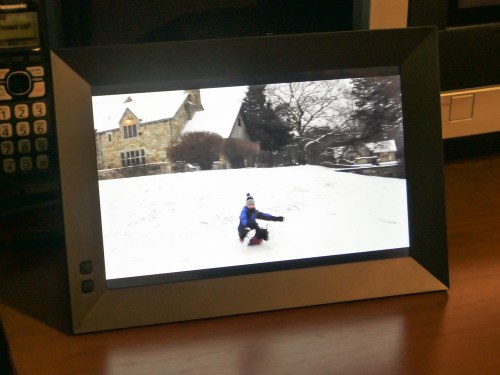
I immediately set up a series of video clips for my Nixplay highlighting our day’s fun sledding during a light snow storm.

I felt like I was transported to the middle of a Harry Potter movie where photos and paintings come to life. Watching the videos on the frame was really that cool!

For the record, I kept the frame’s audio functionality off. Sure, it would be great to hear the sound, but I think only when you’re actively showing off your videos. Otherwise, it would be too intrusive as an ongoing environmental background element.

15-Second Videos for your Photo Frame
To simply throw your clips into a playlist for easy viewing and not have to edit together a finished video… that’s so quick and easy!

Plus, video files fit perfectly in this HD 16×10 aspect-ratio frame.
(The screen resolution is 1280×800, which is essentially 720HD. That said, my 1080p video files have been playing back fine.)

Sure, there are still some drawbacks.

The 15-second video limit is depressing, but it also respects people’s limited attention spans. If you want to show off the ten-minute school chorus performance that your child was a part of, you’ll simply need to tether your viewer to another screen.
(If you’re interested, I be happy to set up my video for you.)

And the restriction to load videos only via the Nixplay iOS app means you’ve first got to get your video onto your iPhone. So that could mean another step or two if you’re not working with native iPhone videos.

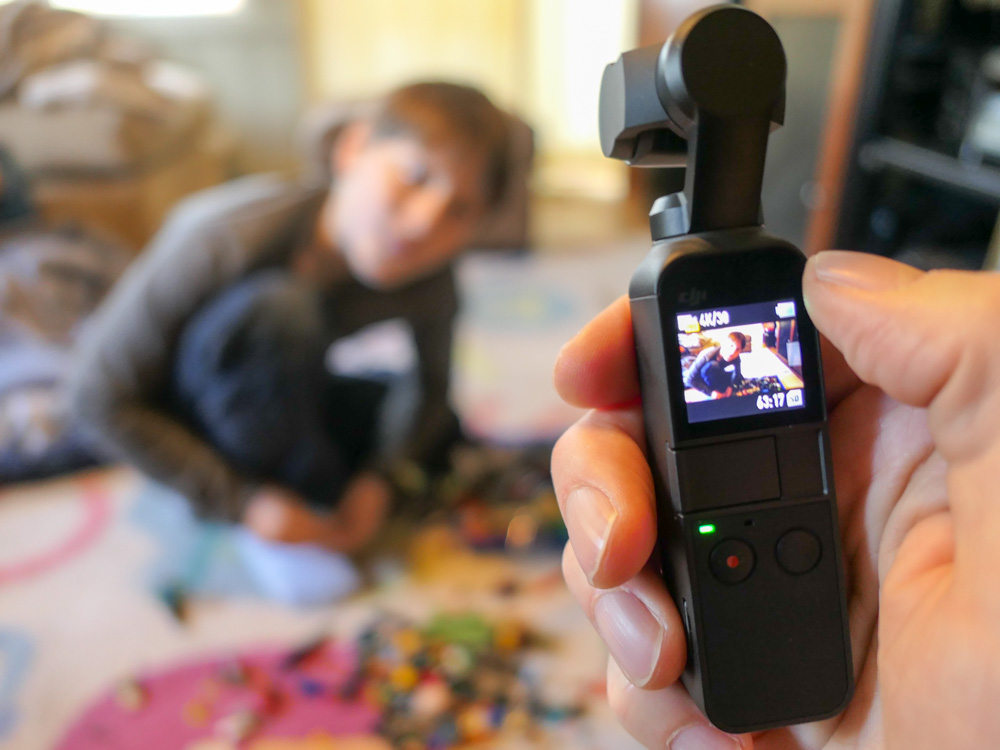
I’ve been having a lot of fun lately shooting time lapse videos with my new DJI Osmo Pocket.

Snowy Day at Cranbury Park
Still, a digital photo frame that can easily play your HD video files is a big step forward in functionality.

Every day, we’re evolving further into a world dominated by video. Digital frames that show off photos are nice, but that trick is so yesterday.

Smart frames that can handle HD videos isn’t magic anymore. It’s the only way to go.

Thank you, Nixplay!

How to Take Great Photos at Family Events While Still Enjoying the Party

Taking a DSLR Photo

If you’re often too focused taking photos and then forget to enjoy the activity, I can entirely relate. So I’ve got three ways to help you have your cake and eat it too.

So you’ve decided to take on the responsibility of documenting your family get-together with your camera. Well, that decision can really get in the way of your own enjoyment. If you’re like me, you usually show up with a predetermined ‘shot list’ that you absolutely have to get. And I’ve sometimes had to remind myself to be more mindful of the moment and actually pay attention to ‘experiencing’ my family affair as opposed to ‘covering’ it.

To do that, I feel it usually comes down to staying emotionally connected to the action.

Here are three ways to help ensure that happens:

1. Snap Your Shots Early
I find the longer you wait to begin taking photos, the less likely it is that you’ll get the shots you really want, and you’ll quickly begin to stress. So whenever you see a natural moment, you’ve got to go for it. You just can’t wait and hope that another opportunity will magically appear later on.

I used to feel that the appropriate time to ask folks to say “cheese,” or gather everyone together for a group family photo was towards the end of the party.

While that may make sense from a social etiquette perspective, you may find any number of variables that foil your plan. Some people may have already left. Others may be tired and a little cranky. And if you do actually get to take the shot, it had better be perfect with nobody’s eye mid-blink, because there will be no second chances for you.
(If you orchestrate the shot earlier, then there’s still time for a second attempt later on.)

2. Take Lots of Group Selfies
You’ve got to pick the right moment, because suggesting that a ‘conversation pod’ suddenly join you for a group selfie will likely halt things. But once you’ve successfully sold the idea, it can be a really fun group activity, especially if you’ve got to jam a bunch of people into the shot. Yes, it will be entirely imperfect, but the often absurd attempt to squeeze everyone together to fit in the frame is usually a whole lot of fun. I highly recommend trying it, and the resulting goofy shots will pleasantly surprise you.

3. Set a Time Limit
This is where you draw your own line in the sand to ensure that you also get to fully participate in the event. I like to spend 20-30 minutes or so walking about the room to get the shots I want. I quickly review what I’ve got, and then I put my camera or iPhone away.

If another photo opportunity spontaneously self generates, yes, of course you can still snap it. But the important point is you’re not putting any more pressure on yourself to continue on as the family photographer after your self-imposed time limit.

It’s a Balancing Act
Where’s the value in documenting your family event if you don’t really experience it yourself? Sure, you may be contributing to the greater good, but at what cost?

So, go get the photos you want, and don’t forget to add to the life of the party.

Find your balance and enjoy!
Thanksgiving Dinner


Three Ways to Massively Improve the Quality of Your Family Video Shots

I’ve got three big tips that will help jump-start your action videos of your family members...

Let’s face it. Few of us would mind if Steven Spielberg showed up with his camera crew to immortalize our next family event. All of that talent poured into the visual capture would undoubtedly generate amazing imagery. (I don’t care how disruptive a large film crew would be!)

Unfortunately, I know that scenario is also a fantasy. But instead of dreaming about how you might improve your home videos, I’ve got three ways to upgrade your video talents to the next level…

#1
Steady Does It

Shaky jumps and bumps created by an unsteady hand are sure signs of amateur video. The good news is technology is making it easier for you these days to create steadier shots, especially when covering action.

Digital stabilization is now common in consumer camera tech, but a real game changer is consumer-grade ‘gimbals.’ These are 3-axis stabilized handheld devices.

You can mount your smartphones to these stabilizers to create silky-smooth cinematic videos.

DJI makes the Osmo Mobile 3.
$119.00 on Amazon Prime

Or you can go with the DJI Osmo Pocket, which is a tiny, all-in-one camera/gimbal that can create amazingly smooth action from the palm of your hand.
$349 on Amazon Prime

I use the Osmo Pocket, and it maximizes many video opportunities to keep up with my active nine-year-old son.

#2
Slow It Down

I know I’ve recently taken a deep dive into the value of shooting in slow motion, but I think the point bears repeating.

When not overused, slow motion video can really add emotional impact to your video storytelling. It can also help you extend a significant visual moment which goes by too quickly. 

All you need to do is shoot at a higher frame-rate. Today’s smartphones are entirely capable to handle this trick with a tap of a setting. 

If you’re not already a slow-motion believer, just give it a try. You’ll see what I mean.

#3
Let There Be Light!

Sure, you can buy expensive gear to help shoot in low light, and the results can be strikingly beautiful. But why confront this difficult challenge if you don’t have to? 

Instead, simply look for every opportunity to record in good light. Either take advantage of the outdoors or a well-lit room. Simply avoid those infamous backlight problems that come from bright windows or the sun in the background. 

And always remember to keep the brightest light in front of your subject!

Show and Tell

Here’s an example of these three tips in action… I used my DJI Osmo Pocket to ‘smoothly’ document my son’s participation in a community fun run on a bright, cold weekend morning.

I recorded these clips at 60 frames per second and then slowed the motion down a bit while editing them in Final Cut Pro X on my iMac. I added in a little rhythm from Apple’s GarageBand and threw in some white flashes to finish off the sequence.

Put It All Together

Steady, slow and the use of lots of light will help you take a significant step forward as the family videographer. 

(I believe my post’s title says, “massive.” I’ll stand by that.)

If you incorporate these strategies when capturing action, you can create clips that will turn lots of heads.

All right, maybe just a few… but I expect the ones that matter to you!