At Home with Tech

Unlock the power of all your technology and learn how to master your photography, computers and smartphone.

Category: Tech in the News

How to Enjoy a Rainy Day with an iPhone and a GoPro during COVID-19

If you’re concerned about social-distancing challenges at the beach, consider this strategy to avoid the crowds.

Everything is the opposite these days. Well, it certainly feels that way with all of the new anti-social norms that are fusing into our daily lives.

I’ve got just two words to say about this right now…

It’s complicated.

But general human avoidance does seem like a best practice for the foreseeable future.

Practicing the New Art of Avoiding Humanity

It’s all about figuring out where lots of folks aren’t go be. 

Doing the opposite.

So when the Saturday weather forecast predicted lots of rain, that was my cue to activate our family beach-day plan (or at least a brief visit).

Fortunately, the storm took its time arriving, and there was wasn’t a drop of precipitation until after we returned home. But the threat was enough to keep the throngs of beach-deprived, COVID-19-weary people away. 

And that’s exactly what I was counting on. I brought my GoPro along to capture our moment in the happy emptiness.

Raining on your Parade?

When the downpour finally arrived, and I heard the sudden impact of a thousand rain drops on our roof, I closed my eyes and searched for another opposite reaction.

Then, I grabbed my waterproof iPhone and raincoat and ran outside as the deluge was still at its early peak.

My goal?

…to explore what I usually try to avoid.

Raindrops.

Getting soaking wet isn’t so bad if that’s part of the plan.

Especially when the other part is attempting to snap a few shots of rain in flight and after arrival. 

Enjoy your Opposite

In times like these, you’ve got to get a little creative to hold onto your own balance. And that might involve getting out of your comfort zone.

So, try spending some time examining the opposite and chasing your own raindrops.

You might discover your own private beach.

Why Now’s the Time to Go Mobile with Zoom

Do you feel like you’ve exhausted all options to improve your Zoom video set up at home? Here’s a new angle to help solve your problem.

If you’re experiencing a general sense of malaise while using video conference apps like Zoom to maintain your tether to the outside world, it may be due to your mediocre home-office arrangement.

You could be responding to the suboptimal visual conditions of your Zoom shot. Or perhaps your background reveals the current state of messiness in your home (not judging).

I’ve shared best practices that will minimize these challenges for you. Still there are probably only so many places where you can safely and comfortably relocate your computer or laptop.

To access that perfect location for your Zoom shot that’s probably out of reach for your computer, you need a mobile solution.

And that right there… is your answer.

Use the Zoom app on your smartphone!

Don’t Make Zoom a Balancing Act
By untethering myself from my iMac and instead using Zoom on my iPhone, I immediately opened up several new shot possibilities for my video communications.

But you can’t simply hold your smartphone for thirty minutes in the perfect location for your next Zoom call. Instead, you need a way to safely mount it.

In one of my less inspired moments, I tried carefully placing my iPhone on the top ledge of a living room window. The lighting was glorious, and the framing was perfect. But using that plan for any extended period would be begging for disaster.
(Our cat would certainly find an interest in ruining that scenario!)

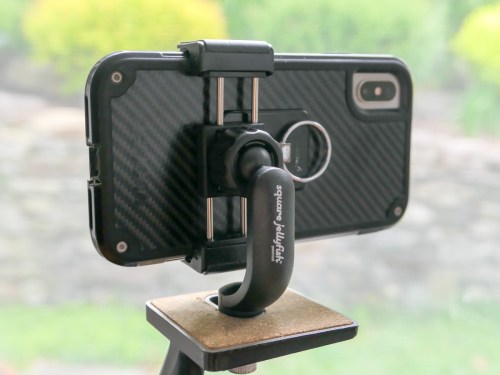
So, the only reasonable way to get the shot is to securely mount my iPhone onto a tripod.

Many of us may already have access to a tripod at home, but you also need a way to attach your smartphone to your tripod.

That’s the situation I found myself in.

How to Mount your Smartphone to a Tripod
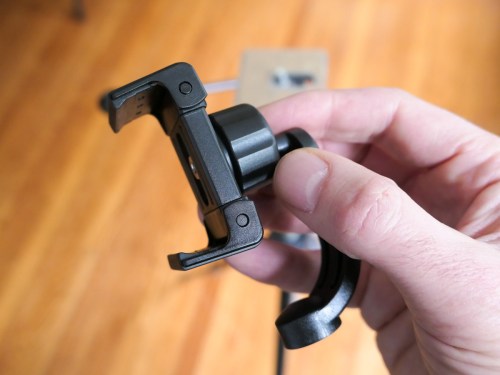
I needed to buy a smartphone tripod mount for my iPhone. There are a variety of options on the market and fortunately not that expensive.

I went with a Square Jellyfish Jelly Grip Tripod Mount for smartphones.

It’s $12.95 on Amazon Prime.

Click.

Break Free from your Desk
Now, I’m free to Zoom around my house! And a huge added benefit is the option to stand in my tripod-enabled shot. Believe me, that’s so great when you feel like you’ve been glued to your chair for the past nine weeks.

So, go ahead and take your next Zoom call on the road… or at least to the next room.

A change of scenery may be just the adjustment you need!

The Secret to Finding your Zen in Zoom

You don’t need to suffer with the mess behind you on your next Zoom video call. It’s time to ‘virtually’ relocate to another part of your home. Here’s how…

Remember when once upon a time, you’d show up for an in-person meeting feeling fabulous? Maybe you had a presentation to do, and you hit it out of the park. After your diligent preparation, your success would ultimately rely on psychology and mindset. To help get you in your ‘zone,’ maybe you’d show up wearing your favorite shirt or shoes. Perhaps you’d arrive at the room early to center yourself and visualize the next hour. Or whatever to get your game face on.

But now, all of that has clearly changed. The good news is Zoom and other video conferencing apps have done some heaving lifting filling in the resulting gaps.

Sure, Zoom has been remarkable at keeping us together, but it can’t entirely replace the in-person experience you may be craving.
(Who knows when any of us will physically walk into a conference room again with other people.)

And as amazing as Zoom has been for many of us, perhaps you’ve been unable to get yourself entirely comfortable with Zoom.

Why is that?

Virtual Backgrounds to the Rescue?
It might be because you’re secretly a little frustrated with how your image has appeared on your recent Zoom calls. I’m certainly not thrilled with how I’ve been showing up.

Sure, I’ve worked hard to improve my lighting in my home office by taking advantage of a nearby window and adding in an Elgato Key Light Air light for soft fill on my face.

I’ve also tidied up my background to help ensure there’s nothing too distracting. I want people to pay attention to me, not my mug collection on the shelf behind my head!

But try as I may, I must accept that my home office background isn’t designed for prime time.

So, in moments of frustration, I’ve sometimes activated Zoom’s ‘Virtual Background’ mode to try to quickly solve the problem.

Assuming your computer or smartphone has the horsepower to switch in a virtual background, the result may seem like a neat parlor trick. However, you’ve got to admit it’s a little hokey using someone else’s picturesque background.

Reality Check
Maybe this isn’t actually a problem for most folks living on Zoom these days. Perhaps their backgrounds are the least of their concerns during the altered reality of COVID-19.

And I must concede this excellent point. Our priorities should probably focus elsewhere.

That said…

If you do have some extra bandwidth to improve your Zoom shot, I’ve got an insight to share about your background that could be a gamechanger.

It’s worked great for me!

Choose an Authentic Virtual Background
As much as I just dissed using virtual backgrounds, I feel they’re actually vitally important to solving the challenge of your Zoom shot from home. But your virtual background can’t be some vacation destination or cartoon image like the Minecraft universe.

That just screams…. VIRTUAL BACKGROUND!

Your background should represent your own reality. And that means some part of your home that you’d enjoy sharing with others. And it’s not important exactly where it is. It matters how that background makes you feel.

Forget all preconceptions about some perfect home-office setting that you don’t have. Instead think about your favorite part of your pad… that’s the place you want behind you!

Bring your Happy Space to your Next Zoom Meeting
But that space may or may not be available to you for your next Zoom meeting. (Others may already be occupying it!) That’s why it’s time to make it your virtual happy space!

Simply take a picture of this favorite spot at home and then use it as your virtual background.

It’s authentic; it’s real; it represents a part of you!

This is my home office via Zoom.

And this is my virtual happy space in Zoom courtesy of our living room.

See?

You’re in your Zoom Zone!
Now, when you show up for your next Zoom meeting, you should feel awesome being exactly where you want to be (at least virtually).

Of course, it’s ironic that your fabulous virtual background will likely fade into the background for your viewers, but that’s exactly what you want.

Because, then you can focus forward on what matters most… Forming a real connection with your Zoom participants.

So go find your Zoom Zen!