At Home with Tech

Unlock the power of all your technology and learn how to master your photography, computers and smartphone.

Category: Tech Trends

Which Premium Compact Camera Should You Buy?
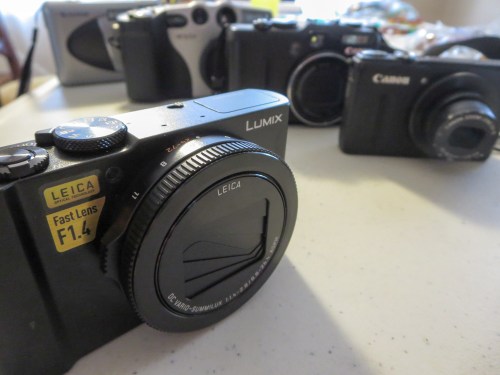
If you’re looking to purchase a new point-and-shoot camera, you should consider upgrading to a premium compact camera. You’ll be able to snap superior pictures and successfully battle photo blur, but it’s going to cost you…

If you’re looking to purchase a new point-and-shoot camera, you should consider upgrading to a premium compact camera. You’ll be able to snap superior pictures and successfully battle photo blur, but it’s going to cost you…

You might be wondering why anyone would want to spend an ungodly amount of money on a newfangled compact camera that can fit in your pocket? Haven’t those kinds of cameras been around forever for a couple of hundred bucks? Plus, can’t your smartphone already take care of all your photo-snapping needs?
Well, not quite…

For me, the challenge is still how to capture a great moment in low light without a flash. That eternal blur is killing me. Unless, I’m shooting a bowl of fruit, any kind of motion creates some amount of blur!

I just want to be able to generate a crisp shot!
But for that, I’m going to need a bigger camera sensor. And I want it in a small camera.

Exactly…

The ‘Better’ Pocket Camera
They’re called ‘premium compact cameras.’
And they belong to a relatively new category of camera that’s supposed to solve the blur problem by using a much larger 1 inch-type sensor that’s typically built into larger and better DSLR cameras.

This upgrade provides a massive improvement over all other compact cameras that use smaller sensors.

If you think that ‘premium’ means it’s going to cost you more, it certainly will…

You may recall I recently destroyed my old Canon S100 pocket camera while performing an especially silly and pretty dangerous parenting maneuver. Since then, I’ve been on the market for a replacement camera. I questioned whether another standard point and shoot would really be that much better than the camera on my old iPhone 6 Plus. Not to mention the more advanced camera(s) on the iPhone 7.
(By the way, I think I’m going to wait to upgrade to the 8.)

And here’s the major reason for the creation of the premium compact camera market. Why else would anyone shell out anything for a pocket camera unless that camera could knock the socks off your smartphone?

And with that ‘promise’ in front of me, I decided to shell out some big dough in search of a little more clarity.

How to Decide…
There are essentially three choices to consider:

  • Sony DSC-RX100 V
    This is the fifth generation of the camera that launched the premium compact camera market. By most accounts, it’s still the one to beat.
    Among its superior features, it’s the only one of the three to have a separate pop-up viewfinder in addition to its LCD screen.
    The problem is it costs a thousand bucks!
    (You can save some money by buying an earlier model… The III and IV are still on the market and are solid choices.)
  • Canon G7X Mark II
    At $700, the Canon is a little easier on the wallet. But the jump from what I’m used to spending is still startling.
    The G7X II also has lots of fans out there. So I wouldn’t go wrong remaining in the Canon orbit.
    The one big drawback is it doesn’t offer 4K video like the other two.
    (More on this later.)
    On the plus side, it has a longer 24-100mm zoom lens than the other two.
  • Panasonic Lumix DMC-LX10
    This one will also set you back seven hundred bucks, but it has a slightly brighter lens. (F1.4-2.8 24-72mm equivalent) Every little bit helps when you’re fighting the blur in low light.
    (But you only get the F1.4 boost when you’re framing at 24mm. I really like the 24mm wider angle when trying to handle group selfies.)
    The Panasonic also has 4K-video capability. (As does the Sony)
    But the LX10 can create MP4 video files in addition to AVCHD unlike the Sony, which can only generate AVCHD.
    (I prefer editing with MP4 files in Final Cut Pro X.)
    The LX10 has a cool ‘4K Photo-Burst’ mode, which gives you the option to generate a specific jpeg from a short MP4 clip that’s captured at 30fps.

Process of Elimination
You’ll find tons of camera reviews out there comparing these options. And you’ll probably spend hours (days) trying to digest it all. (I certainly did!)

I don’t think you can really go wrong with any of these three amigos. But each has its own advantages. There’s no perfect choice.
(Is there ever?)

For me the decision comes down to this…

As much as I don’t feel the need to start shooting my family videos in 4K right now, (1080 is just fine, that you very much.) I want to future-proof this camera as much as possible. iPhones already shoot in 4K. I don’t think it’s going to be that long until 1080 HD video becomes yesterday’s dated 720 HD format.

As much as I’ve been a Canon guy for over a decade, I have to make the difficult decision to walk away from the G7X II, because it lacks 4K.

And I just can’t bring myself to spending a thousand smackers on a pocket camera. That means I can’t go with the Sony.

So that leaves the Panasonic…
Though the process of elimination does lead me here, I don’t feel I’m going with a runner up. The LX10 gets its own great reviews.
(And by the way, I don’t mind that it doesn’t have a separate viewfinder. I never have the time to frame like that. I’m lucky if I can pull the camera out of my pocket and point it at a family moment before that moment has moved on!)

Click.
panasonic-lumix-lx10-is-ready-to-go


Hello, Panasonic Lumix DMC-LX10!

Consider Yesterday’s Model
So I set myself back $700. And I’m not done yet.
(More on that in a moment.)

But before you take the same financial plunge, you should remember you’ve always got a fourth choice…

If you buy an older camera model, you’ll certainly save some money…
(Newer versions seem to get cranked out every year.)

The popular Sony RX100 III is selling for $698 at B&H Photo. That erases my Sony price premium concern. But it doesn’t have 4K video capabilities.

Amazon’s got the original Canon G7X for a hundred bucks less than the G7X II.
But I figure if I’m ready to spend $600 on a camera, then it’s worth ponying up a little more to get the latest and greatest.

As for the Panasonic LX10, there’s no earlier model that enough of an apples to apples comparison.

Should You Buy the Insurance?
I decided to purchase my Lumix LX10 online at B&H for $697.99.
As I looked at B&H’s check-out screen, there was the option to pick up an insurance plan through SquareTrade. (3-years of Drops and Spills for $128.99)

I quickly dismissed it, as I’m not a big believer of insurance for tech gear, except for my Apple products. My curser hovered over the camera-purchase button, but I just couldn’t press it…

What was wrong?

My subconscious was communicating with my conscious self…
It reminded me that I’ve broken more than one camera since becoming a daddy. The odds weren’t good that this one could go through the next few years totally unscathed.

Why wouldn’t I protect this camera, as I’m sure to be putting it in harms way?

I’m spending a boatload on this camera! It’s not going to be a throwaway item the first time it needs a repair. So why wouldn’t I buy the insurance?

Okay… enough said.
Hello, SquareTrade!

Accessorize!
Remember when I said I wasn’t done spending money…?
Well, there are a couple of important accessories to consider…

  • Soft Pouch
    I’ve got to protect my new precious. It just can’t bang around with all of my spare change in my pocket.
    (What little is left!)
    A stretchy, soft pouch will do the trick. The question is which one?
    (There are dozens out there.)
    So I called up B&H and asked the sales guy. He pointed me to this:
    OP/TECH USA Digital D Soft Pouch – $17.95 at B&H.
    Done.
  • Extra Rechargeable Camera Battery
    I always like to carry one with me. You never know…
    It’s the Panasonic DMW-BLH7 – $39.95 at B&H.
  • Battery Charger
    Guess what? The LX10 doesn’t come with a separate battery charger.
    Surprise!

You’re supposed to charge it in-camera using a supplied USB cable and AC charger.
While that felt like a game changer when I opened the box, after I sat with it for a bit, I realized it wasn’t such a big deal.

That said, I am getting that second battery. It would be nice to have a charger instead of always having to shuttle batteries in and out of the camera.

The B&H guy told me Panasonic hasn’t come out yet with its charger. But you can buy one from this manufacturer…
The Watson Compact ac/DC Charger Kit with Battery Adapter Plate for DMW-BLH7 is $19.95 at B&H.

It’s Not So… Small
And how pocketable is the LX10, really?

Well, it’s quite a bit bigger than my obliterated Canon S100. (R.I.P.)
But it’s smaller than my old Canon G9 (R.I.P.) …not as tall and thick.

Does the LX10 fit in my front pants pocket? Yeah…technically.
But honestly, it’s kind of tight.

I’ll make due…
(There’s no smaller camera with the same specs… especially a fast 24mm lens at the wide end.)

The Bottom Line
So I’ve got three takeaways to review as you consider your own decision:

#1
I love my new Panasonic Lumix LX10. It’s built like a tank, and my early photos look super!

lumix-lx10-hand-and-keyboard-shot


#2
Yes, I’ve been suckered into buying into the world of 4K video to create my family videos.
(But I bet my future self will soon come back in time to thank me for this forward-thinking move.)

#3
If a camera costs a lot… go buy the insurance to protect it! You don’t have to feel good about the fact that you need it. (I still don’t.) Just do it. Trust me.

You can’t control your world. But now, you can certainly take better pictures of it. At some point along your photo-snapping journey through life, I expect you’ll decide it’s worth it to spend the extra money.

As my father likes to say, we go around once.
Get the nice camera…

lumix-lx10-depth-of-field-globe-shot

Which Robot for Your Six Year Old?

Is it too soon for a first grader to receive a personal robot? Perhaps he/she could just build one. On the other hand, how many humans today can construct their own toy android? So this daddy has taken a different road to introducing robotics at home…

Is it too soon for a first grader to receive a personal robot? Perhaps he/she could just build one. On the other hand, how many humans today can construct their own toy android? So this daddy has taken a different road to introducing robotics at home…

My six-year-old son is really into robots these days. He’s especially fascinated with the Zane character in the Lego Ninjago universe.
(Technically, Zane is a ‘Nindroid’… but let’s not get tripped up over details…)

Last week, my boy declared he wanted to build his own Zane.

He walked up to me with his Ninjago book in hand. He opened up the book to a page with a blueprint of Zane and pointed.
in-the-workshop-building-zane


Uh oh.

I suggested using cardboard, paper and paint. My response was clearly way too simple and old fashioned for him…

He declared he wanted to build his Zane out of metal.

Uh oh.

Well, I didn’t happen to have any scrap metal lying around…
(And I typically don’t ‘work’ with metal… I tend to just buy gear made out of metal!)

Nevertheless, I decided to embark on a daddy/son mission, (admittedly half baked) and I took my young Frankenstein to Home Depot to get some small metal mending plates and nuts and bolts. I figured that might do the trick.

Note to other parents out there:
Don’t try this!
Ever!!

You’ll encounter sticker shock at the checkout register and end up becoming the proud new owner of lots of scrap metal. Sure, my boy had some fun screwing sharp metal parts together, but he didn’t create anything close to a robot.

The Influence of the Lego Universe
However, he did create a Ninjago ‘Shurikan’ by bolting together three pieces of metal into a large triangular ‘tool.’
(He actually made two.)

And in that moment, he couldn’t be more proud of himself.
So perhaps I shouldn’t dismiss the entire venture so easily…
a-shuriken-built-out-of-mending-plates


But as grand as this spontaneous creation was, it’s a little too real. Much like Shurikans in the mystical Ninjago story that were so powerful and originally banished, our newly created 3-D Shurikans will need to be dismantled and made into something else.
(The parts redistributed for less ‘impactful’ purpose)

And there’s another problem… Remember, we didn’t build a robot. Perhaps if I were an AI genius, I might have had greater success, but it was time to look for help with this quest elsewhere…

Time to buy a toy robot that some other AI genius built.

Welcome to the Commercial Lab of Creation
There are a variety of aspiring toy robots out there for kids, but I quickly focused on an established solution… one of the robot toys made by a company called ‘WowWee.’

WowWee’s designers have come up with a variety of tech toys since 2004, including their WowWee MiP Robot.

The MiP is a cute little balancing guy on segway-like wheels with ‘GestureSense’ technology that allows you to control its actions with your hands. Plus you can use an app on your smartphone to control it.

There’s also a newer WowWee Coder MiP Robot, which is translucent, sports a rechargeable battery pack and comes with a cool plastic ramp to play with.
wowwee-coder-mip


This ‘Coder’ version has every capability of the original MiP, but you can now also ‘code’ actions and sounds with the app based on how you interact with your MiP.
(It’s not really coding… it’s simply selecting your “when/then” choices.)

Whether my six year old is ready for even this basic kind of coding is questionable, but I figure the functionality will still be there for him in a year or two to explore.
(Assuming the Coder MiP is still a functioning member of the Lester family.)

Amazon has the Coder MiP for $44.90.
(MSRP is $99.99.)

That’s actually way less than my metal mission to Home Depot set me back.
(Let’s speak no more of that.)

Click.

Fueling the Mad Scientist
Okay. So I’ve checked the robot box.
But again I still haven’t solved the building need.

WowWee also makes mini versions of their robots, called RC Minis.
And they make sub versions of the mini robots called “Build-Up” editions.
(They come in pieces.)

There’s a small “Build Up” clone for the MiP and one for their ‘Robosapien.’

These “Build-Ups” are much simpler than their cousins, and you control forward and turning motion using an included remote.

Pretty basic.
But you do actually build them…

For my six year old, he may need some help getting it all together. So it’s probably going to be a family activity… but that’s just fine with me.
(That said, I don’t want to sell him short. He’s already a pro at building Lego Bionicles on his own.)

The WowWee Robosapien RC Mini Build-Up edition goes for $29.96 on Amazon.
Not a bad deal…
…If it gets the job done.

Click.

Daddy Time
The bottom line is there’s now a young tech builder in the family. So these two WowWee bots are just the beginning.

Any other ideas out there on technology-based building projects I can line up for my son? I’m thinking that this is where things can really start to get interesting…

Wow Wee!

Four Great Tech Gifts for the Geek in Your Life

Are you having trouble adding tech gifts to your shopping cart? I’ve got four winners at three different price points that can get you to the finish line!

Are you having trouble adding tech gifts to your shopping cart? I’ve got four winners at three different price points that can get you to the finish line!

I know… it’s sometimes pretty difficult buying the right tech for that lovable ‘Tech Geek’ in your family. He/she knows what rocks their world, but you may not have total access to all of that ‘unique’ perspective. So how are you supposed to buy the perfect gift?

You’re going to have to ask!
(And that’s okay… you really shouldn’t have to guess…)
And then get started creating an old-fashioned list to work from.

If you want to see my list, I happen to have it right here!
(And feel free to use it!)

I’ve got four picks in three price categories:

  • Under $50
  • Under $200
  • Under $400

On Barrett’s Tech Wish List Under $50

You usually can’t go so wrong on a gift at this price point. Especially if the recipient has given you a clue that he/she wants one…

iPhone Lightning Dock
Let’s face it…Your iPhone can’t always make it through the day on its own.
(There’s no shame in admitting it.)

Sometimes, you just need to plug it in for a little extra juice. Wouldn’t it be nice to stop treating that need as an emergency and instead formalizing it with a dedicated device on your desk?

An Apple iPhone Lightning Dock can certainly get the job done.
(Just make sure your iPhone’s case isn’t too thick to use this lightning dock.)

apple-lightning-dock-white


Apple iPhone Lightning Dock – white
$39.00 at Apple

apple-lightning-dock-grey


Alternately, you can get one of the newer metal versions for ten bucks more.
$49.00 on Amazon

Or…

You could go rogue and look at a sturdier option called the HiRise 2, which doesn’t use such a minimalistic approach. It offers ‘back support’ and also has the flexibility to work with any iPhone case or your iPad…

highrise-2


The HiRise 2 made by Twelve South
(black or silver)
$22.00 on Amazon.com

I really like the adaptability of the HiRise 2 and think the silver model would look great on my desk…
(Plus, because your iPhone sits higher on your workspace, it saves your arm from supporting your Facetime and Skype video chats.)

Just don’t forget to bring along your own lightning cable.
(Alternately, you can buy the HiRise 2 Deluxe, which also comes with Lightning and Micro-USB cables and a heftier $39.99 price tag.)

Touchscreen Gloves
Geeky-gloves with special conductive fingertips that can operate your smartphone have been around for a while now.
(So nothing new here.)

Plus, you’ve got to admit that gifting gloves in general is almost as boring an idea as getting someone a tie.

That said, being able to use your smartphone while wearing your gloves does have real value. I can think of several important moments over the past few years when having the right pair of gloves on a cold winter day would have been so sweet.

I came across this cool-looking wool pair from Mujjo:

mujjo-double-layer-touchscreen-gloves


Mujjo Double Layer Touchscreen Gloves
$34.95 on Amazon

If you wanted to upgrade to a more formal leather look, Mujjo also makes a pricier version:

mujjo-leather-touchscreen-gloves


Mujjo Leather Touchscreen Gloves
$99.00 on Amazon

On Barrett’s Tech Wish List Under $200

Okay… At this price point, we’re getting more serious…

Sennheiser RF Wireless Headsets for the Family Room’s HDTV
Once upon a time, I envisioned a shining man-cave, and I would build myself an immersive home theater with massive sound that would shake the core of my house (and sooth my geeky soul).
Then I became a daddy, and everything changed.
Now, I’m in eternal stealth mode. It’s not about how loud…. It’s about how quiet.

On the few occasions when I’m consuming TV/video in the family room on my own, it’s usually at night, when our six-year-old son is sleeping.
So I need to wear headsets to maintain evening Zen.
I’ve been using wired headsets for years, and I’ve got to admit… it’s a pain.
It’s time to upgrade to wireless headsets…

Previously, I’ve addressed the same question for my home office and went with a relatively inexpensive solution using a long-in-the-tooth Sennheiser RF wireless model. (RS 120)

As I look at the landscape today, there are a crazy number of choices out there. And honestly, I can’t possibly figure out the very best one at the most reasonable price for my needs.

That kind of research stretches even beyond the amount of time available here at the world headquarters of ‘At Home with Tech.’
(I think I’m on family dinner duty tonight.)

Plus there’s really no one answer…
(I know there are lots of solid choices out there.)

But that said, I decided to stick with Sennheiser and see what they had going with their more current over-ear RF wireless models.

Here’s the current line up:

For me the sweet spot hits at something under $200. So that points to the RS 175 model. Even though the RS 185 really isn’t that much more expensive, the higher-end model is an open headphone design, which leaks more sound, potentially disturbing others in the same room.

sennheiser-rs-175


I prefer to stick with the closed design of the RS 175, which will assist in my stealth media consumption plans.
(Just being practical.)

On Barrett’s Tech Wish List Under $400

Okay… If someone really wants to blow the bank on me, here we go…

GoPro Action Camera
You may have heard I recently trashed my Canon point and shoot camera when I wiped out on my bike while videotaping my six year old riding his new bike.
(I’m okay… other than some road rash. Still healing…)

Yes, I’ve learned the hard way that holding a camera while moving fast isn’t good for my health… So I should probably get an action camera that I can more safely use.
Time for a GoPro?
Think so…

GoPro currently makes three models:

  • GoPro Hero Black – $399
  • GoPro Hero 5 Session – $299
  • GoPro Hero Session – $199 (rebranding of older Hero 4 Session)

As you can guess from the price, the GoPro Hero Black is the flagship model. It gets great reviews, including this Wired video review by Brent Rose.

gopro-hero-5-black


For me, a huge plus is having the small screen on the back.

The others don’t have screens at all. You can view your live shots via an app, but then you’re working with a second device…
(Granted, I know the whole point is you’re not supposed to worry about framing your camera at all. It’s point and go. I guess I’m old school and want to see the framing before a shot begins…)

So in something of an unusual move for me, I’m partial to the most expensive model.

If you also buy GoPro’s ‘’The Strap,” you can then attach your GoPro to the top of your hand or arm, which frees up your hand to pay attention to keeping you safe!

GoPro Hero 5 Black
$259 on Amazon

The Strap
$59 on Amazon

Sure, it’s a costly gift set, but I also call it protection…
(And how can you put a price on safety?)

Plus, my six-year-old isn’t getting any younger. There are more adventures to come. If I want to capture them, I really need to be better prepared…

And going with the latest and greatest will go a long way towards future proofing it.
(At least for the next few years)

Barrett’s Wish List
So, to recap…
I crave the following:

  • The HiRise 2 Lightning Dock
  • A pair of the Mujjo Double Layer Touchscreen Glove
  • The Sennheiser RS 175 RF Wireless Headsets
  • The GoPro Hero Black
  • Along with the GoPro Strap (to help me not wipe out again)

What’s on your list?

Good luck with your shopping, and may your loved ones act surprised when they get the tech gifts they were hoping for!