At Home with Tech

Unlock the power of all your technology and learn how to master your photography, computers and smartphone.

Category: Tech Trends

Best Recipe to Bring to Family Holiday Gatherings

Whipping up a batch of cranberry sauce from scratch is a quick and easy way to contribute to the holiday meal. But if you really want to make a bigger impact and don’t have the cooking chops, you might want to turn to your tech skills and use my recipe for success…

Whipping up a batch of cranberry sauce from scratch is a quick and easy way to contribute to the holiday meal. But if you really want to make a bigger impact and don’t have the cooking chops, you might want to turn to your tech skills and use my recipe for success…

I started to sweat… It was our turn to host Thanksgiving dinner this year. We set the table for fifteen. My wife cooked up a perfect twenty-pound turkey. Family members and in-laws brought incredible side dishes. And what was my contribution…?

Let me simply say I’m not a gourmet chef.
Others in my extended family are far more accomplished in this arena.
(Although I can whip up a fine stack of banana pancakes… Which, of course, did me no good here.)

I’ve also previously created some mean chocolate bread pudding for the desert table, but I wasn’t on desert duty this year.

Suffice it to say, I checked the box by making some decent cranberry sauce from scratch…

It’s actually super simple…

  • 24 oz of fresh or frozen cranberries
  • 2 cups of sugar
  • 4 tablespoons of water
  • A little orange zest

Cook it up, keep stirring and about a half an hour later… you’re done!
(Here’s the official recipe at foodnetwork.com.)

More than Good Food
It was a decent effort… though hardly a culinary stretch by any means.
I didn’t embarrass myself, and I received a dozen polite compliments.

But that wasn’t it for me.
It simply couldn’t be…

I had to contribute something more significant to this family gathering.
I had great intent… just not the skills in the kitchen.

Because at the end of the day, it’s not really about the meal, right? It’s about getting family together. It’s about remembering the good times… and giving thanks.

Bring Your Tech Smarts to the Holiday Meal
So the feast began to break up after all of the yummy deserts had been consumed. All of the young cousins had long departed the dining room, and my six year old was leading the children on some noisy adventure in the family room.

Then, the adults wandered in…

I was a few steps behind the pack, and when I got there, I witnessed them all hovered around my old 42” plasma Panasonic HDTV.
My family members were all smiling and reminiscing about what they saw…

A Trip Down Memory Lane
My HDTV displayed a magical, morphing photomontage, courtesy of my Apple TV’s screensaver. The series of 125 photos represented all of the kids over the past seven years at different family activities and events.

This digital display of recent family history was my true contribution to this gathering.

I brought the gift of remembering good times…

‘Cause let’s face it. Life is messy.
Thanksgivings are rarely perfect.
(Growing up, mine certainly had major flaws.)

Life just isn’t a holiday card.

But on the other hand, there are still plenty of amazing moments.
You’ve just got to remember them. Isn’t that part of what giving thanks is about?

And if someone could simply gather up all of those memories and serve them up… wouldn’t that be nice?

Well, that’s exactly what I did.
I served up some great family memories.

This is my pièce de résistance for large family meals.
And what’s my recipe…?

iCloud Photo Sharing on your Apple TV
If you often worry about what you’re going to do with all of those photos you’ve been collecting, (and sometimes not having the time to share) this can be your moment of reckoning…

It’s actually not at all difficult to pull off. The major ingredient is taking all of those photos over the years and keeping them organized in a program like Aperture 6.

Then, you simply export your group of photos into a new iCloud shared photo album that your Apple TV can access.

Here’s how you complete your visual feast using Apple’s connected ecosystem…

  • Go to your Apple TV and click on ‘Settings.’
  • Click on ‘General.’
  • Click on ‘Screensaver.’
  • Click on ‘Type’.
  • Click on ‘My Photos.’
  • Click on your new iCloud shared photo album.
  • Click on ‘Set as Screensaver.’
  • Your Apple TV will ask you to confirm. Click ‘Yes.’
  • Then, step back a few times to the main menu screen on your Apple TV.
  • Press the Menu button again. That will activate the screensaver program, and your photos will start to scroll up the screen in random order.

Voilà!

A few other notes…

  • You don’t have to use full-res photos.
    (The pics look great at a fraction of the size.)
  • Your Apple TV will also activate its screensaver automatically after a few minutes of non-use
    (depending on what delay length you’ve set in your screensaver settings).
  • You can also enjoy your shared photo album on your other Apple devices
    (though not as a photomontage).

Problem Solved
As you may know, I fret a lot about how to manage and share my growing mountain of family pictures.

A good solution is to regularly funnel them through digital photo frames.
(Currently, I’m a fan of using Nixplay digital frames, although I’ve had some connectivity issues with them in the past.)

So why not expand on this plan and simply use your HDTV as a giant multi-image photo frame?
(Just use a connected 4th generation Apple TV to perform the trick.)

I think it’s a great way to fuel all of those good feelings when family and friends get together for the holidays.

It’s a recipe that can’t be beat!
Use Old Tech to Find Lost Memories

Much like many of your memories, old tech may be discarded, but not actually forgotten. Did you realize that yesterday’s tech can sometimes evolve into a time machine to help you rediscover joy from your past? Here’s how…

Much like many of your memories, old tech may be discarded, but not actually forgotten. Did you realize that yesterday’s tech can sometimes evolve into a time machine to help you rediscover joy from your past? Here’s how…

Do you recall the adrenaline rush you get when you open a box for the first time containing that new piece of must-have tech? It’s like pure joy. But then, it often dissipates as your brain looks for the next must-have tech bling.

That’s a problem on a variety of levels, but I’ve chosen not going to confront any of those concerns in this moment.
Instead, I’m going to focus on the fleeting goodness…

My good news is I’ve discovered that emotional memories of ‘new tech joy’ doesn’t have to entirely disappear!

If you are of a certain age, I invite you to a take a trip back in time with me…

Find a Time Machine
My family and I recently visited a series of artist open houses in Bridgeport, Connecticut, where artists opened up their studios to the public.
(I had no idea that Bridgeport had such a thriving artists community.)

And hidden in the middle of all of the amazing studios was a magical room filled with video arcade games from the 1980’s.
(To be clear, this wasn’t an art space… it was a company that rents these old relics for parties.)

But to me, it was something else.
It was an actual time machine!

I stepped in, took a few more steps… and was suddenly transported back to my college days at Colgate University, when I would hang out in the basement of K.E.D. in the common space and play video games for a quarter a play.
(Or was it fifty cents?)

Specifically… I played ‘Galaga’ and ‘Atari Star Wars.’

Remember Your New Tech Joy Using Forgotten Old Tech
As I walked deeper into the dark room, I spotted those same games! I walked up.
And then something happened…

I realized you could actually play them… right there!
(For free, no less)

What?

galaga


I pressed the start button on Galaga.

Holy cow.
The little laser blasts.
The sounds.
The feel of it all…

atari-star-wars


And then I walked up to a Galaxy Far, Far Away and launched my X-Wing to destroy the Death Star.
(It took me three passes, but I eventually got it done!)

All of those past quarters spent. All of those forgotten skills…

The Past is the Present
I never thought I would ever play these arcade games again.

And yet here they were.
It was if I was in a temporal nexus.

The memories all rushed back.
I felt it.
All of it.

Whoah.

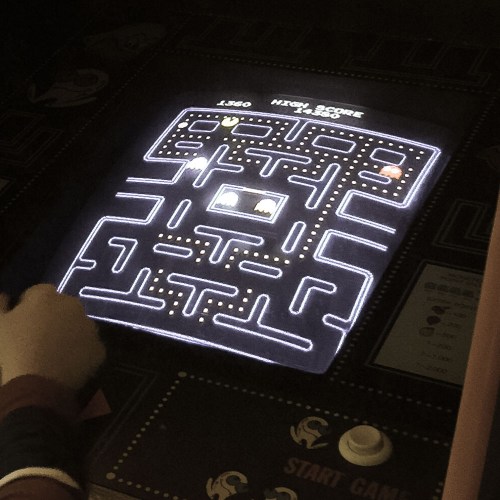
This dark, seemingly endless room must have been crammed with fifteen other favorites.

pac-man-arcade


We all had our go-to game, right?

Pass the Baton
What a treat.
And an amazing demonstration of both the emotional and experiential memories your brain holds onto.

But my rewarding trip down tech memory lane inevitably had to end, right?
Well, not necessarily…

There was someone else in there with me.
Somebody who had never played a video arcade game from the ‘80’s.

I then watched my six year old play Pac-Man for the very first time.

21st-century-six-year-old-meets-pac-man


I felt the universe re-centering itself.

(If only for a moment)
And then it was time to say goodbye to this Guardian of Forever…

Keep the Memories Alive
It’s funny how you can run into your past in the most unlikely of places and reactivate your tech joy from long ago.
(And a testimonial for the ongoing value of old tech)

Plus, if you really pay attention, I think you could easily walk by someone else’s past magic tech joy and experience a bit of their own euphoria.

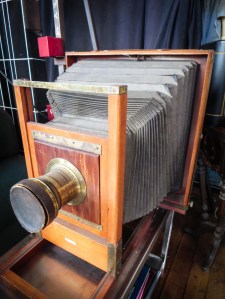
century-studio-camera


Wooden Century studio camera, anyone?
Perhaps… a camera obscura?
No?

All right. Maybe I’ve gone back a little too far…

Seven Ways to Find More Time

If you think your tech wastes more time than it’s worth, you’re not alone. But if you look around, you can find suggestions on how your tech can actually improve your day. I’ve gathered seven tips to share…

If you think your tech wastes more time than it’s worth, you’re not alone. But if you look around, you can find suggestions on how your tech can actually improve your day. I’ve gathered seven tips to share…

The irony is all of your home tech is supposed to save you time and ‘enhance’ your life. But technology also can be a huge time suck.

A piece of advice…
Don’t get distracted (too much) by the many lures of your tech.
Keep it working for you!

Here are seven ways I use my own tech to help squeeze a little more time out of my week…

1. Always Know the Time as You Sleep
You wake up in the dead of night and wonder what time it is. If you’re like me, you’ve long retired your clock radio. Now, only your smartphone hangs out on your bedside table. But you’ve got to reach over and activate it if you want to see what time it is. How annoying is that? Wouldn’t it be great if you could quickly just peer up at the ceiling to see what time it is?

Well you can… with a projection alarm clock!
I’ve got one made by Electrohome.

2. More Impulse Buying on Amazon
Do you keep forgetting to get maple syrup at the supermarket for Sunday pancakes? Just putting it on a list for the next time you hit Stew Leonards will delay you until you actually make that trip.

I say order the replacement item on Amazon Prime as soon as you run out.
With ‘Prime,’ you don’t waste money on extra shipping charges with this one-off scattered shopping approach.
(Organic Maple Syrup. Click.)

So yes, this falls under the category of impulse buying…but only for your kitchen staples.

3. Keep your Home Cozy from Anywhere
Did you forget to turn down the heat before you left the house this morning?
No worries. You don’t have to turn around to check.

If you have a smart thermostat like a Nest, you can adjust the temperature from an app on your iPhone from anywhere in the world.

4. Catch the Train with Your Smartphone
Running late to your Metro North train at Grand Central Terminal for your evening commute out of New York City? And a few saved seconds can make the difference whether you make your train or not?
(Yes, that’s how I roll.)
No problem!

Your TrainTime app on your smartphone will quickly inform you which gate your train is leaving from.

And you can quickly buy a digital train ticket using the MTA eTix app, instead of waiting on line at a ticket kiosk to purchase a physical one.
(And that app is going to be especially handy in the dead of winter when you encounter an exposed and frozen ticket kiosk that’s malfunctioning.)

5. Stop Going to the Post Office
Why would you ever choose to waste even a fraction of your existence at the post office buying stamps? The lines are endless. It’s like Purgatory in there.
Even the stamp-dispensing square autobot will drain your life force.
Why not simply purchase your stamps from the convenience of your home computer?

It’s wicked quick at store.usps.com…
(Sure, you pay a $1.25 shipping charge for a roll of 100 Forever stamps. But I say that’s more than worth it for the convenience.)

6. Avoid Greeting Card Aisles
Do you still feel like you have to troll for greeting cards at the local CVS or Walgreens to get the ‘perfect card?’
Well, STOP IT!

You know what I mean… searching up and down that forest of disorganized generic thoughts. Finding that perfect card, only to realize there’s no matching envelope, and having to start all over again.

It’s no longer a badge of honor to say to your loved one… “I spent an hour looking for the perfect card!”
(My mom used to always to say that to me.)

There’s got to be a better way!
Well, of course there is…

Here are three online destinations you can visit-

These websites contain virtually all the greeting cards you could ever want.
Plus they’ll mail them for you!

Whoah…. Now that’s really a paradigm shift.

7. Get E-ZPass or Bust
All right, who here doesn’t have E-ZPass yet?
What? You’re still waiting on long lines in your car at tollbooths?
Please stand up and walk upstairs.
Now go to bed…. There’s no dinner for you.
(And here’s something to ponder as you drift off…
Technology is quickly killing off the tollbooth.)

The rest of you can sleep soundly knowing your E-ZPass is working hard to save you time. But before you start your snooze, you might want to check in on your E-ZPass account just to make sure it’s current.
You don’t want E-ZPass to list the car you owned a decade ago.

Enough said.

How Did It Get So Late So Soon?
Look, I’m not saying you should stop wasting your precious time checking Facebook twenty times or spending hours on a Sunday night combing through your weekend family photos using Lightroom.

I get it.
Believe me…

Guilty.

I’m just pointing out how you should also be very deliberate to find ways to use your tech to save you time.

And maybe… just maybe… at the end…

You’ll break even.