At Home with Tech

Unlock the power of all your technology and learn how to master your photography, computers and smartphone.

Category: Tech Trends

Buying a Camera For My Four Year Old
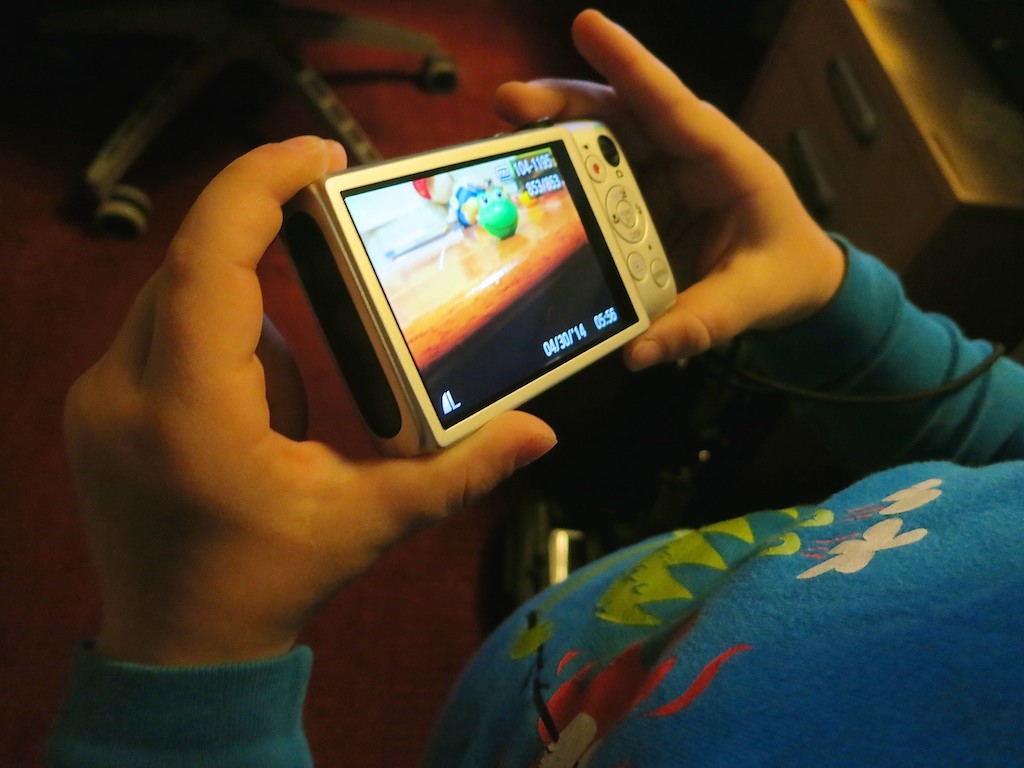
Surprise! My son shows me the latest picture he’s taken with my Canon Elph. I think this may be a sign it’s time for his own camera. But is he ready for the real thing?

Surprise! My son shows me the latest picture he’s taken with my Canon Elph. I think this may be a sign it’s time for his own camera. But is he ready for the real thing?

When I was seven, my mother bought me a portable cassette tape recorder for my birthday.

This gift arrived after a successful multi-month marketing campaign on my part.
I had expressed all kinds of plans for what ‘sounds’ I would be capturing with its little microphone.

Plus I wanted to launch my very own audio documentary series starring the boy Barrett. Topics would range from ‘what’s for dinner’ to exclusive interviews with the parents.

It was an ambitious plan… and a big ask on my part to begin with.
(This tech of the 70’s was not considered a ‘toy.’)

My father had his doubts, predicting the rectangular device made by Sound Design would end up back in its box, abandoned in a corner of my closet within the week.

But my mom read her parental tea leaves differently.
And it was definitely the right call…

The recorder was a home run.
For years, that tape recorder was never far from my sight.
Looking back now, it was one of the most influential gifts I ever received.

In fact, you can probably track the origins of my career back to that moment.

Thanks, Mom.

Deciding on the Right Birthday Gift
This story is never far from my heart as we approach Mother’s Day, which coincidentally falls around the same time as my son’s birthday.

Of course, I’ve been thinking about what to get him as he turns four.
Yes, we’ve already bought the new bike with training wheels.
It’s waiting, hidden in the back of the garage.
(Please don’t tell him.)

While I know we probably can’t go wrong with this iconic gift, I’ve also been trying to review his interests to triangulate another memorable gift.

Earlier this week, it hit me…

My boy has been snapping pictures with my cameras since he was two.
I was so impressed by his ‘early’ work, that I blogged about it.

But letting my then toddler run around with a grown-up camera was always a bit of a problem.
Sure my old, semi-retired iPhone 3GS was a low risk gadget for him to play with.
But I really winced whenever I saw him zipping about with my newer Canon PowerShot Elph 330.
(I’ve experienced my own woes with dropped cameras.)

Today, he’s quite adept at using the Elph. In fact, as I write this, he just sauntered by to show me a picture he took with it.

Hmmmmm….
I’d call that a sign…

The solution:
Buy him his own camera!

Clearly he enjoys taking pictures, and he’s got a good eye.
He could be the next Ansel Adams.
(maybe not)

In Search of a Good Toy Camera
So a digital camera for my son it shall be!
Now of course comes the hard part-
What camera to get him?

Certainly not an ‘adult’ digital camera…
That could quickly meet an early demise after a couple of hard drops.
Perhaps something more durable and kid friendly.
(and a bit more economical)

But it should be capable of taking and exporting a decent photo…
(Because when he snaps that magic shot…
I want it to add to the ‘Lester Collection.’)

So I quickly went to work Googling for cute cameras for kids.

And here are a couple choices I found:

Kid-Friendly Digital Cameras

So they all hover around the same price tag.
The $30-$50 is reasonable, but are these ‘toy cameras’ any good?

Don’t Buy a Toy if You Want a Camera
Unfortunately, they usually get mediocre reviews due to their low picture quality.
That’s because they’re more toy than camera.
I guess what else would you expect at that price point?

And maybe that’s just fine as a starter camera/game to give to a preschooler.

But adult cameras start at around $100.
That’s really not such a big price gap….

I could certainly convince myself to spend that much on the boy Lester.
That wasn’t the problem.
But I didn’t want to waste money buying a piece of technology that wasn’t durable enough to keep up with the lifestyle of my four year old.

I needed a rugged ‘family’ camera
Shock proof. Waterproof.
Life-proof, if you will…

Nikon COOLPIX W100
Nikon seems to own this market niche right now with its COOLPIX W100.
It’s waterproof to 33 feet, shockproof from a 5.9-foot drop,
and designed to be easy to use.
(That’s code for ‘even a child can make it work.’)

There are other tough cameras out there that take better pictures, but they’re also more expensive…
(The COOLPIX W100 goes for $119.00 on Amazon Prime.)

Used and Refurbished
The used and refurbished market is one way to bring the price down.  Amazon also has renewed COOLPIX W100’s for $99.

But you’ve also got to wonder how long a refurbished family camera will last.
You don’t know how many times it’s already been run over by some family’s robotic toy dinosaur…
(ouch)

Predicting the Future
My verdict:
I’m going with a real camera for my boy!
A new Nikon COOLPIX W100.

Hey, I know he’s only four, but it’s his birthday!
(I guess I should prepare for an ‘onslaught’ of criticism about my four year old not being mature enough to play with a sophisticated piece of photographic tech.)

But for the extra bucks, isn’t it worth having a camera that can take a decent picture? Plus, in a pinch, I can also see an adult snapping a few shots with it.
(He has no problem borrowing my camera… why can’t we use his?)

Plus, it’s a good way to hedge against the humorous nature of
the ‘photo gods’…
Because when that perfect photo moment presents itself, you don’t want to have a toy that shoots muddy blobs as the only available device in reach.

And yes, even if it’s not the best camera out there, it’s still light years ahead of any toy camera on the market today.

Click.

Will this be the birthday present he’ll remember for the rest of his life?
Will he blog about it one day?
Or will it end up in the back of his closet within the week?

I guess all we can really do is check back in a few decades.
Then we’ll see how accurate my own tea leaves really were.

Hello, I’d Like to Buy 10,000 Stamps

Online at the post office beats waiting on line at the post office. But is that the best site to buy enough stamps to keep your bills paid?

Online at the post office beats waiting on line at the post office.
But is that the best site to buy enough stamps to keep your bills paid?

It seems I’m always dangerously close to running out of stamps.
And I inevitably have to prepare myself for another ‘adventure’ to the post office.

So, sure… I know we live in a paperless society where so much of our commerce is transacted digitally. But please tell that to the owners of all the bills I still receive in the mail. Yes, I’m a huge fan of online bill payments, but it takes a big commitment to get everyone into the ‘system.’

Sometimes, it’s easier just to reach for a self-stick stamp.

I Want a Real Stamp!
I don’t know about you, but I do not find it especially convenient to just walk into a post office and buy a book of stamps.
(Waiting on line is so analog!)

And purchasing stamps from the automated touch-screen dispenser doesn’t give you the real deal. Recently, these machines have been ‘upgraded’ to spit out this freshly printed but very ordinary sheet of stamps.

Yes, they’re legit, but they seem so…generic.
Something almost out of a kindergarten art project.
Certainly non-collectibles…

Google for Your Stamps
The other morning, I peeled off a little 47-cent ‘Forever’ square and realized I only had two left.

It was time to jump into action.
But I was determined not to get out of my chair.
(Besides, it was still dark out.)

I turned on my iMac.
Its glow powered my resolve.

“Send me stamps,” I whispered evilly.

Nothing.

Then I realized I was momentarily caught in a temporal rift, and I was channeling my future self ten years out.

I sighed and looked around to see if anyone got the joke.
The rest of the family was still asleep.

Oh well…
I lifted my fingers to initiate some Googling…

Amazon’s Deal Isn’t Prime
I figured the U.S. Postal Service must sell stamps online.
And of course they do.
Buying stamps at usps.com… it seems so patriotic.

Problem solved, right?

Well, I happened to notice there would be a shipping fee.
(amount unknown)
And you have to sign up for an account to discover how much that would cost.

Hmmmm….

I’ve been so spoiled by the free shipping convenience of Amazon Prime.
(Though apparently their more expensive $99 Prime charge isn’t enough to prop up Amazon’s sickly profit margins.)

I immediately went to Amazon to find my stamps.
Yup, there they were!
Prime?
Check!

Price: $13.35 for 20 stamps.

My neurons powered up to do the short math.
(uhhhhh)
I reached for the calculator instead.

Their deal turned out to be a little more than 66 cents for a 47-cent stamp.

What?!
That’s a huge mark up!!

No thank you, Amazon.

Office Depot to the Rescue
I can’t be the first person out there looking for a good deal on stamps online.

Google. Google.
Google. Google. Google.

Wait… there!!
Officedepot.com sells stamps.

Their website offered a cool roll of 100 stamps for $47 with free delivery.
(And even I could do that simple math to know the price was right.)

But then I noticed there’s a $1 ‘Processing Fee’ added at checkout.
(D’oh!!)

But I still pulled the trigger, reluctantly.
The convenience of free home delivery was worth the dollar.
(if you can follow that logic)

Uncle Sam Can’t Be Beat
But I still wasn’t 100% satisfied.

So to quench my intellectual thirst,
I went back to Uncle Sam to check out his shipping costs.

Of course, usps.com offered the traditional Forever flag stamps.
(I half expected the site to offer me an apple pie if I spent $50.)

You can order in incremental strips of 20 or 25 stamps.

And in case you suddenly find the urgent need to buy 10,000 stamps, have no fear.
The United States Postal Service has got you covered.
It just takes a click and $4,700.00, and you’re ready to go.
(I’m not kidding.)

ten-thousand-47-cent-forever-stamps

I’m not so sure how many people are clicking for 10,000 stamps, but our government has got them at the ready to ship out to you!

Once I got over considering how long it would take me to go through all those stamps, (I don’t get that many bills!)
I got back to the shipping cost question.

I took the few minutes to sign up with the government.
(Don’t they already know me?)

I experimented by putting in a few different orders into the shopping cart.
And do you know what I discovered about the shipping charge?

  • 25 stamps – $1.25 shipping
  • 50 stamps – $1.25 shipping
  • 75 stamps – $1.25 shipping
  • 100 stamps – $1.25 shipping

The United States government apparently has this great flat-rate shipping deal going with our post office.

Who knew?!!

(Actually, I think it’s a little more to ship your 10,000 stamps.)

Plus, there’s no processing fee to infuriate you!!
(That just comes once a year in April.)

So I immediately felt buyer’s remorse.
But comparing officedepot.com to usps.com… the pricing is actually kind of a wash.

Click-N-Ship
Now I had become an honorary member of the U.S. Postal Service Fan Club,
I figured I should check out the rest of what usps.com had to offer.
And I discovered our nation’s digital post office had a few other tricks up its sleeve…

Did you know….?

  • You can schedule online a free package pickup
    (though it costs $20 if you ask for a specific time window)
  • You can also order mailing and shipping supplies for free
  • And print shipping labels with postage

So for many situations, you don’t ever have to go to the post office ever again!
(Whoah… what a concept.)

Invasion of the Stamp Snatchers
I think usps.com is going right into my favorites folder.

I prefer online artificial intelligence over pod people any day….
Come on… you know what I’m talking about.

It’s not everyone at the post office, mind you…
But every so often when you go up to the counter, the post office guy looks up,
and it’s Donald Sutherland!!

Come to think of it, when you’re online late at night at usps.com, it’s probably a wise move not to fall asleep.

You never know…

How Do You Fit the Whole Family into a Selfie?

I’ve listed a few tricks below to help jam everyone into a group picture, but it also doesn’t hurt to extend the arm’s reach of your camera.

I’ve listed a few tricks below to help jam everyone into a group picture, but it also doesn’t hurt to extend the arm’s reach of your camera.

One of the hardest pictures to snap is a simple group shot of your family.
Whether using your smartphone or pocket camera, it’s not that easy to stick your arm out, reverse the camera and blindly click a decent family selfie.

As a result, I’ve shot countless pictures of my son and wife over the past few years, but there are only a few dozen successful Team Lester portraits.

Sure, you could hand over your camera to a stranger, but that assumes there’s someone close by.
And somebody who can take a decent shot.
(The basics of ‘point and shoot’ inevitably take on new complexities when someone else is fumbling with your gear.)

And if you happen to be enjoying a little family hike, you’re probably out of luck, unless you want to train a nearby bear in the art of photography.

The Right Way
Of course you can create a more formal photo setup using a tripod and your camera’s countdown timer.
You can even pull out a little GuerrillaPod or Tiltpod from your pocket to steady the shot.

But that still requires you to run around like a mad hatter.
Then your little snapshot quickly devolves into a lengthy ‘production’ for everyone.

The Easy Way
It’s painless and zippy if you can just stick out your arm and magically get the shot, right?

So given the choice, you’re probably going to go for the selfie.

And if you’ve chosen that path, here are a few suggestions to help you get the entire family unit over the photo finish line with you.

5 Tips to Better Family Selfies

1.  Use a Wider Angle Lens
It helps a whole lot if you have a camera with a wider-angle lens.
That makes it easier for your camera to ‘see’ everyone from the short distance your arm provides.
(unless you’re the more flexible Mister Fantastic)

I know you can’t do anything about your lens specs when you’re trying snap a group selfie in the middle of Times Square.
But you should always keep your lens in mind when you’re shopping for your next camera.

Case in point:
The zoomed-out lens of a Canon PowerShot Elph 150 with its 24 mm focal length (35 mm film equivalent) will see a lot more up close using your outstretched arm than the field of view provided by the more expensive
Canon PowerShot G16 with its 28 mm focal length lens.

2.  Keep the Light in Front of You
Just because you feel all hip and cool shooting a ‘selfie’ doesn’t mean you should forget about the basic rules of good photography.
Make sure you’re facing the sun or your main light source.

You want everyone to look their best, right?

3.  Ignore Personal Space
Lens specs aside, everybody still really needs to scrunch in.
No matter what.
And I’m talking close!

I’ve crammed in up to 6-7 people and still got them all in the selfie.
And if done right, these can become your best pics of the day!

4.  Use a Real Button to Click
If you’re using your iPhone, it doesn’t help to have to guess where the red icon is on your screen when you’ve got it facing away from you. Plus if you don’t have the digital dexterity of Houdini, you have a pretty good chance of dropping your smartphone before you even get the shot.

The good news is the side volume button doubles as the camera’s trigger.
Use it!
(It’s really that much easier…)

5.  Extend Your Arm’s Reach with a Selfie Stick
If you arm just isn’t long enough to get the job done, it’s time to stretch your ability by using a little telescoping pole with a camera mount on the end.

This can be especially useful if you’re using your smartphone.
Its fixed lens likely offers a tighter field of view than your digital camera.

There are a lot of these mini poles on the market and some extend out more than others. I suggest buying only the length you need, simply because you don’t want to lug around extra weight.

A few choices out there include:

The QuikPod Pro
I finally decided on the $24.99 Digipower TP-QPPRO QuikPod Pro.
($21.48 on Amazon)
It seemed a little sturdier than the competition, and it extends 20 inches.
But that’s plenty for my basic selfie requirements.

You might have been wondering how useful this kind of contraption is if you can’t see the framing of your shot.
Well, you can.
(kind of)
It’s got a tiny mirror, which reflects your image back at you.
But you still have to make sure the camera tilt is appropriate and facing you.

More importantly, the QuikPod can mount digital cameras, the GoPro camera as well as your smartphone!

CLICK.

One caveat:
Using the QuikPod (or any other monopod assistance) does require you to use the timer on your camera or download a countdown app for your iPhone.
(I downloaded ProCam 2 from iTunes for 99 cents.)

Second caveat:
Extending the QuikPod out straight at a level angle will ensure the pole gets in the shot.
You’ve got to position the pole at a 45-degree angle to hide it from view.

Otherwise, you’re good to go…
Just don’t drop the camera when you’re unscrewing it from the QuikPod’s base, like I did!
(seriously)

Fortunately my stunned Canon Elph still had a heart beat.
(It just fell on my rug.)
And I didn’t have to rush to reread my own post,
“I Dropped my Camera. Now What?”

The Family Selfie is in the Palm of Your Hand
So now equipped with the power of a longer arm and these tips to follow, you’ve got a fighting chance to capture that group selfie you’ve been looking for!

And when you say you’ll go to any length to get your shot, I’ll know you’re not kidding!