At Home with Tech

Unlock the power of all your technology and learn how to master your photography, computers and smartphone.

Category: Tech Trends

If You Snap a Family Photo and Nobody Sees It, Does It Really Exist?

This nixplay WiFi Cloud Frame is a digital photo frame with lots of tricks to help display your photos. Unfortunately, I’m not sure it’s ready for prime time.

This nixplay WiFi Cloud Frame is a digital photo frame with lots of tricks to help display your photos. Unfortunately, I’m not sure it’s ready for prime time.

My life as the family photographer feels like a huge storage container of ‘quadro- triticale’ and a bunch of tribbles.

If you’re not familiar with the classic “Star Trek” episode, “The Trouble with Tribbles,” Captain Kirk uncovers a Klingon conspiracy to poison relief supplies designated for a distant planet‘s population. He realizes the evil plot when an expanding family of cute tribbles starve in a poisoned shipment of wheat.

The Trouble with Too Many Family Photos
I’m taking thousands of pictures a year, but you wouldn’t know it.
Neither would most of my family or friends.
Because the photos are buried away in my computer’s hard drive, burdened down by a self-inflicted organization and processing system I designed.

My original plan was solid (or so I thought):

  • Take lots of photos
  • Separate the digital wheat from the chaff every week
  • Upload the very best online to share with family and friends
  • Print photo albums by the year or event
  • Print one-off photos with your home printer

But I didn’t properly factor in the variable of time allocation per photo…

My system’s fatal flaw:
There are simply too many pictures to go through.
And now I’ve fallen behind…way behind.

I’ve talked before about the challenges of organizing vast numbers of digital family photos.

Yesterday’s Photo is Yesterday’s News
I’m a busy father.
Looking through all my photos every week isn’t exactly at the top of my to-do list.

My review process has slowed so dramatically, I’m getting to photos of my three and half year old son that don’t really look like him anymore!

And when they say a picture is worth a thousand words… that’s for yesterday’s picture. Six months from now, that cute photo of my boy ‘rowing his boat’ in a laundry basket still may be a keeper, but our extended family and friends want to know what he did six days ago!

So in a manner of speaking, family photos have an expiration date.

Life moves pretty quickly.
Your photos had better keep up!

Digital Photo Frames to the Rescue?
The same rule goes for sharing your photos at home with the inner circle…
So I decided it was time to update ‘the plan.’

One option was to simply take fewer pictures.
(Believe me… that would solve a lot of problems.
I almost pine for the days when you only had 24 or 36 shots to work with.)

The other ‘obvious’ solution is to power up a digital photo frame to help get those photos quickly in front of the family’s eyeballs.

I know this isn’t a revolutionary solution.
In fact, digital photos frames are already yesterday’s tech.

The idea of buying a digital screen and loading it up for the one purpose of rotating a group of photos isn’t as wonderful as it once was.
You can already display photos on all the other digital screens you own.

Who needs to spend money on another one?

Plus, I’ve generally found digital photo frames to be a pain to use.
(They’re just glitchy!)

Maybe since they never became such a hot tech commodity, all the kinks never got worked out.
(Not that I’ve tested all of them…)

That said, I’ve bought two digital photo frames so far,
including the positively-reviewed Pix- Star PXT510WR02 for my father a year ago.

I found the Pix-Star to be perfectly functional but also somewhat unresponsive whenever I tried adding more photos into the mix. The Pix-Star was supposed to make the upload process really simple, because it can pull existing photos from one of my Flickr family albums.
(It’s web connected.)

Third Time’s the Charm?
But I haven’t given up.
I’ve been paying attention to see when a new digital photo frame that could be a game changer hits the market …

Recently I noticed a new player:

nixplay Cloud Frame

The Nixplay WiFi Cloud Frame

It’s just come out and was displayed at CES 2014.

Nixplay’s Cloud Frame’s particular trick is it can access your pictures not only from your hard drive, but also from Facebook, Instagram and Picasa. Then you create your own albums and slideshows on nixplay.com and finally send them to your web-connected frame.

Plus, it’s got a motion sensor. So it can turn off when you’re not in the room.

Sweet!

Beta be Good!
For full disclosure, this Nixplay Cloud Frame is also a beta version.
But I figured it’s got to work since it was on sale at Amazon.

Click.

Buyer beware…
Beta versions always come with risks…

Setting up my nixplay and connecting it to my wireless network went smoothly enough, but as soon as I tried loading up some photos, I ran into a bit of trouble.

As in… I couldn’t load any photos onto the frame!

Yes, I was able to upload the photos onto my nixplay web albums, though a few pictures didn’t make it up to the nixplay cloud on the first try.
Instead, I got a scary ‘communications error’ message.
(A second attempt was ultimately successful.)

But when there’s smoke, there’s usually fire…

So Close and Yet So Far
For almost a day, I couldn’t get the frame to pull down any of the photos from the nixplay cloud.

NONE!

But it did recognize the existence of my online slideshows.
Just not any of the photos!

ARGH!!!!

Actually, all of the blank slideshows didn’t always show up in the menu.
Getting confused…?
Exactly.

NIXPLAY, WE HAVE A PROBLEM!

Nix the Nixplay?
When I first unpacked the nixplay, on the top of the its screen, there was a peel-able sticker that read,
“Congratulations on being one of our first nixplay customers. We are really excited to have you as part of the family!”

The feeling’s not mutual.

  • I’ve lost time trying to get this beast to work!
    (that precious commodity I was trying to save in the first place)
  • I’ve lost money!
    I just saw the nixplay’s price on Amazon has suddenly dropped 20% to $79.99!!!
    (I guess that $20 price drop is good for the next guy… though that’s predicated on the frame actually working!)
  • And I’ve lost a happy ending for this post!

But it gets worse.

The Taunt of the Intermittent Problem
To demonstrate further proof that technology has already reached a sentient stage… the next day, my frame inexplicably started working.
It started sucking in the photos.

Not all of them, mind you…. but a lot.
I think it was taunting me.

So what’s going on here?

  • More communication errors?
  • Or perhaps, it’s normal for nixplay photos to take their time downloading to the frame
    (so much for instantaneous gratification)

The questions keep pouring into my brain like water into a leaky Octonauts submarine toy during bath time.

Help At Home with Tech!
I’ll reach out to nixplay’s tech support for help…
But this kind of thing is really supposed to work from the start.

A device that works some of the time is the worst kind of tech to keep around.
It should either work right or not at all.
(I think I was happier when the frame remained stubbornly blank!)

Owning a solid digital photo frame shouldn’t be a pipe dream!
Like flying cars, it still seems like such a great idea!!

But it looks like Amazon could be getting a return very soon…

(If anyone out there has a recommendation for a good digital frame that’s not hobbled in some inscrutable way, please let me know!)

Stay tuned…
(Ugh)

A Digital Sniffer Can Be Your Nose’s Best Friend

Gas in the home doesn’t always look like this. If there’s a leak, and you don’t know it, your nose is your only defense. Or is it…?

Gas in the home doesn’t always look like this. If there’s a leak, and you don’t know it, your nose is your only defense. Or is it…?

Did you know your nose might be called upon at any moment to save you and your family?

If you use natural gas to heat your home or power your oven, you might be familiar with the fact that your gas company adds a rotten-eggs smell (mercaptan) to its otherwise odorless natural gas to help you know if there’s a gas leak.

But what if you can’t totally trust your nose?

I just went through one of these real-life ‘moments’ a few nights ago.

Let me set it up like a Lifetime movie…

After the Opening Credits
Scene 1: Fade up to a nighttime shot of a typical suburban neighborhood.
The full moon glows overhead.

An ominous music track begins…

Zoom in to a house containing a sleeping family, all cozy in their gas-friendly home.

Dissolve to the parent’s bedroom.

Cut to medium shot of the happily sleeping husband. The clock on the night table glows 4:00am. Next to it, an outdoor thermometer display reads 15 degrees.

Cut to tight shot of the wife’s eyes popping open.

“Are you awake?”

“Murphenpoppen. Cragglesnaffen. Mmmrph. Uuuhh.
Yesss!”

“Do you smell something?”

“What?”

“I think I smell gas. Do you?”

“I’m not sure. My nose is a little stuffed. Hang on.
(SNIFFF)
I don’t think so.”

“I do. Would you go downstairs and check it out?”

The husband gets out of the bed and embarks on the critical mission.
His weapon of choice: His nose.

The stairs creak ominously as he descends.

Fade to back.

Putting the Nose to Work
I’m happy to report my life is not a Lifetime movie.
That said, here’s what happened next…

I walked carefully about the kitchen and the basement and put my nose in action.
I sniffed the stove. I sniffed the oven. I sniffed here and there. I sniffed everywhere.

Our two cats watched me perform this strange human ritual of safety.
They were not impressed.

My verdict: Nothing.
I couldn’t detect any signs of a gas leak.

I think I may have picked up the essence of a few charred remains from dinner.
(My meat-broiling skills have been a little off lately.)

But my nostrils did not reveal anything else out of the ordinary.

So I shared my findings upstairs, and we both went back to sleep.

Time to Team Up with Technology
The fact that I’m still here to document this incident means my conclusion was correct.

And I want to thank my wife for waking me up in the dead of night to go on what might otherwise be considered a fool’s errand.
(Up until then, I hadn’t figured out a post topic for this week!)

Because I suddenly realized how nice it would be if I had a little technology on my side the next time to help with the investigation.

The Digital Sniffer
We all have carbon monoxide detectors in our homes, but it’s not common to see digital gas sniffers hanging around. I guess the rotten egg smell is supposed to do the trick all on its own.

The gas detector market is mostly focused on devices that can zero in on the precise location of a gas leak. These $200-$300 (and up) sniffers will help your plumber isolate the spot on the gas pipe needing repair.

But these expensive gadgets overshoot my particular parameters.
I just want some affordable tech to tell me,
“Yes, your nose is correct. There’s gas in this room! Get out now!!”

I’d let the professionals take it from there…

Conversely, I want a device to support my conclusion if, in fact, there isn’t any gas hanging around the house.

I would certainly sleep better knowing that the rest of my night won’t play out like an explosive scene from a Michael Bay movie.

Sure, your schnoz should easily detect the rotten egg scent, but what happens if you’ve just recovered from one of those nasty January colds?

Sniffing Out the Best Solution
The good news is there are a few less-expensive sniffers out there that should do the trick.

Here are a couple more choices out there around the $100 price point:

Earlier I hedged with the phrase, “should do the trick.”
It’s worth repeating each of these choices received some percentage of reviews saying the device came up short. And the fact that there are other options costing hundreds of dollars more is a reminder that these sniffers have certain limitations.

That said, the EUi CD100A appears almost universally loved.

Keeping Your World Safe, One Sniff at a Time
A digital sniffer can be exceptionally useful to have around the next time you “think you smell gas.”

But should you entirely trust one of these ‘more-affordable’ units?
Of course not.
(I wouldn’t completely put my life in the hands of a $300 device.)

Just think of a digital sniffer as simply another addition to your overall tool belt to help you protect your world.

And your nose will thank you!

How to Help your Car Stream Bluetooth Music from your Smartphone

If you don’t like running a cable from your phone to your car and your vehicle can’t talk ‘A2DP,’ it’s time to buy a Bluetooth receiver that can!

If you don’t like running a cable from your phone to your car, and your vehicle can’t talk ‘A2DP,’ it’s time to buy a Bluetooth receiver that can!

You may have heard I bought a Toyota RAV4 last month.
Like any new relationship with tech, I was dazzled by all the sparkle.

“Look Ma… no keys!”

“And you can make Bluetooth-enabled hands-free calls from your smartphone with the car’s voice-recognition technology using the overhead microphone and stereo speakers?
Cool!!”

But the next morning, you invariably wake up, take another look and realize when it comes to tech, perfection is always just out of reach.

“You can’t stream music from a smartphone to the car’s speakers via Bluetooth?!
You didn’t tell me that last night!!”

Your Phone’s Ball and Chain
When your tech isn’t the latest and greatest, you’re at risk for a few surprises…
(Remember, I bought a pre-owned vehicle.)

And while car body styles don’t change much from year to year, the embedded tech you don’t see ages swiftly in dog years.
(Today, a brand new RAV4 can do the streaming music trick.)

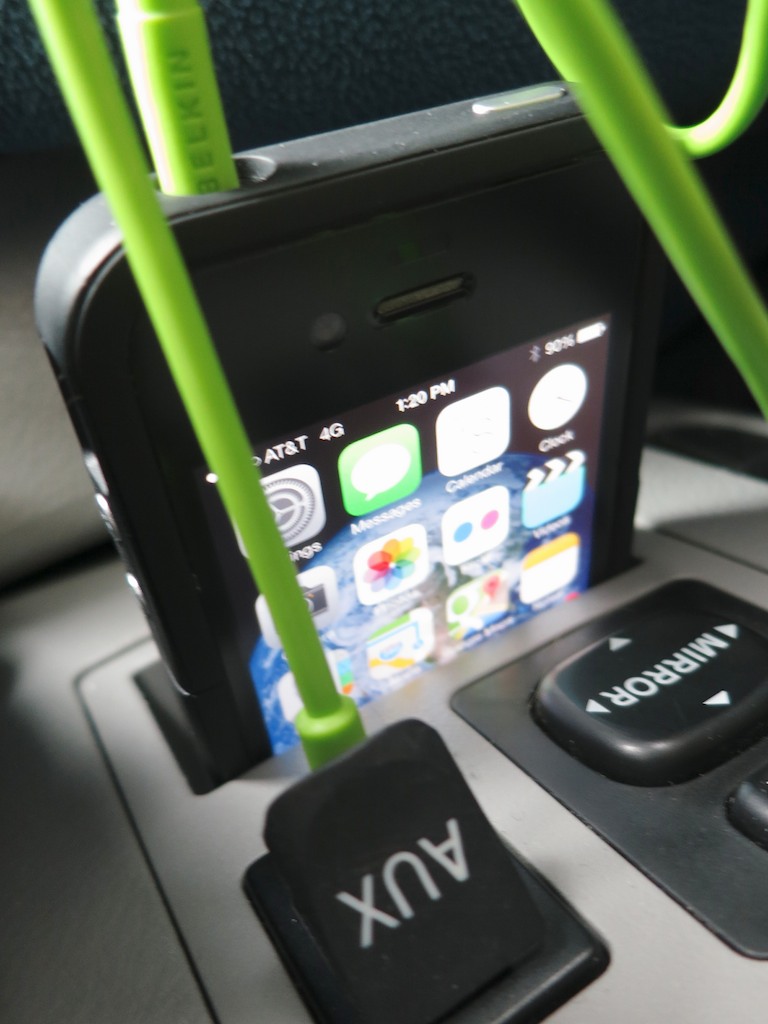
So to play my iPhone’s music through my car’s stereo system, I discovered I needed to jack in my iPhone to an AUX input port next to the shift lever, using a bright green mini cable (3.5 mm) I had lying about.

Now, who wants to hard-wire your phone every time you want some tunes?
(How embarrassing.)

So what’s a humanoid to do?

Get thee to a computer and research a Bluetooth receiver workaround to replace this messy, old school cabling solution!

You may not need the resources of a Viking king to figure it all out,
but it couldn’t hurt. I found this tech rabbit hole particularly deep…
(Along the way, you may even uncover the origins of Bluetooth’s odd name!)

R2D2 Vs A2DP
Like my RAV4, lots of newer cars come equipped with Bluetooth power to make smartphone calls via the car’s stereo system.

But to stream music via Bluetooth from the same smartphone, a car also needs to be ‘A2DP’ capable.

What?
(Is that something out of “Star Wars?!”)

A2DP is simply a newer Bluetooth flavor.
It stands for “Advanced Audio Distribution Profile.”
And that’s what enables your car to stream Bluetooth ‘audio.’

So if your car can’t do A2DP, what you need is a portable A2DP Bluetooth receiver to pair with your smartphone and then send the A2DP audio down the car’s AUX jack with its own cable.

Don’t Cross the Streams
In case you’re wondering, it’s not a problem to pair two devices to your smartphone:

  • One connection to your car’s phone system
  • Another to your new Bluetooth adapter for music

In fact, Bluetooth tech allows you to connect up to 8 devices simultaneously.

Just don’t try to do exactly the same thing with any two of the connections.
That would cause a universe-ending ‘conflict.’
(like crossing the streams in “Ghostbusters”)

Choose your Bluetooth Receiver!
There are three variables to consider when you look to buy your portable Bluetooth receiver:

  • Price
  • Power
  • Pleasure

You might expect a wide range of available solutions to address all three pieces. But in fact, there are not!

The challenge is finding a compact unit with a DC adapter that’s priced right.

I’ve done some research, and I’m chastened to report in today’s marketplace you can only get two of the three:


#1 – Compact and Good Price, but Requires Regular Recharging

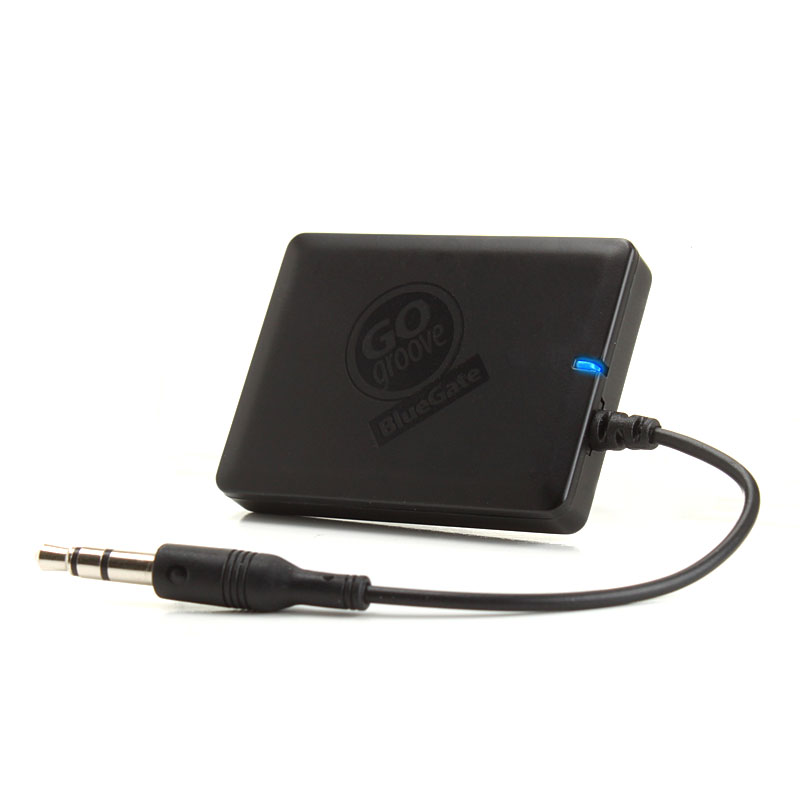
GOgroove BlueGate

Gogroove BlueGate Bluetooth Adapter – $29.99

What’s not to like? The form factor is perfect!
It’s tiny and does the job of bridging the inches between your iPhone and the AUX jack. The problem is it only runs on its rechargeable battery.
So you’ve always got to worry about charging it up via a USB port.

Runner up:

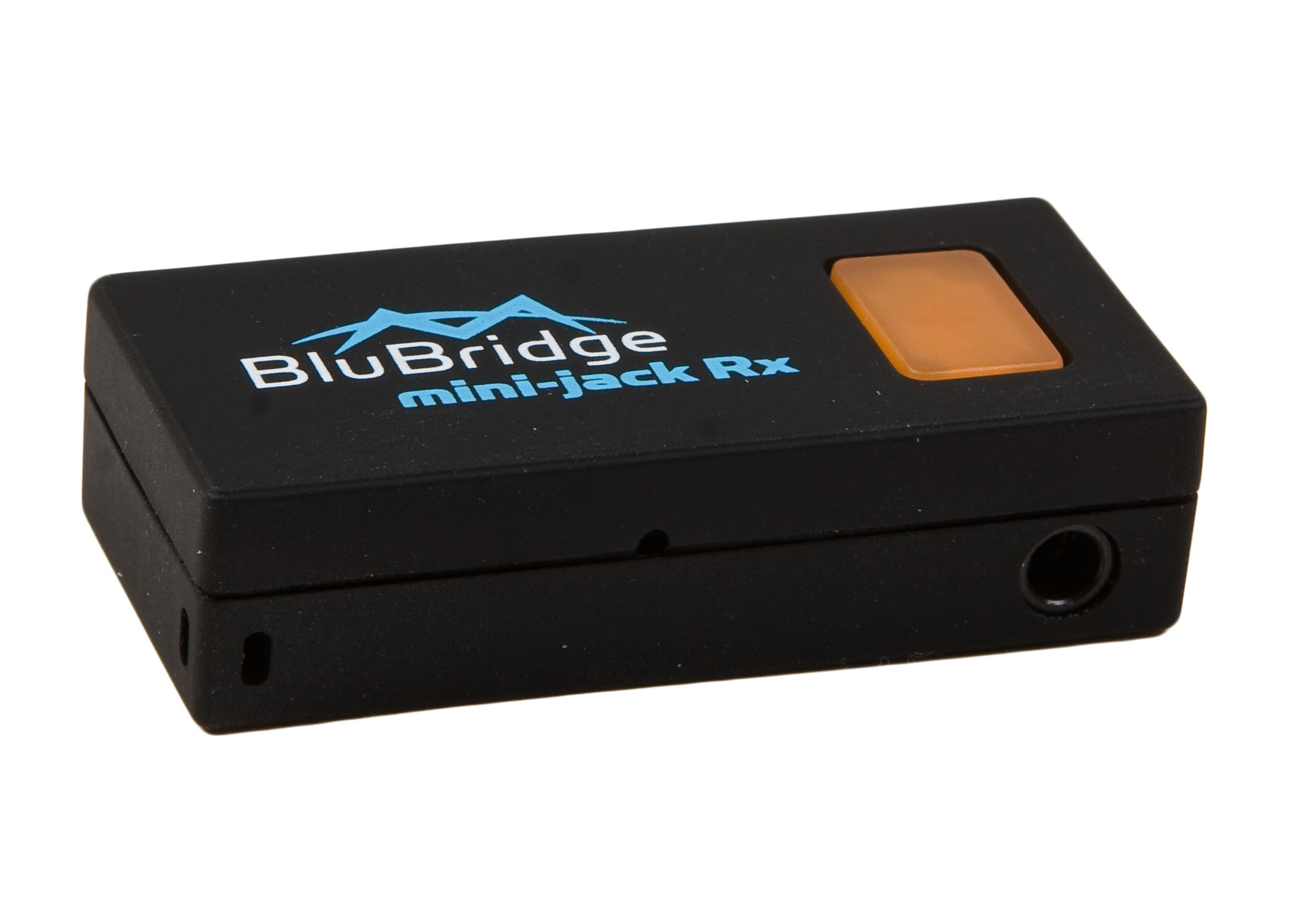
Miccus Mini Jack Rx

Miccus Mini-Jack Rx Bluetooth – $37.99

This one doesn’t have the short cable. Its little plug juts right out of the unit.
Then, the tiny stick attaches onto the AUX jack.
This uber-compact design may or may not work for your car…


#2 – Good price and DC Adapter, but More Messy Cables

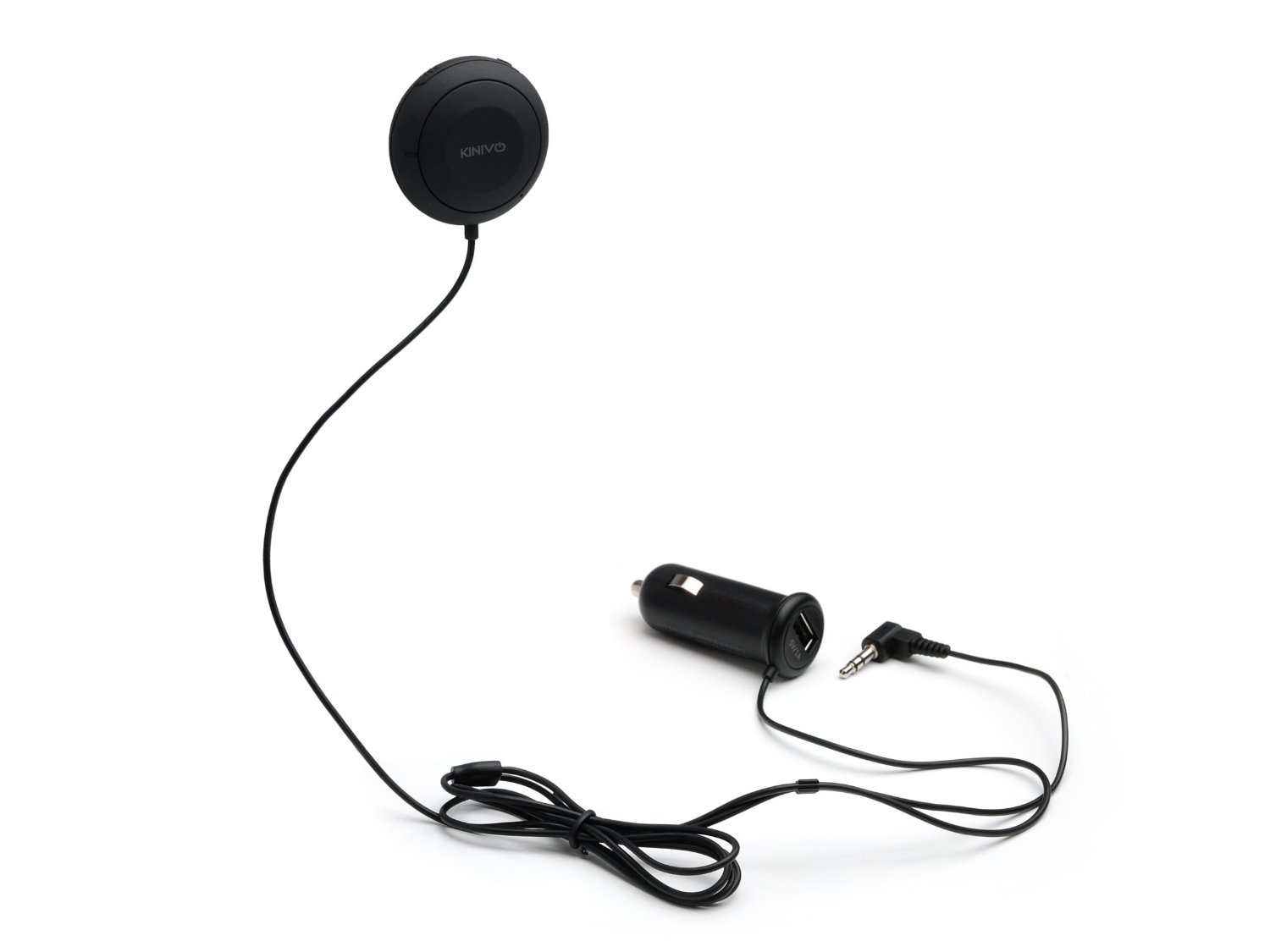
Kinivo BTC450

Kinivo BTC450 Bluetooth Hands-Free Car Kit – $39.99

This device can also handle your phone calls, because it houses a microphone in its little disc controller.
But you don’t have to use it for that purpose, since you’ve already got your car’s phone system paired to your phone for that use.

The unit gets really great reviews on Amazon. It even auto-connects, when it senses your phone! The only problem is you’ve got two cables to contend with.
(DC power to the unit, and then the connection to the AUX jack)
Granted, neither of them weighs down your phone.

Runner up:

Belkin Bluetooth Car Hands-Free Kit – $79

It’s more expensive, but for no apparent reason.
(sigh)


#3 – Compact and a DC Adapter, but Expensive

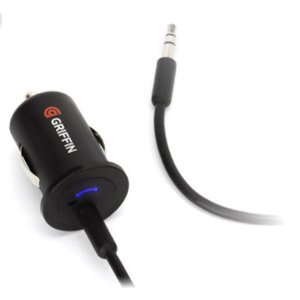
Griffin Technology BlueTrip AUX

Griffin Technology BlueTrip AUX- $99

This should be the perfect choice!
Its design has only one cable running from your DC adapter
(which houses the Bluetooth receiver) straight to your AUX jack.

The only problem is price. It shouldn’t be this expensive!
I think the root cause is it’s been discontinued.
(no longer seen on Griffin’s website.)

Now, it’s only offered on Amazon Prime through a third party.
So, buyer beware…

Runner up: NONE!

(I don’t see any other products out there designed like the BlueTrip AUX…)

Tomorrow is NOT Yesterday
I think the real problem here is there’s no ‘problem.’
What I mean is… today’s ‘new’ cars can normally handle A2DP audio streaming if they’ve got Bluetooth functionality.
They don’t need no stinking adapters!

So this is yesterday’s problem.

Manufacturers know this and probably haven’t continued to offer more efficient solutions, simply because there’s no future in supporting this particular past.
(I came upon several viable devices online that were no longer available…)

The Kinivo Joins the Team
So what’s a cable-phobic tech everyman to do?

Honestly, I considered doing nothing and just leave that bright green mini cable in my car for my iPhone’s use. The phone slips nicely into a little slot right above the AUX jack.
(My little green snake really isn’t that horrible!)

But that solution wouldn’t be very forward focused, would it?
And hardly a fitting end to this week’s epic journey in search of tech enlightenment.

So I Iooked again at the Kinivo and its 963 ratings boasting four and five stars.
(versus only 97 lower ratings)

Click.

If adding two cables to lose one cable is what it takes to free up my iPhone from its lowly 20th century tether, then I say….

…well, let’s move on.

Did I mention how much I love my car?