At Home with Tech

Unlock the power of all your technology and learn how to master your photography, computers and smartphone.

Category: Technology

Ode to Fathers and Technology

As I ponder my existence as a dad experiencing the eternal struggle to retain tech harmony at home, I am inspired to write yet another poem. (cough) Here we go…

Fathers and Technology

Every day is a fight
To keep my tech working right
And yesterday’s solution
Can create more confusion

In my head I can’t recall
My smart home laughs at my gall
To think I am in control
I feel like a lump of coal

Tech changes so quickly now
My gear often just says ciao!
Today what I really want
Is just one day with détente

T-800 mows my lawn
HAL serves veal parmesan
It’s silly to think they can
When you feel like a madman

But each morning holds the key
My son is my nominee
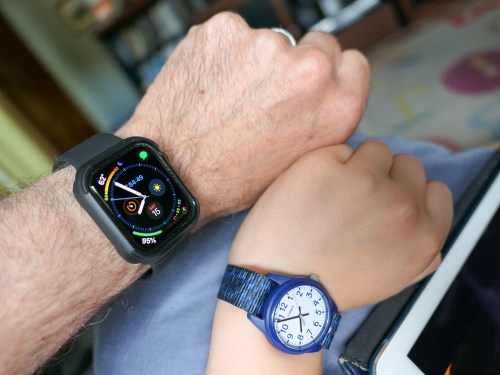
At nine he is the future
Born to tech he is super

I see what really matters
Fatherhood fills the chapters
Being a dad is the gift
Who cares our tech is adrift?

Happy Father’s Day to all
Stand up for your curtain call
Take a photo if you can
If not, enjoy as caveman

Are you still here?
(Remarkable)

All right then…
For your consideration, please click through to read some of my previous attempts at ‘poetry.’

Enjoy!

How to Record Better Field Audio When Shooting iPhone Videos

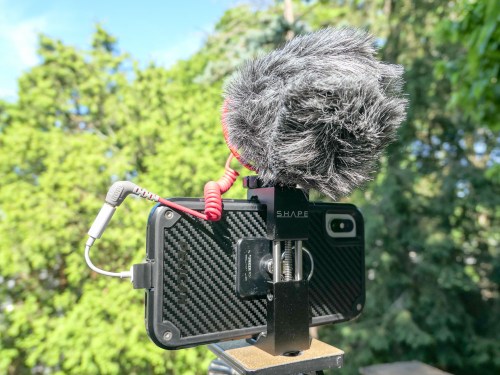
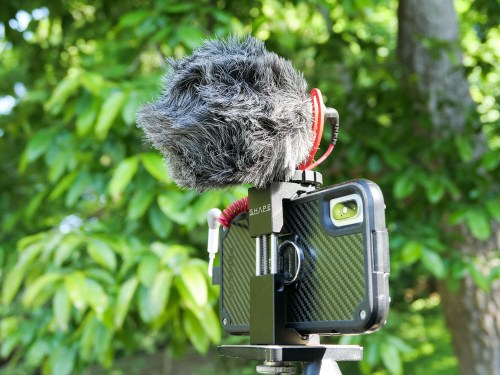
I admit it… I’ve created the Frankenstein iPhone. Why? I simply wanted to enhance its 4K video recording capability with cleaner audio in the field. Here’s how I did it…

Look, I know my iPhone XS Max isn’t a ‘real’ video camera (although it is). And you wouldn’t think it’s supposed to carry the weight of capturing conversation in the not-so-quiet outdoors. But why not?

With the right lighting conditions, an iPhone XS Max can capture beautiful 4K video. And its multiple onboard microphones do an effective job in many situations. Its only real limitation with field audio is handling windy conditions. And that’s the case with any video camera that doesn’t have an attached directional microphone with a windscreen.

So, why wouldn’t the solution be to simply attach a directional mic and windscreen to my iPhone?

And that’s exactly what I set out to do…

The Price for Better Audio in the Field
Audio production is an expensive business, and you can easily spend more on field audio equipment than the price of an iPhone.
(Seriously)

So I gave myself a budget of $100 to see what was possible…

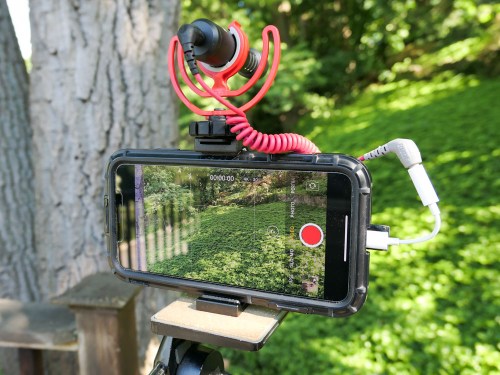
My final ‘creation’ was both hideous and glorious. I’ve truly created a Frankenstein iPhone. I probably should feel ashamed, but I don’t.
Consider yourself warned…

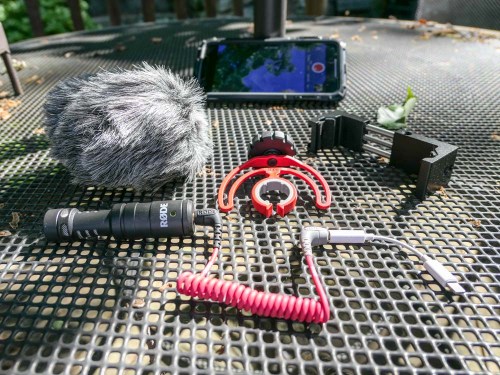
Rode VideoMicro
I zeroed in on the Rode VideoMicro compact on-camera microphone. Rode is well regarded in the audio industry, and this inexpensive cardioid condenser microphone that’s marketed to the DSLR market was a prime candidate for my little project.

Cold-Shoe Clamp
But of course, an iPhone isn’t a DSLR with a cold-shoe mount to easily attach a microphone. So you’ve got to somehow anchor a cold shoe mount to the iPhone…
The Shape Smartphone Aluminum Clamp is one solution.

Lightning Dongle
The VideoMicro uses a 3.5mm plug, which won’t plug directly into an iPhone’s Lightning port. So, the next step is to use an Apple Lightning to 3/5mm Headphone Jack Adapter.

TRS to TRRS Cable
And before you can use the VideoMicro with a smartphone, you also need the TRS to TRRS cable (Rode SC7 Cable). That’s instead of the TRS patch cable that comes in the box… which will not work with the iPhone.

Included Accessories
Perhaps most importantly, the VideoMicro comes with a furry windshield (sometimes called a “dead cat”) to handle the outdoors. It also has a nice little shock mount to suspend it in the cold shoe.

Final Price Tag
Altogether, my Frankenstein plan totaled $104.54. There’s nothing simple or elegant about it, but the Rode should immediately come to life when paired with an iPhone…

Click.

Rode Video Mic Me-L is the Runner-Up
I chose the VideoMicro over Rode’s Video Mic Me-L, which plugs directly into the lightning port of a smartphone. Yes, Rode’s design engineers have actually created the exact product I needed, but I didn’t bite…

The deal breaker was the snug fit required by the Video Mic Me-L that most iPhone cases would prevent. I just couldn’t handle the prospect of having to take my iPhone XS Max out of its cozy Pelican case every time to pop on a microphone.

And even though my VideoMicro is a more cumbersome (and expensive) solution with all of its necessary ‘adapters,’ the fact that it lets me keep my iPhone in its case is the more important feature.

Test Results

First off, my Rode VideoMicro works just fine with my iPhone XS Max. I saw some online chatter that it’s incompatible…
NOT TRUE.

I also read an online comment that there’s a slight audio delay when using the Rode VideoMicro and an iPhone…
TRUE!

Many people may not notice the two-frame lag, but if you’re a video editor, it’s pretty obvious.
(I’m not surprised with all the necessary cable Macgyvering.)

But it’s not a deal breaker, as long as you intend to edit your video footage. All you have to do is separate (unlock) the audio track from the video and then slip the audio track forward a couple frames.

It’s a straightforward step when using standard editing software like Final Cut Pro X, though an admittedly unnecessary step if there wasn’t an audio lag to begin with.

The VideoMicro provides clean, crisp sound… though it is a bit thin compared to what the iPhone’s onboard microphones capture in otherwise perfect conditions. So, you might also want to add in a little bass while you’re working with it in your editing software.

Perfection Not Required?
At this point, you should be wondering why anyone would want to use this Rode and go through all of these extra steps.

Well, don’t forget why I Frankensteined my iPhone in the first place… It’s to capture more directional audio that’s not as affected by the windy outdoors.

And it does successfully deliver on that value proposition at a decent price point.

I also must admit that using my iPhone XS Max with the VideoMicro is a still completely imperfect audio upgrade solution, because it doesn’t provide one additional key feature…

You can’t monitor the audio as you’re recording it!
(Don’t forget that the iPhone’s lightning port is already occupied as the microphone input.)

So, if you want to be sure you’ve captured good sound, you need to review your video clips in the moment. And depending on how much time you have, that can be a real drag…

And let’s face it, as much as the VideoMicro can give you better field audio, it’s never going to do the same job of a more expensive shotgun microphone or a lavalier microphone.

Still…

Better iPhone Audio in the Field for $100
When the need presents itself, using the Rode VideoMicro is a clear step in the right direction.
(And if nothing else, the monster you’ve created that was once a sleek iPhone is sure to be a head turner.)

Recording audio has always been the forgotten cousin of video production… and often the Achilles’ heel of any video shoot.

If you’re serious about putting your smartphone to use recording people talking outdoors, you’ll eventually want to invest in some additional audio muscle, especially if you’re shooting in the field with noisy air flow.

For a hundred bucks, Rode’s VideoMicro along with a team of cables and small clamp is a solution that will help get the job done!

Why You Shouldn’t Throw Away Your Old College Video Projects

I’ve been trying to answer this question for decades. I think I may have finally figured out the answer…

Colgate University just held its bicentennial reunion on campus. My wife and I are both proud graduates (yes, we’re a Colgate couple), and we happily attended the celebration.

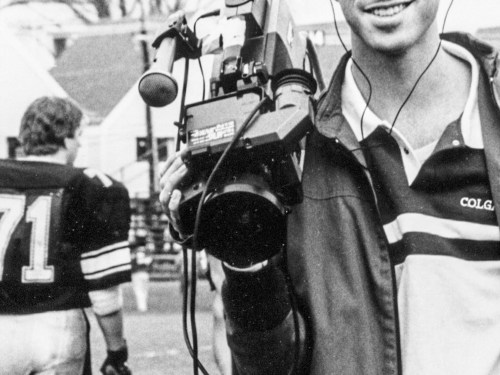
Looking back, I think the most influential piece of my college experience was my involvement in the student-run TV station, CUTV. My life-long passion for video storytelling as a profession fully developed during my college years as CUTV’s first station manager.

As you can imagine, after I graduated from Colgate, I took with me more than just a diploma… I schlepped home videotapes containing a library of content documenting years of student life, events and issues at Colgate.

Future Proofing
This was still a pre-digital time, and when tapes were finally superseded by DVD technology, I digitized much of my content. I repeated the same exercise years later and moved my media to .MOV files on hard drives.

The big question is why…

What ongoing value was there to carry these old clips forward and protect them against the ravages of time for more than three decades?

The Need to Document a Story
I’ve tried to seriously answer that question only three times. And I must admit, I’ve only spent about a week or two during each of these explorations…

And during each exercise, I cleared my head from the competing noise (and music) from my life and tried to take a serious look at this content with the goal of editing together a worthwhile visual story from those years… and then presenting it to a population of Colgate alumni at an upcoming reunion.
(Yes, it always took a nearing reunion to finally jolt this project into high gear.)

1995
My first attempt was back in 1995, when I edited together video highlights for my class’s 10th reunion dinner. As everyone in the room recognized all of the faces in my video, it was easy to see that the footage still had some worth, much like an old family photo.

But was that it? Is the archival value of this footage limited to the Colgate alumni of my generation?

I didn’t try to answer that question again until fifteen years later…

2010
I presented a new video at Colgate’s 2010 Reunion during a CUTV panel presentation representing the previous 25 years. Several generations showed off their own content, and my video documented the the origins of CUTV. This was essentially my story…

And to be honest, I wasn’t really sure how interesting that would be for a general population of alumni not connected to my generation.

Ultimately, it felt like my CUTV origins video served its purpose for the audience in that moment. But the larger questions still remained…

Fast forward nine more years…

2019
It’s now Colgate’s Bicentennial, and as my wife and I were going to be in attendance, I decided to take another look at my old footage. Now that the decades were piling up, I would try to view the content through a different lens. Could I actually find and extract content that would have some true historical value to a general alumni population?

I found my answer, and it was hard to face…

Because as much as I wanted the answer to be yes… the truth was most of my old footage displayed students doing and talking about things that any generation of students might address. You could just change the faces, and bingo… you’d be watching almost the exact same thing.

But I did come across a consolation prize of sorts… I decided this old footage actually serves more as a cultural look back in time as opposed to carrying the weight of historic significance…

Plus, there were indeed a few moments worthy of archival preservation. Most notably the 1985 student protests and sit-in against Apartheid. And a 1982 lecture by political and social activist Abbie Hoffman.

The rest was simply background… a digital memory of sorts.

So, fully acknowledging the limitations of the content, I edited together attempt #3, and I presented my little opus to a small but interested group of alums.

And the impact…?

Capturing the Voice of a Generation
It seemed that everyone had some level of interest in watching these Colgate moments from another century… much like I might enjoy watching old Colgate films from the 40’s and 50’s.
(maybe)

But people laughed when they were supposed to, and audibly responded to other moments as well.
(There was no booing.)

Beyond that, my series of old video clips prompted a unexpected conversation about the challenge of maintaining a student-run media production operation across the years as a socially and culturally-accepted content generator.

We talked about the reality of a community accommodating and absorbing the ‘voice’ of a student run TV station. It was not unlike experiencing social media for the first time in a pre-digital era….before social media ever existed.
(I think this is a conversation that warrants more analysis at another time…)

The Value of a Common Experience
So after three attempts over the past 24 years, I feel I’ve collected enough qualitative data (not really) to suggest this old student-produced content from the ‘80s can successfully tap into the common experience of anyone who’s been a part of the Colgate community.

There is a collective understanding… and inherent familiarity with it.

So perhaps there is some enduring value for this video footage after all.

I see you’ve read this far… so I’m guessing you must be connected to Colgate. Interested in seeing the first segment from this new edit? Here you go…

Thoughts?

The Beginning of a Digital Memory?
Perhaps, all of this can contribute to some yet-to-be created larger digital memory representing Colgate’s history (and culture) throughout the 21st century.

For now, I’ll simply say that beyond simply showing up to Colgate’s big reunion event, this is my contribution to the bicentennial celebration.

That’s where I’m at with the past and the present.

We’ll see what the future brings…