At Home with Tech

Unlock the power of all your technology and learn how to master your photography, computers and smartphone.

Category: Technology

5 Packing Tips for Your Tech When Traveling Overseas
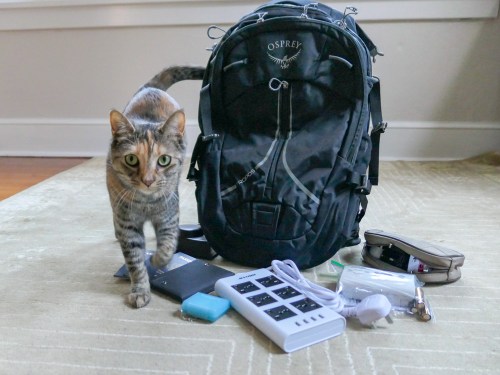
When you’re packing your carry-on bag, here are a few tips to help you focus on the tech you really need to bring along. (Or you can ask your cat.)

My family and I just got back from a fun holiday in London. In preparing for our trip overseas, I asked myself two questions to help decide what technology to pack.

  • How much tech do I really have to bring along?
  • How am I going to protect it?

Of course, you really don’t want to pack anything more than you need. That said, if you want to play with some of your gear while on vacation…well, isn’t that what vacations are for?!

So, it’s a balancing act of sorts.

If you find yourself confronting similar questions, here’s one traveler’s tech packing list to consider…

1.
Portable Power Strip and Surge Protector
It’s likely you won’t have access to as many power outlets in your room as you’d like. Bringing along a portable power strip will certainly help you get all of your tech powered and charged up overnight. And electrical surge protection is a really good idea when you’re staying in a strange place. Finally, make sure the unit can handle different voltage standards.

2.
Compact Portable Charger to Throw into Your Day Pack for On-the-Go Power Back Up
You certainly don’t want your smartphone to choke when you’re traveling through a long day in an unfamiliar land!

3.
New SDXC Memory Card for Your Camera
Yes, standalone compact cameras can still get certain shots that a smartphone will have trouble with… especially in low light.

  • SanDisk Extreme Pro SDXC UHS-1 Card, 64GB
    $20.49 on Amazon Prime
    (Sure, you can manually delete videos and photos from your existing SD card to free up space for your trip. But for only twenty bucks, you can start with a fresh card that’s instantly ready to store as many media files as you can possibly create on your trip!)

4.
Portable, Battery-Operated Carbon Monoxide Detector
You never know, right? If you’re not sure if your room has one of these, it makes sense to pack this.

5.
RFID-Blocking Passport Wallet to Prevent Data Skimming
There’s some controversy as to whether you really need this level of protection, but I say better safe than sorry.

Additional Packing Prep to Consider…

Do You Need a Voltage Converter?
Of course, you’ll need to bring adapters to fit electrical outlets when you’re traveling overseas. England uses Type G electrical plugs, and the voltage in the sockets is 230v.

Since the voltage in U.S. power outlets is 120v, consider the need to take a voltage converter in addition to your plug adapters.

The battery chargers for all of the mobile tech I pack happen to all work in dual voltage modes… 100 – 240 volts.
(Listed on the battery charger in really small print.)

So, I didn’t need to bring a voltage converter to England.
(But the power strip I brought still required plug adapters.)

Add International Service to Your Wireless Plan
My iPhone has AT&T Wireless service. The easiest way to adjust my AT&T plan while overseas is to go with the $10/day “International Day Pass.”

For the ten bucks, you’re essentially mimicking the same plan as you use when you’re home in the United States. You don’t have to worry about data limits or the threat of any additional usage costs. It may not be the cheapest way to use your phone internationally, but I still think it’s a great deal to give your smartphone full functionality.

Bring All of Your Gear Home
It may be an obvious point, but don’t leave any of your expensive tech behind! Stay organized and keep track of all of the little support pieces like battery chargers and cables.

And when you get home, make sure you quickly get to work organizing and sharing the photos and videos you shot on your trip. Family and friends want to see them!

Happy travels!
Why You Need to Build a Kitchen Counter Tech Station

If you’re finding too much of your tech cluttering your kitchen counter, it’s time to get organized. Here’s what I did…

Your kitchen counter made is for cooking, right? But how often do other household items and mail accumulate on it? And how about all of your tech? Don’t tell me that you’ve never had to charge up your smartphone on your counter…

It’s just a mess!
Right?

Instead of fighting it… I say… go with it.
…and officially make some space for it.

Your tech doesn’t have to take a lot of room, but you should really consider creating your own kitchen counter tech station.

The Lester Kitchen Tech Station
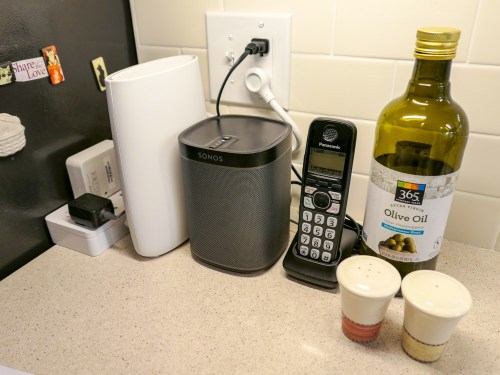
My tech station lives in the corner of our kitchen tucked away on the counter next to the refrigerator. These are the pieces:

  • Sonos Play:1 wireless speaker
    If you dream of having whole-house music functionality, then you’ve got to find a place in your kitchen for a speaker, right?
  • Orbi Wi-Fi router’s satellite unit
    When I upgraded my home Wi-Fi to a mesh system, I needed to find a centrally-located place on the first floor to locate the satellite Orbi to extend its mesh network. The corner of our kitchen counter was the perfect spot.
  • Cordless telephone
    Yes, we still have a landline. (Cough)
  • Compact power strip
    Of course, your kitchen wasn’t designed for your power-hungry tech to take over all of the outlets. So, you’re probably going to need to create a power extension for all of your resident kitchen tech. I went with a compact 4-plug surge protector and 2 USB charger made by NTONPOWER.
    It’s $20.99 on Amazon Prime.

I’ve positioned these four tech supports neatly in a row in the corner of our kitchen counter.

Smartphone Support
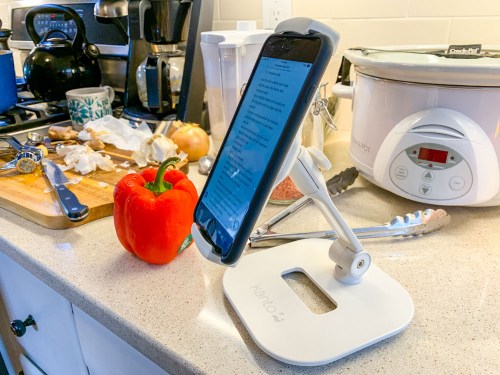
Then, I’ve got a mobile smartphone/tablet stand. It’s easy to attach one of our iPhones to it when cooking from an online recipe. Sure, you can simply place the phone on the counter, but when food and knives are flying around, I find it’s safer for our devices to live slightly above the action. Plus it’s easier to read the recipe!

I went with a stand made by Kanto… It’s $29.99 on Amazon Prime.

Tomorrow’s Kitchen… Today
If you want your kitchen to be a tech-free zone, then good luck to you. Let me know how that’s working out.

For the rest of us, I think it makes a lot of sense to find a corner in your kitchen that’s relatively out of the way and intentionally build your own tech station.

You’ll feel a lot more organized!

Nobody Listens to Work Voicemails Anymore

If you’ve recently left a colleague a voicemail at work, you may want to consider following up using a different communication method…

A few years back, I left a voicemail for a colleague at work. I waited for a response to my question, but after more than a day, I heard nothing back. Then, I ran into her into the hallway and took the opportunity to ask her my question directly.

But when I referred back to my message, she said, “voicemail?”

She stared at me… confused for just a moment. Then, she smiled slightly.
“Oh… I don’t listen to voicemails. Please, just email me.”

I tried to process this moment to understand if this was just one person’s preferred workflow or something else. I decided it must have been an example of a unique relationship with voicemail.

But I think I was wrong…

The Demise of Voicemail
Certainly, in any number of circumstances, some people have to use voicemail as part of their work communication. But if there’s a choice in the matter, I think my little story is an example of a growing shift in the workplace.

Even though I believe it’s easy to quickly leave a voicemail vs typing up the same detail in an email, it’s actually slower for someone to have to wait around and listen to your voice rambling through the few sentences on the other end.

Voicemail is relatively inefficient and lags behind newer technologies that enable faster communication.
(For that very reason, John Brandon from Inc. has declared that “Voicemail is Now Officially Dead.”)

I guess this is today’s reality, even though tech innovations have supercharged the voicemail proposition as some platforms can send your desktop voicemail through to your email as an attached audio file.

Desktop Phones are Gathering Dust
As I consider all of this, I think about my own work experience of late…

I definitely receive fewer voicemails than I used to. And those that I do get are primarily from people outside of my company.

Most everyone else on the inside emails me or uses the instant-messaging platform to reach out.

This trend is not only about employees shunning voicemail. I think it has to do with people also not choosing to use the phone at their desk.

The Rise of the Conference Call
This is not to say that employees don’t talk to each other anymore. Far from it! Conference calls are alive and well…

So are web-based conference calls where you can activate your webcam and visually participate in the conversation as well. Although I must admit I do choose which conference calls get my ‘video’ participation.
(I don’t have to tell you that opening up your live feed to a full video signal requires that you appear relatively attentive.)

But for me, the decision to activate my webcam is more than just deciding whether I want to multitask or not. It also has to do with what type of image I’m projecting to the other participants.

This probably comes from my background in video production and what has become a now instinctual need to present a ‘good image.’

Should Employees Care How They Look on Your Computer Screen?
And I’m not talking about looking good, which is certainly important and why some folks might choose to shy away in the moment from a particular video chat. I’m talking about the shot looking good…

  • Is my shot framed properly to ensure I’m front and center and not a speck in the left corner?
  • Is the lighting soft and hitting me from the front?
  • Is there a window behind me that destroys my shot by overwhelming it with light?
  • Is the angle of the shot level to ensure that the webcam is not looking up my nostrils?

That’s a lot to consider and certainly not what the average person normally takes the time to think about.

In fact, I’ve observed that when people get over the hump of displaying their image to the rest of a conference-call population, some tend to forget about it entirely.

And then I’ve found myself watching people who are seemingly oblivious to the fact that they can be seen. I want to blurt out, “Don’t you know that people are watching you even though you’re not speaking?!”
(Maybe I should text them.)

It’s so interesting to observe public norms shifting to finally embrace and then quickly ignore the once revolutionary promise of the 1960’s video phone.

The Downside to Efficiency
Who’s got the time, right?

Sure, we’ve all got to attend work meetings, in person or virtually.
But beyond that, all bets are off.

People aren’t calling each other. They’re not leaving voicemails anymore. Heck, I see so many instances where colleagues aren’t getting up from their cubes to talk to each other anymore. They’re emailing each other… when they’re sitting fifteen feet apart.

I suppose that is more efficient at one level.

But what are we losing in the process?

Connect to the Conversation
I would say the most important contribution that you make to your workplace is how you support the culture.

  • How do you show up?
  • How do interact with your colleagues?
  • How positive a force do you project through your voice?
  • What do the expressions on your face say?

Sure, I understand that many of you can avoid all of this and get the job done faster with just your keyboard.

But if you don’t take the time to offer others the clues to your own humanity, how can you ever expect to be truly recognized for who you are and what you offer at work?

Without contributing to these public-facing elements, it’s much harder to build your personal brand.

Never forget the human factor.

Voicemail may be one tool that technology has effectively replaced. But there are plenty of other ways to truly connect to the ongoing conversation.