At Home with Tech

Unlock the power of all your technology and learn how to master your photography, computers and smartphone.

Category: Technology

A Few Old Photos and the Mystery of My Paternal Grandmother
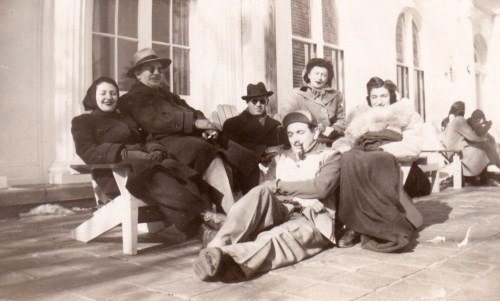
Trying to solve the puzzle of your family’s past with a few fading pictures is hard to do. This photo of my grandfather (back center) and his friends tells a story, but I have no idea what it is. It’s time to stop history from repeating itself…

Some families maintain solid details on their past. For various reasons, others do not. I’m sure I don’t have to tell you that families, large or small, are usually pretty complicated entities. And without going into too much background about mine, I should say that there were fracturing events that left certain folks estranged from others for many years… and in some cases… forever.

And then I came along, and grew up without many details on who was who… let alone actually spending time with many of my relatives.

Let’s simply say that I was born disconnected from much of my family…

With the major exception of my maternal grandmother’s side, which I’ve gotten to know well during my adult years (an amazing story for another time), I’ve had no choice but to rely on spotty intel from my now 86-year-old father.
(My mom’s been gone since 2006.)

Shoe Box Time Machine
The only other resource I have is a small collection of old family photos from my father’s side that was entirely disorganized in a shoe box and envelopes. They were mostly undated and without accompanying notes.

Over the years, I’ve digitized many of these pictures and tried to figure out some of the puzzle of my family’s past through them. Of course, I recognize the major players… my dad… and his parents. But the where and when are often unclear.

Yes, I’ve asked my father for the details… I’ve shown him the pictures multiple times. The problem is I haven’t always gotten the same answers against the same photos. So, I’ve sometimes had to rely on consistency to determine probable facts.

Figuring Out Your Origins in Old Photos
I just held another ‘photo review’ session with my dad and displayed our family photo archive to him on my iPhone while we were having dinner at the local diner. Happily, I had immediate access to the pics on my cloud family photo archive.
(More on that project here.)

I took notes on all of his responses and then brought the detail back to create more metadata for each of the original photo files. They’re officially stored in Adobe Lightroom on my iMac. I adjusted the ‘creation date’ for some of the photos, and I added my father’s new comments into the caption section.

And then I took a step back and looked at the entirety of my adjusted collection… fewer than 100 photos that comprise my father’s side of the family from 1900-1960.
(After that, I’ve got more images and information to work with.)

And let me tell you, every time I go through this exercise, I work out a few more ‘aha’ realizations.

This time, with the date adjustments and brand new background on my grandfather’s family road trip to California to visit a childhood friend, I created a new grouping of photos that brought this story to life.

I’m a detective… figuring out my own origins.

I think most everyone wants to better understand their past… their roots… the basis of their identity.

For me… it’s been one picture at a time.

The Mystery of My Paternal Grandmother
Rachel was my grandmother, and she died when my father was very young. He doesn’t remember her very well.
(I know she was a school teacher, but that’s about it.)

Rachel’s family name was Dworkin, and we have a handful of pictures from several moments of her life in New York City, including two with my father when he was a child. These photos offer clues to who she was. But you can only glean so much from a photo…
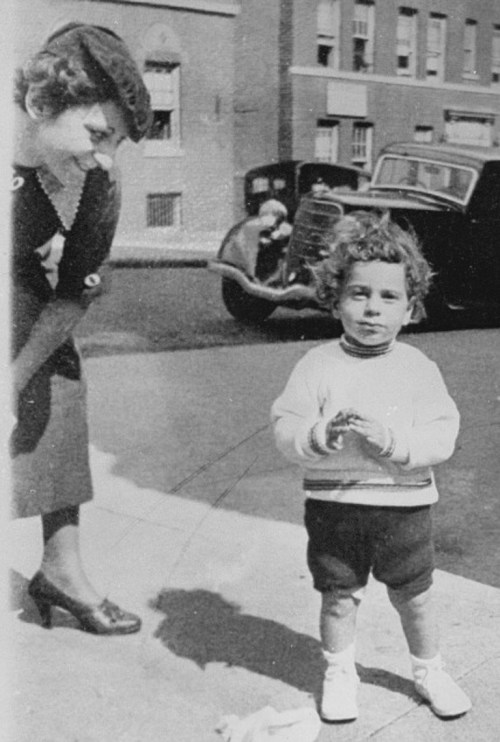
One detail I’m still working through is accurately dating her photos. There are certain anchor shots like this one where I can more easily determine the date. My dad can’t be more than two years old here… so it’s probably 1935. Then, I compare how my grandmother looks here to other shots of her to help order them chronologically…

Doomed to Repeat the Past?
I know at some point, I will have mined as much detail as possible. And this part of my family history project will be wrapped (though still very much incomplete).

But family histories are never really finished… are they?

New stories are constantly generated, and now… countless digital photos are snapped to document the lives of our families.

Our decedents should have no problem putting together this chapter of the early 21st century, because there’s so much to work with, right?

Well… I wouldn’t be so sure.

Too many photos can be overwhelming. And too many disorganized photos… almost impossible.

Sure, they’re all digitally time stamped and possibly geotagged, which is a huge benefit. But without other critical information, these pictures will have limited value in the future.

And a forgotten portable drive with archived photo files found decades later in the back of a closet may be an unrevivable dead brick. So, now you’ve gone from thousands of family photos to… zero.

3 Ways to Back Up the Memories of Your Life
I don’t have the perfect solution to creating a bulletproof photo archiving plan that will hold up into the distant future.

But it makes sense to confront the challenge on several fronts…

  • Organize your photos in the days and weeks after you snap them
  • Make photobooks at least every year to document your family’s story
  • Back up the very best of your photo files to several locations, including the cloud

And it still couldn’t hurt to print out a few photos every so often and then jot down the details on the back of them. Finally, throw these pictures into a shoebox and then hide it in the back of a closet to be discovered decades later.
(Yes, I recognize the irony.)

Future-Proof Your Family History Archive
We all want to be remembered.

Even a few photos with key information can provide a tether to the reality of a past life.

I wish I knew more about my beautiful grandmother.
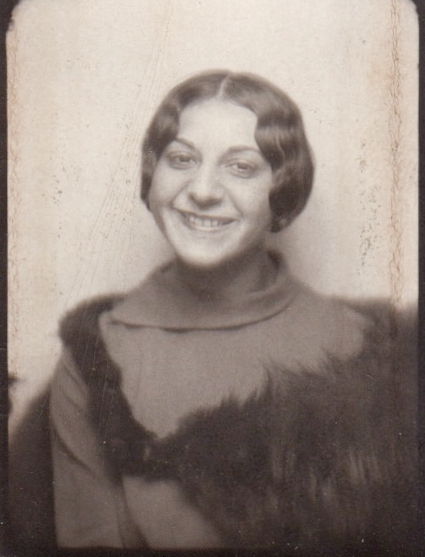


She looked like she was a wonderful person.

Please… do your descendants a favor and try not to make them guess about your life…
Why You Need to Create Your Own Cloud Photo Archive

If you crave instant access your best family photos from yesteryear, here’s how to create your own portable archive…

My family and I attended a little party the other day… a reunion of sorts. It consisted of four families with kids of the same age who spent time together at playdates a few years back. One family then moved to New York City, and we really hadn’t seen them for a while. So, they were the special guests at the party.

Joining the Time Warp
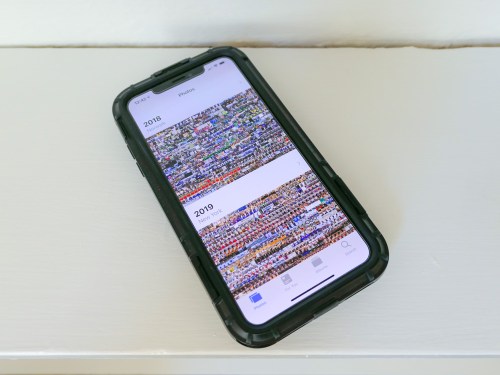
Of course, everyone commented on how big all of the third graders had become. Inevitably, one of the parents whipped out her iPhone and began searching for old playdate photos when the kids were three. I watched her two-fingered gesture slide upwards again her smartphone’s surface as she commanded her iPhone’s photo library to speed backwards in time.

And then another parent activated her iPhone and began her own photo time-warp search. And then my wife did the same…

And before I knew it, the group was excitedly sharing shots and reminiscing about the good old days.

Experiencing Photo Failure
And I just stood there, happy that these iPhones had provided instant gratification, but stunned that mine hadn’t contributed. In fact, I didn’t even try to look for any photos. I knew I didn’t have one to share… not in that moment.

Sure, I could go home and easily find whole bunches of old playdate photos in the appropriate folders organized in Adobe Lightroom on my iMac. But I had no cloud access to any of them from my iPhone. My cloud photo folders through Dropbox and Apple’s Photos all contained more recent groupings of pics. I figured when would I possibly want instant access to photos from five years back? (Cough)

My iPhone’s onboard memory didn’t house photos that old either. I thought I was doing the ‘smart’ thing by not wanting to bog down my device with really old photos.

I stared into space and pondered the absurdity of it all…

If at First You Don’t Succeed…
I’d spent years and countless hours organizing tens of thousands of family photos into folders on my iMac. My focus had been to share relevant photos with family and friends while the pictures were still “fresh.”
(Old photos are old news, right?)

But now, I had encountered a huge flaw in my plan as I watched others suddenly require instant access to photos buried deep in time. Sure, the old photos were hiding in their iPhones and entirely disorganized. But the images were still there in the order they were taken, and a few finger swipes could still access them by simply warping back to 2013.

Huh.

By doing nothing with all of the old photos on their smartphones, these parents had succeeded where I had hopelessly failed.
(So, disorganization does have its benefits.)

I thought a bit more about the irony of my experience. I finally resolved to create another layer of organization on top of my current photo management plan…

If successful, I would give myself easy, mobile access to a percentage of my archival photo content to properly handle this kind of moment next time.
(We’ll get to how much in a moment…)

Create Portable Access
I’d been focused for so long on creating physical photo books as the endgame for archiving all of my best family photos. But that strategy assumed that I’d only want to access these photos from a bookshelf in my living room. That was the problem right there.

Clearly, I also needed ongoing access to some of these photos from my iPhone’s screen.

Sure, that could be accomplished by simply leaving all of my photos on my iPhone. But this limited ‘clutter’ strategy assumes I’m not taking pictures with other devices.

In fact, I’m also shooting pics with…

So, all of my digital photos, including those from my iPhone, need to flow through Adobe Lightroom on my iMac for organization, quality improvements and file backup.

And then some of these photos flow back to my iPhone via cloud folders so I can display what’s been going on in my family’s life. And when a particular cloud photo folder of a family event gets old enough that it’s yesterday’s news, I simply delete the folder.

The only necessary upgrade to this workflow is to leave some of these pics behind in long-term cloud folders as part of a portable and permanent archive of my family’s life.

Build Your Cloud Photo Archive
But I think the trick here is not to move photos out of short-term cloud photo folders into long-term folders. That’s not so simple. It’s an extra step that first requires you to review all of the photos again before you delete the folder. That’s a lot of work right there.

The moment to feed an archival cloud photo folder comes when you’re first picking out your best pics at the beginning of your entire process… not months or years later.

When you first create a short-term cloud photo folder with the pics that you want to show off, also ask yourself if there are one or two that are so great or so relevant to your family’s history that they should always be available in an archival cloud photo folder.

If so, then simply drag and drop them into the archival folder right then and there. That will take you another fifteen seconds. Maybe less.

Done.

Don’t Cut Corners
The next big hurdle to overcome is to resist the urge to simply throw these photos into one big archival cloud folder. Even though you’re only feeding it with a couple pics at a time, it will eventually become massive and difficult to navigate.

So, you have to create a number of permanent cloud folders where you can better organize your best pics.

With all of this in place, you will created a cloud photo archive of your best pics that you can easily access from anywhere!
(Plus, you’ll have an additional layer of backup and protection for these valuable images…)

Look for Efficiencies
Chances are… you’ve already done a lot of the work, especially if your cloud folder categories also exist in the photo folders on your local hard drive.
(Like me, you’ll probably still need to create a few new folders in both locations.)

Once you’ve matched up the categories, you’re essentially mirroring your new permanent cloud photo folders against your local photo folders of the same name.

Carry the Past with You
After you activate this ‘enhanced’ photo-organization plan, you’ll essentially have access to the pictures that tell the story of your life, your family and even your ancestors.
(So… not just from yesterday or last week)

And if you need to pull any of them up on your iPhone… for any reason at all… well now, you can!
(I’m sure you’ll still get stumped now and again when the need for a particular photo pops up unexpectedly. But you’ll always be in the game!)

I’ve successfully made my cloud family photo archive upgrade, and it’s a huge step forward.

Having permanent cloud photo folders to turn to is an amazing resource that everyone should carry around in their pocket!

Why I Bought an Amazon Echo for My Aging Parent

I’ve introduced my father to Alexa. Now, I realize why a digital voice assistant in a smart speaker is a must-have device for the elderly living independently…

My father just celebrated his 86th birthday. He lives on the Upper East Side in Manhattan. Yes, he’s on his own, and he likes it that way… mostly.

To celebrate his birthday I took him out for a big dinner at TAO Uptown.

He loved his meal and especially his molten chocolate cake with birthday candles.

He’s doing okay. But he’s… 86. And he uses a walker. And he a little unsteady on his feet. And yes, I worry about him.

Fortunately, he has some help at home. Plus, I’m able to see him every week or so to check in, have a meal with him and reminisce about my mom.

And it’s really great that he’s relatively adroit using his iPhone. FaceTime calls have also been a useful way to keep in touch. Although lately, he’s fumbling a bit with his iPhone and doesn’t always answer correctly on the first try.

So, I worry about being able to reach him just to make sure he’s doing okay.

Hello, Amazon Echo
I gave my dad an Amazon Echo for his birthday. He’s always fashioned himself a user of new and cool consumer tech. (In the 1970’s, I remember him running around wearing some crazy Seiko TV watch that didn’t work very well.)

When he unwrapped his present, he looked a bit confused… He didn’t really know what a voice-controlled smart speaker was. But when I unboxed the Echo in front of him, powered up Alexa and started our first conversation, my dad was instantly hooked.
(Gifting note: I had previously set up the Echo at my house and figured out all of the interface details using the Amazon Alexa app on my iPhone. Then, all I had to do with my father was update the Echo’s Wi-Fi setting to his home Wi-Fi network.)

More than Music
Originally, I figured getting my dad a digital voice assistant would be a great way for him to stream his favorite tunes from the ‘30’s and ‘40’s. That functionality was mostly all that I was focused on. I also expected that my father would enjoy chatting with Alexa and would find her encyclopedia of knowledge charming. Perhaps her alarms and reminders would also be of use.

But after I bought the Echo and began setting it up, I quickly realized the massive opportunity it offers to help me better keep in touch with my aging father. Here’s how…

Alexa Calling
It’s so easy for him to contact my iPhone by just telling Alexa to call me by name.
(Yes, the Echo can make a phone call.)

That’s certainly a lot simpler for him than trying to find and fumble with his iPhone during a critical moment.

Drop In
Or perhaps more importantly… his Echo gives me two additional ways to reach out and contact him using the Amazon Alexa app on my iPhone.

When I call his Amazon Echo with my Alexa app…
The Echo immediately starts to glow and ring loudly. Then, all he has to do is say “Alexa… Answer.”

He also doesn’t have to get up to answer my call if his iPhone isn’t in his pocket.
(He moves pretty slowly.)

But the second way for me to connect with him is the real game changer…
It’s the “Drop In” feature, which essentially turns my iPhone and his Echo into a walkie talkie system.

A tone on the Echo announces that ‘hailing frequencies are open.’ Then, when I start talking, the Echo projects my voice throughout my dad’s apartment and I can hear his response.
(He doesn’t have to tell Alexa to do anything.)

Of course, for this to work, he needs to be at home and within earshot.

Yes, it may feel intrusive and a bit big brother-like that I can drop in at any given moment. But for an aging parent who is living on his or her own, I don’t think this is such a bad thing… at all.

In fact, it’s great.

New Connections for the Long Term
I’ve already found our new technology-infused interface quite useful, although the Echo doesn’t replace the clarity of a cell-to-cell connection. So, his iPhone isn’t going out of style any time soon.

But the fact that I suddenly have these new methods to remotely reach him is amazing.
(Whether he develops a long-term relationship with Alexa is almost beside the point.)

“Hey Siri” and “OK Google”
So, I know that Alexa isn’t the only game in town. I would be remiss if I didn’t mention Siri on the Apple HomePod or Google Assistant using Google Home. I’m sure my father would enjoy using these speakers just as much as Alexa.

Either way, introducing a digital voice assistant via a smart speaker into my father’s apartment has immediately had a positive effect on his life (and mine, as well).

The Conversation Continues
No, Alexa isn’t a real person. And my father still needs to navigate the challenges of living alone at 86 years old. But now, he has something to talk to 24/7 which responds to him using AI in a friendly, human voice.

And Alexa is only getting smarter. What will she be like in only a few more years?
(We’ll be talking with her.)

Futurists have been talking about this for a long time, and my father and I have only just entered the first chapter of the story.

Whoa.
It’s not science fiction… anymore.

If you’ve got an aging parent living alone, you should really consider introducing a new ‘friend,’ like Alexa.