At Home with Tech

Unlock the power of all your technology and learn how to master your photography, computers and smartphone.

Star Trek: Discovery Has Dropped the F-Bomb

I’m sure Kirk and Spock would be a bit more than a tad surprised if they heard some of the bad language coming out of the latest “Trek” iteration.

“Star Trek” has always been about breaking down barriers.

Remember that ‘first’ interracial kiss between Kirk and Uhura in the 1968 “Star Trek” episode “Plato’s Stepchildren?” And the “Star Trek: Deep Space Nine” kiss between two women (Dax and Lenara) from 1995’s “Rejoined” episode.

Now, “Star Trek: Discovery” has one of those barrier-breaking scenes that Trekkies will talk about for generations to come. It’s from the “Choose Your Pain” episode.

No, there’s no kiss in this fifth episode of the young series, but we see Lt. Stamets and Dr. Culber brushing their teeth together in their quarters and articulating some clearly intimate feelings. We have our first openly gay crew members. It’s a gentle and charming scene in a show that’s bombarded with harsh uncertainty. It’s well written and another important “Star Trek” moment that supports and builds on its universe of inclusion.

Bravo.

That, in itself distinguishes this episode as one to remember.
And it’s all I should be writing about.
(Other than we are introduced to a young Harry Mudd.)

But unfortunately, that’s not all that differentiates it.

Star Trek and the Four-Letter Word
In what actually felt pretty awkward to me, the writers also decided to throw some bad language into the script.

Variants of the four-letter ‘F’ and ‘S’ words, to be precise.

What???
(I had read this would be coming, but dropping the F-bomb still felt a little shocking.)

Look, I know that “Discovery” is a more gritty and edgy series, and there’s clearly a lot of violence.
So, what’s the problem with a few four-letter words?

We’ll, first off… it just seemed gratuitous. It didn’t feel any more significant except to inform viewers that the universal translator for this “Trek” doesn’t restrict *uck and *hit.

There are no CBS broadcast censors to worry about here.
(Hurray?)

So, I guess anything goes.
I feel it was clearly a message more than anything else.

Message received.

Daddy, What’s that Word Mean?
Suddenly, “Star Trek: Discovery” just became off limits to some younger viewers who aren’t allowed to consume R-rated content.

How inclusive is that?

Are the producers so desperate to distinguish their pay TV niche to attract only adults who enjoy their “Game of Thrones?”

I get the value proposition that if you’re going to pay for your “Star Trek,” the producers have got to give viewers more than what’s available on broadcast television.

But R-rated profanity? Really??

What’s interesting is the writers waited until the fifth episode to sprinkle in the three words at issue.

Hmmm… Actually, how bold is that?
If there’s going to be bad language here…. it should be present… front and center from the beginning of the series.

The Orville Surges Ahead
Speaking of trying to boldly go where no one has gone before, “Discovery” has another challenge to deal with. It continues to be scooped by the spoof over at Fox.

“The Orville” established its own onboard male couple (Bortus and Klyden) in its second episode. Sure, it’s a little different, because there are no females in their alien species.
(Well, not exactly)

And I’ve got to give some kudos to this “Star Trek” wannabe, which is rocking with some big-time guest stars – Liam Neeson and Charlize Theron.

I’m also really tickled how Seth MacFarlane is weaving in references (or boldly borrowing) story elements from some science fiction I grew up with… like “The Starlost” TV series from 1973 with Keir Dullea and 1989’s “Millennium” movie with Cheryl Ladd and Kris Kristofferson.

All of this is to say that “The Orville” in all of its silliness is showing lots of promise.

For Adults Only?
“Star Trek: Discovery” has promise too.

On a lark, I decided to take a look again at the first episode of “Star Trek: The Next Generation”
(CBS All Access gives you instant access to all “Trek” episodes.)

Whoa!!
Those first awkward minutes from “Encounter at Farpoint” have not aged well at all. We Trekkies really gave that series a lot of leeway until it found its footing.

But it was a series that everyone could watch.

All I’m saying here is I hope “Discovery” doesn’t continue too far down its path of targeting adult viewers only.

A Child of Star Trek
There has always been a younger generation of fans who were inspired by each version of “Star Trek.”

I was among the first wave, and honestly, I can’t imagine being told by my parents that I couldn’t watch “Star Trek,” because it wasn’t appropriate for kids.

Now, it’s true you can make the argument that “Discovery” is already too violent for children, but you wouldn’t find universal agreement on that point.

But you just can’t get around the F-bomb.

Right?

Retain the Universe of Inclusion
I just don’t think “Discovery” viewers need the naughty language.
(One Trekkie’s opinion)

That particular barrier doesn’t have to be broken.
It will just put up another one for younger viewers.

Message to “Discovery” writers:
Please clean up your potty mouth!

Don’t Call Me

Sometimes it doesn’t matter how amazing the newest smartphone is. What’s important is can it actually connect you with the person you’re trying to reach? And that answer can unfortunately push you down a path of unnecessary simplicity.

Imagine this: It’s last night… 7:34pm. You’re holding onto your smartphone. You look down and see only one bar. But you go for it anyway…

“Hello?”

“It’s Barrett.”

“Who?”

“Your husband!”

“I can barely hear you.”

“We just landed.”

“What?”

“Jus w ntd you kno tha I can’t m do mak ak fo bap rit.
…I’ll tell you more later.”

“What?”

“Bye.”

Click

Deep down, we all know the wonders of technology are only as good as the weakest link.

Welcome to the World of Words
Still, smartphones connect us in ways unimaginable only a few years back.
That you can talk with and sometimes see your loved ones from almost anywhere is two parsecs shy of science fiction. And now, with the prospect of augmented reality becoming a regular part of the user experience… that’s mind blowing.

So, it’s ironic that email and especially texting continue to maintain their dominant roles during smartphone use. As a result, the near lost art of writing has experienced an amazing renaissance.

In fact, it’s absolutely the new normal.
I know that so many of you would regularly pass on the rigors of a phone call when you can ‘more easily’ text someone.

It’s generational.
I don’t mean to generalize, but younger folks don’t dig talking on the phone so much.

Ring, Ring
That’s so weird.
Aren’t we genetically wired to communicated via voice?

Of course, I love the art of the phone call. It provides plenty of emotional context, which is absent throughout the act of texting.
(Though using emojis does help.)

And think of all that incessant back and forth of an email chain, often over the course of hours or days. A 30-second phone call would get the same results.

And remember, your highly-evolved smartphone is not as limited as your grandfather’s Ma Bell indestructible monster. With mobile video enabled technologies like Skype and Apple’s FaceTime, you can enjoy the purity of non-verbal communication cues to help you stay totally in sync with your phone buddy. It’s almost like being in the same room.

Why wouldn’t you want to reach out and touch someone?

Well, there’s one problem…

What Did You Just Say?
If you don’t have access to a strong connection, the value proposition of a phone call falls apart pretty quickly…

I’m sure I don’t have to tell you how frustrating it is having a conversation with someone on a spotty cell connection.
Understanding one out of every three words just doesn’t cut it.
And adding video into the equation is immediately hopeless.
You get the first video frame or two, and that’s about it.
Then the call crashes.

Conversely, getting a simple text out into the ether over a mediocre connection feels downright glorious.

Keep it simple. Get it done.
The pleasantries can wait till next time…

The Frustration-Free Moment
Our nationwide cellular networks still have their holes, even in metropolitan areas.
And calling from inside thick tall buildings or moving metal cars doesn’t help much.

The truth is…
Smartphones can’t yet mimic the magic of a Starfleet communicator on the prescient ‘Star Trek.’
(You can’t really have a crystal clear conversation from inside a Horta’s cave with your starship in standard orbit above Janus IV.)

There are limits…

Texting is Bulletproof
So maybe millennials are onto something. Maybe this explosion of texting is not about shunning basic human interaction.
(Though I think that’s a part of it.)

It’s about efficiency.
And accuracy.

Transferring simple words in easily-sent data packets.
And if there’s a sliver of a bar of coverage… the text will probably get through.

What’s so bad with that?

Just the Facts, Ma’am!
So, as much as I still love making an old-fashioned phone call, I’ve got to admit that when you’re on the go, texting is the clear leader for straightforward communication.
(As long as you’re not driving!)

When you just care about getting the facts across, it takes all the frustration out of the equation.

Sure… you’ll lose all the personal touches of a phone conversation.
But how hard is it to interpret a smiley face emoji?

The truth is… these days, I text all of the time.

And sometimes… do I prefer sending a text rather than having to spend a few minutes on the phone with someone?

Guilty.

My Mind to Your Mind
There’s no foolproof way to ensure 100% accuracy when communicating with someone from any distance beyond 4-6 feet.
(And even that’s not always perfect)

But it’s ironic that in a world overflowing with communications technologies, we often feel more disconnected than ever.

The power of those little, silent digital words can only accomplish so much.

Until we master the Vulcan Mind Meld, we’ll have to struggle along as best we can.

How to Get the Most out of Lifetouch after School Picture Day

If you’re trying to figure out which Lifetouch photo package is the best one for you to purchase, you’ve come to the right place. Sure, individual needs will vary, but I’ve got ten tips to share that should lead to satisfaction.

My 2nd grader had his class photo taken at school last week. This is my third round of experiencing “Picture Day” as a parent, and as excited as I am for my son to take his official school photo, I’ve realized that I’ve also become somewhat stressed out in the aftermath. Why?
Well, I can’t figure out the right photo package to buy.

How to Make Lifetouch Work for You
Lifetouch is the company that comes to his school and performs the herculean feat of snapping hundreds of portraits of the students. And though I’ve been satisfied with the quality of the photo prints that Lifetouch has sent home, I’m always left with the feeling of buyer’s remorse that I didn’t order the right combination of prints at the best pricing.

And it doesn’t help that each year, I forget about the details from my last experience.
Who really wants to spend the time figuring this kind of challenge out?

This year, I decided that’s going to be me.
So, I’ve rolled up my sleeves and studied all of the choices and pricing. If you’re about to buy some prints from Lifetouch, here are ten tips to help you get exactly what you want…

#1
Don’t Try to Figure Out the Order Sheet

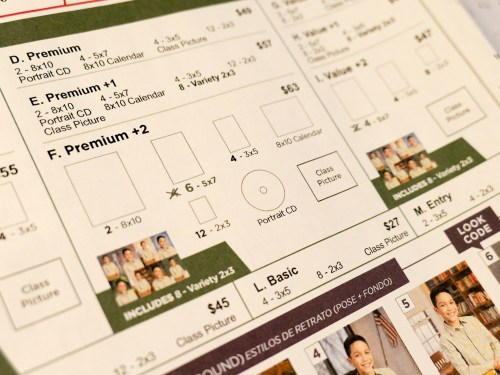
The process begins when your kids show up with a Lifetouch order sheet that documents 13 photo packages to choose between.

The packages range in cost from $19 to $63. Some include the class photo with all of his classmates. Others include a portrait CD with a digital file of your child’s portrait. There’s also an 8×10 calendar as well as multiple print sizes in different combinations.

Confused yet?

Eventually, your eyes will notice some bold lettering on the top of the page…
mylifetouch.com

On the bottom, there’s this helpful message:
“Get more choices and best value when you shop online.”

Okay then.
They don’t really want you to use the order sheet either!

#2
Order Your Lifetouch Photos Online

The good news is your order selection process is easier online.
The bad news is the pricing appears to be exactly the same.

But the overall experience is better online, which is key to helping you make your decisions and getting satisfaction with your purchase.

#3
Don’t Order a Custom Package

If you don’t like being locked into the predetermined number of 8×10’s and 3×5’s in the 13 listed packages, you have the online choice of clicking on ‘Custom Packages.’

I originally thought this was a wonderful idea.
But…

Even though custom packages allow you to choose your own combination of print sizes, some of them are also pre-grouped… like four 3×5’s or two 5×7’s.

Also, don’t expect to really save money this way.
You could save a few bucks, but you lose on the overall value compared to comparably priced regular packages.

That’s because the custom-package pricing starts at $41 for three items.
If you’re getting a CD containing digital files (and you should), that only leaves you room for two varieties of photo prints.

Ultimately, if you choose the least expensive option, you’re only saving $8 compared to the Premium Package, which gives you a much bigger bang for your buck.

#4
Buy the Premium Package for $49

Speaking of the Premium Package, I’ve decided that after some intense focus on all of the choices, it’s became clear to me that the Premium Package is the way to go.
(And I bet it will handle the needs of many of you parents out there.)

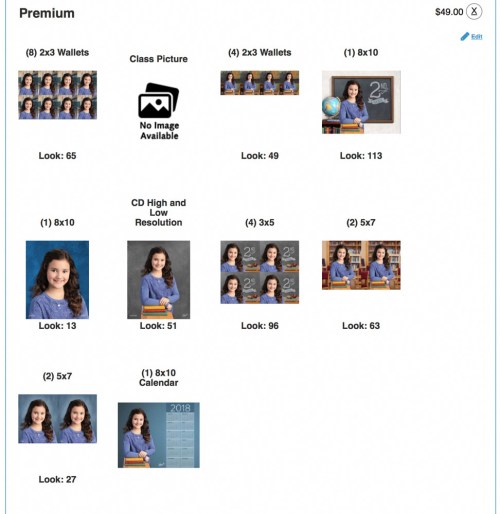
For $49, you get-

  • Two 8x10s
  • Four 5x7s
  • Four 3x5s
  • Twelve 2x3s (in groupings of 8 and 4)
  • Portrait CD
  • 8×10 Calendar
  • Class Picture

#5
The CD is the Key to Getting the Most Value

Ultimately, all I really need are the hi-res digital files of my son’s portrait. I’d be just fine only buying the CD. With my trusty Epson printer, I could do the rest of the work.

That said, I understand that not everyone wants to do their own printing.
(And I can imagine the business model here is based on making a profit on the prints.)

Plus, there’s nothing wrong with having some prints delivered and ready to hand out.
(And printing your own photos costs money too.)

But the real problem if you don’t order prints is you don’t get the opportunity to select different ‘looks.’

#6
Choose as Many Looks as You Can… Because They All Go on the CD!

I case you aren’t aware, when your child’s photo is snapped, the actual background is a pop-up backdrop with a generic color that’s eventually digitally replaced with different ‘looks.’ There are a whole bunch to choose from, and it’s almost as confusing as selecting your package.
(More on the best looks later.)

And here’s a little-known detail regarding ‘looks’ that I uncovered in my research:
All of the looks that you choose for your prints also end up as digital files on the CD you order!

Sure, you’re supposed to choose only one portrait look for the CD, but, if you go with the Premium Package and select as many looks as the package allows… that will give you eight different looks on the CD.
(Cool!)

Remember, each look uses the same image of your child, except that some of the looks use the original wide shot while other looks crop the shot tighter. I recommend you include both versions in your selections.

#7
The 8 Best ‘Looks’ to Use as Backgrounds

So, this of course is entirely subjective, but these are the looks I like:

School Days
Granted, these are all digitally inserted backgrounds. But this is a school photo, right?
It’s nice to give it context as opposed to choosing some generic background.

  • Looks #49 (blackboard/map) and #63 (library) for vertical wide
  • Looks #65 (school hallway) for vertical tight

My Grade
Perhaps it’s a tab obvious to weave the grade information boldly onto the background. On the other hand, why not? If it’s his 2nd grade photo, that’s kind of the point here.

  • Look #96 (blackboard) for tighter shot
  • Look #113 (blackboard) for wider shot

Traditional
If you do need a generic background that’s not school related, I’d stick with an easy-going color.

  • Look #13 (blue background) and tight shot.

Modern
This is a brighter option for a simple color background.

  • Look #27 (light blue background) and tight shot

Most Versatile Option
If you want a generic background plus a nod to a school environment, I like:

  • Look #51 (grey background)
    It’s a wide shot using a few books as props.
    (If you would ever think of getting just one digital file, this would be a great choice, because you can easily crop it in different ways.)

#8
Forget the Extras

I wouldn’t spend the extra money to have the name and date included on the bottom of your pictures.
You can write all of that on the back.

And I don’t think you need to retouch photos of 2nd graders. Aren’t they perfect just the way they are?

#9
Never Order Add-On Prints

You can also order individual prints through yet a different menu, but this is the most expensive way to go.
(So, don’t do that!)

For example:

  • One 8×10 – $13
  • Two 5x7s- $13
  • Four 3x5s- $13
  • Class Picture- $13

Ridiculous.

#10
Best Digital-Only Choice

Okay, remember when I said all I needed are the digital files?
Well you could actually go this way:

  • Five-Image Digital Special Offer- $35

Thirty-five bucks gets you five high-res portraits.
(With five different backgrounds)

And then you do the printing.
…Not a terrible way to go

There’s No Perfect Choice
But I’m still recommending the Premium Package for $49. It really comes down to knowing how you’re going to use your photos.

Will you really give away all of those tiny wallet photos?
(A billion smartphones just shuddered at the very idea.)

But if you can use most of what’s in the Premium Package, it’s still a solid deal.

The Details of My Order
Okay…
If you’re interested in one person’s opinion on how to best navigate all of the Lifetouch choices, here’s what I bought:

Premium Package
Using 8 different Looks for each of the 8 choices-

  • CD High and Low Resolution
    Look #51 (grey background with books used as props/wide shot)
    Again, this background is the most versatile if you want to crop the shot yourself.
    And remember, you’re going to also get the other seven looks on the CD too!
  • Eight 2×3 Wallets
    Look #65 (school hallway/tight shot)
  • Four 2×3 Wallets
    Look #49 (classroom blackboard and map/wide shot)
  • One 8×10
    Look #113 (classroom blackboard with 2nd grade/wide shot)
  • One 8×10
    Look #13 (traditional blue background/tight shot)
  • Four 3x5s
    Look #96 (classroom blackboard with 2nd grade/tight shot)
  • Two 5x7s
    Look #63 (library background with chairs and bookshelves/wide shot)
  • Two 5x7s
    Look #27 (modern blue background/tight shot)
  • One 8×10 Calendar
    (Default calendar background, which you don’t get to choose. But it’s similar to Look #27.)
  • One Class Picture

I’m Exhausted
Holy cow.
I feel like I just explained how to assemble a Star Trek warp-drive engine.
(All right… maybe only a warp-5 engine.)

But I feel better.
I’ve got the best deal I could figure out.
And I’m not going to think about this ever again.
(Next year, I’m just going to refer to this post!)

You can also call Lifetouch customer service at 1-800-736-4753.
They were quite helpful answering my questions.
(Maybe, don’t mention my name.)

I hope this has been useful.
Good luck with your own orders!