At Home with Tech

Unlock the power of all your technology and learn how to master your photography, computers and smartphone.

How to Connect Your Wi-Fi GE Range to the Web
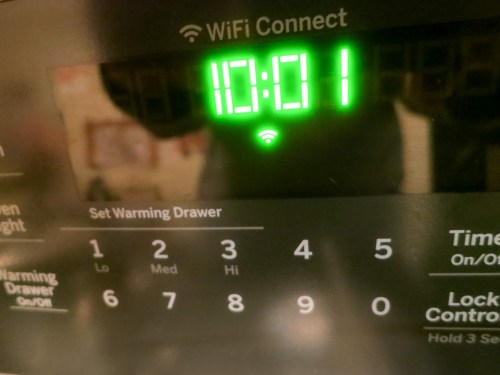
Behold, an oven that has Wi-Fi baked in! I must admit, I was excited and a tad scared to see the Wi-Fi icon pop onto my new GE range’s control pad. But it took a little work for my range to join the Internet of Things…

Behold, an oven that has Wi-Fi baked in! I must admit, I was excited and a tad scared to see the Wi-Fi icon pop onto my new GE range’s control pad. But it took a little work for my range to join the Internet of Things…

I must report I’ve obtained the power to burn down my house remotely using an app on my iPhone. Okay… calm down. That’s not really what this app is intended for… In fact, it’s an innocent app with the good intention to help me control my new GE oven when I’m not at home.

The idea is you can preheat your oven before you arrive home to get your dinner prep started. You can even start cooking that roast you popped in the oven before you leave for work.
(Example used for illustrative purposes only…I don’t know how well a raw holiday ‘Roast Beast’ would last in a cold oven.)

Observing from a Distance
So for those of you in the market for a new range, it’s a Wi-Fi enabled shiny
GE Profile 30” Convection Range. (Model PGB940ZEJ1SS)

And yes, my wife and I just bought one.
No… our decision was not significantly affected by its Wi-Fi capability.
(Secretly, I was pretty pumped.)

But the Wi-Fi value for me isn’t that I can cook dinner while I’m still at work.
(Though I know it theoretically sounds appealing)

What I really want is the ability to randomly check and make sure I didn’t accidentally leave the oven on when I’m not at home.
(The app doesn’t control the gas stovetop.)

Intentionally Disconnected from my Connected Oven
The GE app’s default mode is to simply monitor the status of the oven. You have to opt in to take over active control from your smartphone.

And that… I haven’t done…yet.

I feel a bit like Bruce Wayne in “The Dark Knight Rises.” He built a revolutionary energy generator, but was unwilling to turn it on, because he feared he couldn’t control its use.

And to quote another superhero franchise…
“With great power comes great responsibility.”
(Are we sensing a theme here?)

To be fair, the app has a safety setting, which automatically turns off the oven after it’s been cooking for six hours.
(Looks like the oven’s designers had some of my same concerns.)

So for now, I will observe my oven from afar.
And perhaps one day, I will summon the courage to control it from a distance as well…

How to Turn on the Wi-Fi Feature
You might be wondering how one sets up Wi-Fi on a GE oven.
(It doesn’t exactly operate like a computer.)

And as that’s the subject of this post, it’s probably time to get to the point!

I was a bit puzzled where to begin…
(The one-page instructions on “Connecting your Wi-Fi Connect Enabled Oven” wasn’t especially clear.)

GE calls the feature “Wi-Fi Connect”
and tells you to visit GEAppliances.com/connect to “download the appropriate app” on your smartphone.

On the website, you’re strangely greeted by advertising for more of GE’s Wi-Fi-enabled kitchen devices.
(Including refrigerators and dishwashers)

But in fact you’ve arrived at the right place. It’s the starting line to a process you need to go through if you want your range to join the Internet of Things. So after going through the exercise myself, here are the required steps to connect your oven:

  • On the webpage, click on “More About the Wall Oven & Range App.”
  • On the bottom of the next page you’ll see “What You Need- GE Kitchen App” and two links to download the app on Apple’s App Store or on Google play.

GE Kitchen App


Then, using your new GE Kitchen App…

  • Choose “Add an Appliance.”
  • Choose “Range.”
  • Then turn on the range’s Wi-Fi by pressing the “Remote Enable” button.
    (Yes, it creates a mini Wi-Fi signal that your smartphone can connect to.)
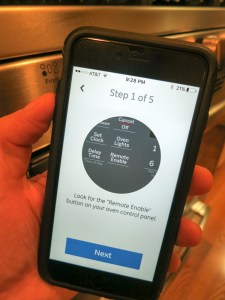
GE Kitchen App Step 1 of 5


  • Join your smartphone to the stove’s network using the password printed on the sticker on the inside edge of the warming drawer.

At this point, I ran into a little trouble…

I received the following message from the GE Kitchen App after trying to connect to my stove’s Wi-Fi signal…
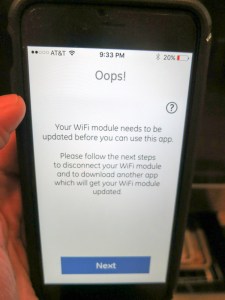
GE Kitchen App Oops


What?!

My stove is brand new. It already needs a firmware update?
Why yes…. Yes it does.
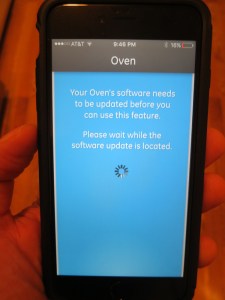
GE Kitchen App Says Update Software


So what’s the fix…?

If this happens to you, you’ll next need to download another app that has the power to update your stove’s Wi-Fi module.

  • This one is called, “GE Brillion App.” The GE Kitchen App is supposed to automatically direct you there, but my iPhone 6 Plus got stuck for some reason. So I navigated to Apple’s App Store, found the new app and downloaded it myself…
  • The GE Brillion App then went through the same early steps, but when it ran into the roadblock, it magically offered to do the firmware update.

GE Brillion App to the Rescue


  • And update my oven… it did!
    (And while the update chugged along, the Brillion App displayed a muffin joke. Really.)
  • And then it said my oven was happy.
    (How can you be mad after that kind of proclamation?)
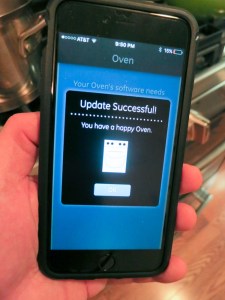
GE Brillion App Says You Have a Happy Oven


  • Once the Brillion App was done bringing my oven back to the future, I successfully connected my iPhone to the oven’s Wi-Fi. Then I got my range onto my home network’s Wi-Fi and finally finished the setup to connect the oven to the app.
    (Quite the little dance)
  • Next, the GE Brillion App offered to run my oven like the GE Kitchen App, but as it appeared to be an older app, I successfully switched back to using the GE Kitchen App.
    (And as I’ve already said, I haven’t yet fully activated the app to ‘control’ mode.)

And I was on my way…

Adding to My Virtual Presence
The whole Wi-Fi setup took about half an hour. And though the firmware update wasn’t a huge roadblock, I’ve got to say the process wasn’t especially intuitive. You’ve really got to pay attention to the twists and turns…
(Though I must admit, the GE Brillion App’s light banter did take the edge off of my growing annoyance.)

So now I have yet another connected device to help me know that my home is healthy when my house is on its own:

And for now, my Wi-Fi connected GE range will simply reassure me wherever I am… that all is cool…

Happy Oven.

Happy Home.

Happy Barrett.

A Digital Memorial

My friend Christopher Kubofcik in Atlanta in 1998

My friend Christopher Kubofcik hanging poolside in Atlanta back in 1998

My long-time friend Chris Kubofcik passed away last month. As I struggle to process the loss, I’ve started to think about the topic of someone’s “life print” living on… online after he or she is gone.

Should their online presence disappear, because they have?
I don’t think so.
(Their memory hasn’t suddenly evaporated.)

I know lots of folks maintain the identities of people online after they’re gone.

I have to admit it’s something of a mind-bending topic. One that I’ll spend more time on right here… after giving it a little more thought.

For now, I’ve decided to create and post this little photomosaic of Chris in his memory…

Peace.

The Best Piece of Luggage for a Six Year Old

Traveling with kids is no walk in the clouds. Their bags had better be able to handle whatever bumps and bruises come their way. I say don’t skimp when it comes to buying their luggage…

Traveling with kids is no walk in the clouds. Their bags had better be able to handle whatever bumps and bruises come their way. I say don’t skimp when it comes to buying their luggage…

My son really needs a decent piece of luggage to travel with. His favorite knapsack has a gaping hole by the zipper, which developed due to massive zipper stress any learning hands will create. Plus, I say he’s ready to handle a more substantial bag with heft and even some wheels to help him along.

Sure, I can get him a cheap rolling soft suitcase that’s specially branded with his favorite cartoon character. Amazon is filled with them.

But I doubt any are really built to last. And perhaps more importantly, I worry they’d provide enough protection for their contents.

Protecting Possessions on the Go
You might be wondering how much protection a few kid’s clothes really need.

But I’m not talking about his shirts and pants. I’m thinking about his prized possessions “de jour” he likes to travel with. In the past, that used to be a few of his favorite stuffed animals. But now, he’s almost six years old, and his favorite toys are clearing evolving into the delicate electronic realm.

Remember that Carrera RC stunt car I got him over the holidays?

And that crummy family Nikon COOLPIX S32 camera?
(He absolutely loves it.)

This is the type of gear he likes to keep close when he’s packing. And I imagine unless my boy suddenly becomes a Luddite, there’s more future tech that’s going to need protection while we travel.

And I’d rather him not use cute luggage made for kids that could disintegrate at any moment.

Sure, one solution is simply to carry his delicate gear in my own luggage until he’s eighteen.
(But how realistic is that?)

I think the better choice is to get him an adult piece of luggage that’s tough enough and simply small enough for him to handle…
(The down side is decent luggage is usually pretty pricey…)

REI or Bust
I’ve always loved shopping at REI. Not that I’m a huge outdoors guy. But I like their stuff. It’s good quality, and yes, I’ve been known to hike a small mountain or two in my time. (Massachusetts’ peaks aren’t very high.)

These days, my wife is leading the way in our family camping experiences.
You may recall my Goal Zero Sherpa 50 battery back-up purchase last summer in advance of our first family camping trip.
(I also picked up a beefy Thule Covert Camera Backpack.)

The REI downside is it isn’t the cheapest place to shop. But I think that economic reality is more reflective of the camping/hiking market anywhere.
(Unless you’re shopping at Walmart… and that inventory is entirely different.)

One factor that softens the REI sticker shock is the 10% rebate you get every year on all of the regular-priced purchases you make as an REI member.

Even so, you don’t go to REI looking for the best prices. You’re there, because you want the product to hold up under tough conditions…
(I think my five year old fits that equation. Plus, he won’t outgrow a piece of luggage any time soon!)

Web Research
I first took a look at rei.com and perused the wheeled-luggage section. It seemed clear that the 22” bags designed as airplane carry-on luggage would be the right size for my young traveler.

Beyond that, we would need to evaluate the options in person. So it was time for a little father-and-son shopping excursion…

Weight Matters
At our local store, I found three similar rolling bags made by Osprey, Eagle Creek and REI:

Osprey Ozone 22
Osprey Ozone 22”
$230
4 lbs, 5.9 oz
22” x 14” x 9”


Eagle Creek Load Warrior 22
Eagle Creek Load Warrior 22” Wheeled Duffel
$239
4 lbs, 13 oz
22” x 14” x 9”


REI Wheely Beast 22
REI Wheely Beast 22” Wheeled Duffel
$169
6 lbs 2 oz
22” x 14” x 9”

I found the biggest difference between the three was the weight differential.
The Osprey was the lightest.

It was really only seven ounces lighter than the Eagle Creek, but my son noticed it immediately.


The REI Wheely Beast was the best deal of the bunch, but it was also almost two pounds heavier than the Osprey! Now that may not sound like a lot, but believe me, when my son picked the heavier REI bag, it was clear what the right choice was.

Not only was the Osprey the lightest. It also has a cool, neon green interior.

That doesn’t quite shout, “This is a cool kid’s bag!” But it definitely has that ‘fun’ vibe.

Plus my son liked the red surface color.
(It also comes in light blue and black.)
…and he also called out the osprey image stitched on the front.
(Which he thought was a bald eagle)

Click.
Actually, ‘Swipe.’
(REI didn’t have chip-card readers installed yet.)

Life-Long Journey
My boy’s tech gear is now safe.
Well… safer.

No, I didn’t buy him a hard travel case that can withstand a playdate with a guerilla. But I feel a whole lot better knowing the Osprey will hold together for the foreseeable future.

Plus, when my son outgrows it, it will find a second life as a perfect overnight or day trip bag… for me.

Yes, I like it too.
(Is that so wrong?)

…Just thinking about the future.