At Home with Tech

Unlock the power of all your technology and learn how to master your photography, computers and smartphone.

Did You Forget to Unmute Your Cell Phone Again?
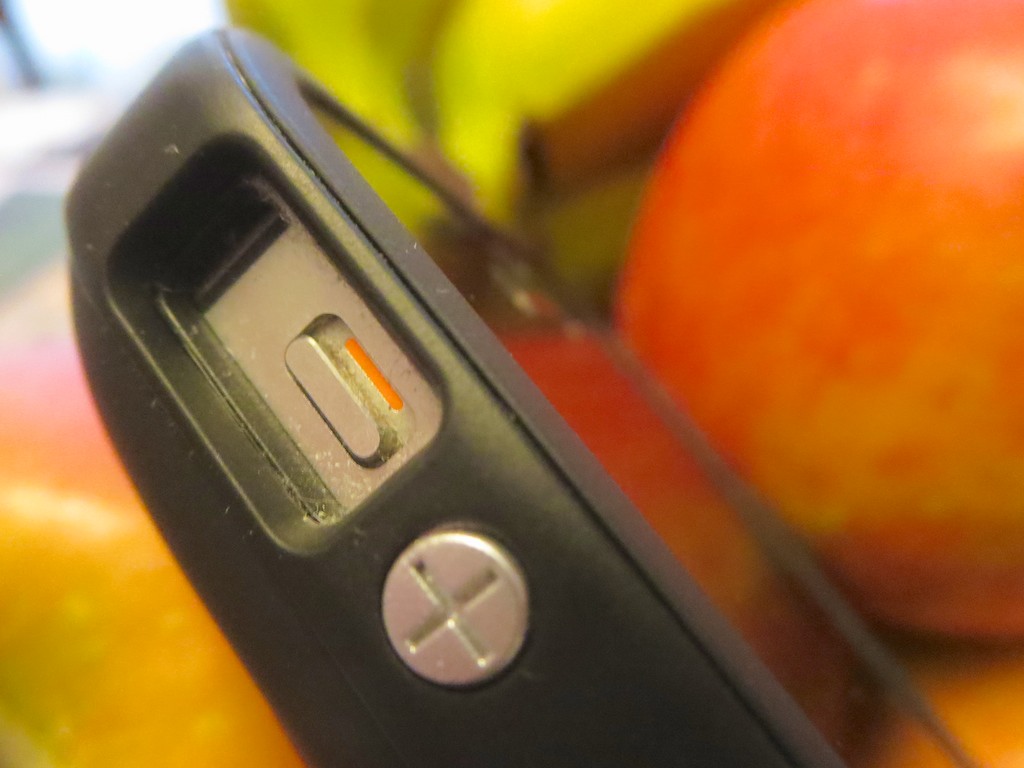
This little red sliver is what stands between you and radio silence with the rest of your world. You’ve got a thousand things to do when you get home. Flicking the switch back usually isn’t at the top of the list. Now what…?

This little red sliver is what stands between you and radio silence with the rest of your world. You’ve got a thousand things to do when you get home. Flicking the switch back usually isn’t at the top of the list. Now what…?

You might think tracking down a friend or family member who carries a smartphone is a relatively simple task these days.

There are certainly plenty of options at your fingertips:

  • Call the cell phone number
  • Or send off a text
  • Then write an email, if you must
  • And if all else fails, call the home landline (if there is one) and hope somebody’s home (and hasn’t muted the ringer because of the sleeping three year old)

But that isn’t always enough…
We’re silencing our cell phones during the day at work and forgetting to unmute them when we get home at night.
(Vibrate mode isn’t the most attention-grabbing.)

So we often blissfully go through our evenings, ignorant that one of our important peeps is trying to connect…

I’m certainly guilty of this phenomenon, and I’ve also been frustrated on the other side of the equation.

The good news is technology has a solution!

Get a Bluetooth Speaker that Ignores Your Phone’s Mute Setting
I wouldn’t consider this ‘techlution’ (tech solution) mainstream…
(at least not yet)
But this little tech company, Olens Technology, makes this cool gadget called
the Renny Bluetooth Home Ringer.
The Renny is essentially a small, AC-driven Bluetooth speaker for your smartphone.

This ‘cell phone base station’ also performs a few special tricks:

  • It will ring, even though your phone is on vibrate or silent
  • It will connect to two cell phones
  • You can answer an incoming call with it
  • It will auto-connect with your phone when you get home
  • It has a relatively long 200 ft Bluetooth range (line of sight)
  • You can keep it plugged in or use it ‘on location’ via its rechargeable battery
  • And you can even stream your tunes, when you’re not chatting on the phone

So if your smartphone doesn’t attract your attention when the call comes in, the Renny will definitely pick up the slack.

The Renny’s marketing machine is also touting it as a cord-cutting device for your landline, if that’s your bag.

You can pick it up on Amazon for $99.95, which is what you might expect from a tiny Bluetooth speaker.
Amazon buyers are giving it pretty good reviews and especially point out the great customer service if you run into any operational snags.
The Renny also comes in multiple colors, and Olens Technology sells an optional external antenna (‘Rentenna’) for $10.
(You’ve got to like a tech company with a linguistic sense of humor.)

More Than Nice to Have?
I hadn’t heard about the Renny until I accidentally came across it while researching what to do with an empty wall phone jack in our kitchen.
(a topic for another day)

The Renny may not seem like a ‘must have’ item, and that, by itself, makes the cost feel a little pricey.

That said, my father just turned 81 years old.
My son is almost four.

I would consider both of them ‘adventurers at heart’
…which is a great quality at any age.

But like it or not, if that important call hits your cell phone when you’re at home, you’d better pick it up.

Having an external speaker to help keep you connected to your smartphone is just good sense these days.

Enough said.

Oh, one more little detail…
Olens Technology is running a promotion as I write this for a free Rentenna and Car Adapter when you buy the Renny on their website. Plus free shipping.

Mine is going in the kitchen.

Click!

HELLO-O-O-O!!
Your Mission: Find a Way to Drive with Head-Up Display

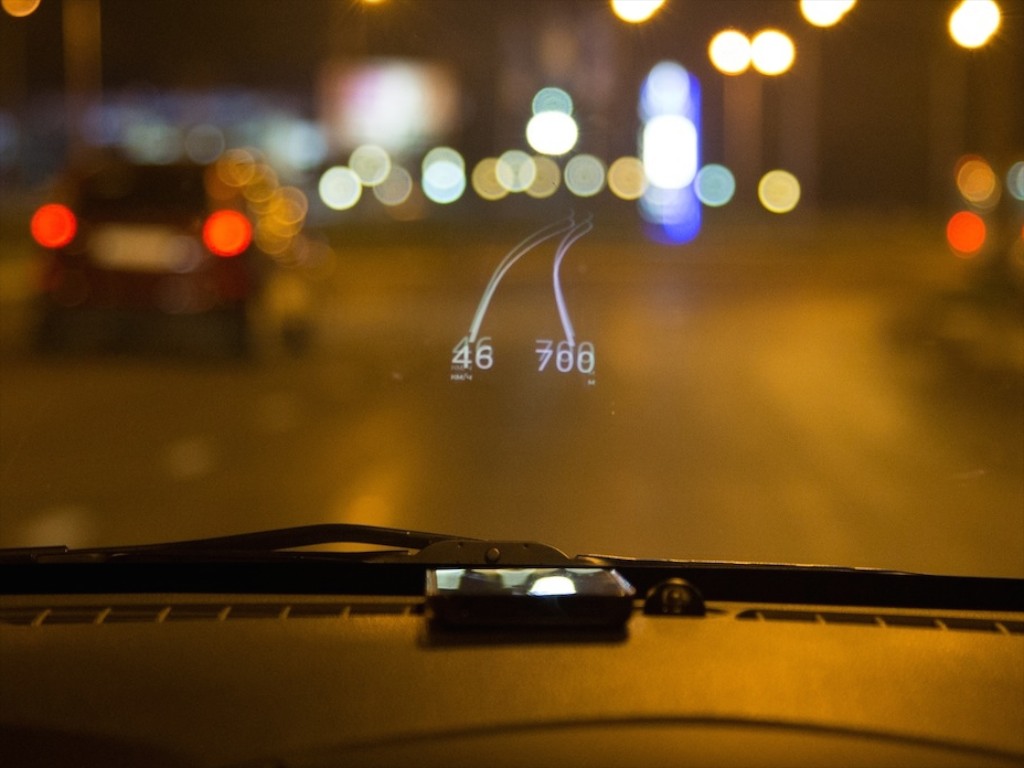
Apps like HUDWAY (seen here) can augment your view while driving in low visibility conditions. But is this tech ready for mass consumption?

Smartphone apps like HUDWAY (seen here) can augment your view while driving in low visibility conditions. But is this tech ready for mass consumption?

Some drivers like to navigate by memorizing street names.
Others rely on landmarks and a general feel of their surroundings.
(kind of like using the Force)

I prefer the latter.

The problem is the Force doesn’t always get me where I want to go, and as a result, my wife has long been anointed the family navigator.

So let’s just say, I’m always on the lookout for ways to enhance my navigational prowess…

Recently I was watching a Brian Cooley video on CNET about the best car apps for your smartphone.
And at the very end of the segment, the solution appeared before my eyes…

Seconds later, I was ready to add a little augmented reality to my windshield.

Heads Up: Here Comes HUD
I’m already taking full advantage of the GPS tech in my iPhone while driving.
The forward-looking arrow in the Google Maps app (or the native Maps app) is always a helpful buddy to keep me on course.
And Siri calmly reminds me when the next turn is coming.

But when I’m driving at night or in low-visibility conditions, it’s harder to maintain that symbiotic connection, because you can’t see as far ahead as your app can.

So the solution is to add a little HUD technology into your smartphone.

HUD, which stands for ‘Head-Up Display’ projects an image onto your windshield so you don’t have to look down at your smartphone.
(wherever it is you’ve got it perched)

Yes, you simply plop your smartphone on the dash near your windshield, and it illuminates useful car-centric data. The trick is the display uses a mirrored effect.
The image glows in reverse it and bounces off your windshield like a mirror to appear correctly for you to view.

Depending on the app you use, different sorts of data can be projected, but I think the coolest scenario is to see your digital directions and path on your windshield.

Sure, you’ve got to mount your smartphone onto your dash in a way that it doesn’t slide around.

I already had a dash mount with a tacky bottom for my iPhone to use.
So I was ready to begin my search for the perfect app to augment my reality while on the road…

Three Ways to Add HUD to Your Driving Experience

My first step was to watch the CNET video again.
But a problem immediately cropped up.
Brian didn’t actually mention the apps by name.

So I had to do the heavy lifting myself.
But after some intense Googling, all I could find were three options for this type of directional assistance.

1.  HUDWAY
The good news is this free app (99 cents for ad-free) displays the road ahead and your upcoming turns.

The bad news is there’s no voice assistance.
And it pre-maps your route, which is useful if you lose your cell connection, but not so great if you go off course and need the app to recalculate your route on the fly.

It’s also got some negative reviews on iTunes.
And it’s worth noting… a Russian company makes this app…
With the state of geopolitical affairs these days, it doesn’t feel like the time is quite right to download this app…

2.  Sygic
I think this is the app Brian was specifically referring to in his CNET video.

But Sygic is an offline navigation app, which means you’ve got to first download your maps information. And with all the content on my already bloated iPhone, I wasn’t too excited to start feeding it all the roads in the USA.

Plus, even though the app is free, the required map info is a $35 in-app purchase.
(on sale from $80)
And to add insult to injury, the HUD feature is another $8 on top of that.

So it’s a least $43 to give Sygic a test drive.
And that’s a little pricey when you’re used to spending a couple bucks on an app.

3.  ITEQ HUD
If you were wondering who makes a full-on, separate HUD device…. ITEQ makes one.
It’s the ITEQ GPS Car HUD, and it costs $52.99 on Amazon.

I think it’s fair to say this unit hasn’t gone mainstream yet…

Mission Impossible?
So the problem is the perfect HUD driving solution doesn’t exist.
At least, not yet…

You would think that the Google Maps app or Maps would simply have a HUD mode you can click into.

If I’m missing something, please let me know….
But in this particular instance, it would seem the future isn’t closer than you think.

This is still a concept ahead of its time.
(Unless you’re really willing to pay for it.)

Inhabitat.com_Mission Impossible 4 Head Up Display

And if price is really no object
The way to do HUD right is to drive the BMW i8 from
“Mission Impossible: Ghost Protocol.”
That’s only going to cost you $135,925.

No, thank you, Mr. Hunt.

How Easy is E-ZPass?

Using your E-ZPass tag is mostly mindless as long as you don’t totally ignore it.  Otherwise, years will pass by, and your E-ZPass will still think it’s living in the car you owned in a different decade.

Using your E-ZPass tag is mostly mindless as long as you don’t totally ignore it. Otherwise, years will pass by, and your E-ZPass will still think it’s living in the car you owned in a different decade.

A long time ago, in a state far, far away…
(not that far, really)
My wife introduced me to the wonders of E-ZPass.

I have to admit I was a bit skeptical.
I wondered whether technology was up to the challenge of accurately identifying, logging and billing the toll charges on each and every car moving through a toll plaza.

Yes, the century was still young, but my worries were, of course, unfounded.

Perhaps I was secretly mourning the loss of the opportunity to play coin hoops at unmanned tollbooths. After years of practice, I was still finessing my form to match my childhood memory of how my father did it.

He had this certain elegance in his coin toss technique that never compromised on speedy accuracy.
His quarters would hit their mark every time with a definitive ‘clunk!’
There was never a need for the coins to swirl around the basket, because they were always perfectly flung.

But now it was time for me to throw in the towel and stick a strange white cube to my windshield.

I’ve explained before that I usually hold the position of IT Guy in our family, but in this particular moment, I was just a stick-in-the-mud Luddite.
Thank goodness my wife was there to catch me in my tech stumble and keep us somewhat close to the bleeding edge of consumer tech.

Full Speed Ahead!
And the result was pure joy.
Especially back then, when most people didn’t have E-ZPass tags, and there was only one booth in a toll plaza dedicated to the technology.
We’d whisk through, leaving lines of cars in the dust waiting to hand over currency to a live human being.
We felt like we were adding ten to fifteen minutes back to our lives every time we’d pass a toll.

It was just wondrous.

Over the next few years, everyone else eventually got their own E-ZPass tags, and most of the toll lanes bid farewell to their biologic toll collectors.
So the E-ZPass lanes started filling up, and traversing them wasn’t quite as speedy.

But if you didn’t belong to the E-ZPass club, you had the displeasure of waiting in the last line dedicated for citizens with too much time on their hands.

Today, using E-ZPass is a standard way to travel the landscape for most cars.
The good news is you don’t really have to think about it.
(When was the last time you had to worry about exact change?)

It’s simply set it and forget it!
But sometimes, it still pays to check in….

It’s Time to Update Your E-ZPass Account
Recently, the equipment I need as a commuting road warrior has shifted from train to automobile.
Yes, if you were wondering, my recent, ‘fun’ car-buying experience was directly prompted by this development.

My new highway commute places my trek across one of our majestic bridges, and I decided to check out whether I could sign up online as a frequent traveler to receive a lower toll price.
(You can!)

But along the way on the E-ZPass website, I noticed my family’s two cars and their license plate numbers were not listed correctly. The data was years out of date.
In fact, it had not been updated since we opened up our account.
(d’oh!)

In my defense, we’d never had a reason to go to that section of the website to detect the problem.
(And thankfully, nobody else had either.)

Still, it didn’t seem as urgent a problem as the time the credit card on the account expired, (unbeknownst to us)
and we started receiving angry yellow warning flashes at every tollgate.

But the moment had clearly arrived to take some action or invite bad car karma….

If in Doubt, Click “Add Vehicle”
Feeling industrious, I clicked on the ‘Vehicles List’ tab and then clicked on the first of my two former cars.

But when I tried to update the license plate number, as well as the vehicle detail, I discovered that I could only adjust the vehicle information.
The license plate line was grayed out.

Scouring for my problem online did not bring up a solution.

So I decided all I could do was start from scratch and just add in the new car.
And guess what… I think that’s how you’re supposed to do it!

So I clicked- ‘Add Vehicle.’
And then I filled in everything, including the new license plate number.

Finally, I deleted the old car from the expanded vehicle list.

How to Update Your License Plate Number in E-ZPass
It’s extremely straightforward.
(I guess in the battle of Barrett vs. E-ZPass, I’m now 0 – 2.)

That said, I do have small bone to pick with the language used here-
For me it wasn’t really ‘Adding a Vehicle’ as much as it was
‘Adding a License Plate.’

I think the problem also was I was attempting to update both the license plate number and my car information.
(Maybe that would suggest a total do-over right there.)

But if you click on an existing vehicle to edit, the program automatically assumes you’re keeping your license plate and only updating your car.

What happens if you still have your car and just need to freshen up its license plate numbers?

Well, the new ‘Mr. E-ZPass Expert’ has the answer!
Yes, you’ve got to start from the beginning:

  • Click ‘Add a Vehicle’
  • Type in the new license plate number along with your existing car detail
  • Finally, delete the other listing with the old license plate number
  • Continue on with your life

No, I don’t think it’s perfect, but it works.
And that’s as reasonable a way to describe our government on a good day as any!

The Easy Commute Begins?
I’m happy to report, both our cars are now up to date in the E-ZPass system.
I wouldn’t exactly call it easy, but I correctly guessed my way across the finish line.

And I imagine my momentary bout with tech confusion will go a long way towards ensuring future ease every time I cross through an E-ZPass corridor.

Now that I’m a true road warrior, it’s all that really matters!