At Home with Tech

Unlock the power of all your technology and learn how to master your photography, computers and smartphone.

Tag: apple tv

Best Recipe to Bring to Family Holiday Gatherings

Whipping up a batch of cranberry sauce from scratch is a quick and easy way to contribute to the holiday meal. But if you really want to make a bigger impact and don’t have the cooking chops, you might want to turn to your tech skills and use my recipe for success…

Whipping up a batch of cranberry sauce from scratch is a quick and easy way to contribute to the holiday meal. But if you really want to make a bigger impact and don’t have the cooking chops, you might want to turn to your tech skills and use my recipe for success…

I started to sweat… It was our turn to host Thanksgiving dinner this year. We set the table for fifteen. My wife cooked up a perfect twenty-pound turkey. Family members and in-laws brought incredible side dishes. And what was my contribution…?

Let me simply say I’m not a gourmet chef.
Others in my extended family are far more accomplished in this arena.
(Although I can whip up a fine stack of banana pancakes… Which, of course, did me no good here.)

I’ve also previously created some mean chocolate bread pudding for the desert table, but I wasn’t on desert duty this year.

Suffice it to say, I checked the box by making some decent cranberry sauce from scratch…

It’s actually super simple…

  • 24 oz of fresh or frozen cranberries
  • 2 cups of sugar
  • 4 tablespoons of water
  • A little orange zest

Cook it up, keep stirring and about a half an hour later… you’re done!
(Here’s the official recipe at foodnetwork.com.)

More than Good Food
It was a decent effort… though hardly a culinary stretch by any means.
I didn’t embarrass myself, and I received a dozen polite compliments.

But that wasn’t it for me.
It simply couldn’t be…

I had to contribute something more significant to this family gathering.
I had great intent… just not the skills in the kitchen.

Because at the end of the day, it’s not really about the meal, right? It’s about getting family together. It’s about remembering the good times… and giving thanks.

Bring Your Tech Smarts to the Holiday Meal
So the feast began to break up after all of the yummy deserts had been consumed. All of the young cousins had long departed the dining room, and my six year old was leading the children on some noisy adventure in the family room.

Then, the adults wandered in…

I was a few steps behind the pack, and when I got there, I witnessed them all hovered around my old 42” plasma Panasonic HDTV.
My family members were all smiling and reminiscing about what they saw…

A Trip Down Memory Lane
My HDTV displayed a magical, morphing photomontage, courtesy of my Apple TV’s screensaver. The series of 125 photos represented all of the kids over the past seven years at different family activities and events.

This digital display of recent family history was my true contribution to this gathering.

I brought the gift of remembering good times…

‘Cause let’s face it. Life is messy.
Thanksgivings are rarely perfect.
(Growing up, mine certainly had major flaws.)

Life just isn’t a holiday card.

But on the other hand, there are still plenty of amazing moments.
You’ve just got to remember them. Isn’t that part of what giving thanks is about?

And if someone could simply gather up all of those memories and serve them up… wouldn’t that be nice?

Well, that’s exactly what I did.
I served up some great family memories.

This is my pièce de résistance for large family meals.
And what’s my recipe…?

iCloud Photo Sharing on your Apple TV
If you often worry about what you’re going to do with all of those photos you’ve been collecting, (and sometimes not having the time to share) this can be your moment of reckoning…

It’s actually not at all difficult to pull off. The major ingredient is taking all of those photos over the years and keeping them organized in a program like Aperture 6.

Then, you simply export your group of photos into a new iCloud shared photo album that your Apple TV can access.

Here’s how you complete your visual feast using Apple’s connected ecosystem…

  • Go to your Apple TV and click on ‘Settings.’
  • Click on ‘General.’
  • Click on ‘Screensaver.’
  • Click on ‘Type’.
  • Click on ‘My Photos.’
  • Click on your new iCloud shared photo album.
  • Click on ‘Set as Screensaver.’
  • Your Apple TV will ask you to confirm. Click ‘Yes.’
  • Then, step back a few times to the main menu screen on your Apple TV.
  • Press the Menu button again. That will activate the screensaver program, and your photos will start to scroll up the screen in random order.

Voilà!

A few other notes…

  • You don’t have to use full-res photos.
    (The pics look great at a fraction of the size.)
  • Your Apple TV will also activate its screensaver automatically after a few minutes of non-use
    (depending on what delay length you’ve set in your screensaver settings).
  • You can also enjoy your shared photo album on your other Apple devices
    (though not as a photomontage).

Problem Solved
As you may know, I fret a lot about how to manage and share my growing mountain of family pictures.

A good solution is to regularly funnel them through digital photo frames.
(Currently, I’m a fan of using Nixplay digital frames, although I’ve had some connectivity issues with them in the past.)

So why not expand on this plan and simply use your HDTV as a giant multi-image photo frame?
(Just use a connected 4th generation Apple TV to perform the trick.)

I think it’s a great way to fuel all of those good feelings when family and friends get together for the holidays.

It’s a recipe that can’t be beat!

How to Take Your Apple TV on the Road

Why would anyone want to take their Apple TV on vacation? Think about it… You’re welcome. Now just don’t forget about one important detail…

Why would anyone want to take their Apple TV on vacation? Think about it… You’re welcome. Now just don’t forget about one important detail…

My family and I stayed at an inn in Massachusetts a couple of months back, and I was surprised to find an Apple TV connected to our room’s television. I stared at it for a moment, and it was as if I were one of those guerillas at the beginning of “2001: A Space Odyssey.”

I reached out to touch it, but instead, I picked up the cute Apple TV remote and logged myself in with my Apple ID.

BAM!
There was all of my media (and my six year old’s favorite shows).

Wow. What a concept…

  • No more having to bring your visual media with you
  • No more having to think about it in advance
  • You have access to everything… right there

I like that.

Of course, the only rub is you’ve got to remember to log out before you check out. Otherwise, you might find a whole bunch of movie rentals on your Apple bill in the coming weeks.

I guess that could bring new meaning to the term, ‘pay it forward.’

The Curse of the Aging HDTV
So… ubiquitous public Apple TVs in every corner of the world may not exactly be coming soon to a life near you.

But it got me thinking…

What if I were to travel about on vacations with my own Apple TV?
It’s certainly small enough.

You’d just have to plug it in and attach its HDMI cable to the ‘guest’ TV. Then simply join the local Wi-Fi, and you’re ready for action.
Easy, right?

Well, not if the guest TV doesn’t have an HDMI input. And if you’re staying in hotel rooms or bed and breakfasts, you never know what you’re going to find. You’re probably not always going to have access to the latest and greatest TVs.

Time to Remember What ‘Component’ Means
I know… it must seem incomprehensible that there are still HDTVs out there without a single HDMI input.

Well, trust me… there are…

I’ve just returned from a family beach vacation to the North Fork of Long Island.
You may recall, I proudly declared it a tech-free week.

Well, truth be told… that’s because I couldn’t plug in my Apple TV to the old HDTV.

That darned TV was a massive HD screen.
(It was a beaut for its time.)

The only problem is it only had component inputs. No HDMI connections.

Do you even remember what ‘component’ plugs are? They were used at the dawn of HDTV, when you had three separate RCA connectors (not just one for a ‘composite’ signal) to handle the video feed…

  • Red
  • Green
  • Blue

‘RGB’
(Technically, I think it’s YPbPr)

And then… two separate audio cables.

In total, that’s five cables, which are typically bundled together to carry the ‘component’ signal. That’s a lot to keep track of!
(Thank goodness, nobody uses them anymore. Except for…)

HDMI to Component Cable Converter
So what I really needed was an HDMI to component cable converter or adapter for my Apple TV to connect to this older HDTV.
They must make those, right?

Sure they do…

When I got home, I decided I would be better prepared next time. To ensure my Apple TV would be able to hook up to an older HDTV, I would need one of these adapters at the ready to be part of my vacation travel kit…

So guess what?
Let’s go shopping!

Have You Heard of the Portta?
First off, a simple cable with an HDMI connector on one end and the five RCA connectors on the other isn’t going to do the trick. You must also convert the signal from digital in the HDMI plug to analog that the five RCA connectors need to carry!

A little 1 x 5 box with the right electronics inside is supposed to get it done…

In my research into ‘HDMI to Component Converters,’ I found that ‘Portta’ is a manufacturer that has a strong presence on Amazon.

I zeroed in on:
The Portta HDMI to Component and R/L Audio Converter, which goes for $27.88.

It has the right specs and receives good reviews on Amazon. (4.4 stars)

For comparison, it’s worth noting that B&H Photo sells a similar-looking model made by company named Kanex…
It’s the KanexPro HDMI to Component Converter with Audio, and it costs $59.00… more than twice as much as the Portta.
(Amazon’s got it for $29.99.)

Honestly, I’m not familiar with either Portta or Kanex.
(For all I know, they could both be alien species in the upcoming
“Star Trek: Discovery” TV series.”)

On the one hand, I’d have more confidence in the manufacturer that B&H sells.
But it’s double the cost!

Hmmm…..
Many others on Amazon seem happy with their Portta converter.
(Plus Prime offers free returns if something goes horribly wrong.)

Okay…

Click.

The Choice is Yours
Bathing suit… Check.
Suntan spray… Roger that.
Waterproof camera… Good thinking.
Apple TV with HDMI to Component Converter…?

Okay… to be clear, I’m not suggesting that you should definitely take your Apple TV with you on vacation.
(That’s clearly a debatable point!)

I’m just saying that if you wanted to, you’ll be really disappointed when you find there’s no compatible TV to connect to. So you simply need to prepared.
Nothing wrong with that. Right?

Or maybe you just convert into a vacation mode on a higher plane that doesn’t allow for silly tech distractions.

Unless you’re MacGyver…

Then, I say, “Go for it!”

Is It Finally Time to Cut the Cable TV Cord?

If you can stream more and more cable channels on your Apple TV or Roku, do you still need a cable subscription?

Since you can stream more and more cable channels on your Apple TV or Roku, do you still need a cable subscription?

I’ve been sharpening my scissors next to my cable cord for quite some time, but every time I’ve picked them up, I’ve back off at the last minute. But not yesterday…
(And this has nothing to do with the President’s recent support to open up the market for other technology companies to sell cable boxes.)

It’s not like I have something against cable television. I like cable TV. And those of you who know me from back when will understand when I say I have a strong connection to the cable world.

I don’t mind paying for my cable service… as long as I’m using it.

My Screens are Dark
But my viewing habits have been changing. I no longer spend significant time in front of my shrine-like media center I built over a decade ago in our family room. I think that’s partly due to being Dada to my little boy now in kindergarten.
(How did that happen so fast?)

And it’s also because technology has allowed me to watch my favorite shows remotely on my iPad and iPhone, and on the go and on Metro North during my commute to New York City. And I’m streaming a lot of my content on apps like Netflix and Amazon Video.

My home office iMac has longed replaced my old Panasonic Plasma TV in the family room as my daily viewing portal. And I’ve found that my secondary TV and cable box in my home office have largely sat dark over the past few months. The exception has been to serve up some of this year’s overwhelming political landscape… usually through CNN.

Who Needs Cable When You Can Stream?
So I woke up yesterday and suddenly felt compelled to cut the cord. And I said to myself… maybe I can simply stream CNN on my new Apple TV.

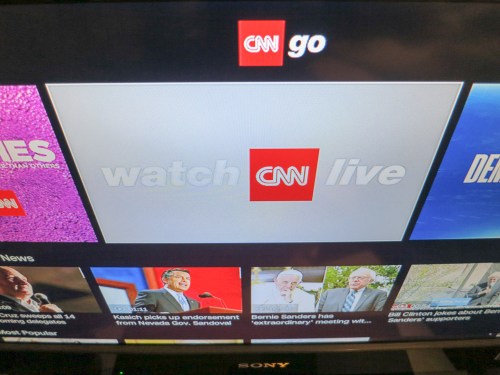
I ran over and took a look and found that in fact CNN does have an app that streams the live feed.
(CNNgo)

I immediately downloaded the app and activated it by confirming I had a cable subscription.
(I needed to type in a code on a companion CNN activation page on my iMac.)

BAM!
I was suddenly streaming CNN on my Apple TV!
(for no cost!!)

Then I picked up the phone and then almost dropped it, because I was so excited.

I dialed my cable company to downgrade my service to a sub CNN package level. I figured as long as I had a basic tier of cable TV service, the CNN app would still let me stream away. Right?

Wrong.

I told the cable customer service rep my nefarious plan, and she told me it wouldn’t work. If I wanted to stream CNN via my Apple TV, I would still have to subscribe to it through my cable package.

Huh.

So I hung up the phone, feeling rather deflated and thought a bit more about my half-baked strategy. Of course, what I attempted would be forbidden. Otherwise, the entire cable business model would come crashing down.

So where’s the value of a CNN live streaming app on a home Apple TV or Roku if you still need to subscribe and pay for the cable channel as well? Sure, it makes sense to stream cable content to a second screen if that screen is mobile or outside the house. You can see the added value in that scenario.

But if your Apple TV is sitting right next to your cable box, and they’re both connected to the same HDTV… I’m just not seeing the point of being able to stream a cable channel, when it also needs to be active on the cable box.

Wait… did I say, “cable box?”

I had an idea…

The Big Switch
I walked over to my dark home-office HDTV and cable box team. There they both were… gathering dust, except for occasionally serving up CNN.

I ran back to my aging media center in the family room. Actually, it really should be called my “Franken-center,” because it now had all of these disparate technologies bolted on…

Hmmm…

The truth is my Roku had been gathering dust too, ever since my new Apple TV showed up.

I stood there. And yes, a light bulb illuminated above my head.
(Ding!)

I disconnected the Roku and ran it over to my home office. And then the moment of truth…

I reached behind the cable box and unscrewed the coax cable. The old-school cable fell to the floor, and I think I felt a slight rumble caused by the magnitude of my moment.

I pulled out the cable box… and connected the Roku.

I then signed up for CNN on my Roku, just like I had done on my Apple TV.

And voila!
I was watching CNN live on my home office TV without the cable box.

Temporary Insanity
Then I jumped in my car and sped down to my local Cablevision office to return the cable box.

I gleefully handed over my box and companion remote control and was told I would receive a monthly credit… of just under $9 a month.

I ran back to my car and drove home. I walked up my basement stairs and back to my home office. I sat down at my desk.

What had I done?!

Still Married to Cable
Well, I had denied myself all of my cable TV programming on my home office TV except for CNN.
(And any other streaming app I could activate on my Roku that I already had a cable subscription to)

And I’d saved myself nine bucks a month, which you’ve got to admit is not really a game changer.

Did I cut the cable cord?
No, not at all… I just trimmed it ever so slightly.

You might be asking… what’s the point?

Overwhelmed with Options
I think the point is I’m a little frustrated and kind of cranky.

We’ve all got so many ways now to consume media.
And so many opportunities to pay for it…

The list goes on and on…

I simply want to use what I’m paying for.
And pay for what I really consume vs. what I’ve historically spent.

And that equation clearly takes some fine-tuning along the way.

Victory?
So I ripped one of my cable boxes out of my house. This little act of defiance only reflects on my own process of understanding what I want… and need.

Yes, the scissors are always within reach. And it may feel empowering to talk about cutting the cord. But for now, I’ve only done a little spring pruning.

…And I’ve got nine dollars in my pocket.

Does anyone want to place any bets on how long it will take me to replace the box?

At the very least, either way… I’m ready for the next debate!