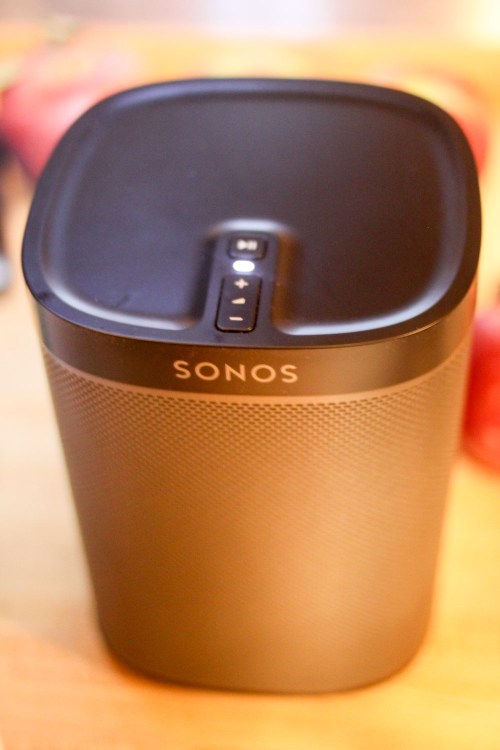
Behold! My new Sonos Play:1 wireless speaker. I’ve struggled with the choice to go Sonos for years. But it really boils down to five reasons….
I used to long for the days when playing music at home was as easy as turning on an analog radio. Yes, I still have my old stereo system with its antiquated tuner, but it sits mostly dormant in our family room, unable to compete in today’s on-demand and streaming world of music consumption. My bookcase with hundreds of CDs gathered over half a lifetime collects dust in a corner.
(My stalled CD music transfer project to iTunes is on eternal “I’ll get to that tomorrow” mode.)
Bluetooth Blues
I thought I was finally ‘getting it done,’ when I bought my little Logitech UE Bluetooth rechargeable speaker that could pair with my old iPhone 6 Plus.
(No, I haven’t felt compelled yet to pull the trigger on an iPhone 7.)
The portable Bluetooth speaker was fine, but it really didn’t cut it as a total solution.
Sure, when linked to my iPhone, it could magically project whatever music I wanted while I made my Saturday morning pancakes for the family. But whenever a phone call came in, my little pop-up concert came to an immediate halt. The call became a projected public event as the Bluetooth speaker morphed into an unwanted speakerphone.
(The speakerphone trick is cool, but not when you’re rocking out.)
Also, if I had to run downstairs to the garage with my iPhone in my pocket, the distance back to the speaker would break the Bluetooth connection.
(Another way to interrupt your six-year-old’s dance party.)
And sometimes, my rechargeable Bluetooth speaker would simply run out juice.
(You can’t always keep track of every device’s charge.)
Hello, Sonos
Our limited sonic existence at home has been going for a few years. As a parent, I imagine you’d agree there are a fair number of bowling pins to juggle. This particular inconvenience just wasn’t percolating to the top of my fix-it list.
But every six months or so, my wife would walk up to me, and in the nicest of ways would suggest how great it would be if listening to music at home were just… easier.
- If we could more quickly and easily access our music.
- If we could listen to the same music in different rooms in the house.
- If some of my tech solutions weren’t so… complex.
- If…
I think you get it.
And of course, I knew what the answer was.
Sonos.
Whenever we visited friends… there it was… some variant of a Sonos system.
Sonos has been around for years as the go-to solution for wireless, Wi-Fi speakers that can stream music from a myriad of music services or connect to your massive HDTV to complete your home media center.
A free downloadable Sonos app on your smartphone then turns your phone into a remote control for your entire Sonos ecosystem.
Sonos.
The choice is easy, right?
So what was my problem?
Well, I thought it was going to be an expensive solution…
Truthfully, I hadn’t done enough Sonos research to fully understand all of the purchasing choices.
Bite the Bullet
And in fact, Sonos speakers are pretty expensive.
There are three flavors of standalone Wi-Fi speakers:
- Play:1 – $149
- Play:3 – $299
- Play:5 -$499
They range in size and power…
So if you contemplate popping a bunch of them throughout your house, you can see how the price tag will quickly add up.
Still, it is a once-and-done solution.
And there’s another way to look at it… you can build to your whole-house sound system over time.
But the key factor for me was the release of the smallest but more affordable Play:1.
(which came out back in 2013)
So when my wife whispered in my ear again a couple of weeks back, I finally sat down and took a good look at the Sonos universe online and quickly realized the Play:1 could easily be our path in…
It was finally time to begin…
Toe in the Water
I decided to buy one Play:1 and pop it in our kitchen. That space is currently a music hub, as my family often enjoys listening to tunes during meal prep.
I figured if it all worked out, I would then expand the joy to our family room and bedroom.
The Play:1’s price was exactly the same wherever I looked… $149.
It comes in white or black.
Here’s the black Play:1 on Amazon.
Click.
How to Install Your Sonos
I opened the box and pulled out a pretty hefty ‘small’ speaker. It stood 6.5 inches tall, and I think if you dropped it, you’d likely break a toe.
(So don’t drop it!)
Then, I realized there are no instructions… You’re supposed to just download the app on your smartphone, and let it take you through the install process from there.
There’s an online product guide, but the app-directed install couldn’t have been easier.
Here are the key set-up pages you’ll encounter…
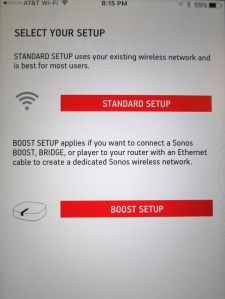
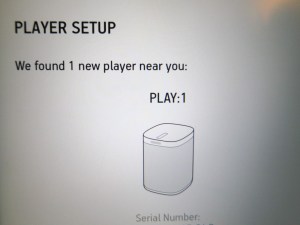
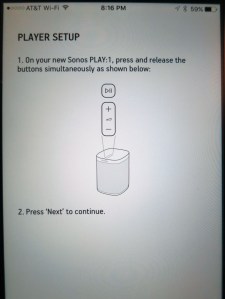
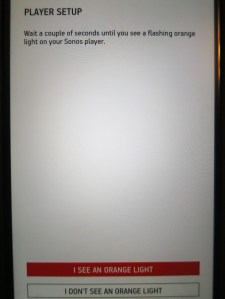
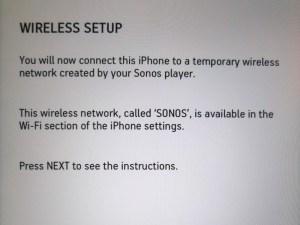
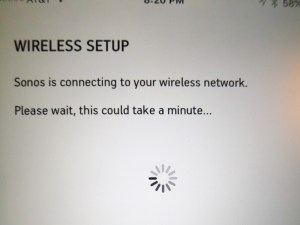
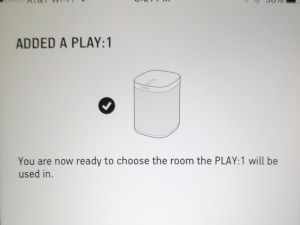
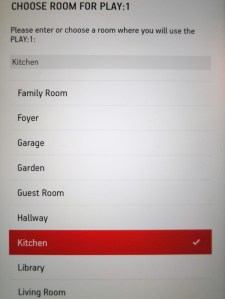
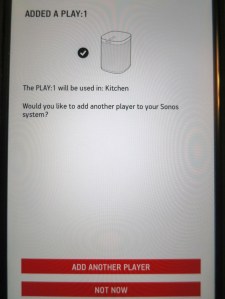
There are a few more pages that deal with registration and updates that your Sonos may need.
But that’s essentially it.
Let the Music Begin
Once you’ve got your Sonos speaker up and running, you have immediate access to your streaming music services like Pandora as well as over 100,000 internet radio stations.
(Radio by TuneIn comes preloaded.)
And your Play:1 can play music from up to 16 of your devices.
(smartphones, tablets, computers)
One surprising detail…
The Sonos speaker is designed to always be on.
You can hit the pause button on the top control panel and just walk away.
(A little light on the top stays on, but it apparently draws only a trickle of juice in this mode.)
Is the ‘1’ Big Enough?
The early review from my wife is a big thumbs up!
The Play:1 sounds awesome and is plenty powerful for our kitchen. In fact, it would do just fine projecting into the other rooms in our house.
Sure, if you have a more cavernous space to fill or really enjoy punching it to ‘eleven,’ then I imagine you’ll want the Play:3 or Play:5.
But I think our little kingdom is going to be quite happy populated by more Play:1 speakers.
The Five Reasons
Am I the last person on Earth to recognize the power and ease of Sonos?
It certainly feels that way.
But if you’ve read this far, I bet you’ve also held back but have the itch.
And if you’re still unsure, it boils down to this:
- It’s the current go-to solution for Wi-Fi speakers.
- You can get started for $199.
- Installation is a snap.
- You can stream music but also play from local devices like your iPhone.
- It makes your family happy.
So if you haven’t taken the plunge yet, I’m happy to report the water’s warm.
Jump in!

 At Home with Tech