At Home with Tech

Unlock the power of all your technology and learn how to master your photography, computers and smartphone.

Tag: digital photo frames

How to Frame a Live Photo for Hogwarts or your Muggle Home

If you extend the wizardry of an iPhone’s Live Photo mode and add your imagery to a digital photo frame, you can transform your photography. It’s not so futuristic. Here’s how to bring more motion to reframe your photos today.

I’ve always been on the fence regarding the value of Live Photo mode on an iPhone. This feature appears to magically turn a still photo into one with three seconds of motion. Of course, the reality is these ‘magical’ photos are just little movie files (1.5 seconds before and after you snap).

Sure, creating a Live Photo is useful so you can later pick out a better ‘key photo’ frame. That’s especially helpful in a group shot if someone’s eyes are mid blink. But if you really want to capture a micro movie, I recommend just shooting in video mode for a few seconds.

But I think Apple is onto something that isn’t yet mainstream. And it connects with how you would want to display a Live Photo. I would offer that these moving photos are ideal in a digital photo frame.

The Perfect Moment can Take Longer than 3 Seconds
If you think about the Harry Potter films and all those ‘living’ paintings often seen in the background, the paintings are effectively digital photo frames magically displaying live portraits. Of course, the motion in each painting is specially curated to display a longer moment or a complete action from the character in the frame. If you went back and clocked them, they’re probably double the length of an iPhone’s Live Photo.

Often, a ‘moment’ in time that’s visually meaningful takes more than 3 seconds to complete. But as photographers (and aren’t we all?), we’re trained find that singular frame that captures it all.

But you can also just let the ‘live’ unfold. Sometimes, that’s so much easier. And Apple would say that’s exactly what a Live Photo offers.

Extended Live Photos are Better
However, I don’t think a Live Photo is entirely optimized for this task. It’s just too short, and you can’t be sure you’ll capture the complete end of the moment in front of you. Apple’s automation of its Live Photo process creates an imperfect crop of time versus how long the moment requires.

I feel you’ve really got to be running your iPhone in video mode for at least a few more seconds to ensure for that.

And in doing so, you’ll create what I’ll call an ‘extended live photo.’

Yes, it’s simply a seven to ten second video clip. But now your mindset should shift to still see it as one extended moment… with motion. (Do you feel your brain vibrating with this aha moment?)

Photographic Magic
Okay. So now, you’re creating something entirely new. Congratulations. You’re a wizard.

But what are you supposed to do with these extended live photos? Well, as I mentioned up top, they’d look great on a digital photo frame. All of your longer visual moments would still be short, but entirely complete without being abruptly cut off.

So, you’ve just got to bring a new mindset to your photography with the goal of finding and capturing these extended moments and then showing off your short videos on your digital photo frames. Soon your home will start to resemble the hallways at Hogwarts.

If you want to give it a shot, here are some ideas on where to spot perfect visual moments for this.

Opportunities for Extended Live Photos
First off, any moment for a still photo can also make for a great extended live photo.

  • People hugging
  • Blowing out birthday candles
  • Vacations
  • School reunions
  • Outdoor activities
  • Your pet simply staring at the camera

Find the Highlight from a Longer Video
If you’re already planning on taking a longer video, later selecting a five to ten second highlight will probably make for a great extended live photo.

Create a Living Group Portrait
We’ve been trained to think of a group shot as a still moment where everyone is smiling and looking at the camera.

I would offer that’s only part of the picture. The energy and motion that surrounds that one perfect frame is often as interesting, if not more so. In a group, the interpersonal dynamics are usually on full display (people talking and laughing together).

  • I’ve seen the New York Times use this visual strategy online when presenting people features. (It’s quite compelling.)

Enjoy Nature’s Beauty
If you’re a nature photographer, why not simply capture 10 seconds of that beautiful scene?

Adding in the ‘live’ will totally bring the still moment to life.

It’s a similar strategy as creating a live portrait, but much easier as nature is always strutting its stuff.

What About the Audio Track?
Technically, you don’t need the audio if you’re displaying your extended live photo on a digital frame. Sure, some of these frames can play sound, but I don’t expect you’ll use that functionality. (Photo frames are meant to be seen and not heard.)

But your extended live photos should still be optimized for the sound to heard. That’s because the clip may later be used with its audio track for a future use. So be mindful to trim these short video clips accordingly.

Keep it Moving
Digital photo frames are hardly new. I wouldn’t even call the product line that exciting anymore. But if you feed them with your own ‘extended’ live photos, that can be a real game changer.

And sometimes, you might naturally just shoot a video for only 10 seconds. Later, you’ll ask yourself how you might use it. Well, now you know!

I’m just a mere Muggle, but using this photographic trick for your digital photo frames will always look like magic.
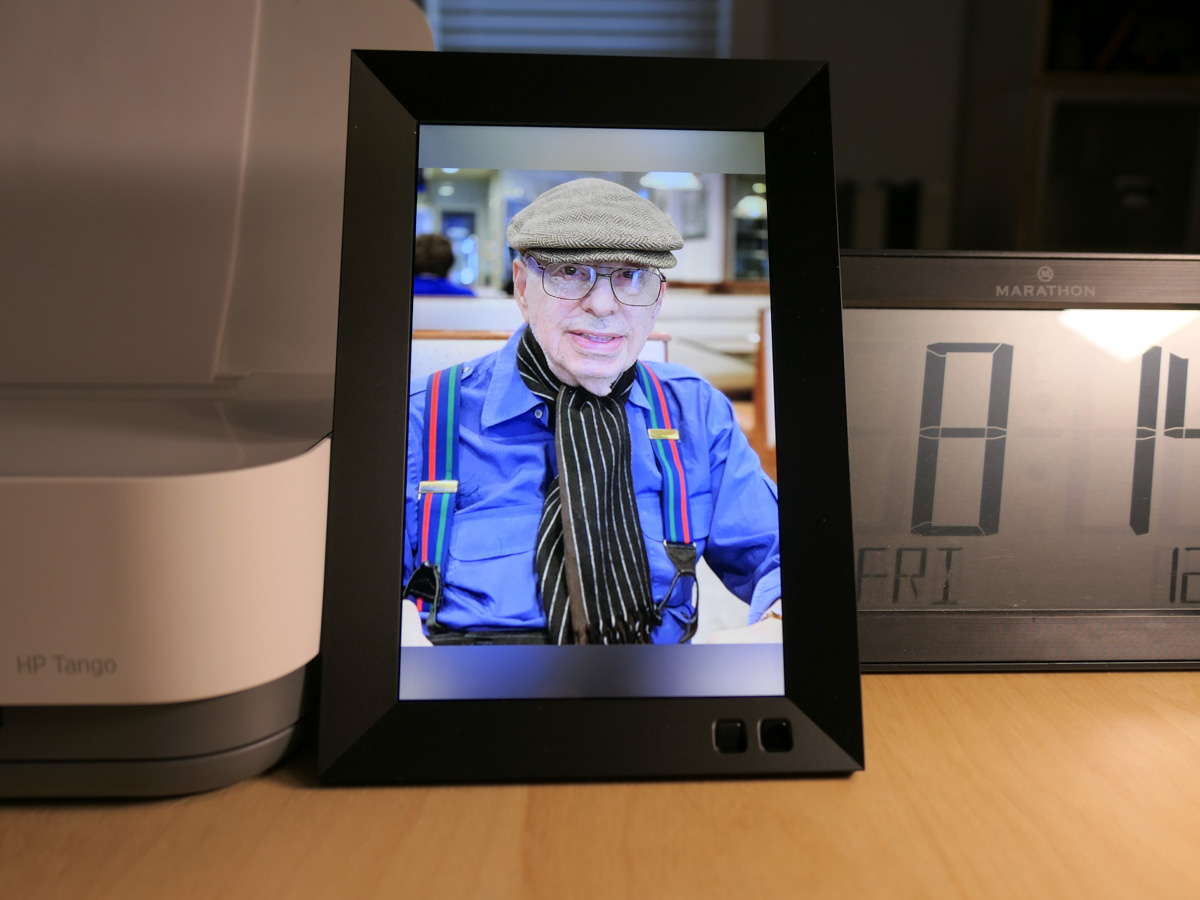
How a Digital Photo Frame Helps Me Remember my Dad

I’ve set up a photo gallery of my father’s life on this digital photo frame. It’s powered up next to me at my desk and rotates through his images across the years.

My father is gone. I knew this day would eventually come, but I was still entirely unprepared for the terrible moment when it arrived.

He passed away on December 15th. While he wasn’t in the best of shape, his death was sudden and a surprise. He was in rehab at the time and was medically stable. The nurse had just been in to see him. When she came back, he wasn’t there anymore.

That was it.

My dad always liked to play by his own rules. So, it feels appropriate that he left this world on his own terms. He had always told me that he wanted to die in his sleep. This seemed pretty close. He wasn’t in pain, and it was quick.

He was 89. (Here’s his obituary.)

My father had a full life, and throughout his 80s he often told me that he didn’t expect that he would be sticking around that long. He also said in recent years that he was okay with passing on, because he had enjoyed his life.

Donald Lester had “lived.”

One Last Present
A week before he died, I ordered a digital photo frame to give him for the holidays. My plan was to set it up in his rehab room to share some family photos with him.

After my success placing an Amazon Echo Dot Wi-Fi speaker next to his bedside so his could listen to his favorite tunes from the ‘40s and ‘50s, this was to be my next step. I wanted to provide a little more personal tech support to help make his time away from home more comfortable.

Plus, my father loved technology. (I got that from him.) I knew he’d get a kick out of the digital photo frame.

But I never got the chance to give it to my dad.

A Different Use
So, the Nixplay frame sat in its unopened box on the floor of my home office. I’ve been wondering what to do it with. Of course, I knew I could send it back.

Instead, I’ve decided to hold onto it.

I would finish what I had set out to do… but with a modified purpose. I would still load it with family photos, but with pictures of him… for me.

His Pictures Tell his Story
I powered up the digital frame, and it’s now in place on a shelf by my desk.

It glows warmly with images of my father and cycles through his photos across the years. It’s one way to keep his story alive.

He was a born-and-bred New Yorker. He traveled the world including Africa and into the Amazon rain forest. He had his suits tailored from Hong Kong, and he loved to wear his bowlers and straw hats. And he was a life-long Yankees fan.

He was a real character.

A Digital Candle
I think setting up this digital frame near me is also a way to help me process all of this.

As you might imagine, there’s been a lot ‘to do’ over these past weeks. I haven’t had much time to truly feel the impact. The loss. As that happens in the months ahead, this frame will serve as a comforting support for me and my family.

It’s a little candle for me.

Holding onto the Memories
Over the past months, I’ve been slowly digitizing some of the photos that my mother had placed in thick albums decades ago when I was growing up. She was the family archivist. (I can’t believe it’s already been 16 years since she passed.)

Moving forward, of course I’ll continue my family-photo archiving project. And I’ll keep feeding the frame with images of my father throughout his life… and mine.

It’s one way to honor his memory and to help me remember the good times.

I miss you, Dad.

Why Nixplay Smart Photo Frames are Better as Screens for Video

Nixplay’s new smart digital photo frames can handle HD video files transmitted via your iPhone. Here’s why that’s a game changer.

I picked up one of the next-generation Nixplay Wi-Fi digital photo frames over the holidays to support my ongoing quest to provide more exposure for my recent family photos. I’ve generated thousands of family images over the years, and most never get any screen time, let alone make it to the physical print stage.

Yes, I know that many folks use their smartphones and shared cloud photo albums for this purpose. Or they just email pics around. But that design requires an action from both the sender and receiver. A Wi-Fi digital photo frame only needs the recipient to glance over and see what’s on the frame.

Plus digital photo frames have the huge advantage of being able to cycle through many photos.

My new frame is the Nixplay Smart Photo 10.1” Black.
$152.99 at Amazon Prime

HD Video Capability
But a funny thing happened while I set up my new Nixplay frame, which was a snap… and an entirely different experience than earlier generation Nixplay frames that I had to wrestle with.

I finally processed that these current Nixplay frames now have the capability to playback HD video files.
(Older Nixplay frames could only handle SD videos, which required you to first convert your native HD MOV video files to lower-resolution AVI files. Ugh.)

So, this improvement instantly sets up a simple distribution pipeline for all of my family video clips that have had an even harder time finding an audience than their photo cousins.

But before I was able to get too excited, I read the fine print:
The length of videos is limited to a mere 15 seconds.

Well, how Vine of them!
(I expect this is not so much a creative choice as a limitation of the hardware handling huge video file sizes.)

Still, you can do a lot with 15 seconds.

Straight Out of Hogwarts
And once you put together a playlist of short video clips using the Nixplay iOS app, it creates a whole new visual experience on the frame that a sequence of digital photos simply can’t compete with.

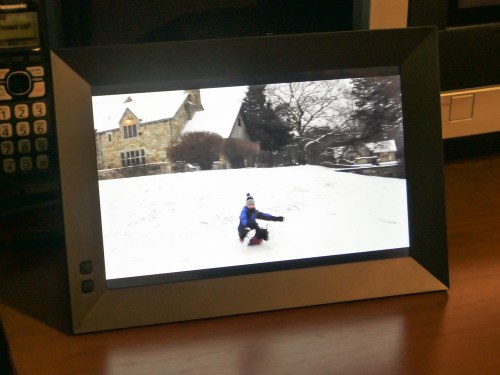
I immediately set up a series of video clips for my Nixplay highlighting our day’s fun sledding during a light snow storm.

I felt like I was transported to the middle of a Harry Potter movie where photos and paintings come to life. Watching the videos on the frame was really that cool!

For the record, I kept the frame’s audio functionality off. Sure, it would be great to hear the sound, but I think only when you’re actively showing off your videos. Otherwise, it would be too intrusive as an ongoing environmental background element.

15-Second Videos for your Photo Frame
To simply throw your clips into a playlist for easy viewing and not have to edit together a finished video… that’s so quick and easy!

Plus, video files fit perfectly in this HD 16×10 aspect-ratio frame.
(The screen resolution is 1280×800, which is essentially 720HD. That said, my 1080p video files have been playing back fine.)

Sure, there are still some drawbacks.

The 15-second video limit is depressing, but it also respects people’s limited attention spans. If you want to show off the ten-minute school chorus performance that your child was a part of, you’ll simply need to tether your viewer to another screen.
(If you’re interested, I be happy to set up my video for you.)

And the restriction to load videos only via the Nixplay iOS app means you’ve first got to get your video onto your iPhone. So that could mean another step or two if you’re not working with native iPhone videos.

I’ve been having a lot of fun lately shooting time lapse videos with my new DJI Osmo Pocket.
Snowy Day at Cranbury Park
Still, a digital photo frame that can easily play your HD video files is a big step forward in functionality.

Every day, we’re evolving further into a world dominated by video. Digital frames that show off photos are nice, but that trick is so yesterday.

Smart frames that can handle HD videos isn’t magic anymore. It’s the only way to go.

Thank you, Nixplay!