At Home with Tech

Unlock the power of all your technology and learn how to master your photography, computers and smartphone.

Tag: home videos

How to Make a Bar Mitzvah Video

Here’s an outtake from the video I created to celebrate our son’s bar mitzvah. I followed a process that prioritized keeping it simple. Here’s how I did that.

Over the years, I think I’ve recorded hundreds (thousands?) of little family video clips. So if you’re wondering, yes, of course I created a video to celebrate our son’s bar mitzvah.

It was a highlights reel of sorts, containing some of his greatest hits to date… at least the ones that I happened to capture on video.

Fortunately, I’ve been diligent over these past thirteen years to label each of my family video clips and organize them into folders by month and year. (That’s a lot of folders!)

Over time, I’ve also created a variety of little ‘finished’ family videos that reflected different moments in our family’s story (birthday parties, vacation trips). These particular videos were especially useful to identify the clips I needed for the bar mitzvah video.

Not a Documentary
So years of good digital organization set me up nicely to begin my project. (I’ve got all of my video files stored in an external G-RAID drive.)

But really, any way I looked at my task, it was still absolutely overwhelming. (And I wasn’t even considering using any photos.)

So instead of trying to accomplish the impossible and somehow jam in every perfect clip to tell the ‘total’ story, I decided instead to enjoy my trip into the past and simply use what I uncovered in my digital archives over the course of several hours during three separate research sessions.

Capture the Spirit
Sure, there were a few video moments that I had specifically remembered and searched for. (My wife also had a few clip requests.) But for the most part, my process of rediscovery organically led me to the clips I used. If I had repeated my exercise the following month, I could have easily collected an entirely different grouping of clips that were just as delightful.

I realized as I went along that the video would mostly reflect these three factors:

  • Our son’s growth across the years
  • His family and friends
  • Some fun moments

It would never be a complete reflection on his life to date. And that was fine.

Keep a Simple Structure
This understanding freed me to focus on creating a video that was simply enjoyable to watch. And it was ‘relatively’ simple to make.

It ran seven and a half minutes. Each clip was 10 to 15 seconds long. And I organized them chronologically (using Final Cut Pro on my iMac) with a date stamp graphic in the bottom of the frame. I think the dates were useful to show the passage of time. I used a couple of his favorite pieces of music to support sections that were more visually oriented. And I popped in a title at the top and a ‘congratulations’ graphic at the back.

Finally, my wife and I recorded a short video message to our son that I included towards the end of the video.

Make a Few Drafts
That was it. I made three drafts before locking the final cut.

The first draft was a just a long string of clips in the right order. The second draft was a shorter version. (Everything can’t make it in. Always remember that less is more.) The third draft added a few more clips that my wife had remembered. (Don’t forget to collaborate!) And the final cut was where I polished it all up.

There are any number of ways to make a bar mitzvah video. This was the path I took.

A Video for the Past and the Future
We showed my finished video to our son, and I think he enjoyed it. He did smile a few times. To be fair, I can understand how he may not be as excited to see his toddler clips as we were. (My wife and I were delighted with the trip down memory lane.)

But beyond celebrating an important milestone for our son, I also see this video as a piece of family history that reflects our son’s first thirteen years. And I hope it’s something he can return to years into the future and enjoy.

My wife and I certainly will!
Why Nixplay Smart Photo Frames are Better as Screens for Video

Nixplay’s new smart digital photo frames can handle HD video files transmitted via your iPhone. Here’s why that’s a game changer.

I picked up one of the next-generation Nixplay Wi-Fi digital photo frames over the holidays to support my ongoing quest to provide more exposure for my recent family photos. I’ve generated thousands of family images over the years, and most never get any screen time, let alone make it to the physical print stage.

Yes, I know that many folks use their smartphones and shared cloud photo albums for this purpose. Or they just email pics around. But that design requires an action from both the sender and receiver. A Wi-Fi digital photo frame only needs the recipient to glance over and see what’s on the frame.

Plus digital photo frames have the huge advantage of being able to cycle through many photos.

My new frame is the Nixplay Smart Photo 10.1” Black.
$152.99 at Amazon Prime

HD Video Capability
But a funny thing happened while I set up my new Nixplay frame, which was a snap… and an entirely different experience than earlier generation Nixplay frames that I had to wrestle with.

I finally processed that these current Nixplay frames now have the capability to playback HD video files.
(Older Nixplay frames could only handle SD videos, which required you to first convert your native HD MOV video files to lower-resolution AVI files. Ugh.)

So, this improvement instantly sets up a simple distribution pipeline for all of my family video clips that have had an even harder time finding an audience than their photo cousins.

But before I was able to get too excited, I read the fine print:
The length of videos is limited to a mere 15 seconds.

Well, how Vine of them!
(I expect this is not so much a creative choice as a limitation of the hardware handling huge video file sizes.)

Still, you can do a lot with 15 seconds.

Straight Out of Hogwarts
And once you put together a playlist of short video clips using the Nixplay iOS app, it creates a whole new visual experience on the frame that a sequence of digital photos simply can’t compete with.

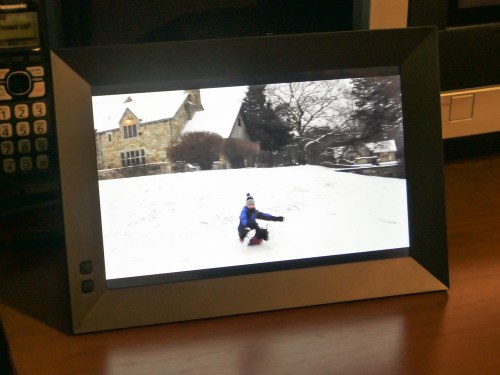
I immediately set up a series of video clips for my Nixplay highlighting our day’s fun sledding during a light snow storm.

I felt like I was transported to the middle of a Harry Potter movie where photos and paintings come to life. Watching the videos on the frame was really that cool!

For the record, I kept the frame’s audio functionality off. Sure, it would be great to hear the sound, but I think only when you’re actively showing off your videos. Otherwise, it would be too intrusive as an ongoing environmental background element.

15-Second Videos for your Photo Frame
To simply throw your clips into a playlist for easy viewing and not have to edit together a finished video… that’s so quick and easy!

Plus, video files fit perfectly in this HD 16×10 aspect-ratio frame.
(The screen resolution is 1280×800, which is essentially 720HD. That said, my 1080p video files have been playing back fine.)

Sure, there are still some drawbacks.

The 15-second video limit is depressing, but it also respects people’s limited attention spans. If you want to show off the ten-minute school chorus performance that your child was a part of, you’ll simply need to tether your viewer to another screen.
(If you’re interested, I be happy to set up my video for you.)

And the restriction to load videos only via the Nixplay iOS app means you’ve first got to get your video onto your iPhone. So that could mean another step or two if you’re not working with native iPhone videos.

I’ve been having a lot of fun lately shooting time lapse videos with my new DJI Osmo Pocket.
Snowy Day at Cranbury Park
Still, a digital photo frame that can easily play your HD video files is a big step forward in functionality.

Every day, we’re evolving further into a world dominated by video. Digital frames that show off photos are nice, but that trick is so yesterday.

Smart frames that can handle HD videos isn’t magic anymore. It’s the only way to go.

Thank you, Nixplay!

Eight Ways to Face Your Digital Mess

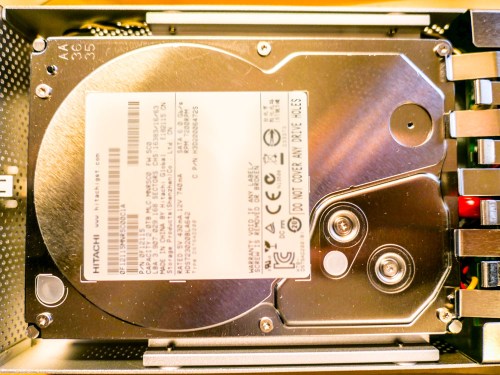
hitachi-hard-drive

Click on your computer’s hard drive and select ‘Get Info.’ If the percentage for remaining space shocks or worries you… (Other negative emotions also apply) Read on!

Is two terabytes enough space to house the digital contents of your family life? (That’s the size of my iMac’s hard drive.) Well, I certainly thought so. I mean… how much space do you really need to capture and archive the important moments?

The truth is your final archived files for posterity probably shouldn’t take up terabytes of space. (How much media do you really want to carry forward into future decades…?)

The real problem is housing all of your raw content that you’re regularly capturing… and then just letting it pile up, because other priorities tend to get in the way of your little personal archiving plan.

The Digital Math Doesn’t Lie
For me, that constant digital flow of incoming family-related media looks something like this:

  • Weekly family photos that document the day to day: 25 pics x 4MB each = 100MB
  • Three video clips a week averaging 90 seconds each: 3 x 400MB = 1.2GB
  • And let’s throw in one larger ‘event’ a month that generates 50 more pics (200MB)
  • Plus, four vacation zones each year that bring in 250 photos and 10 video clips each. (5GB)

Let’s tally that up…
Roughly, we’re talking about taking in 75GB of photos and videos each year… and that’s without even trying.

You can imagine if you add in a few more one-off events and other kinds of files that you’ll also acquire throughout a year, that number can easily jump to 100GB.

But even at that rate, it would take you twenty years to fill up a 2TB hard drive.

What Happened?
But last week, I realized my iMac was almost out of hard drive space.
(Yes, this disturbing moment shouldn’t come as a complete surprise to anyone ‘at home with tech,’ but that’s another story.)

So what was taking up all of that space?!

Before I allowed myself to descend into a ‘digi-tizzy,’ I realized that I am indeed working on my second decade of digital media collection.
(I’ve owned iMacs since 2004.)

Still, twelve years in should only have pushed me to about 60% of my current hard drive’s capacity.
(Also, photo and video file sizes weren’t nearly as large back then in our pre-HD days.)

But the truth is I’ve captured a whole lot more video than my above equation entirely accounts for.
(One example is a family history video project I’ve been doing with my dad over the past few years. He tells great stories, but he certainly takes his time.)

So now, I’ve got to finally deal with it!!!

Time to Help Out Your Computer’s Overstuffed Hard Drive
Sure, I can consider upgrading my computer and simply getting a bigger internal hard drive. But that’s not really the fix. That’s just ignoring the larger problem…

You can offload much of your media inventory to external drives.
(In fact, that’s a best practice anyway when editing video.)

But without an organized plan, that’s not going to be much help when you rediscover the drives a decade later, and you’re confronted with hundreds of unlabeled files.
(Assuming the drives even boots up)

Much like my philosophy when it comes to sharing your photos quickly, you should be regularly going through your video files to organize/edit/share.

But today it’s not about what you should be doing… it’s about what you must do! You may want to check… because much like me, your computer’s hard drive may already be just out of space…

It’s time to do some file organizing/deleting/moving…

Eight Ways to Reclaim Hard Drive Space

#1
Review Your Biggest Files First
You’ll move the needle fastest if you can move/delete some really huge files. So begin your file search there. Addressing those offenders first will have the greatest impact on freeing up hard drive space.
(Obvious, though always worth mentioning!)

#2
Don’t Ignore Your Videos. They Can Sink You!
Pay attention to all of those videos you’ve been capturing with your smartphone and camera. Video files are HUGE! You should label them and regularly move them to an external drive.
(Actually… two drives. Media always needs to live in at least two locations for back up.)

I’m especially partial to drives made by G-Technology.
I’m currently using the G-Drive Mobile USB 3.0 to house my raw family video files.

#3
Clean Up Your Email
Your email can be sucking up a whole lot of space.
(How many messages from long ago are you still hanging on to? I’m embarrassed to reveal my number.)
And lose all of those damn unread marketing messages from companies you willingly gave your email address to.
(And to some you didn’t)

#4
Find and Move Those Emailed Photos
Don’t forget your family and friends are sending you photos too. Don’t let those pics languish, lost in your hundreds of disorganized email messages.
(Thousands?)

#5
Delete the Photos that aren’t ‘Great’
Face it. Most of your photos stink.
(All right… mine do.)

But that’s my secret to success. I take lots of photos and hope that one in a collection is ‘the one.’

So especially if you have a ‘best version’ of a photo sequence… you need to delete the rest!

#6
Reorganize Your Folder Structure
Go back and review all of those folders you’ve created over the years. You’ll be surprised to discover what you left behind, forgotten and just don’t need anymore.

#7
Delete Old Software
Enough said.

#8
Make the Time
You may be asking yourself, “Who’s got time for all of this?”
Exactly.
(I certainly don’t.)

My response: “You don’t have a choice.”

I’m happy to report my computer is on its way to recovery. But it’s going to take some time to fully complete my hard drive review.

The trick is to keep going…every week.
A little at a time…

Clean Up Your Digital Sock Drawer
If these tips feel like I’m telling you to simply clean up your house… you’re right. It is, in fact… your digital house. And life is going to mess it up just like everywhere else.

You’ve got take some time to tidy up every so often.
(And it’s really much bigger than just organizing your sock drawer!)

People don’t move to a bigger house simply because they’ve got too much stuff.
(Do they?)

So you’re left with living in the boundaries of the digital space you’ve got…
…Or one day, you’ll discover that you won’t be able to open the front door.

You can avoid that day if you start right now…